https://github.com/arsho/paniyo
https://github.com/arsho/paniyo
Last synced: 3 months ago
JSON representation
- Host: GitHub
- URL: https://github.com/arsho/paniyo
- Owner: arsho
- Created: 2018-07-13T06:25:48.000Z (almost 8 years ago)
- Default Branch: master
- Last Pushed: 2018-08-01T11:37:58.000Z (almost 8 years ago)
- Last Synced: 2025-03-23T01:34:40.209Z (over 1 year ago)
- Language: Python
- Size: 10.7 KB
- Stars: 0
- Watchers: 1
- Forks: 0
- Open Issues: 0
-
Metadata Files:
- Readme: readme.md
Awesome Lists containing this project
README
Django MySQL Application in Minishift
=========================================
Deploy a Django MySQL application in Minishift.
### Prerequisites
- Minishift
- OC Tools
You can install these tools by following [this gist](https://gist.github.com/arsho/919d6704ec2838f1b4b25b7e3b61a2f9#file-minishift_installation-md)
### Installation Procedure
#### MySQL
- Create new application for MySQL from Catalogue page. For me the URL was [https://192.168.99.100:8443/console/catalog](https://192.168.99.100:8443/console/catalog)

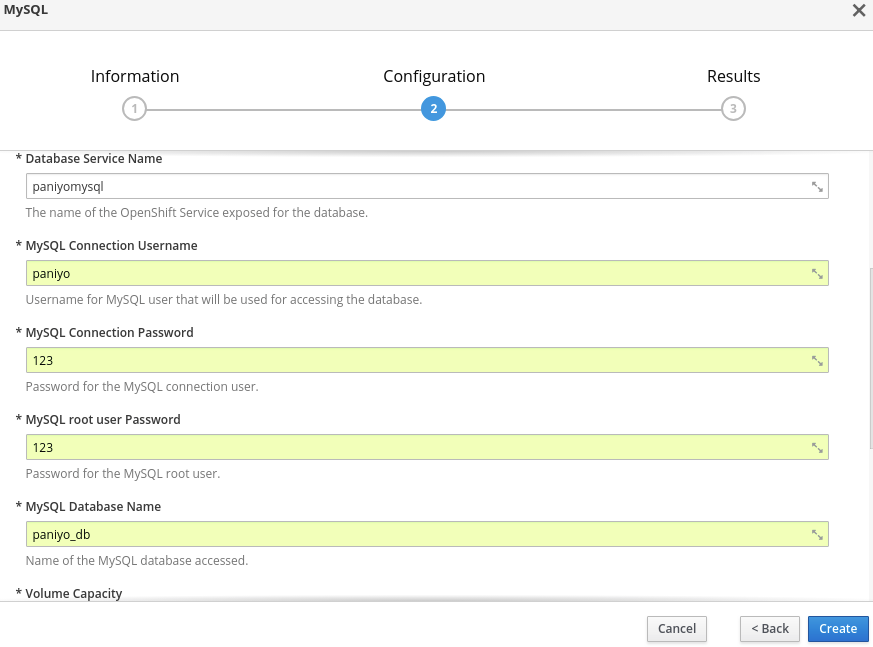
- Configuring MySQL username, password and database name
```bash
Database Service Name: paniyomysql
MySQL Connection Username: paniyo
MySQL Connection Password: 123
MySQL root user Password: 123
MySQL Database Name: paniyo_db
Volume Capacity: 512mi
Version of MySQL Image: 5.7
```
After successful installation it will show connection information:
```bash
The following service(s) have been created in your project: paniyomysql.
Username: paniyo
Password: 123
Database Name: paniyo_db
Connection URL: mysql://paniyomysql:3306/
```
- To use this MySQL database in Django project we need to get the IP address. The IP address of this MySQL service can be found in ```YOUR PROJECT > Applications > Pods > Running Pod with paniyomysql name > IP```. For me the IP address is: 172.17.0.4
#### Django
- You can deploy any Django application in Minishift by modifying few things. You can clone my dummy Django application with necessary modification for Minishift from [https://github.com/arsho/paniyo](https://github.com/arsho/paniyo)
- Modification:
- Update database information in ```settings.py``` file:
```python
DATABASES = {
'default': {
'ENGINE': 'django.db.backends.mysql',
'NAME': 'paniyo_db',
'USER': 'paniyo',
'PASSWORD': '123',
'HOST': '172.17.0.4',
'PORT': '3306'
}
}
```
- Allow all hosts in ```settings.py``` file:
```python
ALLOWED_HOSTS=['*']
```
- Dockerfile (it is based on my project, modify if necessary) : [sample dockerfile](https://raw.githubusercontent.com/arsho/paniyo/master/Dockerfile)
- Push the Django application to Github.
- Deploy Django to Openshift
- A Django application can be deployed to Openshift in several ways (REF DEPLOY). We will show how we can deploy Django application from Github (REF NEW APP).
- To deploy Django application from Github use:
```bash
oc new-app URL_TO_GITHUB_REPOSITORY
```
In our case it is:
```bash
oc new-app https://github.com/arsho/paniyo
```
The build process may fail due to low bandwidth. So, make sure you have at least 1000 KiB/s bandwidth.
- Routes External Traffic: Create route to make the application accessible.
Set the route from ```YOUR PROJECT > Applications > Routes > Create Route```
- Create superuser
- To create super user go to ```YOUR PROJECT > Applications > Pods > Running Pod > Terminal```. Then create super user using
```bash
python manage.py createsuperuser
```

- Access Application
- The URL to access the application can be found in the route we have created earlier.

- Create Storage and attach it to Django Application
- The application needs static storage to allow uploading files.
- Create storage from ```YOUR PROJECT > Storage``` like below:

- Attach this storage to the Django application from ```YOUR PROJECT > Applications > Deployments > Running Pod > Configuration``` like:

Enter ```/src/data``` in mount path:

### Running application:

#### Make commands
- make migrations
- make migrate
- make run
#### How this application is created using Django?
```Bash
python3 -m virtualenv venv --no-site-packages
source venv/bin/activate
pip install -r requirements.txt
django-admin startproject paniyosite
paniyo cd paniyosite
python manage.py startapp product_information
```
#### Author
- [Ahmedur Rahman Shovon](https://arsho.github.io)
#### References
* Blog - Deploy Django to Openshift 3 Powered by MySQL and Gunicorn: [http://ruddra.com/2018/02/24/deploy-django-to-openshift-3/](http://ruddra.com/2018/02/24/deploy-django-to-openshift-3/)
* New App - Official documentation: [https://docs.openshift.com/enterprise/3.1/dev_guide/new_app.html](https://docs.openshift.com/enterprise/3.1/dev_guide/new_app.html)
* Deploy - Official documentation: [https://docs.openshift.com/enterprise/3.0/dev_guide/deployments.html](https://docs.openshift.com/enterprise/3.0/dev_guide/deployments.html)