https://github.com/arsho/pychat
Chatting application over LAN using Python.
https://github.com/arsho/pychat
Last synced: about 1 year ago
JSON representation
Chatting application over LAN using Python.
- Host: GitHub
- URL: https://github.com/arsho/pychat
- Owner: arsho
- Created: 2017-03-25T06:33:21.000Z (over 9 years ago)
- Default Branch: master
- Last Pushed: 2022-01-07T01:26:51.000Z (over 4 years ago)
- Last Synced: 2025-04-30T05:46:20.553Z (about 1 year ago)
- Language: Python
- Size: 124 KB
- Stars: 15
- Watchers: 4
- Forks: 5
- Open Issues: 3
-
Metadata Files:
- Readme: README.md
Awesome Lists containing this project
README
# Chatting application using LAN
Python program to chat using LAN.
If you are in a Wifi network, you can chat with the connected devices
that support Python using this program.
### What is this repository for?
* Quick summary
* Version Controlling
* [Issue Tracking](https://github.com/arsho/pychat/issues)
### How do I get set up?
* Nothing!
* Add Python to Environment Path when installing
### Run the program
* Run as usual python program `python main.py`
* In one computer click on server then connect and make any wanted port
* In the other computer click on client then connect type in the port then the ip adress of the computer that is the server
* Have fun chating!!
extras:
* Change your username by clicking on file then change username
#### Tested OS
* Tested on Windows 8, Windows 8.1, Windows 10
#### Screenshot of various installation
* See attached `screenshot` folder in this repository.
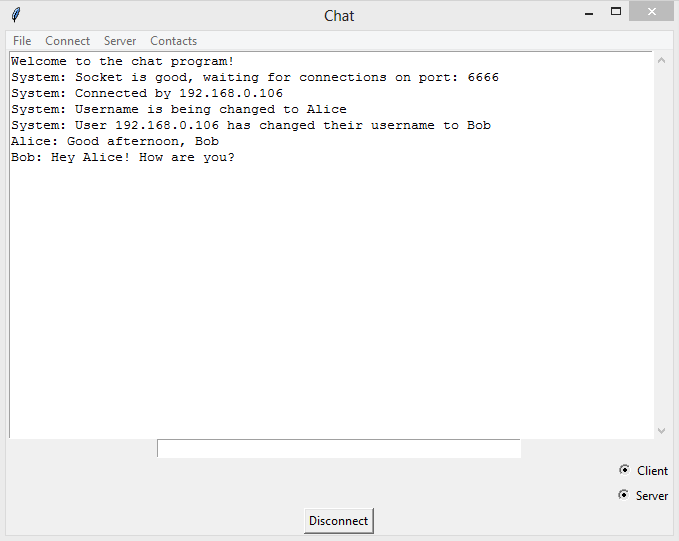
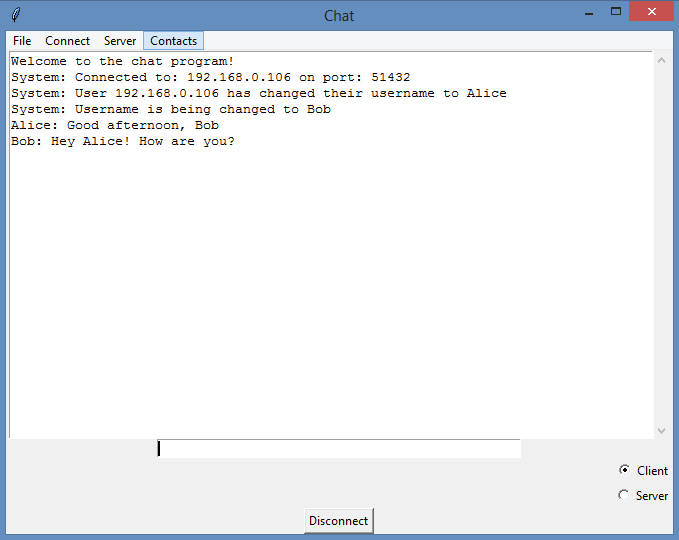
Screenshot of two users chatting using Pychat:
Server user (Alice)
Client user (Bob)
### Command suggestion ###

### Modification Needed ###
* Font should be resized.
### Future work ###
* Update GUI
* Add effect
* Show connected devices
### Reference
* [Socket Programming HOWTO](https://docs.python.org/3/howto/sockets.html)
* [Graphical User Interfaces with Tk](https://docs.python.org/3/library/tk.html)
### Development Status (Current)
* Development Status :: 4 - Beta
#### Development Status Phases (For understanding)
* Development Status :: 1 - Planning
* Development Status :: 2 - Pre-Alpha
* Development Status :: 3 - Alpha
* Development Status :: 4 - Beta
* Development Status :: 5 - Production/Stable
* Development Status :: 6 - Mature
* Development Status :: 7 - Inactive
### Contribution to Pychat (For developers only) ###
#### Step 1: Installing Git Client
The following steps can be done using Git Shell(Windows) or Ubuntu terminal.
* Install `Git` in Windows: Download and install `Github desktop`. URL:
[https://desktop.github.com/](https://desktop.github.com/)
* Install `Git` in Ubuntu: `sudo apt-get install git`
#### Step 2: Clone this repo to your PC
* Open git client (Git shell / terminal).
* `git clone https://github.com/arsho/pychat.git`
#### Step 3: Push modification to Github / Bitbucket from your PC?
* Open git client (Git shell / terminal) and do the following steps.
* `git pull --all`
* `git add .`
* `git commit -m "Commit message"`
* `git push -u origin master`
#### How this repository is created
* Created a repository in Github.
* CD to a directory in local PC.
* Opened git client and did the following steps.
* `git clone https://github.com/arsho/pychat.git`
* `cd pychat`
* `git add .`
* `git commit -m "First commit"`
* `git push -u origin master`