https://github.com/artcc/custom-deskhub
Node.js project to extend DeskHub functionality with custom features. Containerized with Docker and deployed using Docker Compose for easy setup.
https://github.com/artcc/custom-deskhub
deskhub docker docker-compose github-contributions nodejs
Last synced: about 2 months ago
JSON representation
Node.js project to extend DeskHub functionality with custom features. Containerized with Docker and deployed using Docker Compose for easy setup.
- Host: GitHub
- URL: https://github.com/artcc/custom-deskhub
- Owner: ArtCC
- License: apache-2.0
- Created: 2024-11-25T09:59:33.000Z (over 1 year ago)
- Default Branch: main
- Last Pushed: 2025-01-23T13:49:24.000Z (over 1 year ago)
- Last Synced: 2025-02-02T17:54:12.638Z (over 1 year ago)
- Topics: deskhub, docker, docker-compose, github-contributions, nodejs
- Language: JavaScript
- Homepage: https://www.arturocarreterocalvo.com
- Size: 34.2 KB
- Stars: 1
- Watchers: 1
- Forks: 0
- Open Issues: 0
-
Metadata Files:
- Readme: README.md
- License: LICENSE
Awesome Lists containing this project
README
# Custom DeskHub Backend 🖥️
[](https://nodejs.org/)
[](https://expressjs.com/)
[](LICENSE)
[](https://www.docker.com/)
A powerful Node.js backend service to extend [DeskHub](https://getdeskhub.com/) functionality with custom features, including real-time GitHub commit tracking, weather information, and dynamic content display.
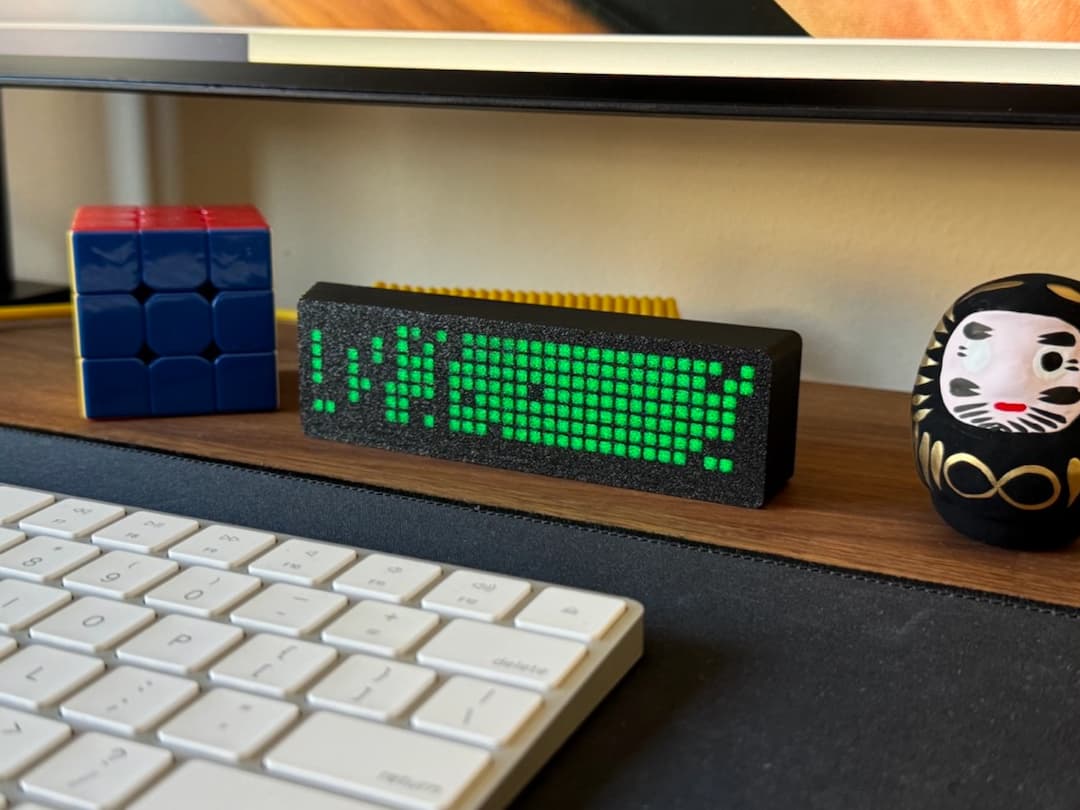
> **About DeskHub**: DeskHub is an innovative physical device developed by [Max Blade](https://getdeskhub.com/). If you don't have one yet, check it out!
---
## 📋 Table of Contents
- [Features](#-features)
- [Tech Stack](#-tech-stack)
- [Prerequisites](#-prerequisites)
- [Installation](#-installation)
- [Configuration](#-configuration)
- [API Endpoints](#-api-endpoints)
- [Docker Deployment](#-docker-deployment)
- [Development](#-development)
- [Project Structure](#-project-structure)
- [License](#-license)
---
## ✨ Features
- **🎯 Dynamic Content Display**: Control what your DeskHub displays in real-time
- **📊 GitHub Integration**: Automatically fetch and display today's commit statistics
- **🌤️ Weather Information**: Real-time weather data from OpenWeatherMap API
- **💾 Persistent Storage**: Content persists between server restarts
- **⚡ Smart Caching**: 5-minute cache for GitHub, 15-minute cache for weather
- **🔒 Environment Validation**: Ensures all required credentials are present
- **🌐 CORS Enabled**: Ready for cross-origin requests
- **📝 Structured Logging**: Comprehensive logging with timestamps
- **🐳 Docker Ready**: Easy deployment with Docker Compose
- **🔄 Health Checks**: Built-in health monitoring for container orchestration
---
## 🛠 Tech Stack
- **Runtime**: Node.js 20+
- **Framework**: Express.js 4.21+
- **APIs**: GitHub GraphQL API, OpenWeatherMap API
- **Containerization**: Docker & Docker Compose
- **Code Quality**: ESLint 9
- **Development**: Nodemon
- **Development**: Nodemon
---
## 📦 Prerequisites
Before you begin, ensure you have:
- **Node.js** 20 or higher ([Download](https://nodejs.org/))
- **npm** (comes with Node.js)
- **Docker** (optional, for containerized deployment)
- **GitHub Account** with a personal access token
- **DeskHub Device** ([Get one here](https://getdeskhub.com/))
---
## 🚀 Installation
### Local Setup
1. **Clone the repository**
```bash
git clone https://github.com/ArtCC/custom-deskhub.git
cd custom-deskhub
```
2. **Install dependencies**
```bash
npm install
```
3. **Configure environment variables**
Create a `.env` file in the root directory:
```env
GITHUB_TOKEN=your_github_personal_access_token
GITHUB_USERNAME=your_github_username
PORT=3005
LOCALHOST=http://192.168.1.100
# Optional: Weather configuration
OPENWEATHER_API_KEY=your_openweather_api_key
OPENWEATHER_CITY=Madrid
OPENWEATHER_UNITS=metric
```
4. **Start the server**
```bash
node index.js
```
For development with auto-reload:
```bash
npm run dev
```
---
## ⚙️ Configuration
### Environment Variables
| Variable | Description | Example | Required |
|----------|-------------|---------|----------|
| `GITHUB_TOKEN` | GitHub Personal Access Token ([Create one](https://github.com/settings/tokens)) | `ghp_xxxxxxxxxxxx` | ✅ Yes |
| `GITHUB_USERNAME` | Your GitHub username | `ArtCC` | ✅ Yes |
| `PORT` | Server listening port | `3005` | ✅ Yes |
| `LOCALHOST` | Server URL/IP address | `http://192.168.1.100` | ✅ Yes |
| `OPENWEATHER_API_KEY` | OpenWeatherMap API Key ([Get free key](https://openweathermap.org/api)) | `abc123...` | ⚪ Optional |
| `OPENWEATHER_CITY` | City name for weather | `Madrid` or `London,UK` | ⚪ Optional |
| `OPENWEATHER_UNITS` | Temperature units | `metric` (°C) or `imperial` (°F) | ⚪ Optional (default: metric) |
> **Note:** Weather variables are optional. The `/weather` endpoint requires `OPENWEATHER_API_KEY` and `OPENWEATHER_CITY` to be set.
### Creating a GitHub Token
1. Go to [GitHub Settings → Developer Settings → Personal Access Tokens](https://github.com/settings/tokens)
2. Click "Generate new token (classic)"
3. **Select scopes based on your needs:**
**Option A: Public repositories only (Recommended for most users)**
```
☑️ read:user
```
This is sufficient to read your profile and commits from public repositories.
**Option B: Include private repositories**
```
☑️ read:user
☑️ repo (full access to private repositories)
```
Use this if you want to see commits from your private repositories.
**What the token is used for:**
- ✅ Read user profile information
- ✅ Fetch commit statistics and contributions
- ✅ List repositories where you've committed
- ❌ No write access - read-only
4. Set an expiration date (recommended: 90 days or no expiration for personal use)
5. Click "Generate token" and copy it immediately (you won't see it again!)
> **⚠️ Security Note:** Never share your token or commit it to repositories. Use environment variables only.
---
## 🔌 API Endpoints
All endpoints return data in a format optimized for DeskHub display (ASCII text only, no emojis or special Unicode characters).
### `GET /display`
Returns the current content to display on DeskHub.
**Response:**
```json
{
"content": "Your custom text here"
}
```
**DeskHub Configuration:**
- **Endpoint:** `http://your-server:3005/display`
- **Recommended fetch rate:** 60,000 ms (1 minute)
---
### `GET /setDisplay`
Updates the display content. Content persists between server restarts.
**Parameters:**
- `text` (required): The text to display
**Example:**
```bash
curl "http://your-server:3005/setDisplay?text=Hello%20World"
```
**Response:**
```json
{
"content": "Hello World"
}
```
---
### `GET /commits`
Fetches your GitHub commits for the current day. Results are cached for 5 minutes.
**Example:**
```bash
curl "http://your-server:3005/commits"
```
**Response:**
```json
{
"content": "Today: 5 commits (custom-deskhub: 3, my-project: 2)"
}
```
**DeskHub Configuration:**
- **Endpoint:** `http://your-server:3005/commits`
- **Recommended fetch rate:** 180,000 ms (3 minutes)
**Features:**
- ✅ Automatic caching (5 min TTL)
- ✅ Formatted for DeskHub display (ASCII only)
- ✅ Counts commits from midnight UTC
- ✅ Counts commits from midnight UTC
---
### `GET /weather`
Fetches current weather for a configured city. Results are cached for 15 minutes.
> **Configuration required:** Set `OPENWEATHER_API_KEY` and `OPENWEATHER_CITY` environment variables.
**Example:**
```bash
curl "http://your-server:3005/weather"
```
**Response:**
```json
{
"content": "Madrid: 22C Clear"
}
```
**DeskHub Configuration:**
- **Endpoint:** `http://your-server:3005/weather`
- **Recommended fetch rate:** 600,000 ms (10 minutes)
**Features:**
- ✅ Automatic caching (15 min TTL)
- ✅ ASCII-only format (no Unicode/emojis - DeskHub compatible)
- ✅ Supports metric (C) and imperial (F) units
- ✅ Compact single-line format
**Weather Conditions:**
- Clear - Clear sky
- Cloudy - Cloudy
- Rain - Rainy weather
- Storm - Thunderstorm
- Snow - Snowy weather
- Fog - Fog/Mist
- Drizzle - Light rain
**Get your free API key:**
1. Go to [OpenWeatherMap](https://openweathermap.org/api)
2. Sign up for a free account
3. Generate an API key (free tier: 60 calls/min, 1M calls/month)
---
## 🐳 Docker Deployment
### Quick Start with Pre-built Image
The easiest way to deploy is using the pre-built Docker image from GitHub Container Registry:
1. **Create a `.env` file:**
```env
GITHUB_TOKEN=your_github_token
GITHUB_USERNAME=your_github_username
PORT=3005
LOCALHOST=http://192.168.1.100
# Optional: Weather configuration
OPENWEATHER_API_KEY=your_openweather_api_key
OPENWEATHER_CITY=Madrid
OPENWEATHER_UNITS=metric
```
2. **Create a `docker-compose.yml` file:**
```yaml
version: '3.8'
services:
custom-deskhub:
image: ghcr.io/artcc/custom-deskhub:latest
container_name: custom-deskhub
restart: unless-stopped
ports:
- "${PORT:-3005}:${PORT:-3005}"
environment:
- GITHUB_TOKEN=${GITHUB_TOKEN}
- GITHUB_USERNAME=${GITHUB_USERNAME}
- PORT=${PORT:-3005}
- LOCALHOST=${LOCALHOST}
- OPENWEATHER_API_KEY=${OPENWEATHER_API_KEY}
- OPENWEATHER_CITY=${OPENWEATHER_CITY}
- OPENWEATHER_UNITS=${OPENWEATHER_UNITS:-metric}
volumes:
- ./data:/app/data
networks:
- deskhub-network
healthcheck:
test: ["CMD", "sh", "-c", "node -e \"require('http').get('http://localhost:' + process.env.PORT + '/display', (r) => {process.exit(r.statusCode === 200 ? 0 : 1)})\""]
interval: 60s
timeout: 3s
retries: 3
start_period: 10s
networks:
deskhub-network:
driver: bridge
```
3. **Run the container:**
```bash
docker-compose up -d
```
**Docker Commands:**
```bash
# View logs
docker-compose logs -f
# Check container health
docker-compose ps
# Restart container
docker-compose restart
# Stop container
docker-compose down
# Pull latest image
docker-compose pull && docker-compose up -d
```
### Building Your Own Image
If you want to build the image locally:
```bash
# Build the image
docker build -t custom-deskhub:local .
# Run with custom image
docker run -d \
--name custom-deskhub \
-p 3005:3005 \
-e GITHUB_TOKEN=your_token \
-e GITHUB_USERNAME=your_username \
-e PORT=3005 \
-e LOCALHOST=http://192.168.1.100 \
-v $(pwd)/data:/app/data \
custom-deskhub:local
```
### Automated Builds
Every push to `main` branch automatically:
- ✅ Builds a new Docker image
- ✅ Pushes to GitHub Container Registry
- ✅ Tags with `latest` and commit SHA
- ✅ Supports multi-platform (amd64, arm64)
**Image Tags:**
- `latest` - Latest stable version from main branch
- `v1.0.0` - Specific version tags
- `main-abc123` - Commit-specific builds
---
## 💻 Development
### Available Scripts
| Command | Description |
|---------|-------------|
| `npm start` | Start the production server |
| `npm run dev` | Start with auto-reload (nodemon) |
| `npm run lint` | Check code style with ESLint |
| `npm run lint:fix` | Auto-fix linting issues |
### Code Style
This project uses ESLint with the following rules:
- Indentation: 2 spaces
- Quotes: Single quotes
- Semicolons: Required
- Line endings: Unix (LF)
### Development Workflow
1. Make your changes
2. Run `npm run lint:fix` to auto-fix style issues
3. Test your changes locally
4. Commit with meaningful messages
---
## 📁 Project Structure
```
custom-deskhub/
├── .github/
│ └── workflows/
│ └── docker-publish.yml # CI/CD pipeline
├── index.js # Main application file
├── data.json # Persistent storage (auto-generated)
├── package.json # Project dependencies
├── eslint.config.js # ESLint configuration
├── Dockerfile # Docker image definition
├── .dockerignore # Docker build exclusions
├── docker-compose.yml # Docker Compose configuration
├── .env # Environment variables (create this)
├── LICENSE # Apache 2.0 License
└── README.md # This file
```
---
## 🔧 Troubleshooting
### Server won't start
**Error:** `Missing required environment variables`
- **Solution:** Ensure your `.env` file contains all required variables (GITHUB_TOKEN, GITHUB_USERNAME, PORT, LOCALHOST)
### GitHub API errors
**Error:** `Failed to fetch GitHub commits`
- **Solution 1:** Check your GitHub token is valid
- **Solution 2:** Ensure token has correct scopes (`read:user`)
- **Solution 3:** Check GitHub API rate limits
### Weather endpoint returns 503
**Error:** `Weather service not configured`
- **Solution:** Set `OPENWEATHER_API_KEY` and `OPENWEATHER_CITY` in your `.env` file
- **Note:** Weather configuration is optional - other endpoints will work without it
### DeskHub shows Unicode characters instead of text
**Issue:** Seeing weird symbols like `\u2600` or `°C` showing as boxes
- **Solution:** This has been fixed - all endpoints now return ASCII-only text
- **Note:** Make sure you're using the latest version of the server
### Docker container exits immediately
**Solution:** Check logs with `docker-compose logs` and verify environment variables
---
## 🤝 Contributing
Contributions are welcome! Please feel free to submit a Pull Request.
1. Fork the project
2. Create your feature branch (`git checkout -b feature/AmazingFeature`)
3. Commit your changes (`git commit -m 'Add some AmazingFeature'`)
4. Push to the branch (`git push origin feature/AmazingFeature`)
5. Open a Pull Request
---
## 📄 License
This project is licensed under the Apache License 2.0 - see the [LICENSE](LICENSE) file for details.
---
## 👨💻 Author
**Arturo Carretero Calvo**
- GitHub: [@ArtCC](https://github.com/ArtCC)
- Year: 2026
---
## 🙏 Acknowledgments
- **Max Blade** for creating the amazing DeskHub device
- **GitHub** for their GraphQL API
- **OpenWeatherMap** for their free weather API
- The Node.js and Express.js communities
---
## 📝 Additional Notes
### DeskHub Display Compatibility
This server is optimized for DeskHub's display limitations:
- ✅ ASCII-only text (no emojis or Unicode symbols)
- ✅ Single-line compact formats
- ✅ Clear, readable information
### Recommended Fetch Rates
Configure your DeskHub with these recommended fetch intervals:
- **`/display`**: 60,000 ms (1 minute) - For dynamic content
- **`/commits`**: 180,000 ms (3 minutes) - Aligns with 5-min cache
- **`/weather`**: 600,000 ms (10 minutes) - Aligns with 15-min cache
---
Made with ❤️ for DeskHub users