https://github.com/artem-sedykh/mini-humidifier
Minimalistic humidifier card for Home Assistant Lovelace UI
https://github.com/artem-sedykh/mini-humidifier
automation custom hassio home-assistant humidifier lovelace lovelace-ui
Last synced: 9 months ago
JSON representation
Minimalistic humidifier card for Home Assistant Lovelace UI
- Host: GitHub
- URL: https://github.com/artem-sedykh/mini-humidifier
- Owner: artem-sedykh
- License: mit
- Created: 2020-04-04T14:35:45.000Z (about 6 years ago)
- Default Branch: master
- Last Pushed: 2024-04-10T10:27:38.000Z (about 2 years ago)
- Last Synced: 2024-05-03T15:52:10.099Z (about 2 years ago)
- Topics: automation, custom, hassio, home-assistant, humidifier, lovelace, lovelace-ui
- Language: JavaScript
- Homepage:
- Size: 1.14 MB
- Stars: 152
- Watchers: 9
- Forks: 27
- Open Issues: 16
-
Metadata Files:
- Readme: README.md
- License: LICENSE
Awesome Lists containing this project
README
# Mini Humidifier Card
[](https://github.com/artem-sedykh/mini-humidifier/releases/latest)
[](https://travis-ci.com/artem-sedykh/mini-humidifier)
[](https://github.com/artem-sedykh/mini-humidifier)
Tested on [zhimi.humidifier.cb1](https://www.home-assistant.io/integrations/fan.xiaomi_miio/)
A minimalistic yet customizable humidifier card for [Home Assistant](https://github.com/home-assistant/home-assistant) Lovelace UI.
Please ⭐️ this repo if you find it useful
Inspired by [mini media player](https://github.com/kalkih/mini-media-player).
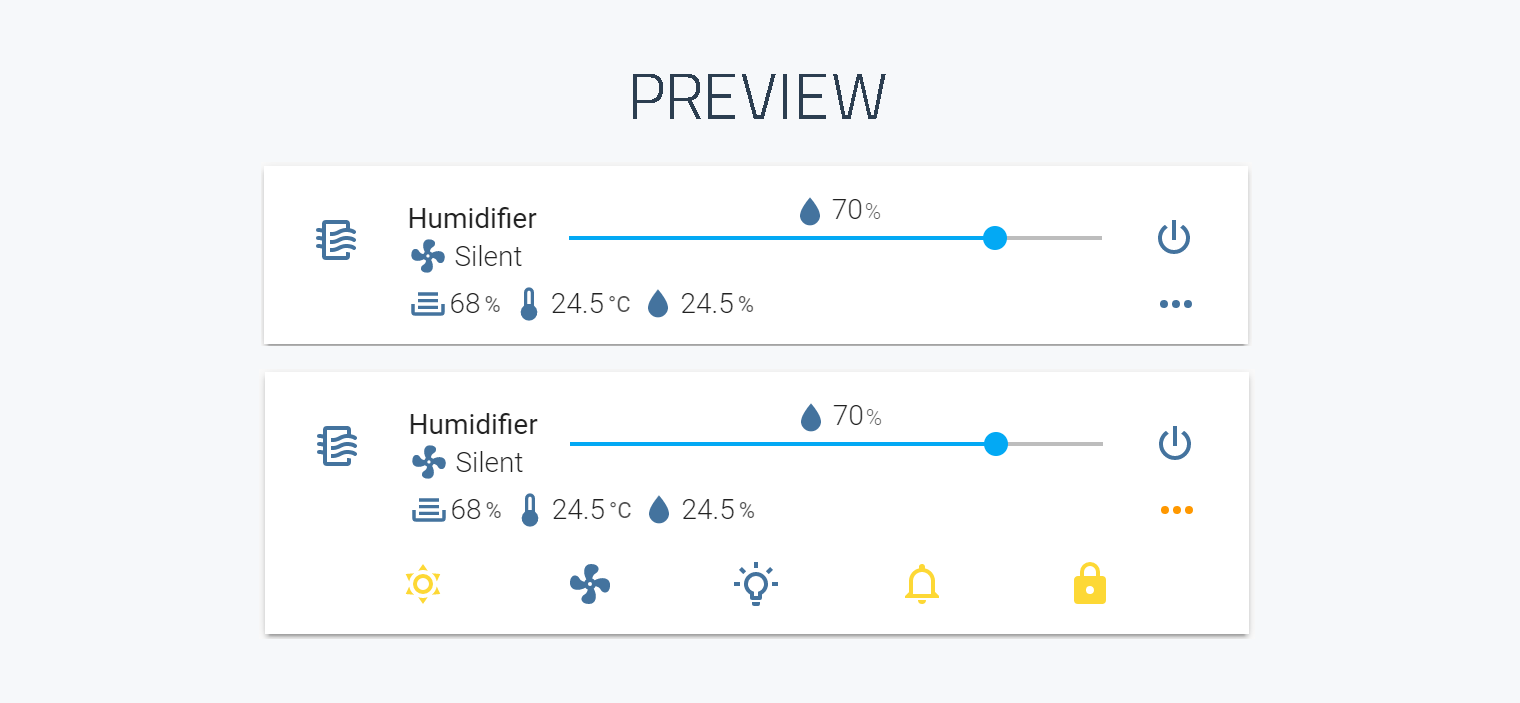
## Notice
v3 is only compatible from version 2022.11 onwards
## Install
*This card is available in [HACS](https://github.com/custom-components/hacs) (Home Assistant Community Store)*
### Simple install
1. Download and copy `mini-humidifier-bundle.js` from the [latest release](https://github.com/artem-sedykh/mini-humidifier/releases/latest) into your `config/www` directory.
2. Add a reference to `mini-humidifier-bundle.js` inside your `configuration.yaml`.
```yaml
resources:
- url: /local/mini-humidifier-bundle.js?v=3.1.1
type: module
```
### CLI install
1. Move into your `config/www` directory
2. Grab `mini-humidifier-bundle.js`
```console
$ wget https://github.com/artem-sedykh/mini-humidifier/releases/download/v3.1.1/mini-humidifier-bundle.js
```
3. Add a reference to `mini-humidifier-bundle.js` inside your `configuration.yaml`.
```yaml
resources:
- url: /local/mini-humidifier-bundle.js?v=3.1.1
type: module
```
## Updating
1. Find your `mini-humidifier-bundle.js` file in `config/www` or wherever you ended up storing it.
2. Replace the local file with the latest one attached in the [latest release](https://github.com/artem-sedykh/mini-humidifier/releases/latest).
3. Add the new version number to the end of the cards reference url in your `configuration.yaml` like below.
```yaml
resources:
- url: /local/mini-humidifier-bundle.js?v=3.1.1
type: module
```
*You may need to empty the browsers cache if you have problems loading the updated card.*
## Using the card
### Options
#### Card options
| Name | Type | Default | Since | Description |
|------|------|---------|-------|-------------|
| type | string | **required** | v1.0.1 | `custom:mini-humidifier`
| entity | string | **required** | v1.0.1 | An entity_id from an entity within the `fan` or `humidifier` domain.
| name | string | optional | v1.0.1 | Override the entities friendly name.
| icon | string | optional | v1.0.1 | Specify a custom icon from any of the available mdi icons.
| group | boolean | optional | v1.0.1 | Removes paddings, background color and box-shadow. [example](#group)
| **toggle** | object | optional | v2.0.1 | Toggle button.
| toggle: `icon` | string | optional | v2.0.1 | Custom icon, default value `mdi:dots-horizontal`
| toggle: `hide` | boolean | optional | v2.0.1 | Hide button, default value `False`
| toggle: `default` | boolean | optional | v2.0.1 | Default toggle button state, default value `off`, [example](#toggle-button).
| **secondary_info** | object | optional | v2.1.1 | secondary_info config. [secondary info examples](#secondary-info)
| secondary_info: `type` | string | optional | v2.1.1 | available types: `last-changed, mode`
| secondary_info: `icon` | string | optional | v2.1.1 | icon for type: `mode`
| secondary_info: `hide` | boolean | optional | v2.2.6 | Hide secondary info, default `False`
| **power** | object | optional | v2.0.1 | Power button, [example](#power-button).
| power: `type` | string | optional | v2.0.1 | `toggle` or `button`, default `button`
| power: `icon` | string | optional | v2.0.1 | Specify a custom icon from any of the available mdi icons, default `mdi:power`
| power: `hide` | boolean | optional | v2.0.1 | Hide power button, default value `False`
| power: `action_timeout` | number | optional | v2.1.1 | `ms` default value `3500`
| power: `disabled` | function | optional | v2.0.1 | button disabled calculation function, default unset
| power: `style` | function | optional | v2.0.1 | function for getting custom styles, default unset
| power: `state` | object | optional | v2.0.1 | config to get power button state.
| power: `state:entity` | string | optional | v2.0.1 | power button entity_id, default current entity
| power: `state:attribute` | string | optional | v2.0.1 | state value attribute default 'unset'
| power: `state:mapper` | function | optional | v2.0.1 | state value processing function, default `unset`
| power: `toggle_action` | function | optional | v2.0.1 | button click processing function
| **target_humidity** | object | optional | v2.0.1 | target humidity config, [example](#target-humidity).
| target_humidity: `icon` | string | optional | v1.0.1 | Custom icon, default value `mdi:water`
| target_humidity: `icon` | object | optional | v2.0.1 | icon config
| target_humidity: `icon:template` | function | optional | v2.0.1 | icon retrieval function
| target_humidity: `icon:style` | function | optional | v2.0.1 | function to get icon styles
| target_humidity: `hide` | boolean | optional | v1.0.1 | Hide target_humidity control, default value `False`
| target_humidity: `disabled` | boolean, function | optional | v2.5.3 | disable target_humidity slider, default value taken from the defined [model](#adding-the-default-configuration-for-the-new-model) and if not set, from the default [model](https://github.com/artem-sedykh/mini-humidifier/blob/master/src/configurations/xiaomi_miio/zhimi_humidifier_cb1.js#L28)
| target_humidity: `hide_indicator` | boolean | optional | v2.2.1 | Hide indicator, default value `False`
| target_humidity: `unit` | string | optional | v1.0.1 | display unit, default `%`
| target_humidity: `min` | number | optional | v1.0.1 | minimum target humidity, default value `30`
| target_humidity: `max` | number | optional | v1.0.1 | maximum target humidity, default value `80`
| target_humidity: `action_timeout` | number | optional | v2.1.1 | `ms` default value `3500`
| target_humidity: `step` | number | optional | v1.0.1 | slider step, default value `10`
| target_humidity: `state` | object | optional | v2.0.1 | configuration to ge target_humidity value
| target_humidity: `state:entity` | object | optional | v2.0.1 | target_humidity entity_id, default current entity
| target_humidity: `state:attribute` | object | optional | v2.0.1 | default value `target_humidity`
| target_humidity: `change_action` | function | optional | v2.0.1 | target_humidity change function
| **indicators** | object | optional | v2.0.1 | any indicators, [examples](#indicators).
| indicators: `name` | object | optional | v2.0.1 | the name of your indicator see [examples](#indicators).
| indicators: `name:icon` | string | optional | v2.0.1 | Specify a custom icon from any of the available mdi icons.
| indicators: `name:icon` | object | optional | v2.0.1 | icon object
| indicators: `name:icon:template` | function | optional | v2.0.1 | icon template function
| indicators: `name:icon:style` | function | optional | v2.0.1 | styles
| indicators: `name:unit` | string | optional | v2.0.1 | display unit.
| indicators: `name:round` | number | optional | v2.0.1 | rounding number value.
| indicators: `name:hide` | boolean | optional | v2.0.1 | hide indicator, default `false`
| indicators: `name:tap_action` | [action object](#action-object-options) | true | v1.1.0 | Action on click/tap.
| indicators: `name:source` | object | optional | v2.0.1 | data source.
| indicators: `name:source:entity` | string | optional | v2.0.1 | indicator entity_id
| indicators: `name:source:attribute` | string | optional | v2.0.1 | entity attribute
| indicators: `name:source:mapper` | function | optional | v2.0.1 | value processing function
| **buttons** | object | optional | v2.0.1 | any buttons, [example](#buttons).
| buttons: `name` | object | optional | v2.0.1 | the name of your button see examples
| buttons: `name:icon` | string | optional | v2.0.1 | Specify a custom icon from any of the available mdi icons.
| buttons: `name:type` | string | optional | v2.0.1 | `dropdown` or `button` default `button`
| buttons: `name:action_timeout` | number | optional | v2.1.1 | `ms` default value `3500`
| buttons: `name:order` | number | optional | v2.0.1 | sort order
| buttons: `name:state` | object | optional | v2.0.1 | config to get button state.
| buttons: `name:hide` | object | optional | v2.0.1 | hide button, default `false`
| buttons: `name:state:entity` | string | optional | v2.0.1 | button entity_id.
| buttons: `name:state:attribute` | string | optional | v2.0.1 | entity attribute
| buttons: `name:state:mapper` | function | optional | v2.0.1 | state processing function
| buttons: `name:disabled` | function | optional | v2.0.1 | calc disabled button
| buttons: `name:active` | function | optional | v2.0.1 | for type `dropdown`
| buttons: `name:source` | object | optional | v2.0.1 | for type `dropdown`
| buttons: `name:source:item` | string | optional | v2.0.1 | source item, format horizontal: horizontal
| buttons: `name:source:__filter` | function | optional | v2.0.1 | filter function
| buttons: `name:change_action` | function | optional | v2.0.1 | for type `dropdown`
| buttons: `name:toggle_action` | function | optional | v2.0.1 | for type `button`
| buttons: `name:style` | function | optional | v2.0.1 | styles
| scale | number | optional | v1.0.3 | UI scale modifier, default is `1`.
| model | string | optional | v2.1.1 | default configuration for a specific humidifier model, default value `zhimi.humidifier.cb1`
| tap_action | [action object](#action-object-options) | true | v1.0.4 | Action on click/tap, [examples](#action-object-options-examples).
#### Action object options
| Name | Type | Default | Options | Description |
|------|:----:|:-------:|:-----------:|-------------|
| action | string | `more-info` | `more-info` / `navigate` / `call-service` / `url` / `none` / `toggle` | Action to perform.
| entity | string | | Any entity id | Override default entity of `more-info`, when `action` is defined as `more-info`.
| service | string | | Any service | Service to call (e.g. `fan.turn_on`) when `action` is defined as `call-service`
| service_data | object | | Any service data | Service data to include with the service call (e.g. `entity_id: fan.xiaomi_miio_device`)
| navigation_path | string | | Any path | Path to navigate to (e.g. `/lovelace/0/`) when `action` is defined as `navigate`.
| url | string | | Any URL | URL to open when `action` is defined as `url`.
### Theme variables
The following variables are available and can be set in your theme to change the appearence of the card.
Can be specified by color name, hexadecimal, rgb, rgba, hsl, hsla, basically anything supported by CSS.
| name | Default | Description |
|------|---------|-------------|
| mini-humidifier-name-font-weight | 400 | Font weight of the entity name
| mini-humidifier-info-font-weight | 300 | Font weight of the states
| mini-humidifier-icon-color | --mini-humidifier-base-color, var(--paper-item-icon-color, #44739e) | The color for icons
| mini-humidifier-button-color |--mini-humidifier-button-color, var(--paper-item-icon-color, #44739e) | The color for buttons icons
| mini-humidifier-accent-color | var(--accent-color) | The accent color of UI elements
| mini-humidifier-base-color | var(--primary-text-color) & var(--paper-item-icon-color) | The color of base text
| mini-humidifier-background-opacity | 1 | Opacity of the background
| mini-humidifier-scale | 1 | Scale of the card
### Adding the default configuration for the new model
1. Read the documentation
2. See an example for [zhimi.humidifier.cb1](https://github.com/artem-sedykh/mini-humidifier/blob/master/src/configurations/xiaomi_miio/zhimi_humidifier_cb1.js)
3. Create a pull request or issue with the configuration file.
#### Available default configurations
`zhimi.humidifier.cb1` - [xiaomi_miio integration](https://www.home-assistant.io/integrations/xiaomi_miio#air-humidifier-cb-zhimihumidifiercb1)
`zhimi.humidifier.ca1` - [xiaomi_miio integration](https://www.home-assistant.io/integrations/xiaomi_miio#air-humidifier-ca-zhimihumidifierca1)
`zhimi.humidifier.ca4` - [xiaomi_miio integration](https://www.home-assistant.io/integrations/xiaomi_miio#air-humidifier-ca-zhimihumidifierca4)
`deerma.humidifier.jsq` - [xiaomi_miio integration](https://www.home-assistant.io/integrations/xiaomi_miio/#air-humidifier-jsqjsq1mjjsq-deermahumidifierjsqdeermahumidifierjsq1deermahumidifiermjjsq)
`deerma.humidifier.jsq1` - [xiaomi_miio integration](https://www.home-assistant.io/integrations/xiaomi_miio/#air-humidifier-jsqjsq1mjjsq-deermahumidifierjsqdeermahumidifierjsq1deermahumidifiermjjsq)
`deerma.humidifier.mjjsq` - [xiaomi_miio integration](https://www.home-assistant.io/integrations/xiaomi_miio/#air-humidifier-jsqjsq1mjjsq-deermahumidifierjsqdeermahumidifierjsq1deermahumidifiermjjsq)
`zhimi.airpurifier.ma2` - [xiaomi_miio integration](https://www.home-assistant.io/integrations/fan.xiaomi_miio/)
`xiaomi_miio_airpurifier:deerma.humidifier.mjjsq` - [xiaomi_miio_airpurifier integration](https://github.com/syssi/xiaomi_airpurifier)
`xiaomi_miio_airpurifier:zhimi.humidifier.cb1` - [xiaomi_miio_airpurifier integration](https://github.com/syssi/xiaomi_airpurifier)
`xiaomi_miio_airpurifier:zhimi.humidifier.ca4` by @ravikwow - [xiaomi_miio_airpurifier integration](https://github.com/syssi/xiaomi_airpurifier)
`xiaomi_miio_airpurifier:zhimi.airpurifier.mb3` by @regevbr - [xiaomi_miio_airpurifier integration](https://github.com/syssi/xiaomi_airpurifier)
> Using the default configuration for a specific model
```yaml
type: custom:mini-humidifier
entity: fan.xiaomi_miio_device
# zhimi.humidifier.cb1 default value may be omitted, added for example.
model: 'zhimi.humidifier.cb1'
```
[deerma.humidifier.mjjsq](https://github.com/artem-sedykh/mini-humidifier/blob/master/src/configurations/xiaomi_miio_airpurifier/deerma_humidifier_mjjsq.js)
```yaml
type: custom:mini-humidifier
entity: fan.xiaomi_miio_device
model: 'xiaomi_miio_airpurifier:deerma.humidifier.mjjsq'
```
> localize status indicator
```yaml
type: custom:mini-humidifier
entity: fan.xiaomi_miio_device
model: 'deerma.humidifier.mjjsq'
indicators:
status:
empty: пустой
filled: полный
```
#### target humidity
> Functions available for the target_humidity:
| Name | Type | execution context | arguments | return type |
|------|------|-------------------|-----------|-------------|
|`state:mapper` | function | target_humidity config | current_value, entity, humidifier_entity | any
|`change_action` | function | target_humidity config | value, current_value, entity, humidifier_entity | promise
|`icon:template` | function | target_humidity config | current_value, entity, humidifier_entity | string
|`icon:style` | function | target_humidity config | current_value, entity, humidifier_entity | object
`current_value` - selected value
`value` - target_humidity value
`entity` - target_humidity entity
`humidifier_entity` - humidifier entity
**execution context methods:**
| Name | arguments | description | return type |
|------|-----------|-------------|-------------|
|`toggle_state` | sate | toggle state, example: `this.toggle_state('on') => off` | string
|`call_service` | domain, service, options, | call Home Assistant service | promise
> Configuration example for the target_humidity:
```yaml
type: custom:mini-humidifier
entity: fan.xiaomi_miio_device
target_humidity:
state:
attribute: target_humidity
mapper: (current_value, entity, humidifier_entity) => current_value
icon:
template: (current_value, entity, humidifier_entity) => 'mdi:tray-full'
style: "(current_value, entity, humidifier_entity) => ({ color: 'red' })"
unit: '%'
hide: off
min: 30
max: 80
step: 10
change_action: >
(value, current_value, entity, humidifier_entity) => {
const options = { entity_id: entity.entity_id, humidity: value };
return this.call_service('xiaomi_miio', 'fan_set_target_humidity', options);
}
```
> The default configuration is configured for `zhimi.humidifier.cb1`,
> to set target humidity, use the service `xiaomi_miio.fan_set_target_humidity`
> Example:
```yaml
type: custom:mini-humidifier
entity: fan.xiaomi_miio_device
target_humidity:
icon: 'mdi:water'
state:
attribute: target_humidity
unit: '%'
min: 30
max: 80
step: 10
change_action: >
(selected, state, entity) => {
const options = { entity_id: entity.entity_id, humidity: selected };
return this.call_service('xiaomi_miio', 'fan_set_target_humidity', options);
}
```
#### power button
> Functions available for the power:
| Name | Type | execution context | arguments | return type |
|------|------|-------------------|-----------|-------------|
|`state:mapper` | function | power config | state, entity, humidifier_entity | string
|`disabled` | function | power config | state, entity, humidifier_entity | boolean
|`style` | function | power config | state, entity, humidifier_entity | object
|`toggle_action` | function | power config | state, entity, humidifier_entity | promise
`state` - current power state
`entity` - current power entity
`humidifier_entity` - humidifier entity
**execution context methods:**
| Name | arguments | description | return type |
|------|-----------|-------------|-------------|
|`toggle_state` | sate | toggle state, example: `this.toggle_state('on') => off` | string
|`call_service` | domain, service, options, | call Home Assistant service | promise
> The power button can be of two types: `button` or `toggle`, default type: `button`
> Attention, the following configuration attributes (icon, disabled, state:attribute, style, toggle_action) are not available for the toggle type,
> since a standard ha-entity-toggle is used, the state of which I do not control
> Configuration example for the power button type `toggle`:
```yaml
type: custom:mini-humidifier
entity: fan.xiaomi_miio_device
power:
hide: off
state:
mapper: (state, entity, humidifier_entity) => state
```
> Configuration example for the power button type `button`:
```yaml
type: custom:mini-humidifier
entity: fan.xiaomi_miio_device
power:
icon: 'mdi:power'
type: button
state:
mapper: (state, entity, humidifier_entity) => state
hide: off
disabled: (state, entity, humidifier_entity) => false
style: "(state, entity, humidifier_entity) => ({ color: 'red' })"
toggle_action: >
(state, entity) => {
const service = state === 'on' ? 'turn_off' : 'turn_on';
return this.call_service('fan', service, { entity_id: entity.entity_id });
}
```
> The default configuration is configured for `zhimi.humidifier.cb1`,
> to on / off, use the service `fan.turn_on`, `fan.turn_off`
> Example:
```yaml
type: custom:mini-humidifier
entity: fan.xiaomi_miio_device
power:
icon: 'mdi:power'
type: button
hide: off
toggle_action: >
(current_state, entity) => {
const service = current_state === 'on' ? 'turn_off' : 'turn_on';
return this.call_service('fan', service, { entity_id: entity.entity_id });
}
```
#### Indicators
> The indicators display additional information on the card, for example, you can display humidity, depth, temperature, etc.
> The default configuration for `zhimi.humidifier.cb1` uses three indicators depth, temperature, humidity.
> [zhimi.humidifier.cb1 indicators](#default-indicators)
> Adding a simple indicator:
```yaml
type: custom:mini-humidifier
entity: fan.xiaomi_miio_device
indicators:
test:
icon: mdi:water
unit: '%'
round: 1
source:
entity: sensor.humidity
```
##### indicator functions
> Consider configuring an indicator using javascript
> Functions available for the indicator:
| Name | Type | execution context | arguments | return type |
|------|------|-------------------|-----------|-------------|
|`source:mapper` | function | indicator config | value, entity, humidifier_entity | any
|`icon:template` | function | indicator config | value, entity, humidifier_entity | string
|`icon:style` | function | indicator config | value, entity, humidifier_entity | object
`value` - current indicator value
`entity` - indicator entity
`humidifier_entity` - humidifier entity
##### source mapper
> Using the mapper function, you can change the indicator value:
> For zhimi.humidifier.cb1, a maximum depth value of 125 is used, which is 4 liters of tank,
> let's get how much water is left in liters or in percent
```yaml
type: custom:mini-humidifier
entity: fan.xiaomi_miio_device
indicators:
depth:
icon: 'mdi:tray-full'
unit: '%'
round: 0
# variable used in mapper
max_value: 125
# variable used in mapper
volume: 4
# variable used in mapper
type: 'percent'
source:
attribute: depth
mapper: >
(val) => {
const value = (100 * (val || 0)) / this.max_value;
return this.type === 'liters' ? (value * this.volume) / 100 : value;
}
```
##### icon template, style
> The indicator icon can be calculated dynamically
for example:
```yaml
type: custom:mini-humidifier
entity: fan.xiaomi_miio_device
indicators:
depth:
icon:
template: >
(value) => {
if (value === 0)
return 'mdi:tray';
if (value <= 20)
return 'mdi:tray-minus';
return 'mdi:tray-full';
}
style: >
(value) => {
if (value === 0)
return { color: 'red' };
if (value <= 20)
return { color: '#FD451D' };
return {};
}
unit: '%'
round: 0
# variable used in mapper
max_value: 125
# variable used in mapper
volume: 4
# variable used in mapper
type: 'liters'
source:
attribute: depth
mapper: >
(val) => {
const value = (100 * (val || 0)) / this.max_value;
return this.type === 'liters' ? (value * this.volume) / 100 : value;
}
```
##### default-indicators
> The plugin is configured by default for zhimi.humidifier.cb1 and 3 default indicators are available in it temperature, humidity, depth
> Their configuration looks like this:
```yaml
type: custom:mini-humidifier
entity: fan.xiaomi_miio_device
indicators:
depth:
icon: 'mdi:tray-full'
unit: '%'
round: 0
order: 0
max_value: 125
volume: 4
type: 'percent'
source:
attribute: depth
mapper: >
(val) => {
const value = (100 * (val || 0)) / this.max_value;
return this.type === 'liters' ? (value * this.volume) / 100 : value;
}
temperature:
icon: 'mdi:thermometer-low'
unit: '°C'
round: 1
order: 1
source:
attribute: temperature
humidity:
icon: 'mdi:water'
unit: '%'
round: 1
order: 2
source:
attribute: humidity
```
> You can override the default indicators or even hide them and add your own
> We will display the depth value in liters and change the humidity icon as well as hide the temperature:
```yaml
type: custom:mini-humidifier
entity: fan.xiaomi_miio_device
indicators:
depth:
unit: 'L'
type: 'liters'
humidity:
icon: 'mdi:water-outline'
temperature:
hide: on
```
#### Buttons
> You can add various buttons, supported types: button and dropdown
##### buttons functions
| Name | Type | execution context | arguments | return type |
|------|------|-------------------|-----------|-------------|
|`state:mapper` | function | button config | state, entity, humidifier_entity | any
|`source:__filter` | function | button config | state, entity, humidifier_entity | object({ id..., name... }) array
|`active` | function | button config | state, entity, humidifier_entity | boolean
|`disabled` | function | button config | state, entity, humidifier_entity | boolean
|`style` | function | button config | state, entity, humidifier_entity | object
|`toggle_action` | function | button config | state, entity, humidifier_entity | promise
|`change_action` | function | button config | selected, state, entity, humidifier_entity | promise
`state` - current button state value
`entity` - button entity
`humidifier_entity` - humidifier entity
`source` - dropdown source object array: [ { id: 'id', name: 'name' }, ... ]
`selected` - selected dropdown value
**execution context methods:**
| Name | arguments | description | return type |
|------|-----------|-------------|-------------|
|`toggle_state` | sate | toggle state, example: `this.toggle_state('on') => off` | string
|`call_service` | domain, service, options, | call Home Assistant service | promise
##### default buttons
> The following buttons are added to the default configuration: dry, mode, led, buzzer, child_lock
> These buttons are configured for zhimi.humidifier.cb1
> It looks like this:
```yaml
type: custom:mini-humidifier
entity: fan.xiaomi_miio_device
buttons:
dry:
icon: 'mdi:weather-sunny'
order: 0
state:
attribute: dry
# the dry attribute is of type boolean, for the button the state should be on/off/closed/locked/unavailable/unknown
mapper: "(state) => (state ? 'on' : 'off')"
# service is used xiaomi_miio.fan_set_dry_on or xiaomi_miio.fan_set_dry_off
toggle_action: >
(state, entity) => {
const service = state === 'on' ? 'fan_set_dry_off' : 'fan_set_dry_on';
const options = { entity_id: entity.entity_id };
return this.call_service('xiaomi_miio', service, options);
}
# dropdown example
mode:
icon: 'mdi:fan'
order: 1
type: dropdown
state:
attribute: mode
source:
auto: auto
silent: silent
medium: medium
high: high
# The button will light up when the humidifier is on.
active: "(state, entity) => (entity.state !== 'off')"
# the button will be locked when depth is 0
# zhimi.humidifier.cb1 does not allow changing the mode when there is no water
disabled: "(state, entity) => (entity.attributes.depth === 0)"
# using service: fan.set_speed
change_action: >
(selected, state, entity) => {
const options = { entity_id: entity.entity_id, speed: selected };
return this.call_service('fan', 'set_speed', options);
}
led:
icon: mdi:lightbulb-on-outline
order: 2
type: dropdown
state:
attribute: led_brightness
source:
0: Bright
1: Dim
2: Off
# button is active while any state except 2 is selected
active: "state => (state !== 2 && state !== '2')"
# using service: xiaomi_miio.fan_set_led_brightness
change_action: >
(selected, state, entity) => {
const options = { entity_id: entity.entity_id, brightness: selected };
return this.call_service('xiaomi_miio', 'fan_set_led_brightness', options);
}
buzzer:
icon: 'mdi:bell-outline'
order: 3
state:
attribute: buzzer
mapper: "(state) => (state ? 'on' : 'off')"
# using service: xiaomi_miio.fan_set_buzzer_on and xiaomi_miio.fan_set_buzzer_off
toggle_action: >
(state, entity) => {
const service = state === 'on' ? 'fan_set_buzzer_off' : 'fan_set_buzzer_on';
const options = { entity_id: entity.entity_id };
return this.call_service('xiaomi_miio', service, options);
}
child_lock:
icon: 'mdi:lock'
order: 4
state:
attribute: child_lock
mapper: "(state) => (state ? 'on' : 'off')"
# using service: xiaomi_miio.fan_set_child_lock_on and xiaomi_miio.fan_set_child_lock_off
toggle_action: >
(state, entity) => {
const service = state === 'on' ? 'fan_set_child_lock_off' : 'fan_set_child_lock_on';
const options = { entity_id: entity.entity_id };
return this.call_service('xiaomi_miio', service, options);
}
```
> You can override the default buttons or even hide them and add your own
> Let's add translations for the mode and led buttons and hide the child_lock button
```yaml
type: custom:mini-humidifier
entity: fan.xiaomi_miio_device
buttons:
mode:
source:
auto: Авто
silent: Тихий
medium: Средний
high: Высокий
led:
source:
0: Ярко
1: Тускло
2: Выкл
child_lock:
hide: on
```
> For some models of humidifiers, there are only two button backlight modes,
> let's change our drop-down list to a button for an example.
> it can be done in different ways, consider a few:
> 1. override current led button
```yaml
type: custom:mini-humidifier
entity: fan.xiaomi_miio_device
buttons:
led:
type: 'button'
on_states: [0, 1]
off_value: 2
on_value: 1
state:
attribute: led_brightness
mapper: "(value) => (this.on_states.includes(value) ? 'on' : 'off')"
toggle_action: >
(state, entity) => {
const value = state === 'on' ? this.off_value : this.on_value;
const options = { entity_id: entity.entity_id, brightness: value };
return this.call_service('xiaomi_miio', 'fan_set_led_brightness', options);
}
```
> 2. Hide led button and add new
```yaml
type: custom:mini-humidifier
entity: fan.xiaomi_miio_device
buttons:
led:
hide: on
new_led:
icon: 'mdi:lightbulb-on-outline'
type: 'button'
order: 2
on_states: [0, 1]
off_value: 2
on_value: 1
state:
attribute: led_brightness
mapper: "(value) => (this.on_states.includes(value) ? 'on' : 'off')"
toggle_action: >
(state, entity) => {
const value = state === 'on' ? this.off_value : this.on_value;
const options = { entity_id: entity.entity_id, brightness: value };
return this.call_service('xiaomi_miio', 'fan_set_led_brightness', options);
}
```
#### toggle button
> toggle button configuration
> For example, we want to always show control buttons, and toggle button hide:
```yaml
type: custom:mini-humidifier
entity: fan.xiaomi_miio_device
toggle:
default: on
hide: on
```
#### secondary info
```yaml
type: custom:mini-humidifier
entity: fan.xiaomi_miio_device
secondary_info: last-changed
type: custom:mini-humidifier
entity: fan.xiaomi_miio_device
secondary_info: #default type mode, changing icon
icon: 'mdi:fan'
```
#### group
> To display entities inside the container, set the group configuration parameter to `on`
```yaml
type: entities
title: Climate
show_header_toggle: true
state_color: true
entities:
- entity: fan.xiaomi_miio_device
type: custom:mini-humidifier
group: on
```
#### Action object options examples
```yaml
# toggle example
type: custom:mini-humidifier
entity: fan.xiaomi_miio_device
tap_action:
action: toggle
# call-service example
type: custom:mini-humidifier
entity: fan.xiaomi_miio_device
tap_action:
action: call-service
service: xiaomi_miio.fan_set_led_brightness
service_data:
brightness: 1
# navigate example
type: custom:mini-humidifier
entity: fan.xiaomi_miio_device
tap_action:
action: navigate
navigation_path: '/lovelace/4'
# navigate example
type: custom:mini-humidifier
entity: fan.xiaomi_miio_device
tap_action:
action: url
url: 'https://www.google.com/'
# none example
type: custom:mini-humidifier
entity: fan.xiaomi_miio_device
tap_action: none
# more-info for custom entity example
type: custom:mini-humidifier
entity: fan.xiaomi_miio_device
tap_action:
action: more-info
entity: sensor.humidity
```
## Development
*If you plan to contribute back to this repo, please fork & create the PR against the [dev](https://github.com/artem-sedykh/mini-humidifier/tree/dev) branch.*
**Clone this repository into your `config/www` folder using git.**
```console
$ git clone https://github.com/artem-sedykh/mini-humidifier.git
```
**Add a reference to the card in your `configuration.yaml`.**
```yaml
resources:
- url: /local/mini-humidifier/dist/mini-humidifier-bundle.js
type: module
```
### Instructions
*Requires `nodejs` & `npm`*
1. Move into the `mini-humidifier` repo, checkout the *dev* branch & install dependencies.
```console
$ cd mini-humidifier-dev && git checkout dev && npm install
```
2. Make changes to the source
3. Build the source by running
```console
$ npm run build
```
4. Refresh the browser to see changes
*Make sure cache is cleared or disabled*
5. *(Optional)* Watch the source and automatically rebuild on save
```console
$ npm run watch
```
*The new `mini-humidifier-bundle.js` will be build and ready inside `/dist`.*
## Getting errors?
Make sure you have `javascript_version: latest` in your `configuration.yaml` under `frontend:`.
Make sure you have the latest version of `mini-humidifier-bundle.js`.
If you have issues after updating the card, try clearing your browsers cache or restart Home Assistant.
If you are getting "Custom element doesn't exist: mini-humidifier" or running older browsers try replacing `type: module` with `type: js` in your resource reference, like below.
```yaml
resources:
- url: ...
type: js
```
## Inspiration
- [@kalkih](https://github.com/kalkih) - [mini-media-player](https://github.com/kalkih/mini-media-player)
## License
This project is under the MIT license.