https://github.com/arturovt/ngxs-capture.dev-plugin
Capture.dev middleware for NGXS - Log actions and state to debug production apps
https://github.com/arturovt/ngxs-capture.dev-plugin
angular bug-reporting capture-dev debugging error-tracking middleware redux session-replay state-management
Last synced: 4 months ago
JSON representation
Capture.dev middleware for NGXS - Log actions and state to debug production apps
- Host: GitHub
- URL: https://github.com/arturovt/ngxs-capture.dev-plugin
- Owner: arturovt
- License: mit
- Created: 2026-02-15T15:42:42.000Z (5 months ago)
- Default Branch: main
- Last Pushed: 2026-02-15T19:24:55.000Z (5 months ago)
- Last Synced: 2026-02-16T00:11:47.998Z (5 months ago)
- Topics: angular, bug-reporting, capture-dev, debugging, error-tracking, middleware, redux, session-replay, state-management
- Language: TypeScript
- Homepage:
- Size: 358 KB
- Stars: 0
- Watchers: 0
- Forks: 0
- Open Issues: 0
-
Metadata Files:
- Readme: README.md
- License: LICENSE
Awesome Lists containing this project
README
# ngxs-capture.dev-plugin
NGXS plugin for [Capture.dev](https://capture.dev/) that augments Capture.dev sessions with actions and state from your NGXS store.
[](https://www.npmjs.com/package/ngxs-capture.dev-plugin)
[](https://opensource.org/licenses/MIT)
## Features
- **Complete Action Logging** - Captures all NGXS actions with their status (Dispatched, Successful, Errored, Canceled)
- **State Snapshots** - Records state before and after each action
- **Optimized Performance** - Runs outside Angular zone to prevent unnecessary change detection
- **SSR Compatible** - Safely skips logging during server-side rendering
## Installation
```bash
npm install ngxs-capture.dev-plugin
```
Or with yarn:
```bash
yarn add ngxs-capture.dev-plugin
```
Or with pnpm:
```bash
pnpm add ngxs-capture.dev-plugin
```
## Requirements
- `@ngxs/store` >= 21.0.0
- `@capture.dev/redux` >= 1.0.5
- Angular (compatible with your NGXS version)
## Usage
### Basic Setup
```typescript
// app.config.ts
import { ApplicationConfig } from '@angular/core';
import { provideStore } from '@ngxs/store';
import { withNgxsCaptureDevReduxMiddlewarePlugin } from 'ngxs-capture.dev-plugin';
// Initialize Capture.dev - it should be loaded from the CDN beforehand
// via a tag in index.html:
// https://cdn.capture.dev/capture-js/browser/latest.js
Capture.identify({ options: '...' });
export const appConfig: ApplicationConfig = {
providers: [
provideStore(
[
/* your states */
],
withNgxsCaptureDevReduxMiddlewarePlugin(),
),
],
};
```
### Lazy-loading Plugin
You can also lazy-load the plugin when Capture.dev is needed in your application, for example when a user logs in and `Capture.identify` is called:
```ts
// somewhere in the app
import { inject, EnvironmentInjector, createEnvironmentInjector, Injector } from '@angular/core';
import { provideStates } from '@ngxs/store';
@Injectable({ providedIn: 'root' })
export class CaptureDevService {
private injector = inject(EnvironmentInjector);
async start() {
// Configure Capture.dev options.
window.captureOptions = { captureKey: config.captureKey };
// Load Capture.dev script.
await loadScript('https://cdn.capture.dev/capture-js/browser/latest.js');
window.Capture.identify({ options: '...' });
// Lazy-load the NGXS plugin.
const { withNgxsCaptureDevReduxMiddlewarePlugin } = await import('ngxs-capture.dev-plugin');
// Register plugin in child injector so it's available globally.
// This adds the plugin to NGXS without requiring app-level configuration.
createEnvironmentInjector([provideStates([], withNgxsCaptureDevReduxMiddlewarePlugin())], this.injector);
}
}
// Helper function to load external scripts.
function loadScript(src: string): Promise<void> {
return new Promise((resolve, reject) => {
const script = document.createElement('script');
script.src = src;
script.onload = () => resolve();
script.onerror = () => reject(new Error(`Failed to load script: ${src}`));
document.head.appendChild(script);
});
}
```
## Action Status Types
The plugin logs actions with the following statuses:
| Status | Description |
| ------------ | ------------------------------------------------------ |
| `DISPATCHED` | Action has been dispatched |
| `SUCCESSFUL` | Action handler completed successfully |
| `ERRORED` | Action handler threw an error |
| `CANCELED` | Action was canceled by another action of the same type |
```
[Countries] Load countries (DISPATCHED)
[Countries] Load countries (SUCCESSFUL)
[Auth] Login (DISPATCHED)
[Auth] Login (ERRORED)
```
## How It Works
The plugin integrates with NGXS as a middleware and leverages Capture.dev's Redux middleware under the hood:
1. Intercepts all NGXS actions before they're processed
2. Logs action dispatch with current state
3. Captures action completion (success, error, or cancellation)
4. Compresses actions and state using Capture.dev's binary format
5. Performs state diffs to minimize network data
All logging operations run outside the Angular zone to prevent triggering unnecessary change detection cycles.
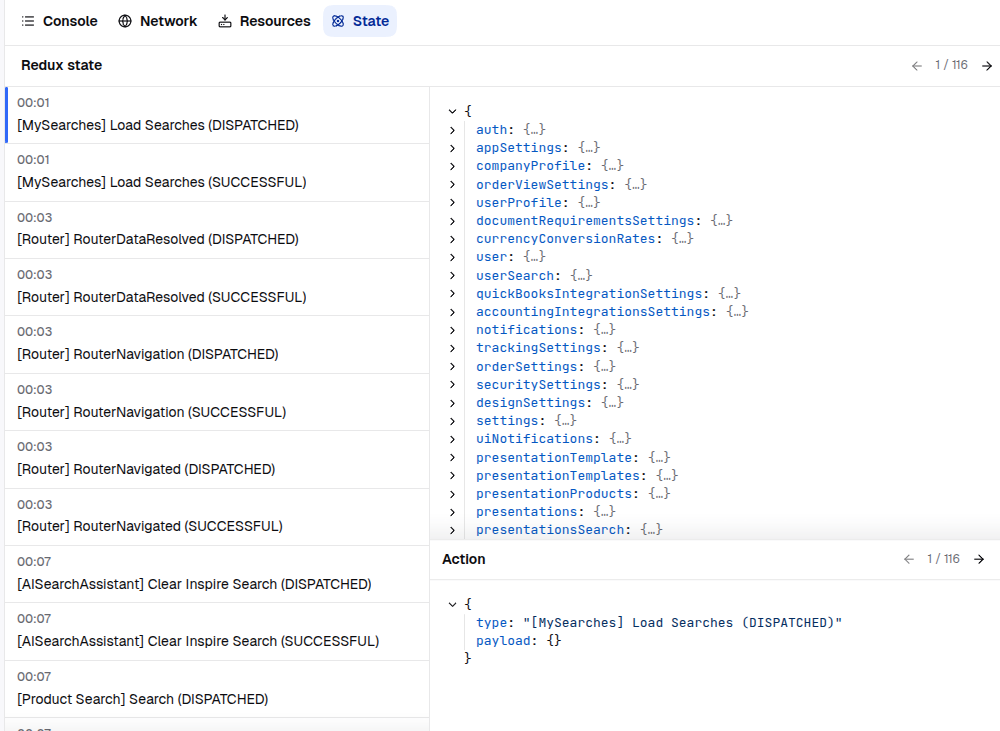
## Viewing Logs in Capture.dev
Once configured, you can view NGXS actions in the Capture.dev dashboard:
1. Open a session in Capture.dev
2. Navigate to the "State" tab
3. Browse actions and state changes
4. Click an action to see state before and after
## Performance Considerations
- **Zone Optimization**: All Capture.dev operations run outside Angular's zone
- **Data Compression**: Actions and state are compressed using binary format
- **State Diffing**: Only state changes are transmitted, not full snapshots
- **Error Handling**: Capture.dev errors are caught and logged without breaking your app
- **SSR Safe**: Automatically skips logging on server to prevent errors
## License
MIT © [arturovt](https://github.com/arturovt)
## Version Compatibility
This package follows the major version of `@ngxs/store`:
| ngxs-capture.dev-plugin | @ngxs/store |
| ----------------------- | ----------- |
| 21.x.x | >=21.0.0 |