https://github.com/aryaxt/ios-rich-text-editor
A Rich Text Editor for iOS
https://github.com/aryaxt/ios-rich-text-editor
Last synced: about 1 year ago
JSON representation
A Rich Text Editor for iOS
- Host: GitHub
- URL: https://github.com/aryaxt/ios-rich-text-editor
- Owner: aryaxt
- License: other
- Created: 2013-05-06T05:34:01.000Z (about 13 years ago)
- Default Branch: master
- Last Pushed: 2016-07-13T09:19:49.000Z (almost 10 years ago)
- Last Synced: 2025-04-04T05:08:29.405Z (about 1 year ago)
- Language: Objective-C
- Size: 1.74 MB
- Stars: 896
- Watchers: 61
- Forks: 158
- Open Issues: 34
-
Metadata Files:
- Readme: README.md
- License: License.txt
Awesome Lists containing this project
README
RichTextEditor-iOS [](http://cocoadocs.org/docsets/iOS-Rich-Text-Editor)
==================
RichTextEditor for iPhone & iPad
Features:
- Bold
- Italic
- Underline
- StrikeThrough
- Font
- Font size
- Text background color
- Text foregroud color
- Text alignment
- Paragraph Indent/Outdent
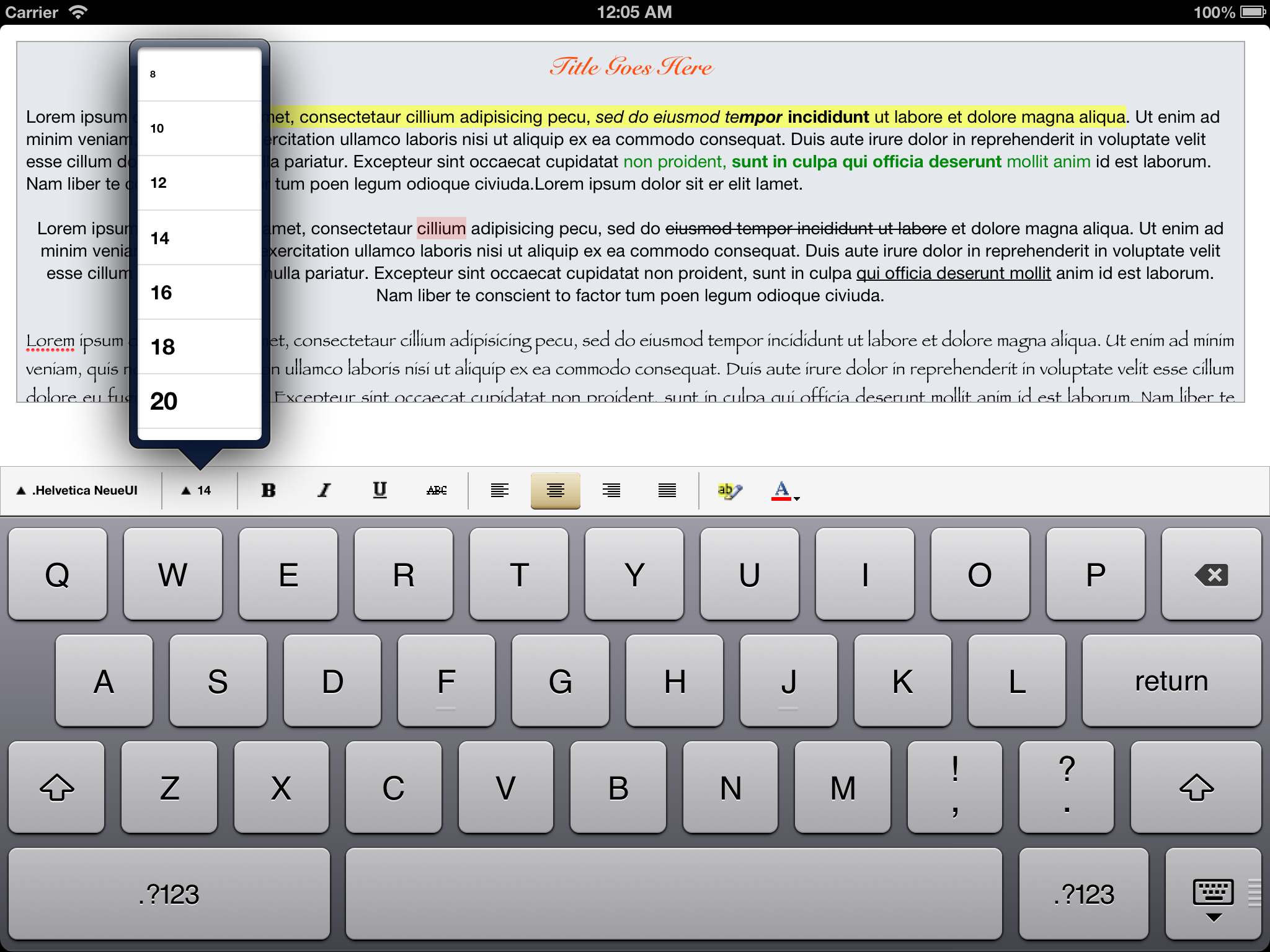

Custom Font Size Selection
-------------------------
Font size selection can be customized by implementing the following data source method
```objective-c
- (NSArray *)fontSizeSelectionForRichTextEditor:(RichTextEditor *)richTextEditor
{
// pas an array of NSNumbers
return @[@5, @10, @20, @30];
}
```
Custom Font Family Selection
-------------------------
Font family selection can be customized by implementing the following data source method
```objective-c
- (NSArray *)fontFamilySelectionForRichTextEditor:(RichTextEditor *)richTextEditor
{
// pas an array of Strings
// Can be taken from [UIFont familyNames]
return @[@"Helvetica", @"Arial", @"Marion", @"Papyrus"];
}
```
Presentation Style
-------------------------
You can switch between popover, or modal (presenting font-picker, font-size-picker, color-picker dialogs) by implementing the following data source method
```objective-c
- (RichTextEditorToolbarPresentationStyle)presentarionStyleForRichTextEditor:(RichTextEditor *)richTextEditor
{
// RichTextEditorToolbarPresentationStyleModal Or RichTextEditorToolbarPresentationStylePopover
return RichTextEditorToolbarPresentationStyleModal;
}
```
Modal Presentation Style
-------------------------
When presentarionStyleForRichTextEditor is a modal, modal-transition-style & modal-presentation-style can be configured
```objective-c
- (UIModalPresentationStyle)modalPresentationStyleForRichTextEditor:(RichTextEditor *)richTextEditor
{
return UIModalPresentationFormSheet;
}
- (UIModalTransitionStyle)modalTransitionStyleForRichTextEditor:(RichTextEditor *)richTextEditor
{
return UIModalTransitionStyleFlipHorizontal;
}
```
Customizing Features
-------------------------
Features can be turned on/off by iplementing the following data source method
```objective-c
- (RichTextEditorFeature)featuresEnabledForRichTextEditor:(RichTextEditor *)richTextEditor
{
return RichTextEditorFeatureFont |
RichTextEditorFeatureFontSize |
RichTextEditorFeatureBold |
RichTextEditorFeatureParagraphIndentation;
}
```
Enable/Disable RichText Toolbar
-------------------------
You can hide the rich text toolbar by implementing the following method. This method gets called everytime textView becomes first responder.
This can be usefull when you don't want the toolbar, instead you want to use the basic features (bold, italic, underline, strikeThrough), thoguht the UIMeMenuController
```objective-c
- (BOOL)shouldDisplayToolbarForRichTextEditor:(RichTextEditor *)richTextEditor
{
return YES;
}
```
Enable/Disable UIMenuController Options
-------------------------
On default the UIMenuController options (bold, italic, underline, strikeThrough) are turned off. You can implement the follwing method if you want these features to be available through the UIMenuController along with copy/paste/selectAll etc.
```objective-c
- (BOOL)shouldDisplayRichTextOptionsInMenuControllerForRichTextrEditor:(RichTextEditor *)richTextEdiotor
{
return YES;
}
```
Credits
-------------------------
iPhone popover by werner77
https://github.com/werner77/WEPopover