https://github.com/asc-lab/ngx-formly-playground
Project with list of Angular Formly exercises. Every next exercise add new feature to the previous one.
https://github.com/asc-lab/ngx-formly-playground
angular angular-formly angular7 ngx-formly playground
Last synced: 10 months ago
JSON representation
Project with list of Angular Formly exercises. Every next exercise add new feature to the previous one.
- Host: GitHub
- URL: https://github.com/asc-lab/ngx-formly-playground
- Owner: asc-lab
- Created: 2019-04-24T06:07:24.000Z (over 7 years ago)
- Default Branch: master
- Last Pushed: 2023-01-07T04:56:27.000Z (over 3 years ago)
- Last Synced: 2025-04-01T22:46:52.211Z (over 1 year ago)
- Topics: angular, angular-formly, angular7, ngx-formly, playground
- Language: TypeScript
- Homepage:
- Size: 1.8 MB
- Stars: 17
- Watchers: 6
- Forks: 7
- Open Issues: 28
-
Metadata Files:
- Readme: README.md
Awesome Lists containing this project
README
# Angular Formly Playground
Formly Playground is a project with list of [Angular Formly](https://github.com/ngx-formly/ngx-formly) exercises.
Every next exercise add new feature to the previous one.
## Business background
The purpose of the project is to build applications form using [Angular Formly](https://github.com/ngx-formly/ngx-formly), which could support requests to Concierge.
Why [Angular Formly](https://github.com/ngx-formly/ngx-formly)? From the fist moment it's clear that the form will contain many options and questions. On the main Formly page you can read "The `formly-form` Component and the `FormlyConfig` service are very powerful and bring unmatched maintainability to your applications forms", so why not check if it's true.
## Before exercise one
Application setup
### Task list
- generate application with [Angular CLI](https://github.com/angular/angular-cli)
- install [Ngx Formly](https://formly.dev/guide/getting-started)
- use one of UI library in our project, in this project Material2 was used
- to app.module.ts import the FormlyModule and UI (pre-defined types/templates)
- check if app works - run `ng serve` dev server and navigate to `http://localhost:4200/`
### In this project
- `home component` was created as navigation page to each exercise
- `angular-material.imports.ts` module was added to collect all [Angular Material](https://material.angular.io/) imports in one shared module
- to import all exercises components with a single statement `index.ts` file was created
- in `app.component.html` file, fixed app-header was added
## Exercise One
Request to Concierge should be divided into sections:
- Order Identification
- Shoppings
- Additional Comments
- Statements
Component [Card](https://material.angular.io/components/card/overview) should be used as section layout.
Add Order Identification card.
### Task list
- generate component `exercise-one`
- read documentation [custom-formly-wrapper](https://formly.dev/guide/custom-formly-wrapper)
- in `shared\custom-wrappers` folder create component `card-wrapper`
- in `app.module.ts` register new custom wrapper as a wrapper
- in component `exercise-one` create "Order Identification" Card using `card-wrapper`
- check if app works
### In this project
- in file `app-routing.module.ts` route to component was added
- to import all custom wrappers with a single statement `index.ts` file was created
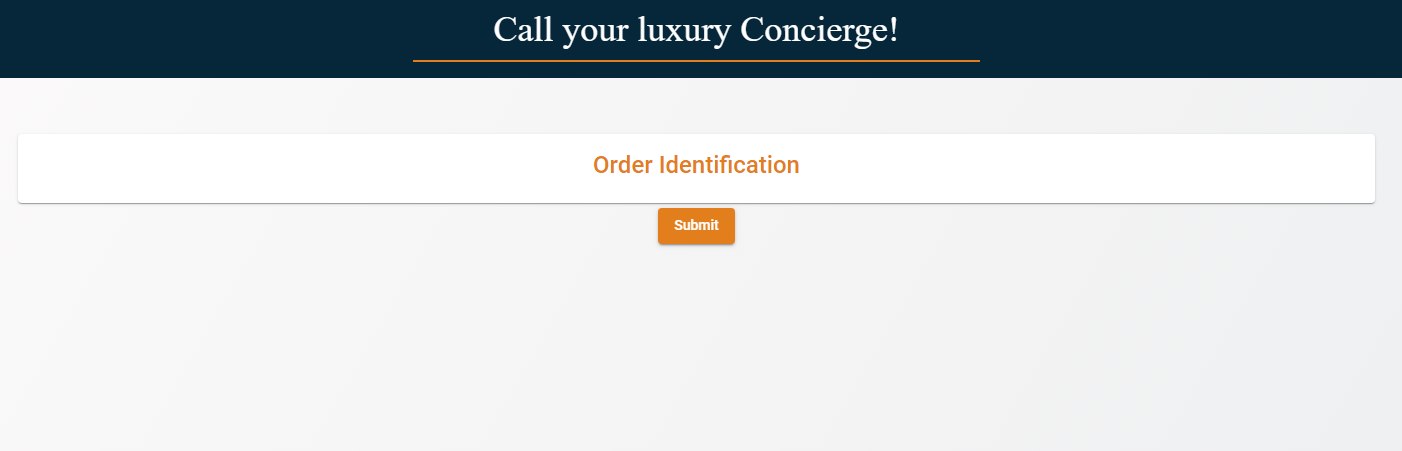
Below you can find screen of component after adding some custom style.
## Exercise Two
Add other sections and add questions to each section. In section Shopping user should be able to add and remove shopping items.
### Task list
- generate component `exercise-two`
- copy code from component `exercise-one`
- add: Shoppings, Additional Comments, Statements sections - use `card-wrapper` created in exercise one
- read documentation [ui material guide](https://formly.dev/ui/material)
- in `shared\model` folder add ts files with model
- in `shared\services` folder add `request.service.ts` with `saveRequest` method to simulate connection to api
- in `shared\services` folder add `dict.service.ts` with `getDictionaryItems` method to simulate connection to api
- add some fields to each section in component `exercies-two` (use different types of fields)
- read documentation [repeating-section](https://formly.dev/examples/advanced/repeating-section)
- in `shared\custom-types` folder create component `repeat-section`
- in `app.module.ts` register new `repeat-section` as a type
- in component `exercies-two` in section Shoppings use `repeat-section`
- check if app works
### In this project
- in file `app-routing.module.ts` route to component was added
- to import all custom types with a single statement `index.ts` file was created
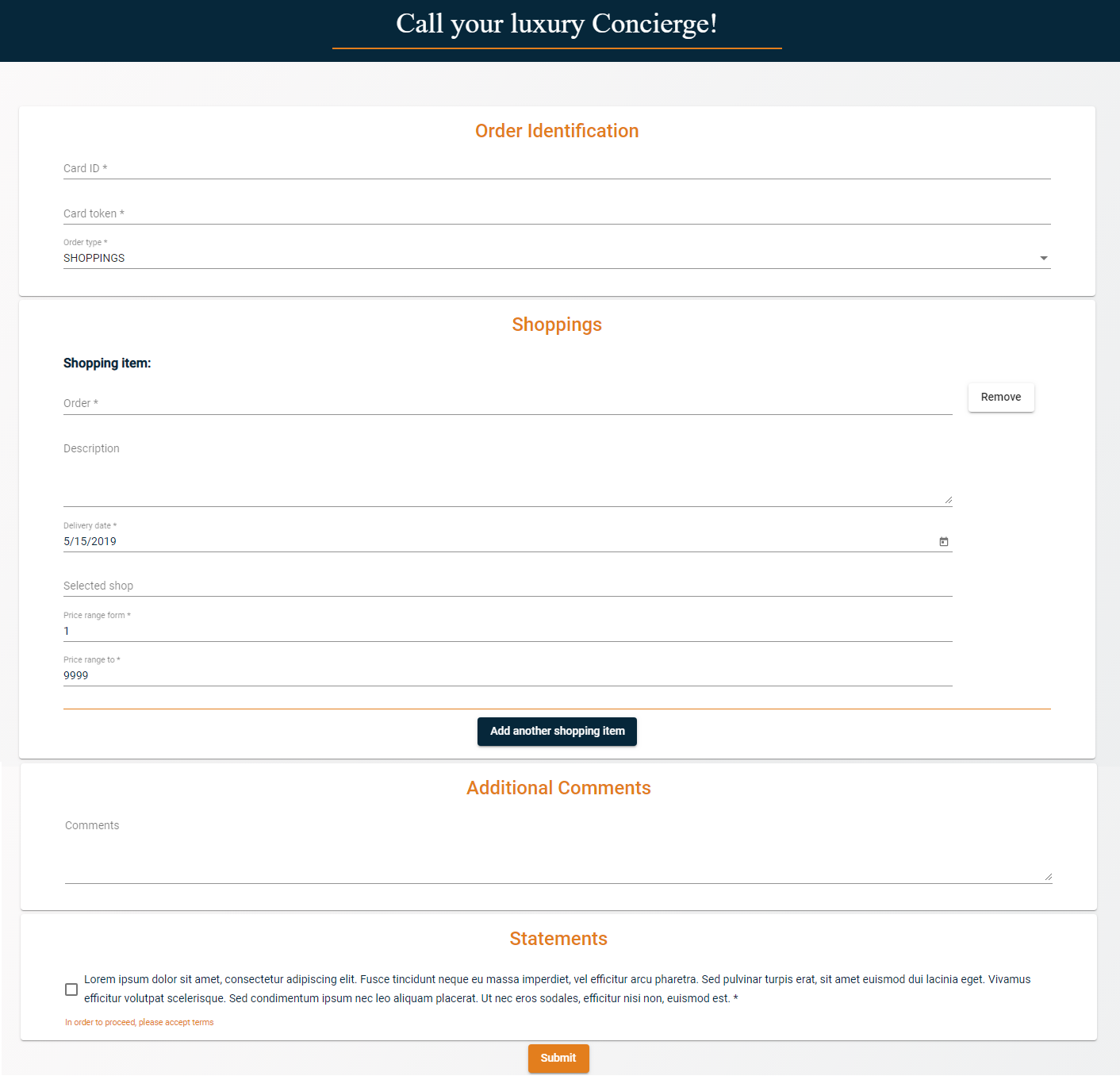
Below you can find screen of component after adding some questions and custom style
## Exercise Three
Add validation to fields, use global and custom validations
### Task list
- generate component `exercise-three`
- copy code from component `exercise-two`
- read documentation [built-in validations](https://formly.dev/examples/validation/built-in-validations)
- add global validations to `app.module.ts`
- in component ts file add some custom validations
In this project
- in file `app-routing.module.ts` route to component was added
- in exercise seven approach to global validation was changed - go to exercise seven to see it
- in field `cardId` [async validator](https://formly.dev/examples/validation/unique-value-async-validation) was used
- in field `email` [validation message](https://formly.dev/examples/validation/validation-message) to attribute pattern was added
## Exercise Four
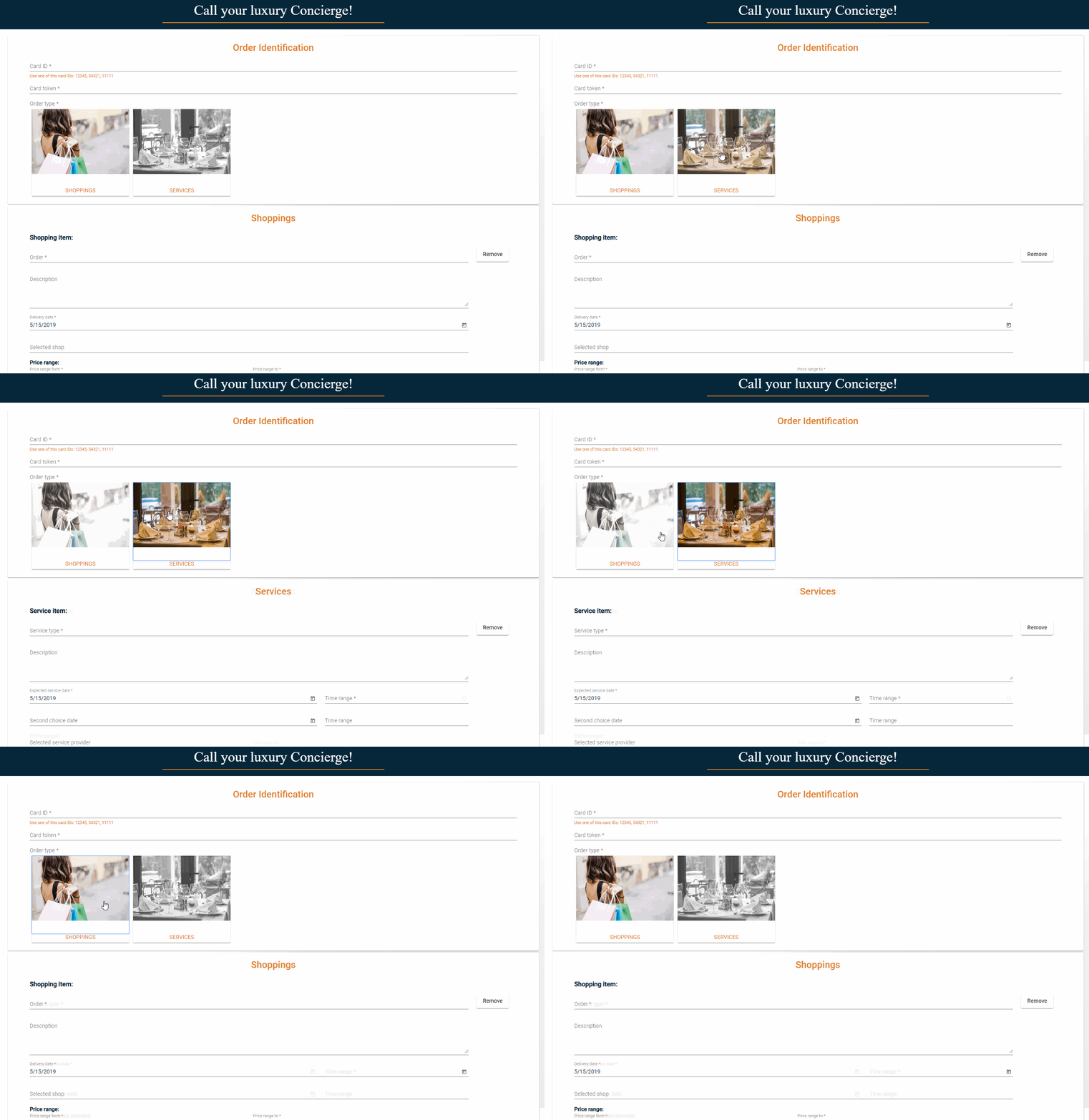
Add new section Services (use `repeat-section`). Section Services should be visible when order type = SERVICES. Section Shoppings should be visible when order type = SHOPPINGS.
Change `order type` field in custom type filed. Replace "boring" select by "fanyc" radio buttons images.
### Task list
- generate component `exercise-four`
- copy code from component `exercise-three`
- in `shared\model` folder add ts files with model
- add: Services sections - use `card-wrapper` created in exercise one
- in section Services use `repeat-section` created in exercise two
- in `shared\custom-types` folder create component `img-radio-type`
- in `app.module.ts` register new `img-radio-type` as a type
- in component `exercies-four` replace type in filed `orderType` by a new created type
- check if app works
### In this project
- in file `app-routing.module.ts` route to component was added
- in section Shoppings and Services [Flex - Layout](https://formly.dev/examples/other/advanced-layout-flex) was used
Below you can find screen of component after adding new section, custom radio btn and custom styles
## Exercise Five
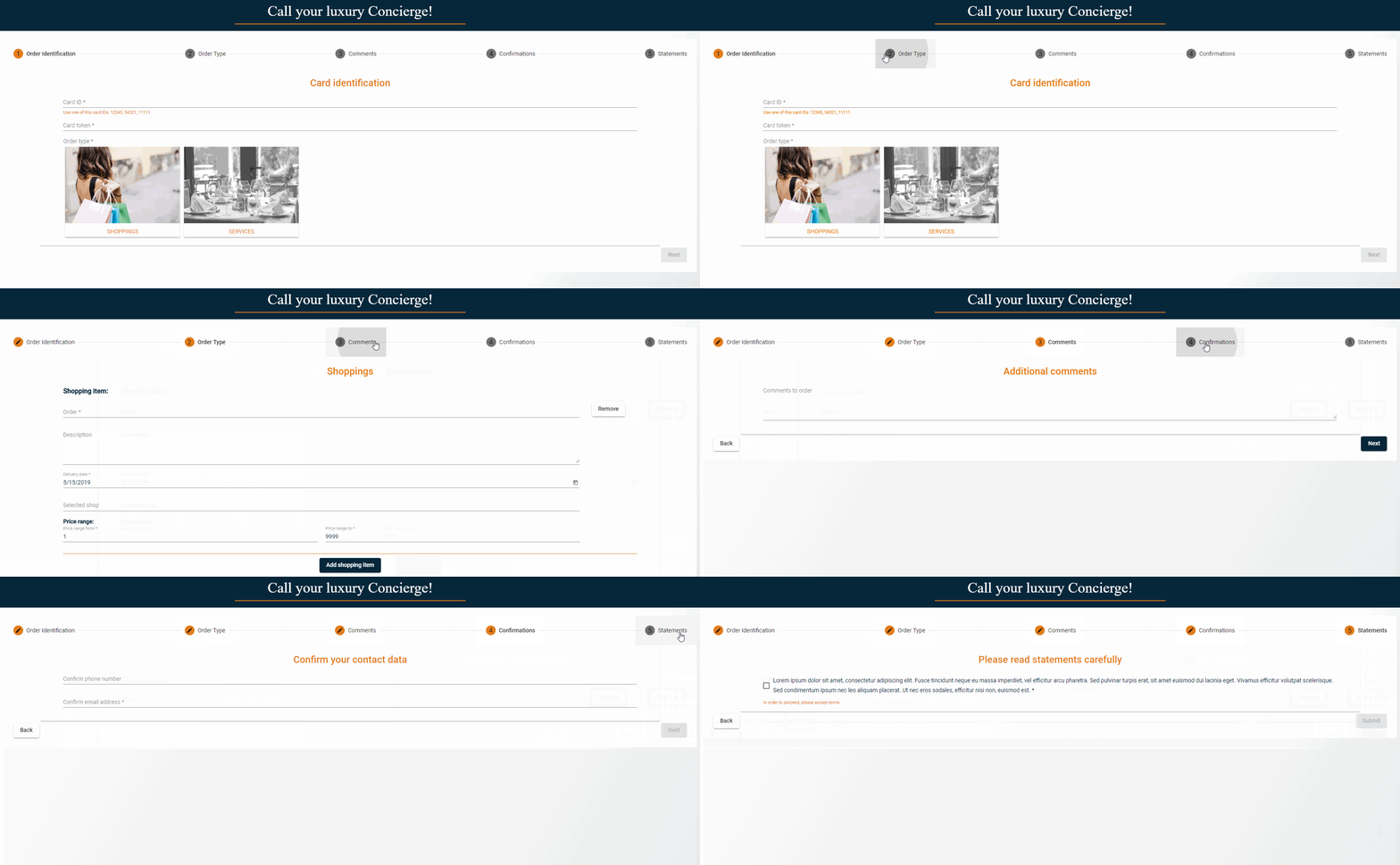
Request form is to long to one screen, change form layout to stepper.
### Task list
- generate component `exercise-five`
- copy code from component `exercise-four`
- read documentation [multi-step-form](https://formly.dev/examples/advanced/multi-step-form)
- remember to import `MatStepperModule` from `@angular/material/stepper`
- in component `exercies-five` add multi-step-form (you have to make changes in html and ts files)
- check if app works
### In this project
- in file `app-routing.module.ts` route to component was added
Below you can find screen of component with stepper and custom styles
## Exercise Six
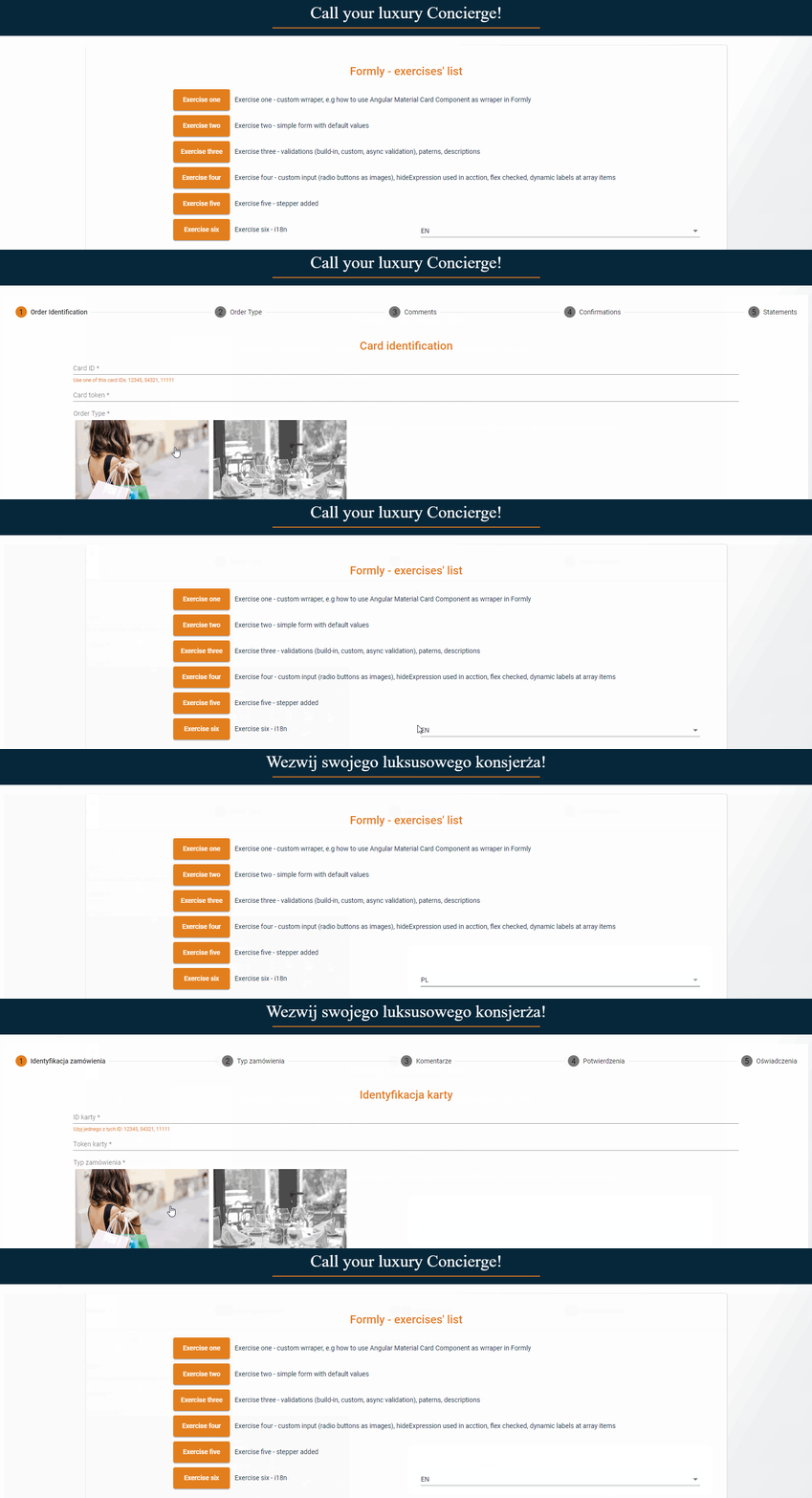
Add translation module to project, and use it in request form.
### Task list
- install [ngx-translate](https://github.com/ngx-translate/core)
- read documentation [i18n](https://formly.dev/examples/advanced/i18n)
- in `scr\assets\translations` folder add json files with translations (in this project there are to files en.json and pl.json)
- in `shared\services\i18n` folder add `translation-loader.service.ts` with `loadTranslations` method to load translations files
- in `shared\services\i18n` folder add `language.service.ts` with `getCurrentLanguage` method to set up selected language
- in this project `translationLoader` is initialized in `home component`
- in component `exercise-six` inject `TranslateService` and now it is possible to use translation service, use `instant` method to load translations e.g. `label: this.translate.instant('RequestToConcierge.orderIdentification')`
- add new method `getDictionaryItemsWithTranslations` in `dict.service.ts` (service was added in ex two)
- in component `exercise-six` in field `orderTypes` load dictionary items with translations
- check if app works
### In this project
- in file `app-routing.module.ts` route to component was added
- `validations.loader` was added in exercise seven
Below you can find screen of component with translations in action
## Exercise Seven
Add translation to global validation. Component ts file is to long and e.g code to Price range fields repeats itself, refactor code.
### Task list
- to load global validation you need to use [FormlyConfig service by calling addValidatorMessage](https://github.com/ngx-formly/ngx-formly/issues/313)
- in `shared\services` folder add `validations.loader.ts` with `init` method
- in this project `validationsLoader` is initialized in `home component`
- in model `PriceRange.ts` add `formField` method, type of `FormlyFieldConfig[]` it should return fields config (the same as in component ts) e.g
```javascript
formField(translations: TranslateService): FormlyFieldConfig[] {
return [
{
className: 'flex-2',
key: 'from',
type: 'input',
templateOptions: {
type: 'number',
label: translations.instant('RequestToConcierge.priceRangeForm'),
min: 1,
max: 999999,
required: true
},
},
{
className: 'flex-2',
key: 'to',
type: 'input',
templateOptions: {
type: 'number',
label: translations.instant('RequestToConcierge.priceRangeTo'),
min: 1,
max: 999999,
required: true,
},
}
];
}
```
### In this project
- similar `formField` methods were created in `Service.ts` and `Shopping.ts`
- new methods can be now use in other components eg.
```javascript
fieldArray: {
fieldGroup: this.shoppingModel.formField(this.translate)
},
```
- check if app works
## Libraries
This project was generated with [Angular CLI](https://github.com/angular/angular-cli) version 7.3.8.
- [Angular Material](https://material.angular.io/)
- [Angular Formly](https://github.com/ngx-formly/ngx-formly) & [Angular Material Formly Module](https://formly.dev/ui/material)
- [Angular Flex-Layout](https://github.com/angular/flex-layout)
- [ngx-translate](https://github.com/ngx-translate/core)
## Development server
Run `ng serve` for a dev server. Navigate to `http://localhost:4200/`. The app will automatically reload if you change any of the source files.
## Code scaffolding
Run `ng generate component component-name` to generate a new component. You can also use `ng generate directive|pipe|service|class|guard|interface|enum|module`.
## Build
Run `ng build` to build the project. The build artifacts will be stored in the `dist/` directory. Use the `--prod` flag for a production build.