https://github.com/asheroto/microsoft-exchange-memory-limits
PowerShell script to place limits on the memory usage of Microsoft Exchange Servers.
https://github.com/asheroto/microsoft-exchange-memory-limits
cache email exchange exchange-server mail memory memory-management microsoft powershell server windows
Last synced: 3 months ago
JSON representation
PowerShell script to place limits on the memory usage of Microsoft Exchange Servers.
- Host: GitHub
- URL: https://github.com/asheroto/microsoft-exchange-memory-limits
- Owner: asheroto
- Created: 2021-02-04T00:01:56.000Z (over 5 years ago)
- Default Branch: main
- Last Pushed: 2021-02-05T11:35:26.000Z (over 5 years ago)
- Last Synced: 2025-03-26T05:12:22.652Z (over 1 year ago)
- Topics: cache, email, exchange, exchange-server, mail, memory, memory-management, microsoft, powershell, server, windows
- Language: PowerShell
- Homepage:
- Size: 71.3 KB
- Stars: 1
- Watchers: 1
- Forks: 0
- Open Issues: 0
-
Metadata Files:
- Readme: README.md
Awesome Lists containing this project
README
# Exchange Cache Memory Limits Made Easy
**Microsoft Exchange has a way to limit the amount of cache memory it is using**. It's not perfect, but it *really helps* when your server *isn't* packed with 128 GB of memory.
**Real world example:** By adjusting these settings, Exchange Server 2019 can run on a server with 16 GB if you have less than 50 users (considering your database size is reasonably small). I have seen this happen for several clients. In comparison, Microsoft's minimum recommend memory requirement is 128 GB. You must keep in mind, they are mostly selling Exchange Server to businesses with over 500 users, which in that case, 128 GB seems reasonable!
By default, Exchange will just consume your entire computer's memory for cache purposes. Depending on how many users you have, and what your server is used for, or how much memory you have, this can become a real pain.
Normally to change the cache settings you have to go into ADSI Edit, go through a long rabbit hole of clicking, then changing parameters, doing some math depending on the page file size, BLAH.
---
**This script enables you to:**
- **Get** the current cache memory limits
- **Reset** the cache memory limits to defaults ("not set")
- **Set** the min/max memory limits
It works just a minute or two. It also produces a log if desired.
---
## Warnings:
- Don't set the min/max limit to a small number, especially if you have a lot of users or a large database.
- If you have trouble with Exchange after setting a min/max limit, try a higher limit and restart. If that still doesn't work, just reset the configuration using the `-Reset` parameter
- Always have a backup of your Exchange server before you make any changes to Active Directory Schemas
---
## Restart is required
You need to restart the server (or restart all of the *Running* Exchange services if you change the min/max limit or reset it to defaults ("not set").
---
## What do I set the min/max limit to?
[Use the table on this article for some ideas](). That article is from 2011, so add a few GB to your calculations.
It is best to work down from your current memory, rather than up. Try setting your minimum to 40% of your memory, and your maximum to 70% of your memory. Wait a few days, if you don't have any complaints, work slowly down from there.
Your min/max setting just depends on how much memory you have compared so how much memory Exchange *actually* needs. Check Performance Monitor to analyze the Exchange services on your server.
---
## Requirements
If you encounter error while executing the script, please ensure you have the [latest version of PowerShell]().
**Compatible with:**
- Exchange 2007-2019
- Server 2008-2019
**Possibly compatible with:**
- Exchange 2000-2003
- Server 2000-2003
## Installation
You can either [download the latest ps1 from Releases](https://github.com/asheroto/Microsoft-Exchange-Memory-Limits/releases/latest/download/ExchangeMemoryLimits.ps1), or type the following command in PowerShell:
`Install-Script ExchangeMemoryLimits`
It should install from [PowerShell Gallery](https://www.powershellgallery.com/packages/ExchangeMemoryLimits) automatically. You may need to answer **Yes** to a few prompts first.
After installed, you can just open PowerShell and reference `ExchangeMemoryLimits.ps1` from any directory.
## Parameters
**Note**:
You need to restart the server (or restart all of the *Running* Exchange services if you change the min/max limit.
---
|Parameters|Description|Required|
|--|--|--|
|-MinSize 2GB|Minimum cache size memory limit for Exchange. 2GB is an example.|**Required** if changing min/max size|
|-MaxSize 4GB|Maximum cache size memory limit for Exchange. 4GB is an example.|**Required** if changing min/max size|
|-Reset|Resets the min/max cache size memory limits to default of "not set"|No
|-ListValues|Shows the current min/max cache size limits for Exchange|No
|-Log|Logs the session to a file on your desktop|No
## Example Usage
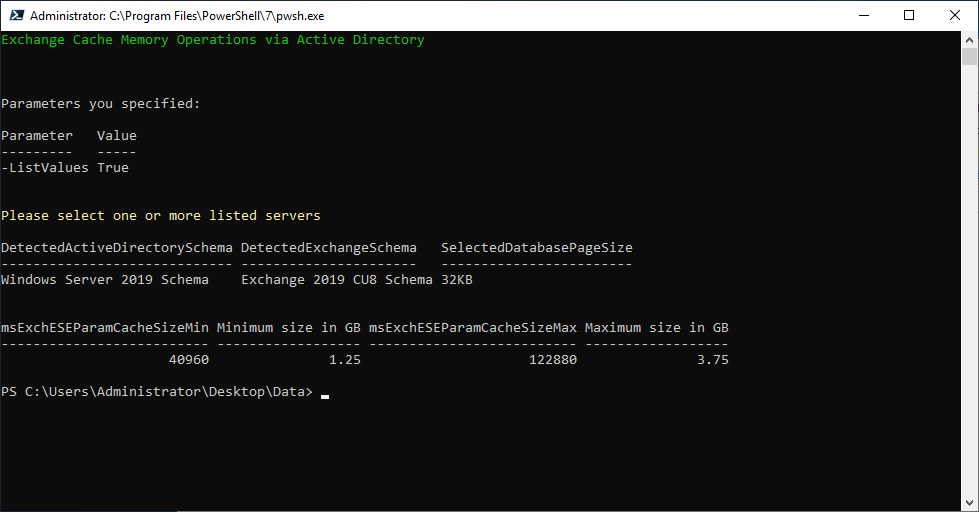
**Get the current values of the Exchange cache size memory limit:**
`.\ExchangeMemoryLimits.ps1 -ListValues`
**Results:**
---
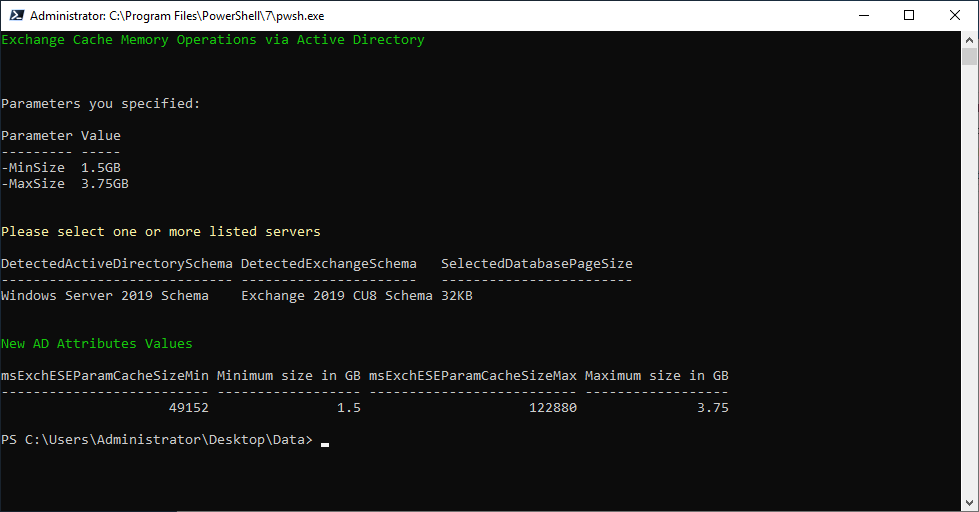
**Set the minimum and maximum memory limit (both are required):**
.\ExchangeMemoryLimits.ps1 -MinSize 1.5GB -MaxSize 3.75GB
**Results:**
---
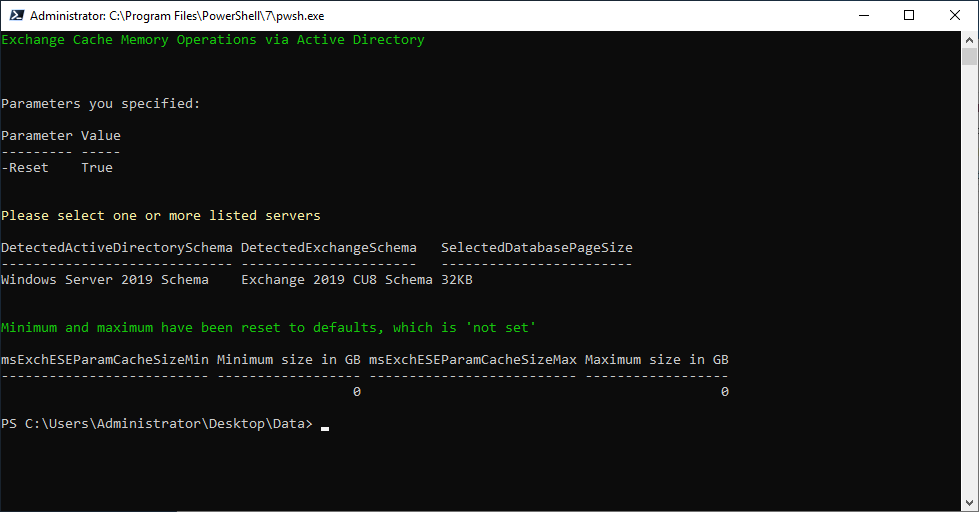
**Reset the minimum and maximum memory limit (set as "not set"):**
.\ExchangeMemoryLimits.ps1 -Reset
**Results:**
---
**Log the transcript (console messages):**
Just add `-Log` to any command and it will put a file on the desktop.
# Behind the Scenes
You don't need this info unless you're curious how it works and what it changes.
The script adjusts two parameters for Exchange inside of Active Directory:
- msExchESEParamCacheSizeMin
- msExchESEParamCacheSizeMax
These parameters are located in **Schema**:
CN=Configuration,DC=YourDomain,DC=YourTLDLikeComOrNet,CN=Services,CN=Microsoft EXchange,CN=privcloud,CN=Administrative Groups,CN=Exchange Administrative Group,CN=Servers,CN=YourServerName,CN=InformationStore
# Credit
I wrote about 25% of the script. The other part, credit goes to [Tudor Popescu](https://www.quest.com/community/blogs/b/data-protection/posts/how-to-limit-the-amount-of-cache-memory-used-by-exchange-servers-using-powershell-with-applications-to-rapid-recovery-post-1-of-3-44962775). I physically typed the script from the article & screenshots, fixed bugs, and improved the main section of the script a lot.