https://github.com/ashish-patnaik/github-repo-analyst
It analyze a public GitHub repository using AI. It provides an in-depth summary, key features, and technical details about the project.
https://github.com/ashish-patnaik/github-repo-analyst
ai aiagent github streamlit
Last synced: 3 months ago
JSON representation
It analyze a public GitHub repository using AI. It provides an in-depth summary, key features, and technical details about the project.
- Host: GitHub
- URL: https://github.com/ashish-patnaik/github-repo-analyst
- Owner: Ashish-Patnaik
- License: mit
- Created: 2025-07-07T17:27:03.000Z (about 1 year ago)
- Default Branch: main
- Last Pushed: 2025-07-07T18:08:13.000Z (about 1 year ago)
- Last Synced: 2025-07-07T18:53:21.763Z (about 1 year ago)
- Topics: ai, aiagent, github, streamlit
- Language: Python
- Homepage: https://app-repo-analyst-appstxxiw3ley4gxx4ul9pa.streamlit.app/
- Size: 1.44 MB
- Stars: 0
- Watchers: 0
- Forks: 0
- Open Issues: 0
-
Metadata Files:
- Readme: README.md
- License: LICENSE
Awesome Lists containing this project
README

🤖 AI GitHub Repo Analyst
A Streamlit web application that uses AI to provide an in-depth analysis of any public GitHub repository.

---
## 📖 Overview
This project is a powerful tool for developers, project managers, and tech enthusiasts who want to quickly understand the purpose, structure, and key features of a GitHub repository without manually sifting through code.
By simply providing a repository URL and your API keys, the application fetches critical data, reads key files, and leverages the **IO Intelligence API** to generate a comprehensive and insightful analysis.
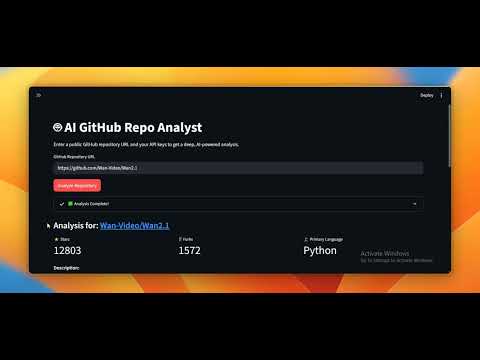
## 📺 Demo
Curious how it works? Watch the demo below:
## ✨ Key Features
- **Dynamic Repo Fetching**: Analyzes any public GitHub repository using its URL.
- **Deep Contextual Analysis**: Reads the content of important files like `README.md`, `requirements.txt`, and `package.json` to provide a richer context to the AI.
- **In-Depth AI Insights**: Generates a structured analysis that includes:
- A detailed overview of the project's purpose and target audience.
- A bulleted list of key technical features and capabilities.
- Inferred "getting started" commands for quick setup.
- **"Bring Your Own Key" (BYOK) Model**: Securely uses your personal API keys for GitHub and IO Intelligence, which are entered in the sidebar and never stored.
- **Tech Stack Detection**: Automatically identifies the primary languages and technologies used in the repository.
## 📸 Application Screenshot
*This is what the application looks like in action!*

## 🛠️ How It Works & Tech Stack
The application follows a simple yet powerful architecture:
1. **Frontend**: Built with **Streamlit** for a fast, interactive user interface.
2. **GitHub API**: Uses the **PyGithub** library to fetch repository data, including metadata and file contents.
3. **AI Backend**: Leverages the **IO Intelligence API** and a Llama 3.3 70B model to analyze the collected data and generate structured insights.
The core technologies are:
- **Python**
- **Streamlit**
- **PyGithub**
- **IO Intelligence**
## 🚀 Getting Started
There are two ways to use the application:
### 1. Access the Live Demo
The easiest way to get started is to use the deployed version on Streamlit Community Cloud:
**[➡️ Click here to launch the live application!](https://app-repo-analyst-appstxxiw3ley4gxx4ul9pa.streamlit.app/)**
### 2. Run Locally
If you want to run the application on your own machine, follow these steps:
1. **Clone the repository:**
```bash
git clone https://github.com/your-username/your-repo-name.git
cd your-repo-name
```
2. **Create and activate a virtual environment:**
```bash
python -m venv venv
# On Windows:
venv\Scripts\activate
# On macOS/Linux:
source venv/bin/activate
```
3. **Install the required libraries:**
```bash
pip install -r requirements.txt
```
4. **Run the Streamlit app:**
```bash
streamlit run app.py
```
The application will open in your browser.
## 🔑 Configuration
The application requires two API keys to function:
1. **GitHub Personal Access Token**: Needed to interact with the GitHub API and avoid rate limits. You can generate one [here](https://github.com/settings/tokens) with `public_repo` scope.
2. **IO Intelligence API Key**: Required for the AI analysis. You can get this from your IO Intelligence dashboard.
These keys are entered in the sidebar of the application and are used only for the current session. **They are never stored or saved.**
---
Made with ❤️ and Python.