https://github.com/askmike/realtime-webgl-globe
A webgl earth making it easy to add shapes at coordinates in realtime
https://github.com/askmike/realtime-webgl-globe
Last synced: over 1 year ago
JSON representation
A webgl earth making it easy to add shapes at coordinates in realtime
- Host: GitHub
- URL: https://github.com/askmike/realtime-webgl-globe
- Owner: askmike
- License: mit
- Created: 2015-01-17T20:15:15.000Z (over 11 years ago)
- Default Branch: master
- Last Pushed: 2016-09-30T11:04:21.000Z (almost 10 years ago)
- Last Synced: 2025-03-27T03:51:17.802Z (over 1 year ago)
- Language: JavaScript
- Size: 2.97 MB
- Stars: 89
- Watchers: 5
- Forks: 25
- Open Issues: 0
-
Metadata Files:
- Readme: README.md
- License: LICENSE
Awesome Lists containing this project
README
# Realtime Webgl Globe
A webgl earth making it easy to add custom shapes at coordinates in realtime.
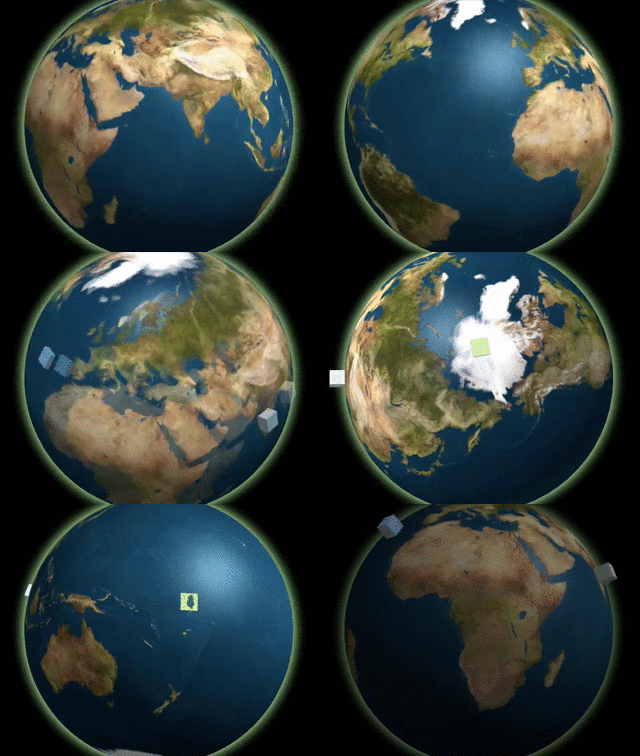
[Demo](https://mikevanrossum.nl/stuff/realtime-webgl-globe/example.html)!
Or check out [this demo](https://github.com/askmike/realtime-webgl-globe/blob/master/example-iss.html) that shows the position of the International Space Station!
## Features
- Makes it easy to add custom shapes to the globe at lat/long positions.
- Interactive (mousewheel scroll & mouse drags).
- Easy API for adding elements on the globe while it's running.
## Basic Usage
var div = document.getElementById('globe');
var urls = {
earth: 'img/world.jpg',
bump: 'img/bump.jpg',
specular: 'img/specular.jpg',
}
// create a globe
var globe = new Globe(div, urls);
// start it
globe.init();
// random data
var data = {
color: '#FF0000',
size: 20,
lat: 52.3747158, // Amsterdam!
lon: 4.8986231, // Amsterdam!
size: 20
};
// add a block on Amsterdam
globe.addBlock(data);
## API
* * *
## Class: Globe
Realtime Globe is a WebGL based earth globe that
makes it super simple to add shapes in realtime
on specific lat/lon positions on earth.
### Globe.init()
Initializes the globe
### Globe.zoomRelative(delta)
Zoom the earth relatively to its current zoom
(passing a positive number will zoom towards
the earth, while a negative number will zoom
away from earth).
**Parameters**
- **delta**: `Integer`
**Returns**: `this`
### Globe.zoomTo(altitute)
Transition the altitute of the camera to a
specific distance from the earth's core.
**Parameters**
- **altitute**: `Integer`
**Returns**: `this`
### Globe.zoomImmediatelyTo(altitude)
Set the altitute of the camera to a specific
distance from the earth's core.
**Parameters**
- **altitude**: `Integer`
**Returns**: `this`
### Globe.center(pos)
Transition the globe from its current position
to the new coordinates.
**Parameters**
- **pos**: `Object`, the position
- **pos.lat**: `Float`, latitute position
- **pos.lon**: `Float`, longtitute position
**Returns**: `this`
### Globe.centerImmediate(pos)
Center the globe on the new coordinates.
**Parameters**
- **pos**: `Object`, the position
- **pos.lat**: `Float`, latitute position
- **pos.lon**: `Float`, longtitute position
**Returns**: `this`
### Globe.addLevitatingBlock(data)
Adds a block to the globe. The globe will spawn
just below the earth's surface and `levitate`
out of the surface until it is fully `out` of the
earth.
**Parameters**
- **data**: `Object`
- **data.lat**: `Float`, latitute position
- **data.lon**: `Float`, longtitute position
- **data.size**: `Float`, size of the block
- **data.color**: `String`, color of the block
**Returns**: `this`
### Globe.addBlock(data)
Adds a block to the globe.
**Parameters**
- **data**: `Object`
- **data.lat**: `Float`, latitute position
- **data.lon**: `Float`, longtitute position
- **data.size**: `Float`, size of the block
- **data.color**: `String`, color of the block
**Returns**: `this`
### Globe.removeAllBlocks()
Remove all blocks from the globe.
**Returns**: `this`
* * *