https://github.com/aspizu/goboscript
goboscript is the Scratch compiler
https://github.com/aspizu/goboscript
compiler programming-language rust scratch
Last synced: over 1 year ago
JSON representation
goboscript is the Scratch compiler
- Host: GitHub
- URL: https://github.com/aspizu/goboscript
- Owner: aspizu
- License: mit
- Created: 2022-07-01T19:18:46.000Z (about 4 years ago)
- Default Branch: main
- Last Pushed: 2024-04-23T15:17:03.000Z (about 2 years ago)
- Last Synced: 2024-04-23T16:33:42.340Z (about 2 years ago)
- Topics: compiler, programming-language, rust, scratch
- Language: Rust
- Homepage: https://aspizu.github.io/goboscript
- Size: 7.79 MB
- Stars: 47
- Watchers: 4
- Forks: 10
- Open Issues: 0
-
Metadata Files:
- Readme: README.md
- License: LICENSE
Awesome Lists containing this project
README
# goboscript

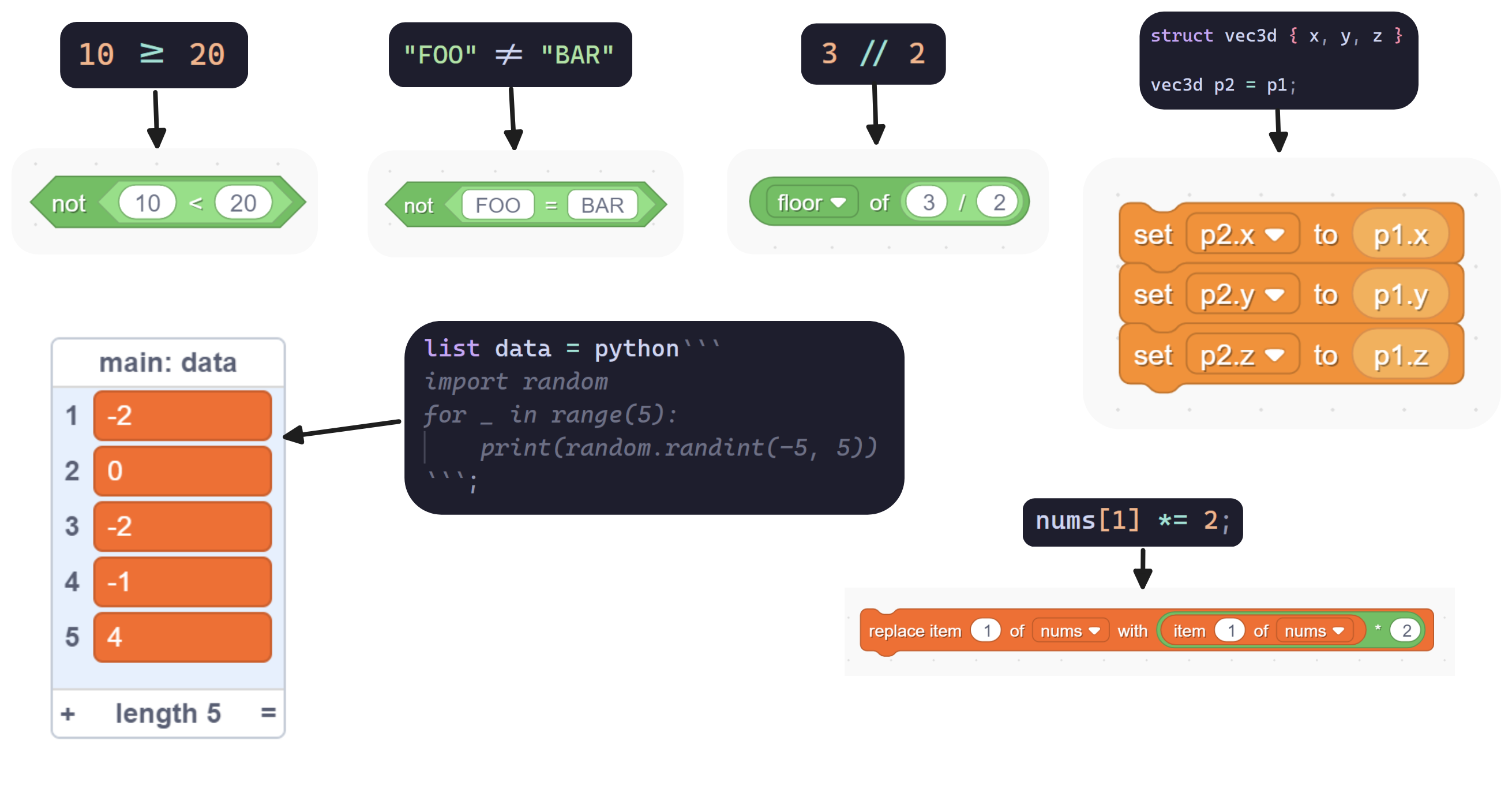
[**Installation and documentation**](https://aspizu.github.io/goboscript)
goboscript is a text-based programming language which compiles to Scratch. It allows
you to write Scratch projects in text, and compile it into a .sb3 file - which can be
opened in the Scratch editor, TurboWarp or be uploaded to the Scratch website.
goboscript allows you to create advanced Scratch projects with ease, you can use any
text editor, use a version control system such as git. You can refactor your code
using search and replace. Text code can be copy pasted, which allows you to easily reuse
code or share it with others. goboscript syntax is concise and easy to read.
goboscript allows you to integrate external tooling and workflows, such as using a
script to generate costumes for a text rendering engine. Or loading in images into
lists.
goboscript has a powerful macro system - similar to Rust's macro system. This allows
you to write macros to generate code.
goboscript is more than just an 1:1 mapping of Scratch blocks to text, it also has
additional features like local variables for procedures (custom blocks).
goboscript also performs optimizations, detects problems and unused code.
# Sister Projects
### [**Package Manager**](https://github.com/aspizu/backpack)
### [**Decompiler**](https://github.com/aspizu/sb2gs)
# Contributing
goboscript welcomes contributions in the form of Pull Requests.
goboscript is written in Rust. You'll need to install the [Rust toolchain](https://www.rust-lang.org/tools/install)
for development.
> [!NOTE]
> To install goboscript, follow instructions at [aspizu.github.io/goboscript](https://aspizu.github.io/goboscript).
> These instructions are for people who want to develop goboscript itself.
```sh
git clone https://github.com/aspizu/goboscript
cd goboscript
```
### Development
After cloning the repository, run goboscript locally from the repository root with:
```sh
cargo run -- build -i your_project/
```
But, to make development easier, and to validate the generated Scratch project - use
the `tools/run` script:
```sh
tools/run compile
```
This assumes that you have set-up a testing project at `playground/`.
It will compile the project, validate it using the schemas from `scratch-parser`.
If the validation fails, Scratch will refuse to load the project. To further debug
the project, the generated `project.json` file is extracted from the `.sb3` file in the
`playground/` directory.
Lets say that you modified the generated project in the Scratch editor or Turbowarp,
and you want to look at the `project.json`. You can extract it with:
```sh
tools/run uncompile
```
Lets say that goboscript produced a broken project, and you are able to fix it by hand -
by modifying the `project.json`. You can add back the `project.json` to the `.sb3` file
with:
```sh
tools/run patch
```
If you want to validate some `.sb3` file, use:
```sh
tools/run check path/to/project.sb3
```