https://github.com/asruda/mi_kettle_pro
A custom component for Home Assistant that controls the Mi Smart Kettle Pro.
https://github.com/asruda/mi_kettle_pro
custom-component hacs-integration home-assistant home-assistant-integration kettle smart-home xiaomi-smart
Last synced: about 1 month ago
JSON representation
A custom component for Home Assistant that controls the Mi Smart Kettle Pro.
- Host: GitHub
- URL: https://github.com/asruda/mi_kettle_pro
- Owner: asruda
- License: mit
- Created: 2025-09-24T04:08:05.000Z (9 months ago)
- Default Branch: main
- Last Pushed: 2025-09-25T10:28:09.000Z (9 months ago)
- Last Synced: 2025-09-25T12:17:27.195Z (9 months ago)
- Topics: custom-component, hacs-integration, home-assistant, home-assistant-integration, kettle, smart-home, xiaomi-smart
- Language: Python
- Homepage:
- Size: 222 KB
- Stars: 0
- Watchers: 0
- Forks: 0
- Open Issues: 0
-
Metadata Files:
- Readme: README.md
- License: LICENSE
Awesome Lists containing this project
README
# Mi Kettle Pro - Home Assistant integration for remote control of the Xiaomi Mi Smart Kettle Pro
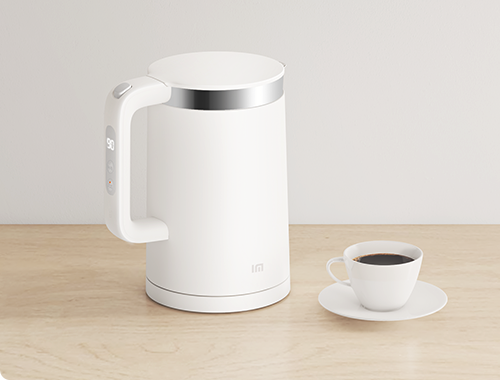
This project adds support for the Xiaomi Kettle Pro to Home Assistant. It establishes a direct local connection to your kettle, which allows you to control it from anywhere using Home Assistant. Currently, it is confirmed to work with the `yunmi.kettle.v9` and should support `v10` to `v16`. If your Kettle Pro is still your faithful companion today, please give it a try!
## Functionality
- Set the temperature of mode: heating, warming
- Heat the water to the set temperature
- Keep water warm according to the set temperature
- monitor water temperature, device status
## Supported Models
- yunmi.kettle.v9
- yunmi.kettle.v10 to v16 (likely supported)
`yunmi.kettle.v9` serves as the testing device (`mjhwsh02ym` on a label on the bottom of the device). Other models are likely supported since they all share the **Mi Smart Kettle Pro** name. You can verify device name [here](https://home.miot-spec.com/s/yunmi.kettle.v10).
## Preparation
1. Recommended Version:
```
HA: 2025.5.3+
HACS: 2.0.5+
```
1. Make sure your **Xiaomi Home app** can control your device.
2. Get your device **token**, **model**, and **MAC address** by following this project: [Xiaomi-cloud-tokens-extractor](https://github.com/PiotrMachowski/Xiaomi-cloud-tokens-extractor).
3. Check that your kettle model is in the range yunmi.kettle.`v9` to `v16`.
4. Make sure your Home Assistant has at least one available Bluetooth adapter which supports BLE 4.2+.
5. It is recommended to enable `Remember keep warm temperature after lifting kettle` in the Xiaomi Home app. The kettle will automatically enter keep-warm status when lifted and placed back.
## Installation
### 1. Install using [HACS](https://hacs.xyz/)
**Click**
[](https://my.home-assistant.io/redirect/hacs_repository/?owner=asruda&repository=mi_kettle_pro&category=integration)
Then, Open HACS > Search `Mi Smart Kettle Pro` and click **DOWNLOAD**
### 2. Clone and Run Install Script
```bash
cd /tmp
git clone https://github.com/asruda/mi_kettle_pro.git
cd mi_kettle_pro
./install.sh /config
```
### 3: Download [Releases](https://github.com/asruda/mi_kettle_pro/releases) and Copy Manually
copy `mi_kettle_pro/custom_components/xiaomi_home` folder to `/config/custom_components` folder in your Home Assistant.
## Configuration
Add a new entry for one device in the Home Assistant UI:
- **Set Heating Temperature**: The target temperature when the `Heat` button is pressed.
- **Set Warming Temperature**: The target temperature when the `Warm` button is pressed.
## Entities
| Name | Type | Usage | Description |
|----------------------|------|-------|-------------|
| Heat | button | set heating mode | When the button is pressed, the kettle is set to heating mode first. After the water temperature reaches the target temperature, the kettle switches to warming mode |
| Set Heating Temperature | number | set heating temperature | min: 50, max: 100 |
| Warm | button | set warming mode | |
| Set keep-warm Temperature | number | set keep-warm temperature | min: 10, max: 90 |
| Operational Mode | sensor | whether the device is controllable | value: `control`, `monitor` |
| Current Temperature | sensor | current water temperature | |
| Status | sensor | kettle status | value: `cooling`, `heating`, `keeping` `warm`, `idle` |
## Instructions
1. Make sure there is always **enough water** in the kettle.
2. Remote control is only possible by pressing the kettle's boil physical button (requires enabling `Automatic heat preservation after boiling` in the Xiaomi Home app), or by pressing the second physical keep-warm button to set in the warming mode. If the device status is idle, the component cannot control the kettle.
3. Only one application can control your device at a time - either this component or the Xiaomi Home app. If you want to control your device using the Xiaomi Home app, please disable the device in Home Assistant first.
4. When the login process finishes, the component will update mode config `3` and `4` on your device as follows:
| Mode | Edit | Description |
|------|------|-------------|
| `0` | no | - |
| `1` | no | - |
| `2` | no | - |
| `3` | **yes** | warming mode, Temperature: `warming temperature`, Duration: 12 hours |
| `4` | **yes** | heating mode, Temperature: `heating temperature`, Duration: 1 hours |
## Troubleshooting
1. If the connection is intermittent, try lifting and replacing the kettle.
2. If the mode buttons are disabled, please short-press the second physical keep-warm button to activate the warming mode, indicated by the warming LED turning on.
3. After updating the token, reload the component for the changes to take effect.
## Acknowledgments
- **[XiaoMi/ha_xiaomi_home](https://github.com/XiaoMi/ha_xiaomi_home)**
- **[custom-components/ble_monitor](https://github.com/custom-components/ble_monitor)**
- **[anna-oake/xiaomi-kettle](https://github.com/anna-oake/xiaomi-kettle)**
- **[drndos/mikettle](https://github.com/drndos/mikettle)**
This work was inspired by prior projects on Xiaomi device integration and protocol analysis.