https://github.com/asterics/gesture_mouse
https://github.com/asterics/gesture_mouse
Last synced: 5 months ago
JSON representation
- Host: GitHub
- URL: https://github.com/asterics/gesture_mouse
- Owner: asterics
- License: mit
- Created: 2022-12-29T12:52:03.000Z (over 3 years ago)
- Default Branch: main
- Last Pushed: 2025-01-24T08:13:52.000Z (over 1 year ago)
- Last Synced: 2025-06-02T16:47:02.214Z (about 1 year ago)
- Language: Python
- Size: 7.19 MB
- Stars: 0
- Watchers: 3
- Forks: 0
- Open Issues: 0
-
Metadata Files:
- Readme: README.md
- License: LICENSE
Awesome Lists containing this project
README
# Gesture Mouse
A program that allows to control the mouse and keyboard with head movement and facial gestures. This project is based on the
google mediapipe library (https://ai.google.dev/edge/mediapipe/solutions/guide).
## Experimental
This software is experimental and not yet suitable for professional use. If there is a bug, please file an issue.
## Installation instructions
Tested with Python 3.10 and PySide6.4.3.
1. Clone repository
2. Execute the following commands in the repository folder:
```bash
pip install poetry
poetry config virtualenvs.in-project true
poetry install --no-root
```
## Running Gesture Mouse
### Release
1. Extract zip file
2. Run `gesture-mouse.exe` (Windows) or `./gesture-mouse` (Linux)
### Development
```bash
poetry run python gui.py
```
## Hotkeys
* CtrlAlt+v: Start/Stop video and tracking
* CtrlAlt+g: Enable/Disable gestures
* CtrlAlt+m: Enable/Disable mouse movement
* CtrlAlt+e: Enable/Disable gestures and mouse movement
* ShiftAlt+m: Change mouse movement mode
* ShiftAlt+r: Change mouse tracking mode
* ShiftAlt+c: Center mouse
* ShiftAlt+s: Switch primary screen for mouse movement
## Creating a release
Use the github action to create a deployment file for each platform, see .github/workflows/pyinstaller_windows.yml.
You can also optionally create a release on github with the deployment file attached.
## Algorithms
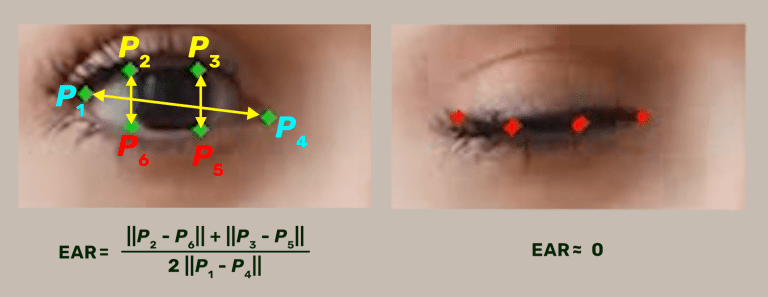
The gesture calculation (e.g. eye-blink) uses the mediapipe facial landmark detection in combination with a modified eye aspect ratio (EAR) algorithm. The EAR algorithm helps to make the gesture invariant to head movements or rotations.
* see [function SignalsCalculator.eye_aspect_ratio](https://github.com/asterics/gesture_mouse/blob/d59c84c273acace350a404e3fe110aad15be1885/SignalsCalculator.py#L330).
* The idea is based on the article about [eye aspect algorithm for driver drowsiness detection](https://learnopencv.com/driver-drowsiness-detection-using-mediapipe-in-python/).
## Links and Credits
The work for GestureMouse has been accomplished at the UAS Technikum Wien in course of the R&D-projects [WBT (MA23 project 26-02)](https://wbt.wien) and [Inclusion International (MA23 project 33-02)](https://www.technikum-wien.at/en/research-projects/inclusion-international/), which has been supported by the [City of Vienna](https://www.wien.gv.at/kontakte/ma23/index.html).
Have a look at the [AsTeRICS Foundation homepage](https://www.asterics-foundation.org) and our other Open Source AT projects:
* AsTeRICS: [AsTeRICS framework homepage](http://www.asterics.eu), [AsTeRICS framework GitHub](https://github.com/asterics/AsTeRICS): The AsTeRICS framework provides a much higher flexibility for building assistive solutions.
The FLipMouse is also AsTeRICS compatible, so it is possible to use the raw input data for a different assistive solution.
* FABI: [FABI: Flexible Assistive Button Interface GitHub](https://github.com/asterics/FABI): The Flexible Assistive Button Interface (FABI) provides basically the same control methods (mouse, clicking, keyboard,...), but the input
is limited to simple buttons. Therefore, this interface is at a very low price (if you buy the Arduino Pro Micro from China, it can be under 5$).
* FLipMouse: [The FLipMouse controller](https://github.com/asterics/FLipMouse): a highly sensitive finger-/lip-controller for computers and mobile devices with minimal muscle movement.
* FLipPad: [The FLipPad controller](https://github.com/asterics/FLipPad): a flexible touchpad for controlling computers and mobile devices with minimal muscle movement.
* AsTeRICS Grid: [Asterics Grid AAC Web-App](https://grid.asterics.eu): an open source, cross plattform communicator / talker for Augmented and Alternative Communication (AAC).
# Support us
Please support the development by donating to the AsTeRICS Foundation:

