https://github.com/astrabert/sentrev-demo
Demo for SenTrEv python package
https://github.com/astrabert/sentrev-demo
dense-retrieval embedding-models embeddings evaluation fastembed metrics qdrant sentence-transformers sparse-retrieval vector-database vector-search
Last synced: about 1 year ago
JSON representation
Demo for SenTrEv python package
- Host: GitHub
- URL: https://github.com/astrabert/sentrev-demo
- Owner: AstraBert
- Created: 2025-01-13T11:58:00.000Z (over 1 year ago)
- Default Branch: main
- Last Pushed: 2025-01-20T22:25:34.000Z (over 1 year ago)
- Last Synced: 2025-03-07T17:58:28.692Z (over 1 year ago)
- Topics: dense-retrieval, embedding-models, embeddings, evaluation, fastembed, metrics, qdrant, sentence-transformers, sparse-retrieval, vector-database, vector-search
- Language: Jupyter Notebook
- Homepage: https://pypi.org/project/sentrev/
- Size: 1.4 MB
- Stars: 1
- Watchers: 1
- Forks: 0
- Open Issues: 0
-
Metadata Files:
- Readme: README.md
Awesome Lists containing this project
README

# SenTrEv📊
## Concepts📚

### 1. Embeddings
> _"In [natural language processing](https://en.wikipedia.org/wiki/Natural_language_processing "Natural language processing"), a **word embedding** is a representation of a word. The embedding is used in [text analysis](https://en.wikipedia.org/wiki/Content_analysis "Content analysis"). Typically, the representation is a [real-valued](https://en.wikipedia.org/wiki/Real_number "Real number") vector that encodes the meaning of the word in such a way that the words that are closer in the vector space are expected to be similar in meaning"._
**Source**: [Wikipedia - Word embedding](https://en.wikipedia.org/wiki/Word_embedding)
### 2. Vector database
> _"A [Vector Database](https://qdrant.tech/qdrant-vector-database/) is a specialized system designed to efficiently handle high-dimensional vector data. It excels at indexing, querying, and retrieving this data, enabling advanced analysis and similarity searches"._
Source: [Qdrant - What is a vector database?](https://qdrant.tech/articles/what-is-a-vector-database/)
### 3. Sparse embeddings
>_"Sparse vectors [...] focus only on the essentials. In most sparse vectors, a large number of elements are zeros. When a feature or token is present, it’s marked—otherwise, zero. Sparse vectors, are used for **exact matching** and specific token-based identification"._
Source: [Qdrant - What is a vector database?](https://qdrant.tech/articles/what-is-a-vector-database/#1-dense-vectors)
### 4. Dense embeddings
> _"Dense vectors are, quite literally, dense with information. Every element in the vector contributes to the **semantic meaning**, **relationships** and **nuances** of the data. [...] Together, they convey the overall meaning of the sentence, and are better for identifying contextually similar items"._
Source: [Qdrant - What is a vector database?](https://qdrant.tech/articles/what-is-a-vector-database/#1-dense-vectors)
### 5. Retrieval
> _"**Information retrieval** (**IR**) in [computing](https://en.wikipedia.org/wiki/Computing "Computing") and [information science](https://en.wikipedia.org/wiki/Information_science "Information science") is the task of identifying and retrieving [information system](https://en.wikipedia.org/wiki/Information_system "Information system") resources that are relevant to an [information need](https://en.wikipedia.org/wiki/Information_needs "Information needs")"_
Source: [Wikipedia - Information Retrieval](https://en.wikipedia.org/wiki/Information_retrieval)
## The problem🤔

- **Retrieval Augmented Generation** (RAG) is growing in importance
- As of December 2024, more than **10,000 models** are available within the _sentence-transformers_ python library
- It's not always easy to understand what's the **best embedding technique** (sparse or dense) and the **best embedding model** for our use case
- It's often complicated to evaluate embeddings on **different data types**
## SenTrEv - A potential solution✅
> [!IMPORTANT]
> _**SenTrEv** (**Sen**tence **Tr**ansformers **Ev**aluator) is a python package that is aimed at running simple evaluation tests to help you choose the best embedding model for Retrieval Augmented Generation (RAG) with your text-based documents._
## Installation⬇️
```bash
python3 -m pip install sentrev
```
## Applicability💡
- Highly integrated within the **Qdrant environment**
- **FastEmbed** sparse encoding models
- **Sentence Transformers** dense encoding models
> [!IMPORTANT]
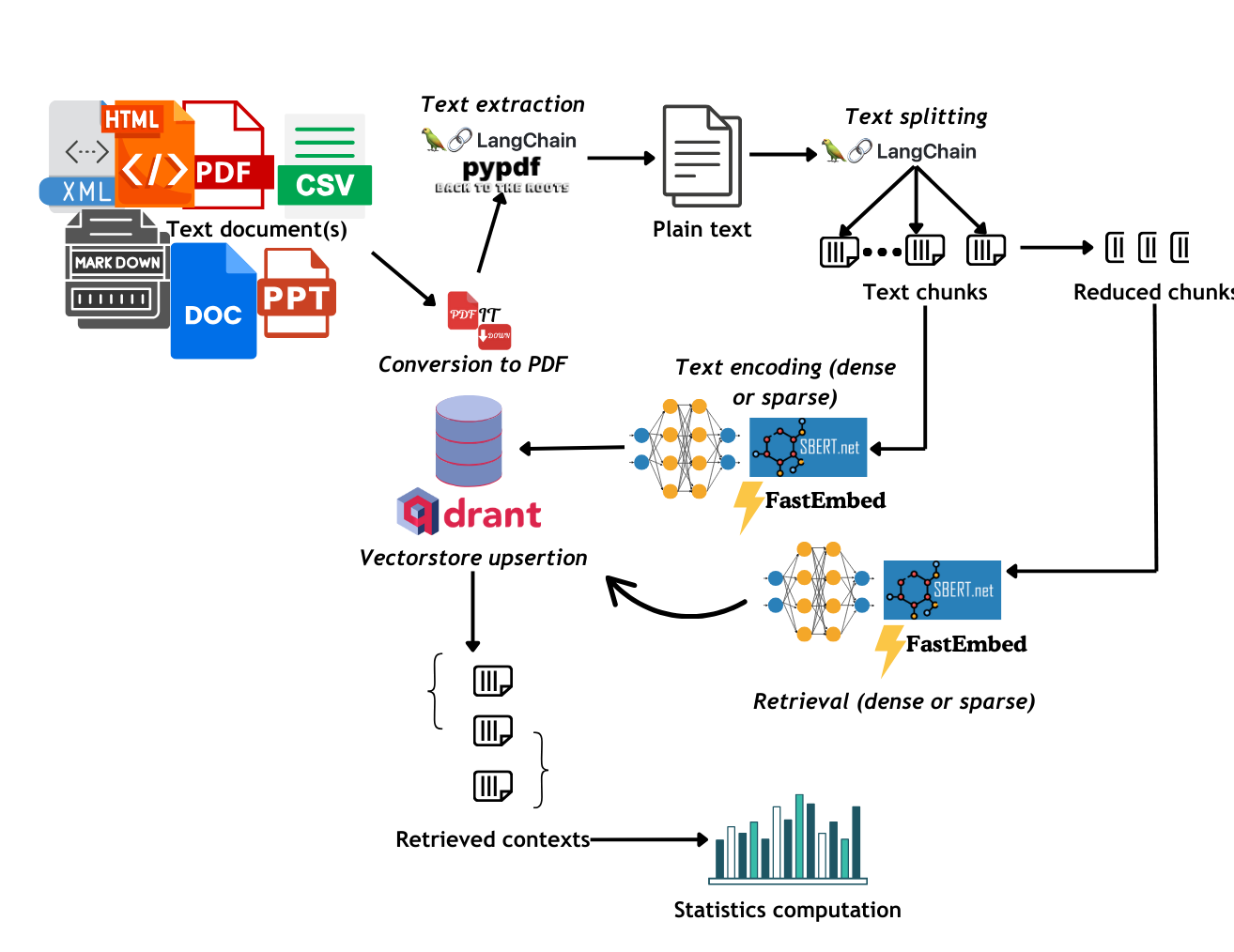
> _Supports most of the **text-based file formats** (.docx, .pptx, .pdf, .md, .html, .xml, .csv, .xlsx)_
## The workflow🔁
## Metrics👑

## Ranking
- **Success rate**: defined as the number retrieval operation in which the correct context was retrieved ranking top among all the retrieved contexts, out of the total retrieval operations
- **Mean Reciprocal Ranking (MRR)**: MRR defines how high in ranking the correct context is placed among the retrieved results.
### Relevance
- **Precision**: Number of relevant documents out of the total number of retrieved documents. .
- **Non-Relevant Ratio**: Number of non-relevant documents out of the total number of retrieved documents
>[!NOTE]
>_Relevance is based on the "page" metadata entry: if the retrieved document comes from the same page of the query, the document is considered relevant._
### Time
- **Time performance**: Average duration for a retrieval operation
### Carbon emissions
- **Carbon emissions**: Carbon emissions are calculated in gCO2eq (grams of CO2 equivalent) through the Python library [`codecarbon`](https://codecarbon.io/).

### CO2 equivalent?
>[!NOTE]
> _This simply means that there are lots of other greenhouse gases (methane, clorofluorocarbons, nitric oxide…) which all have global warming potential: despite our emissions being mainly made up by CO2, they encompass also these other gases, and it is easier for us to express everything in terms of CO2. For example: 1 kg of emitted methane can be translated into producing 25 kg of CO2e._
### How do we measure it?
- [`codecarbon`](https://codecarbon.io/) works with a scheduler and every 15s measures the **carbon intensity** of your running code based on the local grid (country or regional if on cloud)
> _"Carbon Intensity of the consumed electricity is calculated as a weighted average of the emissions from the different energy sources that are used to generate electricity, including fossil fuels and renewables."_ See [here](https://mlco2.github.io/codecarbon/methodology.html#carbon-intensity)
## Example usage🔎

### 1. Import necessary dependencies
```python
from sentence_transformers import SentenceTransformer
from qdrant_client import QdrantClient
from fastembed import SparseTextEmbedding
from sentrev.evaluator import evaluate_dense_retrieval, evaluate_sparse_retrieval
import os
```
### 2. Prepare the embedding models
```python
# Load all the dense embedding models
dense_encoder1 = SentenceTransformer('sentence-transformers/all-mpnet-base-v2', device="cuda")
dense_encoder2 = SentenceTransformer('sentence-transformers/all-MiniLM-L12-v2', device="cuda")
dense_encoder3 = SentenceTransformer('sentence-transformers/LaBSE', device="cuda")
# Create a list of the dense encoders
dense_encoders = [dense_encoder1, dense_encoder2, dense_encoder3]
# Create a dictionary that maps each encoder to its name
dense_encoder_to_names = { dense_encoder1: 'all-mpnet-base-v2', dense_encoder2: 'all-MiniLM-L12-v2', dense_encoder3: 'LaBSE'}
# Load all the sparse embedding models
sparse_encoder1 = SparseTextEmbedding("Qdrant/bm25")
sparse_encoder2 = SparseTextEmbedding("prithivida/Splade_PP_en_v1")
sparse_encoder3 = SparseTextEmbedding("Qdrant/bm42-all-minilm-l6-v2-attentions")
# Create a list of the sparse encoders
sparse_encoders = [sparse_encoder1, sparse_encoder2, sparse_encoder3]
# Create a dictionary that maps each sparse encoder to its name
sparse_encoder_to_names = { sparse_encoder1: 'BM25', sparse_encoder2: 'Splade', sparse_encoder3: 'BM42'}
```
### 3. Collect data
```python
# Collect data
files = ["~/data/attention_is_all_you_need.pdf", "~/data/generative_adversarial_nets.pdf", "~/data/narration.docx", "~/data/call-to-action.html", "~/data/test.xml"]
```
### 4. Create Qdrant Client
1. Pull and run Qdrant locally with **Docker**:
```bash
docker pull qdrant/qdrant
docker run -p 6333:6333 -p 6334:6334 qdrant/qdrant
```
2. Use the python API to create the client:
```python
# Create Qdrant client
client = QdrantClient("http://localhost:6333")
```
### 5. Evaluate retrieval!
```python
# Define CSV path where the stats will be saved
csv_path_dense = "~/evals/dense_stats.csv"
csv_path_sparse = "~/evals/sparse_stats.csv"
# Run evaluation for dense retrieval
evaluate_dense_retrieval(files, dense_encoders, dense_encoder_to_names, client, csv_path_dense, chunking_size = 1500, text_percentage=0.3, distance="dot", mrr=10, carbon_tracking="AUT", plot=True)
# Run evaluation for sparse retrieval
evaluate_sparse_retrieval(files, sparse_encoders, sparse_encoder_to_names, client, csv_path_sparse, chunking_size = 1200, text_percentage=0.4, distance="euclid", mrr=10, carbon_tracking="AUT", plot=True)
```
### 6. Code reference
> [!IMPORTANT]
> _Find the full code reference on [the GitHub repository](https://github.com/AstraBert/SenTrEv/blob/main/REFERENCE.md)_
## What to expect👀

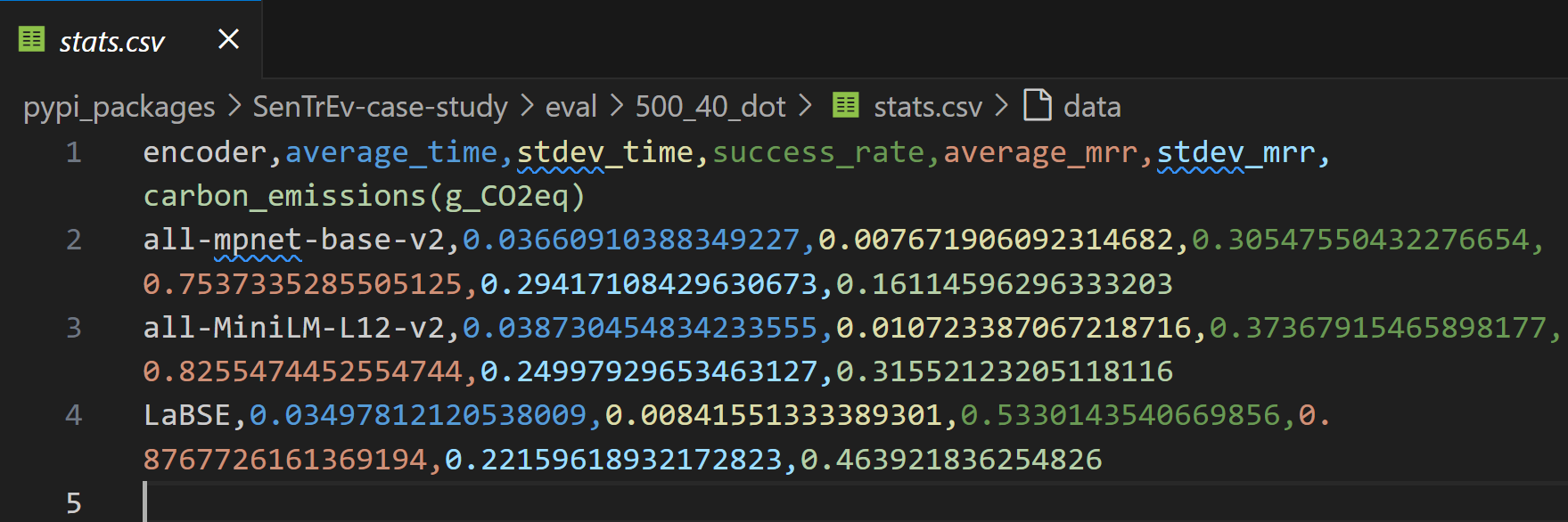
### 1. Stats in a CSV
### 2. Plots
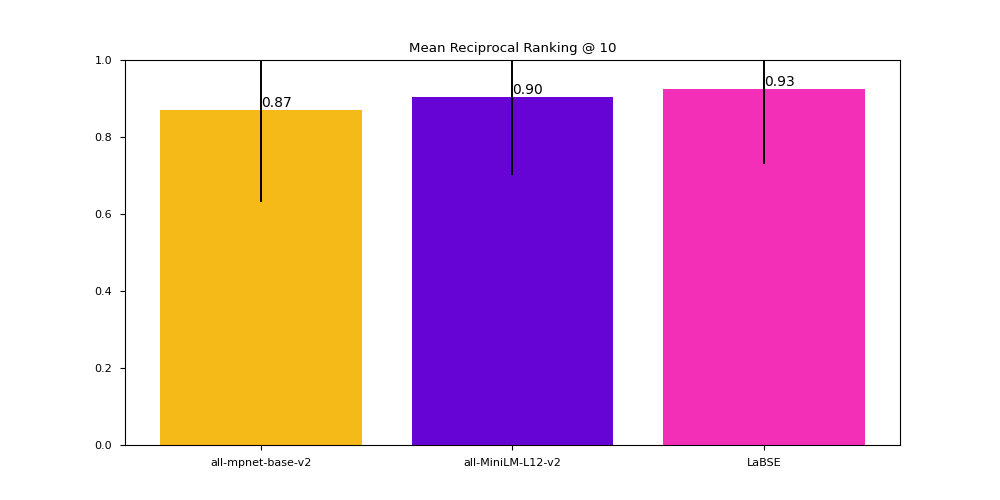
## SenTrEv is in active development🚀
> [!IMPORTANT]
> **[Feedback](https://github.com/AstraBert/SenTrEv/discussions) and [contributions](https://github.com/AstraBert/SenTrEv/blob/main/CONTRIBUTING.md) are always welcome!**
## Thanks for the attention!🤗