https://github.com/asungur/hop_timer
"A ruby gem that calculates runtime between user defined checkpoints."
https://github.com/asungur/hop_timer
ruby ruby-gem rubygem rubygems
Last synced: over 1 year ago
JSON representation
"A ruby gem that calculates runtime between user defined checkpoints."
- Host: GitHub
- URL: https://github.com/asungur/hop_timer
- Owner: asungur
- License: mit
- Created: 2020-08-17T14:51:06.000Z (almost 6 years ago)
- Default Branch: master
- Last Pushed: 2020-08-28T23:48:52.000Z (almost 6 years ago)
- Last Synced: 2025-03-19T03:35:36.017Z (over 1 year ago)
- Topics: ruby, ruby-gem, rubygem, rubygems
- Language: Ruby
- Homepage:
- Size: 28.3 KB
- Stars: 1
- Watchers: 0
- Forks: 0
- Open Issues: 0
-
Metadata Files:
- Readme: README.md
- License: LICENSE.txt
Awesome Lists containing this project
README
# HopTimer
[](https://travis-ci.com/asungur/hop_timer)
[](https://badge.fury.io/rb/hop_timer)
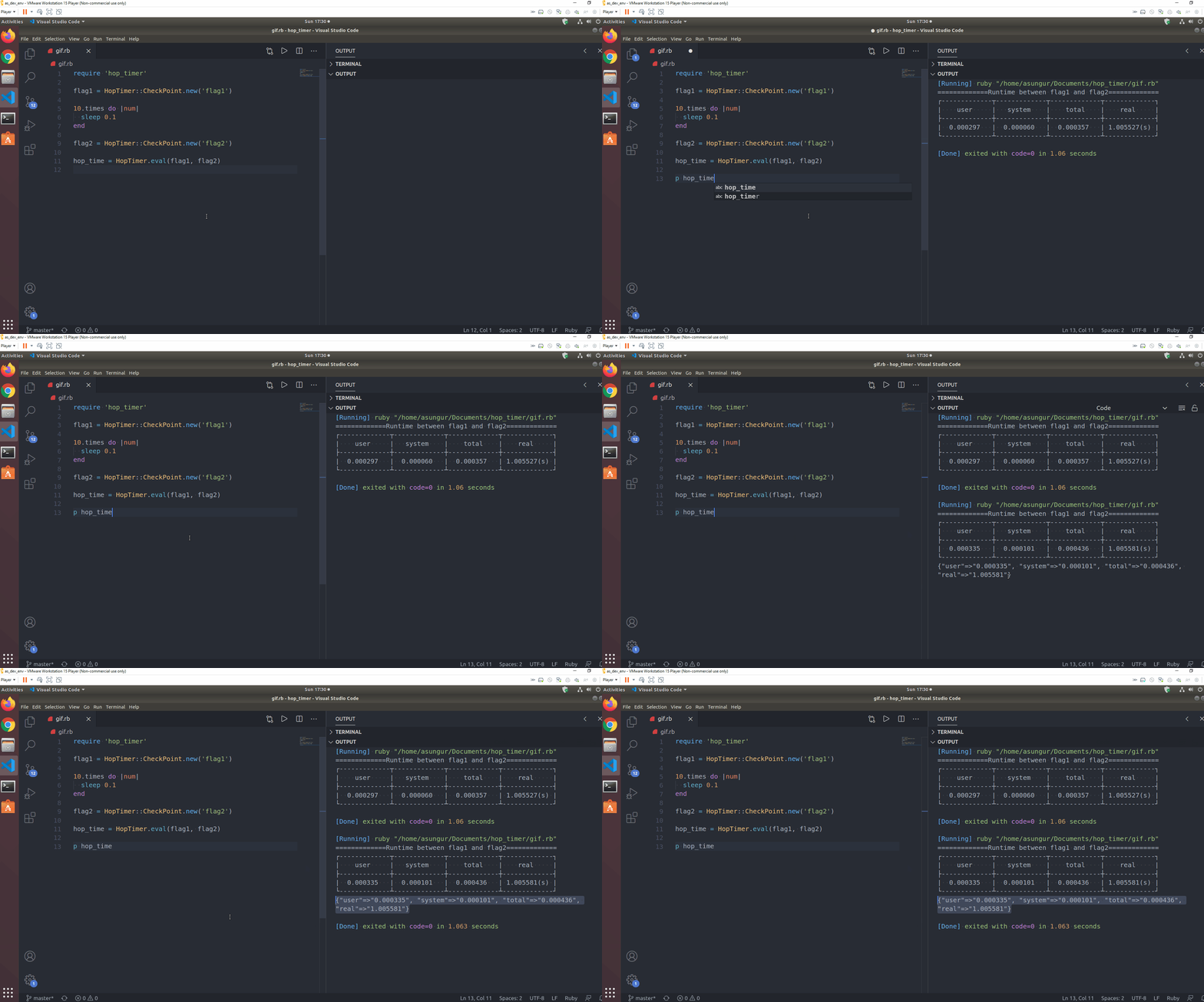
HopTimer is a user friendly benchmarking gem that works as a wrapper for Ruby's default benchmark utility. If you are frequently using benchmark and looking for a more intuitive solution or even planning to start benchmarking in general, HopTimer is for you.
HopTimer uses **check points** and evaluates the runtime between two. As you develop your application define instances of check points and evaluate them whenever you want.
## **Installation**
Add this line to your application's Gemfile:
```ruby
gem 'hop_timer'
```
And then execute:
```ruby
$ bundle install
```
Or install it yourself as:
```ruby
$ gem install hop_timer
```
## **Usage**
Once **HopTimer** is installed on your machine, `require` the gem.
```ruby
require 'hop_timer'
```
`HopTimer.eval` calculates the runtime between the instances of `HopTimer::CheckPoint` . It logs a table to the console and provides the same values in a form of hash.
```ruby
flag1 = HopTimer::CheckPoint.new('flag1')
sleep 1.2 # OPERATIONS THAT YOU WANT TO BENCHMARK HERE
flag2 = HopTimer::CheckPoint.new('flag2')
HopTimer.eval(flag1, flag2)
# RETURNS =>
{"user"=>"0.000022",
"system"=>"0.000045",
"total"=>"0.000067",
"real"=>"1.201469"}
# LOGS TO THE CONSOLE =>
=============Runtime between flag1 and flag2=============
┌-------------┬-------------┬-------------┬-------------┐
| user | system | total | real |
├-------------┼-------------┼-------------┼-------------┤
| 0.000022 | 0.000045 | 0.000067 | 1.201469(s) |
└-------------┴-------------┴-------------┴-------------┘
```
The table breakdowns the runtime as [CPU time](https://en.wikipedia.org/wiki/CPU_time)(user time, system time) and [real time](https://ruby-doc.org/core-2.6.3/Time.html) in seconds. HopTimer uses [Process](https://ruby-doc.org/core-2.6.1/Process.html) and [Benchmark::Tms](https://ruby-doc.org/stdlib-2.4.0/libdoc/benchmark/rdoc/Benchmark/Tms.html) for the calculation.
The values provided with the returned hash can be specified as floats or strings(default).
```ruby
HopTimer.eval(flag1, flag2, :string)
{"user"=>"0.000022",
"system"=>"0.000045",
"total"=>"0.000067",
"real"=>"1.201469"}
HopTimer.eval(flag1, flag2, :float) # OR
HopTimer.eval(flag1, flag2, :number)
{"user"=>3.9e-11,
"system"=>2.5e-11,
"total"=>6.4e-11,
"real"=>1.201488e-06}
```
## **Development**
After checking out the repo, run `bin/setup` to install dependencies. Then, run `rake test` to run the tests. You can also run `bin/console` for an interactive prompt that will allow you to experiment.
To install this gem onto your local machine, run `bundle exec rake install`. To release a new version, update the version number in `version.rb`, and then run `bundle exec rake release`, which will create a git tag for the version, push git commits and tags, and push the `.gem` file to [rubygems.org](https://rubygems.org/).
## Contributing
Bug reports and pull requests are welcome on GitHub at [https://github.com/asungur/hop_timer](https://github.com/%5BUSERNAME%5D/hop_timer).
## License
The gem is available as open source under the terms of the [MIT License](https://opensource.org/licenses/MIT).