https://github.com/at1as/terminal-chess
A chess game written for the Terminal in Ruby
https://github.com/at1as/terminal-chess
chess chess-game game ruby terminal
Last synced: 9 months ago
JSON representation
A chess game written for the Terminal in Ruby
- Host: GitHub
- URL: https://github.com/at1as/terminal-chess
- Owner: at1as
- License: mit
- Created: 2014-07-24T01:08:55.000Z (almost 12 years ago)
- Default Branch: master
- Last Pushed: 2018-01-07T18:26:51.000Z (over 8 years ago)
- Last Synced: 2025-03-26T15:54:21.448Z (over 1 year ago)
- Topics: chess, chess-game, game, ruby, terminal
- Language: Ruby
- Homepage:
- Size: 70.3 KB
- Stars: 2
- Watchers: 2
- Forks: 1
- Open Issues: 0
-
Metadata Files:
- Readme: README.md
- License: LICENSE
Awesome Lists containing this project
README
Terminal-Chess
==============
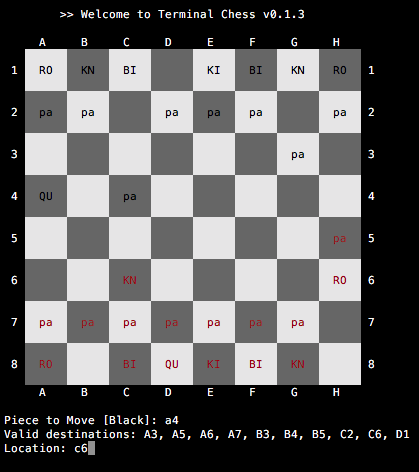
A lightweight two-player chess game for the Terminal, written in Ruby
### Installing
The easiest way to use terminal_chess is to install it via the [Rubygem](https://rubygems.org/gems/terminal_chess).
Otherwise, clone this repo directly and run:
```bash
# Download Repo
$ git clone git@github.com:at1as/Terminal-Chess.git
$ chmod +x lib/terminal_chess.rb
# Install Dependencies. Only dependency for local use is the colorize gem
# however there are various requirements for a websocket client and server in order to play remotely
$ bundle install
```
### Running
#### Local Gameplay
In this mode, the game will launch in Terminal and allow the player to make moves for both sides of the board
```
# Run program in terminal (source)
$ ruby lib/terminal_chess.rb
# Run program in terminal (gem)
$ gem install terminal_chess
$ terminal_chess
```
#### Multiplayer
Terminal Chess can connect to an opponent using websockets over ngrok. The requires first starting the server. While this resides
```
# The webserver must be running either on one of the players machines
# Or somewhere else. This will need to be running before either client can connect
$ SERVER=start lib/terminal_chess.rb
# The host running the server will need to tunnel the connection through ngrok
# on the free plan the URL will change every time ngrok is launched
# therefor the `9cf13f35` component will need to be passed to the clients in order
# to connect
$ ngrok http 4567
=> http://9cf13f35.ngrok.io -> localhost:4567
```
And then the client can connect via the NGROK environment variable. if this environment variable is set, the client will attempt to start a session over the network. If the connection
```
# Replace the NGROK enviroment variable with whatever URL the ngrok server returned
# -- from Soure:
$ NGROK=9cf13f5 ruby lib/terminal_chess.rb
# -- OR from Gem:
$ NGROK=9cf13f5 terminal_chess
# => [:message, "INFO: Awaiting second player..."]
```
And once the second client connects, game on!
```
$ NGROK=9cf13f5 ruby lib/terminal_chess.rb
# => [:message, "INFO: Connected to remote player"]
# => [:message, "SETUP: You are player 2"]
# => [:message, "INFO: Starting game!"]
```
Any subsequent clients that attempt to connect while the game is in session will have their connections dropped
### Testing:
```bash
$ bundle exec rake test --trace
```
### Notes
* Built and tested on macOS 10.11 with Ruby 2.4.0
* Neither player can currently be automated
### TODO:
* Automate one of two players (note: tried and failed at this. Not easy to make it competent)
* Switch written Chess pieces to unicode characters (note: tried this. Didn't look great unless text size was massive)
* Player 2 must play an upside down chessboard. Reorient so it's the same for both players