https://github.com/atac-helicopter/vaultsync
Transparent, cross-platform backup & sync tool focused on visibility and reliability for NAS, network storage and Local drives.
https://github.com/atac-helicopter/vaultsync
avalonia backup backup-utility cli cross-platform dotnet homelab linux macos nas network-storage windows
Last synced: 3 months ago
JSON representation
Transparent, cross-platform backup & sync tool focused on visibility and reliability for NAS, network storage and Local drives.
- Host: GitHub
- URL: https://github.com/atac-helicopter/vaultsync
- Owner: ATAC-Helicopter
- License: mit
- Created: 2025-11-09T11:48:16.000Z (8 months ago)
- Default Branch: Stable
- Last Pushed: 2026-04-16T17:26:26.000Z (3 months ago)
- Last Synced: 2026-04-16T19:28:39.384Z (3 months ago)
- Topics: avalonia, backup, backup-utility, cli, cross-platform, dotnet, homelab, linux, macos, nas, network-storage, windows
- Language: C#
- Homepage: https://fglabs.dev/vaultsync
- Size: 275 MB
- Stars: 37
- Watchers: 1
- Forks: 3
- Open Issues: 8
-
Metadata Files:
- Readme: README.md
- Changelog: CHANGELOG.md
- Contributing: CONTRIBUTING.md
- License: LICENSE
- Code of conduct: CODE_OF_CONDUCT.md
- Security: SECURITY.md
- Roadmap: ROADMAP.md
Awesome Lists containing this project
README

Snapshot | Backup | Sync | Verify
Backups you can actually understand — and actually trust.
Install |
Features |
Documentation |
Download Stats |
Roadmap |
Changelog |
Security |
Contributing
Website:
https://fglabs.dev/vaultsync
---
> Most backup tools either hide everything… or expect you to script your life away.
>
> VaultSync sits in the middle:
> **full visibility, real control, and backups that don’t fall apart when you need them.**
---
## Why VaultSync
Most backup tools fail in the same ways:
- You don’t really know what got backed up
- Restores feel risky or unclear
- NAS / external drives break silently
- History becomes messy or unusable
VaultSync focuses on fixing that:
- See exactly what changed (snapshot diffs)
- Know what’s safe to restore (integrity + readiness checks)
- Control where data goes (per-project destinations)
- Keep history clean and usable (retention + metadata sync)
---
> [!WARNING]
> VaultSync installers are currently unsigned (code signing is planned).
>
> This means:
> - Windows may show a SmartScreen warning
> - macOS may require manual confirmation
>
> The app itself is safe and open-source — these are standard OS security checks.
### Windows
- SmartScreen will flag the installer
- Click **More info → Run anyway**
### macOS
1. Open the downloaded `.dmg`
2. Drag the app into **Applications**
3. Close the disk image
4. Open **Applications**
5. Right-click VaultSync → **Open**
If Gatekeeper still blocks it:
**Apple Silicon (ARM64)**
```sh
xattr -dr com.apple.quarantine /Applications/VaultSync-macos-arm64.app
```
**Intel (x64)**
```sh
xattr -dr com.apple.quarantine /Applications/VaultSync-macos-x64.app
```
---












---
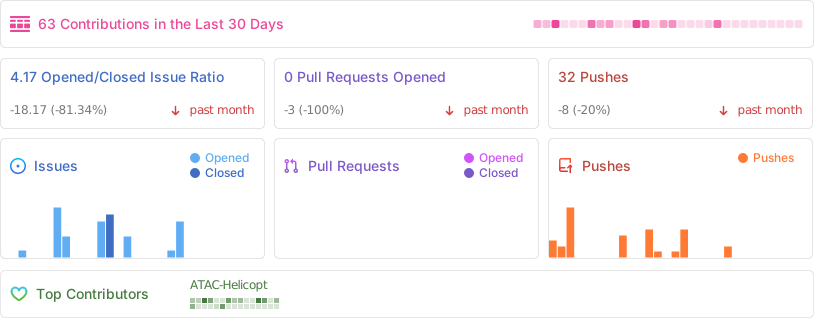
## Project Activity
---
# VaultSync
### Snapshot | Backup | Sync | Verify — for projects & real workflows
VaultSync is a cross-platform backup and snapshot manager built for developers, creators, and power-users working with real project folders.
Not system images.
Not cloud lock-in.
Just reliable backups you can inspect, understand, and restore.
---
## App Screenshots
**Dashboard — see activity, storage, and backup health at a glance**

**Projects — manage what matters, not your whole system**

**Backups — history, restore points, and status in one place**

---
## Core Features
- Snapshot-based backups with full change tracking
- Reliable restores with integrity checks and safety prompts
- Designed for NAS and external storage workflows
- Per-project configuration and routing
- Desktop UI + CLI for automation
---
## Typical Use Cases
- Backing up development projects to a NAS
- Keeping versioned backups of creative work (Blender, video, audio)
- Syncing workspaces across multiple machines
- Maintaining clean restore points without full system images
---
## Features
### CLI
- Create snapshots of any project folder
- Sync using **rsync** (macOS/Linux) or **robocopy** (Windows)
- Hash-based file verification
- Watch mode for automatic syncing
- JSON output for scripting
- Customizable preset rules per project
### Desktop UI
- One-click snapshots and backups
- Per-project destination routing
- Encryption support (global + per-project)
- Backup history with clear context
- Snapshot diff summaries
- Retention policies with protected backups
- Integrity scan + Doctor repair tools
- Metadata sync across machines
- Support bundle export for debugging
---
## Snapshot System
- Fast directory scanning with filtering
- Tracks added / modified / deleted files
- SQLite-backed history
- Per-project snapshot timeline
---
## Backup System
- Backup any snapshot to local or external storage
- Timestamped backups
- Automatic or manual execution
- NAS-aware handling and retries
- Retention with protected backups
- Integrated snapshot + backup lifecycle
---
## Installation (CLI ONLY)
```sh
cd ~/Desktop/Dev/VaultSync
dotnet pack src/VaultSync.CLI -c Release
export PATH="$PATH:$HOME/.dotnet/tools"
dotnet tool install --global --add-source src/VaultSync.CLI/bin/ToolPackages vaultsync.cli
```
Update:
```sh
dotnet tool update --global vaultsync.cli
```
---
## Quick Start (CLI ONLY)
```sh
vaultsync init
vaultsync add-project Demo ~/Projects/Demo --preset unity
vaultsync snapshot Demo
vaultsync sync Demo ~/Backup/Demo
vaultsync verify Demo ~/Backup/Demo --full
```
---
## Useful CLI Commands
| Command | Description |
|--------|------------|
| `vaultsync init` | Initialize config |
| `vaultsync add-project` | Register project |
| `vaultsync snapshot` | Create snapshot |
| `vaultsync sync` | Backup project |
| `vaultsync verify` | Validate backup |
| `vaultsync restore` | Restore snapshot |
| `vaultsync doctor` | Run diagnostics |
---
## Updates & Installers
VaultSync uses GitHub Releases for updates.
- Stable → production releases
- Beta → optional prerelease builds
Installers:
- Windows → Inno Setup
- macOS → `.dmg` (unsigned)
- Linux → planned / in progress
---
## Get Started
- Download the latest release
- Try it on a real project
- See what actually changes
If something feels off, open an issue or drop feedback.
That’s how VaultSync gets better.
---
## License
MIT License — see [LICENSE](LICENSE)
---
## Credits
Created by **Flavio Giacchetti**