https://github.com/atauenis/webone
HTTP 1.x proxy that makes old web browsers usable again in the Web 2.0 world.
https://github.com/atauenis/webone
archiveorg escargot http-client http-proxy http-server http1-0 http1-1 https-proxy retrocomputing yt-dlp
Last synced: 6 months ago
JSON representation
HTTP 1.x proxy that makes old web browsers usable again in the Web 2.0 world.
- Host: GitHub
- URL: https://github.com/atauenis/webone
- Owner: atauenis
- License: other
- Created: 2019-05-20T09:12:06.000Z (about 7 years ago)
- Default Branch: master
- Last Pushed: 2024-03-11T09:20:28.000Z (over 2 years ago)
- Last Synced: 2024-03-11T10:39:36.960Z (over 2 years ago)
- Topics: archiveorg, escargot, http-client, http-proxy, http-server, http1-0, http1-1, https-proxy, retrocomputing, yt-dlp
- Language: C#
- Homepage:
- Size: 186 MB
- Stars: 439
- Watchers: 18
- Forks: 11
- Open Issues: 10
-
Metadata Files:
- Readme: README.md
- Contributing: CONTRIBUTING.md
- License: LICENSE.txt
Awesome Lists containing this project
README
# WebOne
This is a HTTP 1.x proxy server that makes old web browsers, media players and messengers usable again in the Web 2.0 world.
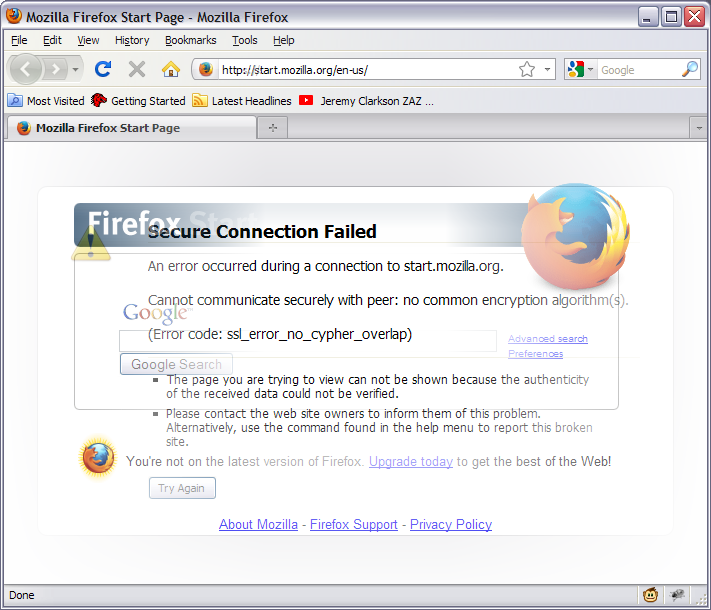
The proxy is an adapter between the modern Web and old software. It is designed to run on an modern PC in same network with older computers.
WebOne HTTP Proxy Server is working by default on port 8080 and is compatible even with Netscape Navigator 3. Set IP address or hostname of PC with WebOne as HTTP/HTTPS/FTP proxy server (or set http://proxyhost:port/auto.pac as Automatic proxy configuration URL) in old browser's settings and begin WWW surfing again. There also is alternative mode (http://proxyhost:port/http://domain/filename.ext) for browsers that cannot work with proxies.
The program's settings are in the __webone.conf__ file (but any other file name can be used too).
See **[WebOne wiki](https://github.com/atauenis/webone/wiki)** for complete list of features and full documentation.
## Server prerequisites
Windows 8+ (or Windows Server 2012+) / Linux / macOS and .NET 8.0 Runtime are required on server PC. See [.NET 8.0 System Requirements](https://github.com/dotnet/core/blob/main/release-notes/8.0/supported-os.md).
## Image and video converting
* Picture format converting is performing via `convert` utility from ImageMagick (bundled with WebOne).
* To watch YouTube.com videos through proxy, install `ffmpeg` together with `yt-dlp` (included in `win-x64.full` zips, and can be installed manually on Linux/macOS).
## Install
Manuals about how to set up a WebOne proxy on [Windows](https://github.com/atauenis/webone/wiki/Windows-installation) / [Linux](https://github.com/atauenis/webone/wiki/Linux-installation) / [macOS](https://github.com/atauenis/webone/wiki/MacOS-X-installation) servers are in the Wiki.
## Run
* On Windows simply run `webone.exe`. Then open port 8080 in Windows Firewall settings.
* On Linux the proxy is installing as a service, so it can be configured via regular service management commands:
```
$ sudo service webone start
or
$ sudo systemctl start webone
```
Other service commands, such as `start`/`stop`/`restart`/`status`/`enable`/`disable`, also work.
* On macOS launch `webone` from Terminal, as the application is not signed for developer verification.
```
$ ./webone (simply)
$ ./webone 5170 (start on specific port, e.g. 5170)
$ sudo ./webone 80 (if port is less than 1024, root rights are need)
$ ./webone /some/folder/myconfig.conf (to use specific configuration file instead of default)
$ dotnet webone.dll (alternative way, armv6 only)
```
These commands also can be used on Linux when systemd service is disabled.
* *Tip:* you may store your own configuration in `/etc/webone.conf.d/` directory. It will override `webone.conf` settings and will not be overwritten on package updates.
Working of WebOne can be checked via web browser by opening http://proxyhost:port/.
Note that this app is not intended for daily use, as removing any encryption from web traffic and use of really old and unsupported browser may cause security problems.
The server can be started even on public hosts. But don't forget to enable password protection in config file to make the proxy non-public.
## Build
Latest source code can be always found in the __master__ () and the __dev__ branches of the [Git repository](https://github.com/atauenis/webone).
The program is built using Microsoft .NET 8.0 SDK and [dotnet-packaging](https://github.com/qmfrederik/dotnet-packaging/) add-on. With them the building is easy on all platforms: use `dotnet publish` & `dotnet deb || dotnet rpm || dotnet zip` tools.
Windows developers can utilize `build.bat` script for cross-platform building. And there is similar `build.sh` script for Linux and macOS environments.
## Feedback
Any questions can be written on official [VOGONS thread](https://www.vogons.org/viewtopic.php?f=24&t=67165), [phantom.sannata.ru thread](https://phantom.sannata.org/viewtopic.php?f=16&t=33291), and GitHub [Issues](https://github.com/atauenis/webone/issues) and [Discussions](https://github.com/atauenis/webone/discussions) tabs.
## Who are the author(s)?
Currently the project is maintained mostly by a single person, Alexander Tauenis (ATauenis). Also thanks to [contributors](https://github.com/atauenis/webone/graphs/contributors) who made pull requests and bug reports.
## How to help the project
WebOne project welcomes any help in the development. Forks, Pull Requests, and Bug Reports are welcome.
Even if you don't know C#, but have skills on HTML/CSS/JS development, it's possible to help with [creating web traffic edits](https://github.com/atauenis/webone/wiki/Sets-of-edits).
# Описание по-русски
__WebOne__ - прокси-сервер HTTP (HTTPS), позволяющий открывать современные сайты на старых браузерах. Своеобразный переходник между реальным Web 2.0 и историческим Web 1.0. Работает по принципу MITM.
Он имеет следующие функции:
* Снятие шифрования HTTPS и двухстороннее преобразование HTTPS 1.1 <-> HTTP 1.0.
* Перекодировка шифров HTTPS в более старые (при необходимости).
* Замена кодировки в ответах серверов на любую, включая транслит.
* Подмена отдельных файлов (например, новых тяжёлых JS-фреймворков на более старые и лёгкие).
* Корректирование частей текстового трафика (например, патчинг JS или XML/CDF/RSS).
* Конвертация или пережатие графических и видеофайлов "на лету" (используя внешние конвертеры).
* Переадресация с несуществующих адресов на Web Archive.
* Скачивание и конвертация видео с YouTube для воспроизведения на старых ПК в браузере.
* Клиент FTP для обращения к таким серверам через браузер.
Этот прокси-сервер необходимо запускать на любом современном ПК с Microsoft .NET 8.0 Runtime, IP адрес которого указывается в настройках устаревшего веб-обозревателя. Порт по умолчанию 8080, тип прокси HTTP 1.0. Доступен файл автоматической настройки: http://proxyhost:port/auto.pac .
Настройки прокси-сервера хранятся в файле __webone.conf__ или любом другом в одном из следующих мест:
* _Каталог программы._
* `/etc/webone.conf` (`/etc/webone.conf.d/*.conf`)
* `~/.config/webone/webone.conf`
* `~/Library/Application Support/WebOne/webone.conf`
* `/Library/Application Support/WebOne/webone.conf`
* `C:\Users\username\AppData\Roaming\WebOne\webone.conf`
* `C:\ProgramData\WebOne\webone.conf` (`C:\ProgramData\WebOne\*.conf`)
* _Указанный в аргументе при запуске через `webone PATH\FILENAME.EXT`._
Файл протокола (__webone.log__) по умолчанию сохраняется по адресу `/var/log/webone.log`, или `C:\Users\username\AppData\Roaming\webone.log`, или `~/Library/Logs/webone.log`.
На Linux используются конвертеры из пакетов __imagemagick__ (convert) и __ffmpeg__. В Windows-версии прилагается конвертер **convert**, а в Full-версии дополнительно имеются **ffmpeg** и **yt-dlp**.
Проект открыт для всех желающих присоединиться к разработке. Автор и основатель проекта: Александр Тауенис (ATauenis).
Подробная документация (на английском) в [wiki проекта](https://github.com/atauenis/webone/wiki).
Обсуждение на [phantom.sannata.ru](https://phantom.sannata.org/viewtopic.php?f=16&t=33291).