https://github.com/athityakumar/git-np
Git New Project (git-np) : A CLI tool to easily get started with a new open-source git project (git-np) easily via templated markdown files.
https://github.com/athityakumar/git-np
Last synced: 5 months ago
JSON representation
Git New Project (git-np) : A CLI tool to easily get started with a new open-source git project (git-np) easily via templated markdown files.
- Host: GitHub
- URL: https://github.com/athityakumar/git-np
- Owner: athityakumar
- License: mit
- Created: 2017-11-29T05:48:39.000Z (over 8 years ago)
- Default Branch: master
- Last Pushed: 2017-11-30T17:26:12.000Z (over 8 years ago)
- Last Synced: 2025-02-02T12:26:25.952Z (over 1 year ago)
- Language: Ruby
- Size: 199 KB
- Stars: 0
- Watchers: 4
- Forks: 1
- Open Issues: 5
-
Metadata Files:
- Readme: README.md
- Contributing: CONTRIBUTING.md
- License: LICENSE.md
- Code of conduct: CODE_OF_CONDUCT.md
Awesome Lists containing this project
README
# Color LS
[](http://forthebadge.com)
[](http://forthebadge.com)
[](https://badge.fury.io/rb/colorls)
[](https://travis-ci.org/athityakumar/colorls)
[](http://makeapullrequest.com)
A Ruby script that colorizes the `ls` output with color and icons. Here are the screenshots of working example on an iTerm2 terminal (Mac OS), `oh-my-zsh` with `powerlevel9k` theme and `powerline nerd-font + awesome-config` font with the `Solarized Dark` color theme.

*If you're interested in knowing the powerlevel9k configuration to get this prompt, have a look at [this gist](https://gist.github.com/athityakumar/1bd5e9e24cd2a1891565573a893993eb).*
# Table of contents
- [Usage](#usage)
- [Flags](#flags)
- `-1`
- `-a` (or) `--all`
- `-A` (or) `--almost-all`
- `-d` (or) `--dirs`
- `-f` (or) `--files`
- `-h` (or) `--help`
- `-l` (or) `--long`
- `-r` (or) `--report`
- `-t` (or) `--tree`
- `--gs` (or) `--git-status`
- `--sd` (or) `--sort-dirs` or `--group-directories-first`
- `--sf` (or) `--sort-files`
- [Combination of flags](#combination-of-flags)
- [Installation](#installation)
- [Recommended configurations](#recommended-configurations)
- [Custom configurations](#custom-configurations)
- [Updating](#updating)
- [Uninstallation](#uninstallation)
- [Contributing](#contributing)
- [License](#license)
# Usage
[(Back to top)](#table-of-contents)
Man pages have been added. Checkout `man colorls`.
### Flags
- With `-1` : Lists one entry per line

- With `-a` (or) `--all` : Does not ignore entries starting with '.'

- With `-A` (or) `--almost-all` : Does not ignore entries starting with '.', except `./` and `../`

- With `-d` (or) `--dirs` : Shows only directories

- With `-f` (or) `--files` : Shows only files

- With `-h` (or) `--help` : Prints a very helpful help menu

- With `-l` (or) `--long` : Shows in long listing format

- With `-r` (or) `--report` : Shows brief report about number of files and folders shown

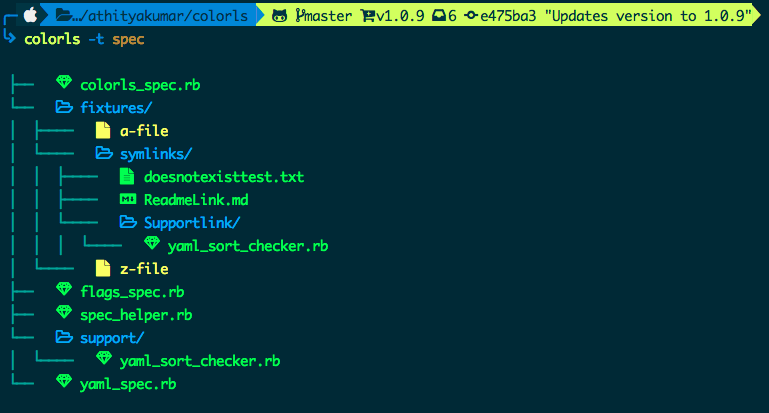
- With `-t` (or) `--tree` : Shows tree view of the directory
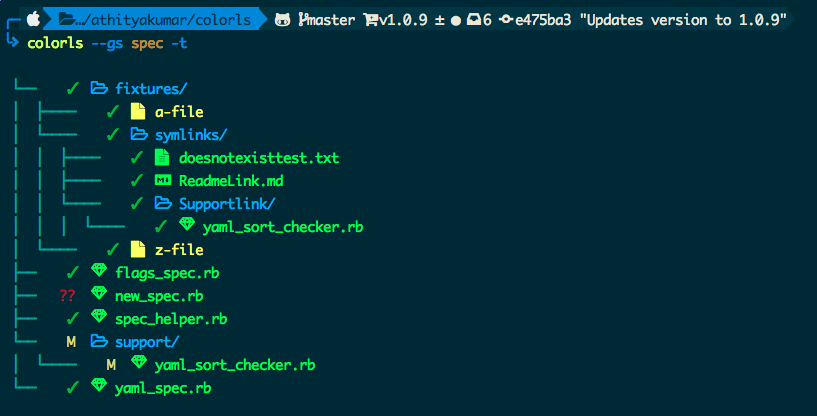
- With `--gs` (or) `--git-status` : Shows git status for each entry

- With `--sd` (or) `--sort-dirs` or `--group-directories-first` : Shows directories first, followed by files

- With `--sf` (or) `--sort-files` : Shows files first, followed by directories

- With color options : `--light` or `--dark` can be passed as a flag, to choose the appropriate color scheme. By default, the dark color scheme is chosen. In order to tweak any color, read [Custom configurations](#custom-configurations).
### Combination of flags
- Using `--gs` with `-t` :
- Using `--gs` with `-l` :

- Using `--sd` with `-l` and `-A` :

# Installation
[(Back to top)](#table-of-contents)
1. Install Ruby (preferably, version > 2.1)
2. Install the patched fonts of powerline nerd-font and/or font-awesome. Have a look at the [Nerd Font README](https://github.com/ryanoasis/nerd-fonts/blob/master/readme.md) for more installation instructions.
*Note for `iTerm2` users - Please enable the Nerd Font at iTerm2 > Preferences > Profiles > Text > Non-ASCII font > Knack Regular Nerd Font Complete.*
3. Install the [colorls](https://rubygems.org/gems/colorls/) ruby gem with `gem install colorls`
*Note for `rbenv` users - In case of load error when using `lc`, please try the below patch.*
```sh
rbenv rehash
rehash
```
4. Enable tab completion for flags by entering following line to your shell configuration file (`~/.bashrc` or `~/.zshrc`) :
```bash
source $(dirname $(gem which colorls))/tab_complete.sh
```
5. Start using `colorls` :tada:
6. Have a look at [Recommended configurations](#recommended-configurations) and [Custom configurations](#custom-configurations).
# Recommended configurations
[(Back to top)](#table-of-contents)
1. To add some short command (say, `lc`) with some flag options (say, `-l`, `-A`, `--sd`) by default, add this to your shell configuration file (`~/.bashrc`, `~/.zshrc`, etc.) :
```sh
alias lc='colorls -lA --sd'
```
2. For changing the icon(s) to other unicode icons of choice (select icons from [here](https://nerdfonts.com/)), change the YAML files in a text editor of your choice (say, `subl`)
```sh
subl $(dirname $(gem which colorls))/yaml
```
# Custom configurations
[(Back to top)](#table-of-contents)
You can overwrite the existing icons and colors mapping by copying the yaml files from `$(dirname $(gem which colorls))/yaml` into `~/.config/colorls`, and changing them.
- To overwrite color mapping :
Please have a look at the [list of supported color names](https://github.com/sickill/rainbow#color-list). Let's say that you're using the dark color scheme and would like to change the color of untracked file (`??`) in the `--git-status` flag to yellow. Copy the defaut `dark_colors.yaml` and change it.
```sh
cp $(dirname $(gem which colorls))/yaml/dark_colors.yaml ~/.config/colorls/dark_colors.yaml`
```
In the `~/.config/colorls/dark_colors.yaml` file, change the color set for `untracked` from `darkorange` to `yellow`, and save the change.
```
untracked: yellow
```
- To overwrite icon mapping :
Please have a look at the [list of supported icons](https://nerdfonts.com/). Let's say you want to add an icon for swift files. Copy the feault `files.yaml` and change it.
```sh
cp $(dirname $(gem which colorls))/yaml/files.yaml ~/.config/colorls/files.yaml`
```
In the `~/.config/colorls/files.yaml` file, add a new icon / change an existing icon, and save the change.
```
swift: "\uF179"
```
# Updating
[(Back to top)](#table-of-contents)
Want to update to the latest version of `colorls`?
```sh
gem update colorls
```
# Uninstallation
[(Back to top)](#table-of-contents)
Want to uninstall and revert back to the old style? No issues (sob). Please feel free to open an issue regarding how we can enhance `colorls`.
```sh
gem uninstall colorls
```
# Contributing
[(Back to top)](#table-of-contents)
Your contributions are always welcome! Please have a look at the [contribution guidelines](CONTRIBUTING.md) first. :tada:
# License
[(Back to top)](#table-of-contents)
The MIT License (MIT) 2017 - [Athitya Kumar](https://github.com/athityakumar/). Please have a look at the [LICENSE.md](LICENSE.md) for more details.