https://github.com/atom-community/ide-python
Python language support for Atom-IDE :atom: :snake:
https://github.com/atom-community/ide-python
atom atom-ide ide-python language-server python python-language-support
Last synced: 12 months ago
JSON representation
Python language support for Atom-IDE :atom: :snake:
- Host: GitHub
- URL: https://github.com/atom-community/ide-python
- Owner: atom-community
- License: other
- Created: 2017-09-12T20:56:52.000Z (almost 9 years ago)
- Default Branch: master
- Last Pushed: 2023-10-15T16:25:15.000Z (over 2 years ago)
- Last Synced: 2025-05-19T15:08:57.910Z (about 1 year ago)
- Topics: atom, atom-ide, ide-python, language-server, python, python-language-support
- Language: JavaScript
- Homepage: https://atom.io/packages/ide-python
- Size: 9.8 MB
- Stars: 236
- Watchers: 14
- Forks: 39
- Open Issues: 137
-
Metadata Files:
- Readme: README.md
- Changelog: CHANGELOG.md
- License: LICENSE
Awesome Lists containing this project
README
# IDE-python package
[](https://greenkeeper.io/)
Python language support for [Atom-IDE](https://atom-ide-community.github.io), powered by the [Python language server](https://github.com/palantir/python-language-server).

## Requirements
[`ide-python`](https://atom.io/packages/ide-python) requires [Atom `1.21+`](https://atom.io/), [Python language server `0.29+`](https://github.com/palantir/python-language-server) and the [`atom-ide-base`](https://atom.io/packages/atom-ide-base) package to expose the functionality within Atom.
### Important
Please note that `atom-ide-ui` is now deprecated, therefore, you must use the packages supplied from `atom-ide-community` as mentioned above. Links are also provided for more information.
## Feature Providers
- [Jedi](https://github.com/davidhalter/jedi) for Completions, Definitions, Hover, References, Signature Help, and Symbols
- [Rope](https://github.com/python-rope/rope) for Completions and renaming
- [Pyflakes](https://github.com/PyCQA/pyflakes) linter to detect various errors
- [McCabe](https://github.com/PyCQA/mccabe) linter for complexity checking
- [pycodestyle](https://github.com/PyCQA/pycodestyle) linter for style checking
- [Pylint](https://www.pylint.org/) linter to detect various errors
- [Flake8](http://flake8.pycqa.org/en/latest/) linter to detect various errors
- [pydocstyle](https://github.com/PyCQA/pydocstyle) linter for docstring style checking
- [autopep8](https://github.com/hhatto/autopep8) for code formatting (preferred over YAPF)
- [YAPF](https://github.com/google/yapf) for code formatting
## Installation
### Language Server
Install the language server (0.29.0 or newer) with:
```bash
python -m pip install 'python-language-server[all]'
```
This command will install the language server and all supported feature providers, which can be enabled or disabled in the settings. Checkout the [official installation instructions](https://github.com/palantir/python-language-server#installation) on how to install only the providers you need.
You can verify that everything is correctly installed by running `python -m pyls --help` from the command line.
It should return
```bash
usage: pyls [-h] [--tcp] [--host HOST] [--port PORT]
[--log-config LOG_CONFIG | --log-file LOG_FILE] [-v]
Python Language Server
...
```
If you have installed `pyls` using a non default installation of Python, you can add modify the _Python Executable_ config in the `ide-python` settings.
### Atom Package
Install `ide-python` and [`atom-ide-base`](https://atom.io/packages/atom-ide-base) from _Install_ in Atom's settings or run:
```bash
apm install atom-ide-base
apm install ide-python
```
To use the debugger you need to install `atom-ide-debugger` and `atom-ide-console` as well:
```
apm install atom-ide-debugger
apm install atom-ide-console
```
### Debugger (experimental)
After installation of the above packages:
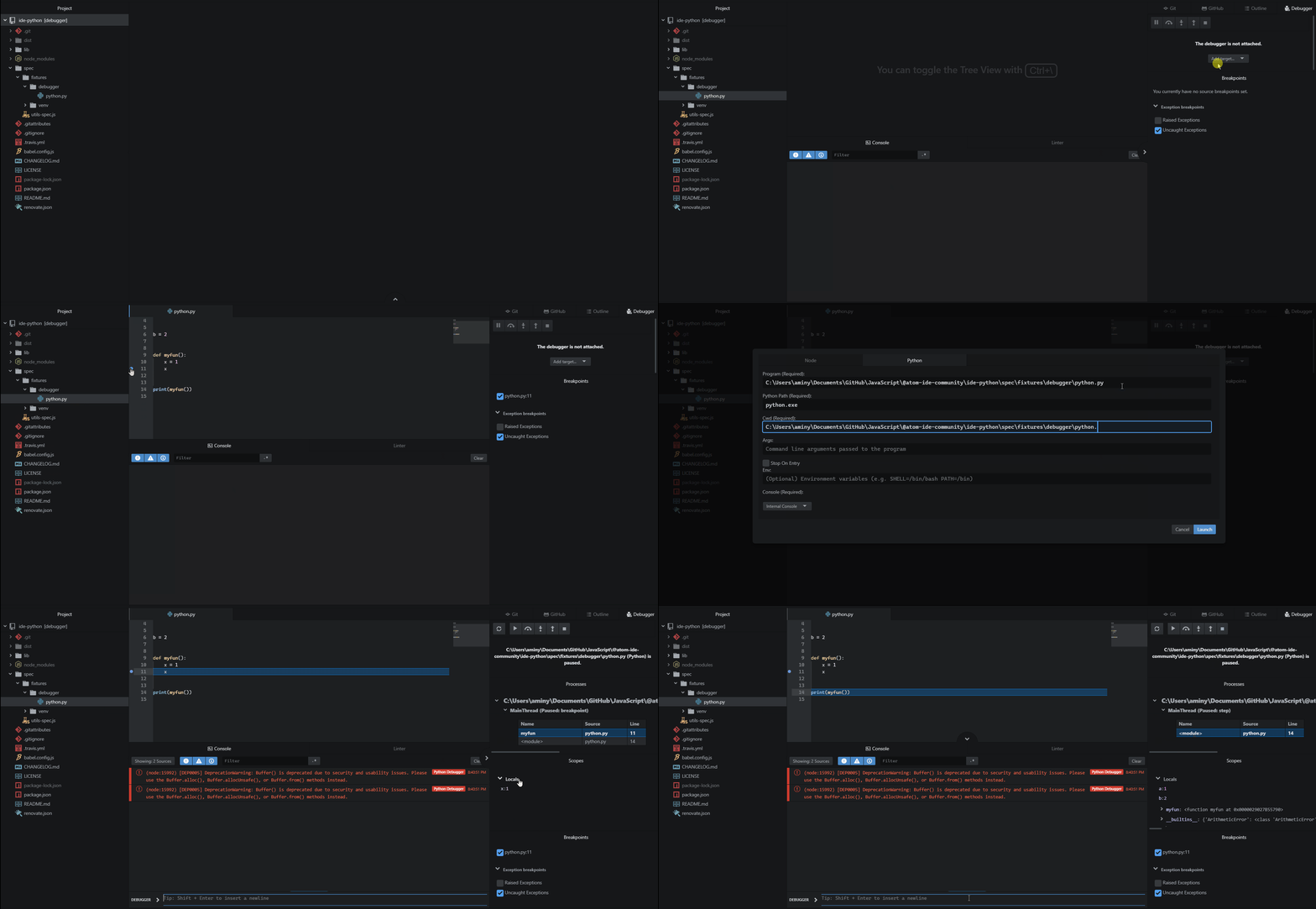
- Open the file you need to debug
- Use CTRL+SHIFT+P and run "Show Debugger" to show the debugger pane
- Click add target button and fill the information
- Debug your application like the gif
## Configuration
Configuration is loaded from zero or more configuration sources.
- `pycodestyle`: discovered in `~/.config/pycodestyle`, `setup.cfg`, `tox.ini` and `pycodestyle.cfg`
- `flake8`: discovered in `~/.config/flake8`, `setup.cfg`, `tox.ini` and `flake8.cfg`
Overall configuration is computed first from user configuration (in home directory), overridden by configuration in the `ide-python` settings, and then overridden by configuration discovered in the current project.
## Contributing
Always feel free to help out! Whether it's [filing bugs and feature requests](https://github.com/lgeiger/ide-python/issues/new) or working on some of the [open issues](https://github.com/lgeiger/ide-python/issues), Atom's [guide for contributing to packages](https://github.com/atom/atom/blob/master/docs/contributing-to-packages.md) will help get you started.
## License
MIT License. See [the license](LICENSE.md) for more details.