https://github.com/atombender/jlf
jlf is a basic JSON line formatter
https://github.com/atombender/jlf
json terminal
Last synced: 3 months ago
JSON representation
jlf is a basic JSON line formatter
- Host: GitHub
- URL: https://github.com/atombender/jlf
- Owner: atombender
- Created: 2020-06-03T20:09:27.000Z (about 6 years ago)
- Default Branch: master
- Last Pushed: 2023-11-22T17:01:04.000Z (over 2 years ago)
- Last Synced: 2025-01-11T23:43:46.546Z (over 1 year ago)
- Topics: json, terminal
- Language: Go
- Homepage:
- Size: 24.4 KB
- Stars: 3
- Watchers: 3
- Forks: 0
- Open Issues: 0
-
Metadata Files:
- Readme: README.md
Awesome Lists containing this project
README
# jlf — a basic JSON line formatter
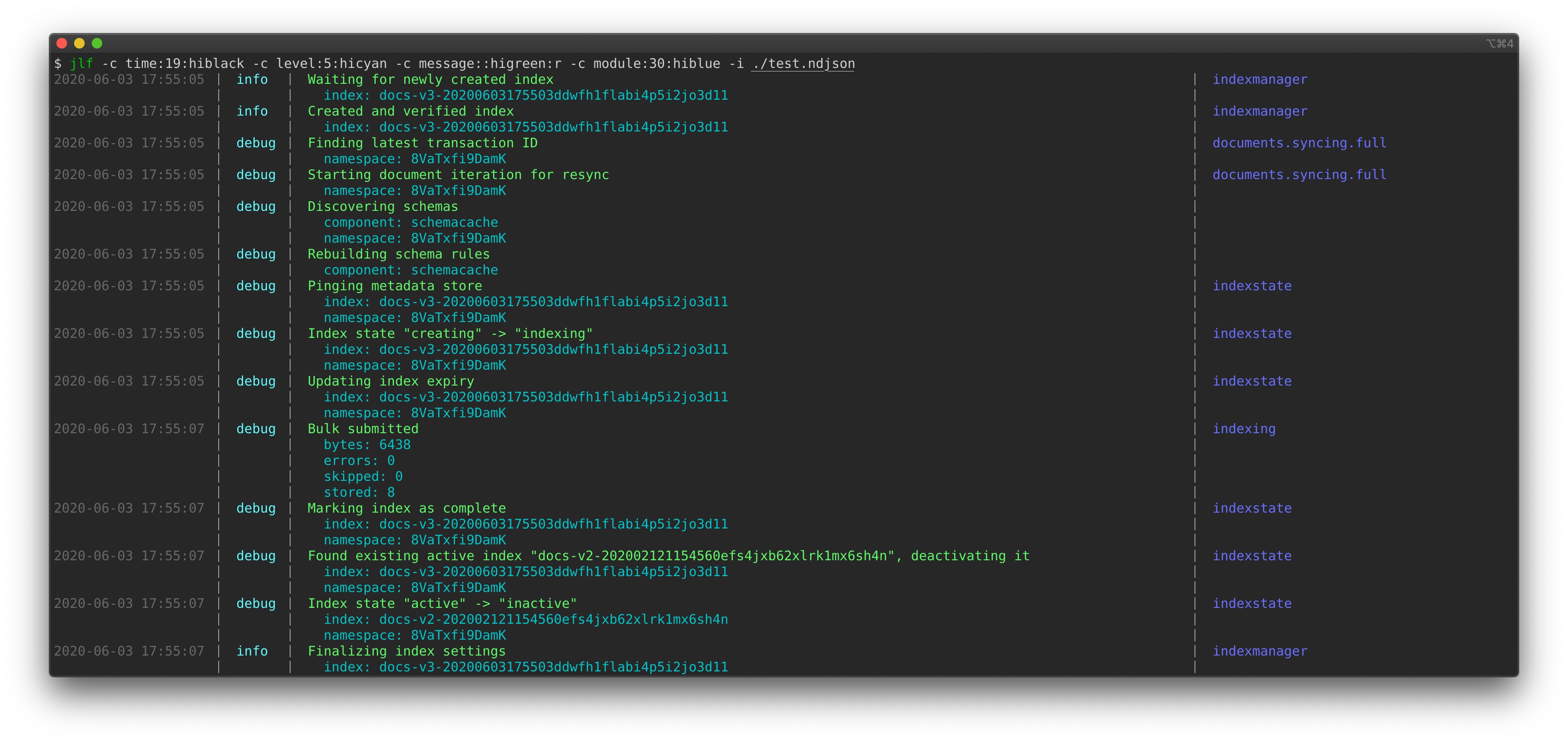
`jlf` is a simple formatter that takes streams of JSON, formatting is a readable table. For example, the above screenshot is a rendering of [this](https://gist.github.com/atombender/0868a9c1638ab3bb979b5b9a06807a11) data.
## Installation
Git clone and then `go install .` (requires Go >= 1.13).
## Usage
You can invoke `jlf` with one or more file names, or simply pipe to it. Other flags:
* `-i` or `--include-rest`: Devote the last column to rest of fields that don't have columns specified.
* `-c=COLUMN` or `--column=COLUMN`: Specify a column. Can be specified multiple times. See below.
### Column format
One or more columns must be specified. Each column has this format:
```
--column=myField:100:blue:r
| | | |
| | | extra options (see below)
| | |
field name | color
| (blank means default)
|
width
(blank means auto)
```
Some examples:
* `--column=myField`
* `--column=myField:100`
* `--column=myField::blue`
* `--column=myField:100:blue`
* `--column=myField:100:blue:r`
Specifying one or more columns without a width will try fill up the full terminal width evenly.
The special column name `...` can be used. It will evaluate to all the other fields that have not been specified, formatted like so:
```
field1: foo
field2: bar
```
#### Column options
* `r`: If `--include-rest`, merge rest of fields into this column.
#### Colors
* `black`
* `red`
* `green`
* `yellow`
* `blue`
* `magenta`
* `cyan`
* `white`
* `hiblack`
* `hired`
* `higreen`
* `hiyellow`
* `hiblue`
* `himagenta`
* `hicyan`
* `hiwhite`