https://github.com/atomjoy/git-upstream
Jak utworzyć upstream w repozytorium git.
https://github.com/atomjoy/git-upstream
git-upstream
Last synced: 18 days ago
JSON representation
Jak utworzyć upstream w repozytorium git.
- Host: GitHub
- URL: https://github.com/atomjoy/git-upstream
- Owner: atomjoy
- Created: 2026-04-19T10:55:49.000Z (2 months ago)
- Default Branch: main
- Last Pushed: 2026-04-19T11:42:13.000Z (2 months ago)
- Last Synced: 2026-04-19T12:32:31.046Z (2 months ago)
- Topics: git-upstream
- Homepage: https://github.com/atomjoy/git-upstream
- Size: 12.7 KB
- Stars: 0
- Watchers: 0
- Forks: 0
- Open Issues: 0
-
Metadata Files:
- Readme: README.md
Awesome Lists containing this project
README
          # Git upstream

Jak utworzyć upstream w repozytorium git.

## Klonowanie repozytorium

Do testów musisz podisdać dwa konta na github z dodanymi publicznymi kluczami ssh. Klucze dodasz w panelu w ustawieniach na github.com.

```sh

# Get repo

git clone git@github.com:username/demo.git

git clone https://github.com/username/demo.git

# Change repo origin when you clone with https://github.com/username/demo.git

git remote remove origin

git remote add origin git@github.com:username/demo.git

```

## Uprawnienia dla VsCode

```sh

# Allow repo from different windows user

git config --global --add safe.directory C:/github/username/repo-name

```

## Tworzenie kluczy ssh

```sh

# Main account github ssh key in id_ed25519

ssh-keygen -t ed25519 -C "username"

# Second github account ssh key for @example github user

ssh-keygen -t ed25519 -C "example" -f ~/.ssh/example_ed25519

```

## Konfiguracja repozytorium bez ssh config

Uruchom w katalogu repozytorium.

```sh

# Dodaj login z githuba

git config user.name "username"

git config user.email "your_github_email_address"

# Dodaj klucz prywatny dodany do konta githuba

git config core.sshCommand "ssh -o IdentitiesOnly=yes -i ~/.ssh/username_ed25519"

# Dodaj klucz publiczny

git config user.signingKey "~/.ssh/username_ed25519.pub"

# Lista ustawień (zamknij przez :q)

git config --list

```

## Konfiguracja z ssh config

Dodaj w pliku konfiguracyjnym ssh **~/.ssh/config** ustawienia dla kluczy prywatnych.

```sh

# Main account @username

Host username username-github.com

  User git

  HostName github.com

  IdentityFile ~/.ssh/id_ed25519

  IdentitiesOnly yes

# Account @example

Host example example-github.com

  User git

  HostName github.com

  IdentityFile ~/.ssh/example_ed25519

  IdentitiesOnly yes

```

### Jak używać hostów z ssh config

```sh

# Change origin in local repository for git cli

git remote add origin git@username:username/demo.git

git remote add origin git@username-github.com:username/demo.git

```

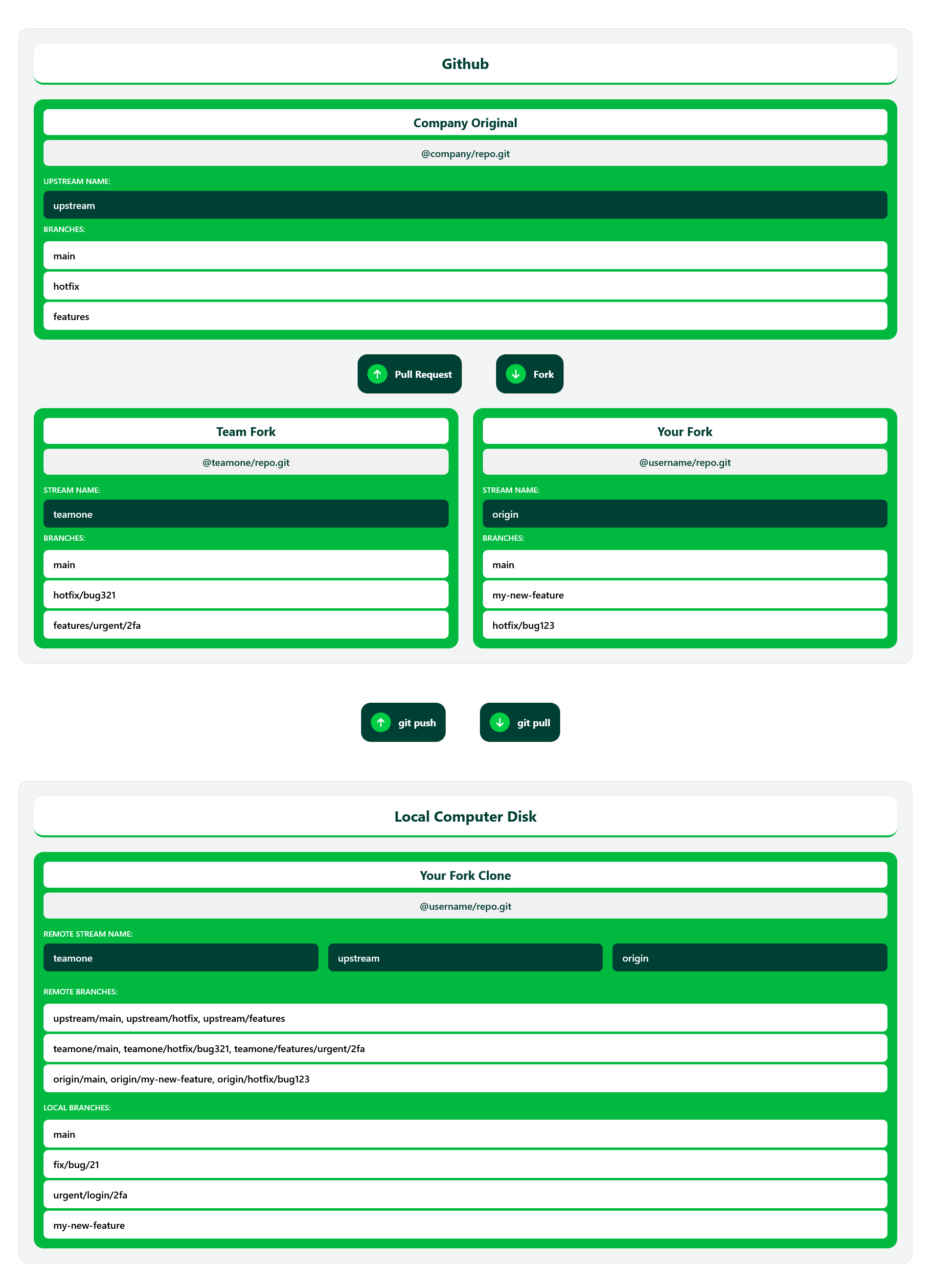
## Budowanie nowej funkcjonalności (contribute)

1. Fork the company repository

2. Create your feature branch **git checkout -b my-new-feature**

3. Create and test a new feature, then add it to the staging area **git add .**

4. Commit your changes to the branch **git commit -am 'Add some feature'**

5. Push to the branch **git push origin my-new-feature**

6. Create new Pull Request from GitHub page

```sh

# Once you push a new branch up to your repository.

# Github will prompt you to create a pull request from page.

# If not, log in to github and do it yourself.

remote: Create a pull request for 'branch-name' on GitHub by visiting:

remote:      https://github.com/your-user/fork-repo-url/pull/new/branch-name

remote:

To github.com:your-user/fork-repo-url.git

 * [new branch-name]      branch-name -> branch-name

```

## Polecenia git

Kilka istotnych poleceń git.

### Pobieranie zmian z głównego repo przed push

```sh

# Check origins list

git remote -v

# Add upstream to repo (or with https)

git remote add upstream git@github.com:company/repo-name.git

# Pull code from upstream to main branch

git pull upstream main

# Or with rebase not merge

git pull upstream main --rebase

# Remove upstream with

git remote remove upstream

```

### Sprawszanie listy gałęzi

```sh

# Check branch list

git branch

# Check branch list with origin

git branch -r

# Change branch to main

git checkout main

```

### Dodawanie gałęzi

```sh

# Create branch (no nested branch in git)

git checkout -b fix/bug1

git checkout -b fix/bug2

# A branch that looks like it's nested

git checkout -b fix/bug1/func1

git checkout -b fix/bug1/func2

# Create branch bug3 from bug1

git checkout -b fix/bug3 fix/bug1/func1

```

### Usuwanie lokalnych gałęzi (z dysku)

```sh

# Delete from local

git branch -d my-new-feature

# Force delete from local

git branch -D my-new-feature

```

### Usuwanie zdalnych gałęzi (z githuba)

```sh

git push -d origin my-new-feature

```

### Dodawanie do gałęzi

```sh

# Add file to the staging area

git add .

# Commit it to your branch --amend

git commit -am "Add some feature"

```

### Wysyłanie zmian do repo

```sh

git push

git push origin my-new-feature

git push origin main

git push --force

git push --tags

```

### Pobieranie zmian z repo

```sh

git fetch

git fetch

git fetch origin my-new-branch

git fetch origin main

git fetch upstream main

git fetch upstream upstream/feature_branch

git fetch upstream main --tags

git fetch upstream main --prune

```

### Integruje pobrane migawki z lokalnym repo

```sh

# Merge branch

git merge

git merge my-new-branch

git merge origin/main

git merge upstream/main

git merge upstream/feature_branch

# Merge branch fix1 into fix2

git merge fix1 fix2

# Or use rebase

git rebase origin/main

git rebase upstream/main

```

### Usuwanie wprowadzonych zmian w repo przy konfliktach z pull

```sh

# Reset changes

git reset

git reset -–hard

git stash --include-untracked

git clean -fd

# Cancel a merge that had conflicts

git merge --abort

```

### Pull to fetch i merge w jednym poleceniu

```sh

# Fetch and merge in one

git pull

# Git pull z rebase a nie merge

git pull --rebase

# Git pull z fast-forward

git pull --ff-only upstream main

# Git pull ze wszystkich zdalnych gałęzi

git pull --all

```

### Status i logowanie

```sh

# Check status

git status

# Log changes in console

git log origin/main

# Check fetched data

git checkout FETCH_HEAD

```

### Dodaj tag do repozytorium

```sh

# Show tags

git tag

# Add tag

git tag 1.1

# With comment

git tag -a  -m "Your message here"

# Push to repo

git push origin --tags

git push origin

```

## Git upstream image