https://github.com/attentionmech/mav
Model Activity Visualiser
https://github.com/attentionmech/mav
large-language-models machine-learning visualization
Last synced: 5 months ago
JSON representation
Model Activity Visualiser
- Host: GitHub
- URL: https://github.com/attentionmech/mav
- Owner: attentionmech
- License: mit
- Created: 2025-03-26T23:54:39.000Z (about 1 year ago)
- Default Branch: main
- Last Pushed: 2025-04-09T02:17:48.000Z (about 1 year ago)
- Last Synced: 2025-11-27T17:11:07.223Z (7 months ago)
- Topics: large-language-models, machine-learning, visualization
- Language: Python
- Homepage: https://pypi.org/project/openmav/
- Size: 5.99 MB
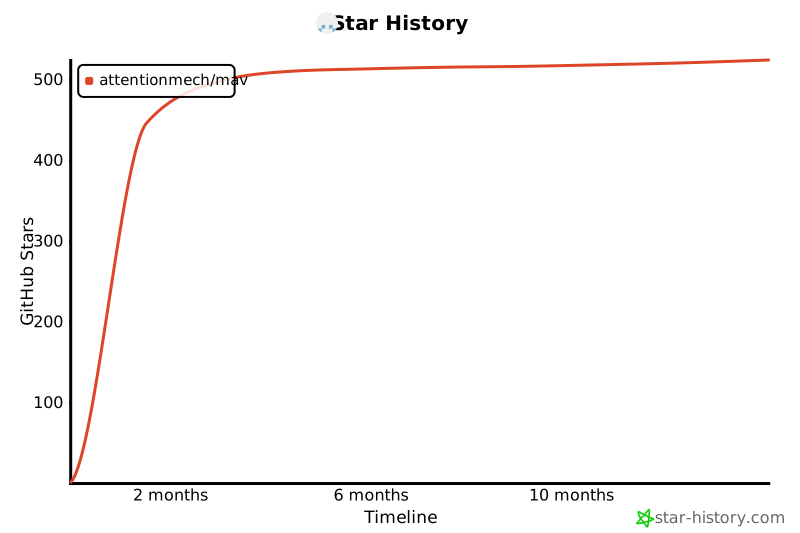
- Stars: 519
- Watchers: 8
- Forks: 40
- Open Issues: 0
-
Metadata Files:
- Readme: README.md
- License: LICENSE
Awesome Lists containing this project
- StarryDivineSky - attentionmech/mav
README





# MAV - Model Activity Visualiser
> **Visualize the internal workings of Large Language Models as they generate text**

## 🚀 Getting Started
### Method 1: Using `uv` (Recommended)
```sh
# Run with PyPI package
uv run --with openmav mav
# Or run directly from GitHub
uv run --with git+https://github.com/attentionmech/mav mav --model gpt2 --prompt "hello mello"
```
**Note**: You can replace `gpt2` with any other Hugging Face model compatible with transformers:
- `HuggingFaceTB/SmolLM-135M`
- `gpt2-medium`
- `gpt2-large`
- `meta-llama/Llama-3.2-1B`
For gated repos, ensure you have done `huggingface-cli login` and your environment has access to it.
### Method 2: Using `pip`
1. Set up and activate a virtual environment
2. Install the package:
```sh
# From PyPI
pip install openmav
# Or from GitHub
pip install git+https://github.com/attentionmech/mav
```
3. Run the visualizer:
```sh
mav --model gpt2 --prompt "hello mello"
```
4. Or import in your code:
```python
from openmav.mav import MAV
MAV("gpt2", "Hello")
```
### Method 3: Local Development
1. Clone the repository:
```sh
git clone https://github.com/attentionmech/mav
cd mav
```
2. Set up and activate a virtual environment
3. Install in development mode:
```sh
pip install .
```
4. Run the visualizer:
```sh
mav --model gpt2 --prompt "hello mello"
```
### Method 4: Jupyter Notebook/Colab

## 📚 Documentation & Tutorials
### Documentation
Check out the [documentation.md](documentation.md) file for detailed information.
### Tutorials
#### Custom Plugin Development
#### Advanced Usage Examples
```sh
# Run MAV with a training loop and custom model
uv run examples/test_vis_train_loop.py
# Run with custom panel configuration
uv run --with git+https://github.com/attentionmech/mav mav \
--model gpt2 \
--num-grid-rows 3 \
--selected-panels generated_text attention_entropy top_predictions \
--max-bar-length 20 \
--refresh-rate 0 \
--max-new-tokens 10000
```
## 🎥 Demos
- [Basic plugins](https://x.com/attentionmech/status/1906769030540824963)
- [Interactive mode](https://x.com/attentionmech/status/1905732784314081511)
- [Limit characters](https://x.com/attentionmech/status/1905760510445850709)
- [Sample with temperature](https://x.com/attentionmech/status/1905886861245259857)
- [Running with custom model](https://x.com/attentionmech/status/1906172982294376755)
- [Panel selection](https://x.com/attentionmech/status/1906304032798339124)
- [Running in Colab notebook](https://x.com/attentionmech/status/1906657159355789593)
> **Note**: Explore additional options using the command line help, as many sampling parameters are exposed.
## 👥 Contributing
Clone the repository and install the package in development mode:
```sh
git clone https://github.com/attentionmech/mav
cd mav
# Using uv (recommended)
uv sync
# Or using pip
pip install -e .
```
## 📝 Citation
```
@article{attentionmech2025openmav,
title={OpenMAV: Model Activity Visualiser},
author={attentionmech},
year={2025}
}
```
## 🧠 Trivia
This project started from a small tweet while testing a simple terminal ui loop: tweet
## ⭐ Star History
[](https://www.star-history.com/#attentionmech/mav&Timeline)