https://github.com/atypicalim/elkatip
This is a Uyghur language text convert tool to display the text in gui programs ...
https://github.com/atypicalim/elkatip
alkatip convert converter elkatip graphic uighur uyghur
Last synced: 10 months ago
JSON representation
This is a Uyghur language text convert tool to display the text in gui programs ...
- Host: GitHub
- URL: https://github.com/atypicalim/elkatip
- Owner: Atypicalim
- License: mit
- Created: 2020-06-06T10:54:24.000Z (about 6 years ago)
- Default Branch: master
- Last Pushed: 2024-08-29T12:38:07.000Z (almost 2 years ago)
- Last Synced: 2025-09-20T02:58:45.860Z (10 months ago)
- Topics: alkatip, convert, converter, elkatip, graphic, uighur, uyghur
- Language: Python
- Homepage:
- Size: 40 KB
- Stars: 14
- Watchers: 1
- Forks: 6
- Open Issues: 1
-
Metadata Files:
- Readme: README.md
- License: LICENSE
Awesome Lists containing this project
README
# Elkaptip
## 0. Description
> This is a Uyghur text convert tool for gui. sometimes u want to display uyghur language in graphic softwares like photoshop or game engines like cocos2dx and unity3d, and u may find chat the characters displayed is not connecting each other. this time u will neet this tool to convert the common uyghur language text and display the converted language.
## 1. Installing
```python
pip install elkatip # python3
```
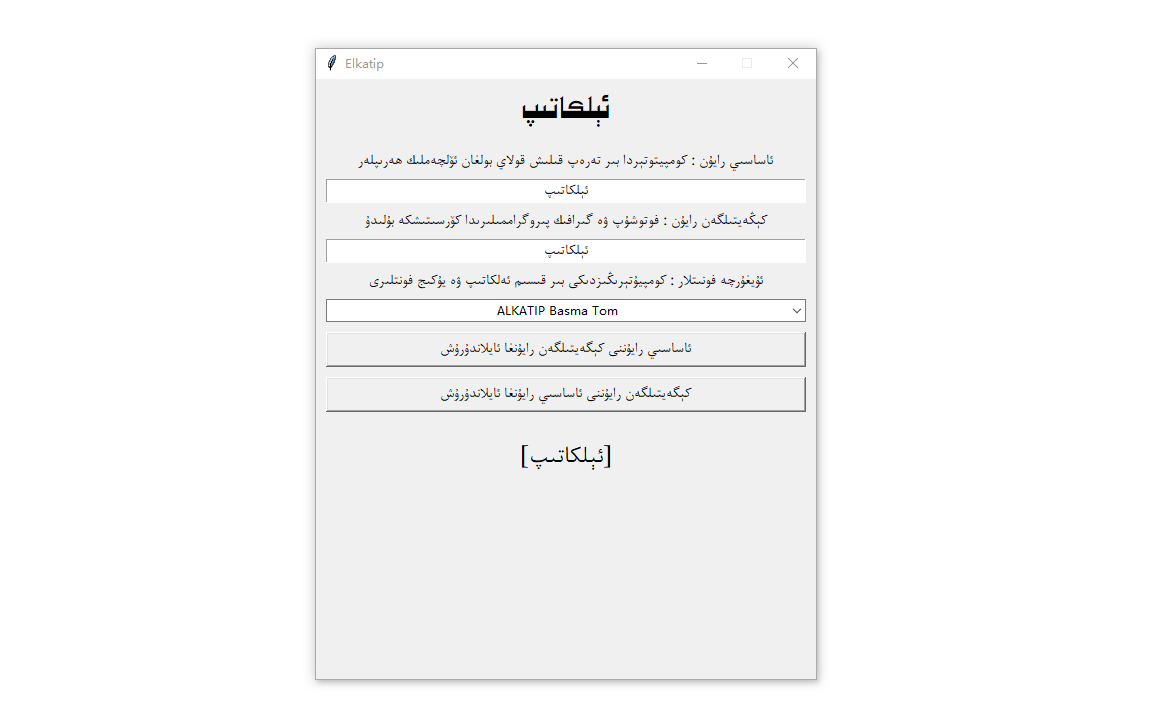
## 2. Use of graphical interface
> if u only want to convert some texts to show in graphic softwares like ps , u can use the gui program to do that. u can start the gui program by `python elkatip` comand in root directory or create your own script and show it like this:
```python
from elkatip inport Elkatip
ktp = Elkatip()
ktp.showGui()
```
## 3. Use of program interface
> if u want to display lots of text in your game or watemark in a photo, then u can use the the string converted by this tool.
```python
from elkatip inport Elkatip
ktp = Elkatip()
uyghurqa1 = "" # the common unicode base area string
uighurche1 = ktp.toExt(uyghurqa1) # the unicode extended area string
uighurche2 = "" # the unicode extended area string
uyghurqa2 = ktp.toBase(uighurche2) # the common unicode base area string
```
> note: uyghurqa1 and uyghurqa2 are the common text typed by modern input method. and uighurche1 and uighurche2 are the extended area string which u can dislay normally in a graphic program
## 4. others
* https://github.com/xirwajim/UyghurCharUtilities
* https://github.com/Alimjan2009/uyghur_convert_util
* https://github.com/almasgeek/UyghurLanguage
* https://github.com/menzil/uyghur-unicode-letters
* https://github.com/Uyghur-LRs/Uyghur-Wordlist
* https://github.com/mardan/Uyghur-SpellChecking-Lib
* https://github.com/neouyghur/fonts-for-uyghur-arabic-script
* https://github.com/gheyret/test_word2vec_uyghur
* https://github.com/neouyghur/uyghur-text-to-speech
* https://github.com/UyghurDev/Yulghun-vkb
* https://github.com/azmat21/Syllabification-for-Uyghur
* https://github.com/neouyghur/Multiple-Uyghur-Script-Converter
* https://github.com/mardan/Uyghur-Tokenizer
* https://github.com/UyghurDev/UySort
## 5. At the end
> honestly, this tool is a java utils when i found it, and i need a python version. so i had to implement the python version myself, and i dont want u to do the same thing i did. hope it is helpful for u.