https://github.com/aurorax-neo/chat2api
chat2api
https://github.com/aurorax-neo/chat2api
api chat gpt
Last synced: about 1 month ago
JSON representation
chat2api
- Host: GitHub
- URL: https://github.com/aurorax-neo/chat2api
- Owner: aurorax-neo
- Created: 2024-04-03T15:36:45.000Z (over 2 years ago)
- Default Branch: master
- Last Pushed: 2026-06-05T12:06:45.000Z (about 1 month ago)
- Last Synced: 2026-06-05T13:09:06.561Z (about 1 month ago)
- Topics: api, chat, gpt
- Language: Go
- Homepage: https://chat2api-seven.vercel.app
- Size: 338 KB
- Stars: 517
- Watchers: 7
- Forks: 86
- Open Issues: 0
-
Metadata Files:
- Readme: README.md
Awesome Lists containing this project
README
# chat2api
秽土转生 `free-gpt3.5-2api` -> `chat2api`.
把 ChatGPT Web 侧能力转换为兼容 OpenAI 风格的 HTTP API。
## 支持能力
- `POST /v1/chat/completions`:兼容 Chat Completions,请求支持普通 JSON 与 stream。
- `POST /v1/responses`:兼容 Responses API 文本链路,请求支持普通 JSON 与 stream。
- Responses 流会先发 `response.created` 和 `response.in_progress`,再推 `output_item.added` / `delta` / `completed`,更适合 CLI / Codex 这类依赖状态事件的客户端。
- Function Calling:兼容 OpenAI `tools`/`tool_choice`、旧版 `functions`/`function_call`,支持多工具调用、工具结果回填与流式 tool calls。
- `GET /v1/accTokens`:查看配置账号池可用数量。
- 本地 `sk-` auth key:使用配置文件中的 `chatgpts` 账号池请求上游。
- 可选私有前缀直传 access token:配置 `auth.access_token_prefix` 后,可跳过账号池直接请求上游;未配置时默认关闭。
说明:当前版本不再做模型映射,`model` 会直接传给上游;请求中未传 `model` 时默认使用 `auto`。
## 配置
服务读取 `conf/app..yaml`,`ENV` 默认为 `dev`,因此本地默认读取 `conf/app.dev.yaml`。
仓库提供了配置模板 `conf/app.demo.yaml`。本地运行时可以复制为 `conf/app.dev.yaml`;Docker Compose 运行时可以复制为 `.chat2api/conf/app.dev.yaml`,因为 compose 会把 `.chat2api/conf` 映射到容器内的 `/app/conf`。
当前版本的业务配置以 YAML 文件为准,环境变量只用于选择配置文件:
| 环境变量 | 默认值 | 作用 |
| --- | --- | --- |
| `ENV` | `dev` | 决定读取哪个配置文件,例如 `ENV=prod` 会读取 `conf/app.prod.yaml`。 |
常见配置文件对应关系:
| 启动方式 | 读取文件 |
| --- | --- |
| `go run ./cmd` | `conf/app.dev.yaml` |
| `ENV=test go run ./cmd` | `conf/app.test.yaml` |
| `ENV=prod go run ./cmd` | `conf/app.prod.yaml` |
```yaml
log_level: debug
log_path: logs
log_file: app.dev.log
bind: 127.0.0.1
port: 3040
auth:
access_tokens:
- sk-your-local-key
# 默认关闭直传真实 access token。
# 如需启用,请配置私有且难猜的前缀,例如:
# access_token_prefix:
# - your-private-prefix-
access_token_prefix: []
proxy: http://127.0.0.1:7890
chatgpt_base_url: https://chatgpt.com
chatgpts:
- id_token: optional_id_token
access_token: real_access_token
refresh_token: optional_refresh_token
account_id: optional_account_id
last_refresh: ""
email: optional_email
type: codex
expired: ""
proxy: ""
```
关键规则:
- `auth.access_tokens` 保存裸 token,不要写 `Bearer`;请求时仍使用标准的 `Authorization: Bearer `。
- `auth.access_token_prefix` 配置直传真实 access token 的前缀;默认空列表会关闭直传模式。启用后,请求头里的 `Bearer ` 会跳过账号池,并把去掉 `` 后的真实 access token 传给上游。前缀务必使用私有且难猜的值。
- 如果 `auth.access_tokens` 为空,服务启动时会随机生成一个 `sk-` token,写回配置文件,并在日志中打印 `current auth: ...`。
- `chatgpts` 是账号池配置,每个账号只有 `access_token` 是必要配置;`proxy`、`id_token`、`refresh_token`、`email` 等字段都是可选字段。
- `chatgpts[].access_token` 是账号池的真实上游 access token。通过本地 `sk-` key 请求时会从这里选择账号。
- 代理优先级为账号代理优先:`chatgpts[].proxy` 不为空时使用账号代理;为空时回退到全局 `proxy`。
- `chatgpt_base_url` 为空时默认使用 `https://chatgpt.com`。
## 运行
本地运行:
```bash
go run ./cmd
```
## Web 管理
服务启动后,可以打开 `http://:/admin` 管理 YAML 配置里的本地 API key、access token 直传前缀、全局代理,以及 `chatgpts` 账号池。
- 管理 API 只接受配置文件中的 `auth.access_tokens` 作为登录密钥,不接受 `access_token_prefix` 直传 token。
- 页面不会回显真实 token,已保存的密钥只显示遮罩值;输入框留空会保留原值,填新值才会覆盖。
- 保存时会先写出 `conf/app..yaml.bak` 备份,再更新当前 `conf/app..yaml`。本地和 Docker 运行时配置监听器会重载账号池;serverless/Vercel 环境不支持在页面中写回配置文件。
指定环境运行,例如读取 `conf/app.prod.yaml`:
```bash
ENV=prod go run ./cmd
```
Docker Compose:
```bash
docker compose up -d
```
### Linux 升级
已经装过旧版本时,通常这样更新:
```bash
# 源码目录
git pull --ff-only
go build -o chat2api ./cmd
# 然后重启你的服务进程或 systemd 服务
```
```bash
# Docker Compose
docker compose pull
docker compose up -d
```
```bash
# 二进制部署
# 停掉旧进程后,替换成最新发布版二进制,再启动
```
升级时保留 `conf/` 和 `logs/` 即可,配置和日志都在挂载卷里。源码目录更新后,重启进程最稳。
Vercel 运行时不会写入配置文件,也不会默认读取仓库里的 `conf/app.dev.yaml`,避免把本地代理或本地账号配置带到云端。下面这些业务环境变量只在 Vercel/serverless 初始化时读取;本地运行和 Docker Compose 仍以 YAML 配置为准。
请在 Vercel 环境变量中配置:
| 环境变量 | 作用 |
| --- | --- |
| `AUTH_TOKENS` | 本地 API key,多个值用逗号、分号或换行分隔 |
| `ACCESS_TOKEN_PREFIX` / `ACCESS_TOKEN_PREFIXES` | 可选,直传真实 access token 的私有前缀,多个值用逗号、分号或换行分隔;不配置则关闭直传模式 |
| `CHATGPT_ACCESS_TOKENS` | 上游 ChatGPT access token,多个值用逗号、分号或换行分隔 |
| `PROXY` | 可选,全局代理 |
| `CHATGPT_BASE_URL` | 可选,默认 `https://chatgpt.com` |
| `LOG_LEVEL` | 可选,默认 `debug` |
| `VERCEL_CONFIG_FILE` | 可选,显式指定要读取的 YAML 配置文件路径,例如 `conf/app.prod.yaml` |
`ACCESS_TOKEN_PREFIXES` 示例:
```text
ACCESS_TOKEN_PREFIXES=your-private-prefix-,another-private-prefix-
```
如果配置了上面的第一个前缀,请求时这样使用:
```bash
curl https://your-vercel-domain.vercel.app/v1/chat/completions \
-H 'Authorization: Bearer your-private-prefix-' \
-H 'Content-Type: application/json' \
-d '{"model":"auto","messages":[{"role":"user","content":"ping"}]}'
```
默认 `compose.yaml` 将容器 `3040` 端口映射到宿主机 `7846`,并映射本地配置与日志目录:
```yaml
volumes:
- .chat2api/conf:/app/conf
- .chat2api/logs:/app/logs
```
容器内工作目录是 `/app`,因此默认会读取 `/app/conf/app.dev.yaml`,也就是宿主机的 `.chat2api/conf/app.dev.yaml`。如需让容器读取其他环境配置,可以在 `compose.yaml` 中增加 `ENV`:
```yaml
environment:
- ENV=prod
```
此时容器会读取宿主机映射进去的 `.chat2api/conf/app.prod.yaml`。
## 接口示例
下面示例以本地开发配置 `127.0.0.1:3040` 为例。
### 查看账号池
```bash
curl http://127.0.0.1:3040/v1/accTokens \
-H 'Authorization: Bearer sk-your-local-key'
```
返回中的 `count` 是账号池账号数量,`canUseCount` 是当前可用账号数量。
### Chat Completions
使用配置账号池:
```bash
curl http://127.0.0.1:3040/v1/chat/completions \
-H 'Authorization: Bearer sk-your-local-key' \
-H 'Content-Type: application/json' \
-d '{"model":"auto","messages":[{"role":"user","content":"ping"}]}'
```
配置私有前缀后,可以直传真实 access token 并跳过账号池:
```yaml
auth:
access_token_prefix:
- your-private-prefix-
```
```bash
curl http://127.0.0.1:3040/v1/chat/completions \
-H 'Authorization: Bearer your-private-prefix-' \
-H 'Content-Type: application/json' \
-d '{"model":"auto","messages":[{"role":"user","content":"ping"}]}'
```
流式返回:
```bash
curl http://127.0.0.1:3040/v1/chat/completions \
-H 'Authorization: Bearer sk-your-local-key' \
-H 'Content-Type: application/json' \
-d '{"model":"auto","stream":true,"messages":[{"role":"user","content":"ping"}]}'
```
Function Calling:
下面示例用 `tool_choice` 强制调用 `get_weather`,适合快速验证 Function Calling 是否生效。
```bash
curl http://127.0.0.1:3040/v1/chat/completions \
-H 'Authorization: Bearer sk-your-local-key' \
-H 'Content-Type: application/json' \
-d '{
"model":"auto",
"messages":[{"role":"user","content":"查一下杭州天气"}],
"tools":[{
"type":"function",
"function":{
"name":"get_weather",
"description":"查询指定城市天气",
"parameters":{
"type":"object",
"properties":{"city":{"type":"string"}},
"required":["city"]
}
}
}],
"tool_choice":{"type":"function","function":{"name":"get_weather"}}
}'
```
如果想让模型自行判断是否需要调用工具,把 `tool_choice` 改为:
```json
"auto"
```
成功时返回里会出现:
```json
{
"choices": [
{
"message": {
"role": "assistant",
"content": null,
"tool_calls": [
{
"id": "call_xxx",
"type": "function",
"function": {
"name": "get_weather",
"arguments": "{\"city\":\"杭州\"}"
}
}
]
},
"finish_reason": "tool_calls"
}
]
}
```
客户端执行工具后,把工具结果带回下一轮即可让模型继续生成最终回答。第二轮可以继续带 `tools`,也可以只带消息历史;服务会把 `assistant.tool_calls` 和 `role=tool` 转成 ChatGPT Web 侧可理解的普通上下文文本再发给上游。
注意:与 Toolify 保持一致,`role=tool` 必须带 `tool_call_id`,并且消息历史里必须包含对应的上一轮 `assistant.tool_calls`;否则会返回 400,避免工具结果失去工具名和参数上下文。
```bash
curl http://127.0.0.1:3040/v1/chat/completions \
-H 'Authorization: Bearer sk-your-local-key' \
-H 'Content-Type: application/json' \
-d '{
"model":"auto",
"messages":[
{"role":"user","content":"杭州现在天气怎么样?"},
{
"role":"assistant",
"content":null,
"tool_calls":[{
"id":"call_demo_weather",
"type":"function",
"function":{
"name":"get_weather",
"arguments":"{\"city\":\"杭州\"}"
}
}]
},
{
"role":"tool",
"tool_call_id":"call_demo_weather",
"content":"杭州晴,26℃,东风 2 级。"
}
],
"tools":[{
"type":"function",
"function":{
"name":"get_weather",
"description":"查询指定城市天气",
"parameters":{
"type":"object",
"properties":{"city":{"type":"string"}},
"required":["city"]
}
}
}]
}'
```
流式 Function Calling 同样支持:
```bash
curl -N http://127.0.0.1:3040/v1/chat/completions \
-H 'Authorization: Bearer sk-your-local-key' \
-H 'Content-Type: application/json' \
-d '{
"model":"auto",
"stream":true,
"messages":[{"role":"user","content":"杭州现在天气怎么样?"}],
"tools":[{
"type":"function",
"function":{
"name":"get_weather",
"description":"查询指定城市天气",
"parameters":{
"type":"object",
"properties":{"city":{"type":"string"}},
"required":["city"]
}
}
}],
"tool_choice":{"type":"function","function":{"name":"get_weather"}}
}'
```
兼容旧版 Chat Completions Function Calling 参数:`functions` 会自动转换为 `tools`,`function_call` 会自动转换为 `tool_choice`。
### Responses
普通文本请求:
```bash
curl http://127.0.0.1:3040/v1/responses \
-H 'Authorization: Bearer sk-your-local-key' \
-H 'Content-Type: application/json' \
-d '{"model":"auto","input":"ping"}'
```
带 instructions:
```bash
curl http://127.0.0.1:3040/v1/responses \
-H 'Authorization: Bearer sk-your-local-key' \
-H 'Content-Type: application/json' \
-d '{"model":"auto","instructions":"用中文回答","input":"ping"}'
```
流式返回:
```bash
curl http://127.0.0.1:3040/v1/responses \
-H 'Authorization: Bearer sk-your-local-key' \
-H 'Content-Type: application/json' \
-d '{"model":"auto","stream":true,"input":"ping"}'
```
`/v1/responses` 文本链路同样支持 `function` tools;`image_generation` 工具会走图片生成兼容链路。
Responses Function Calling:
```bash
curl http://127.0.0.1:3040/v1/responses \
-H 'Authorization: Bearer sk-your-local-key' \
-H 'Content-Type: application/json' \
-d '{
"model":"auto",
"input":"杭州现在天气怎么样?",
"tools":[{
"type":"function",
"name":"get_weather",
"description":"查询指定城市天气",
"parameters":{
"type":"object",
"properties":{"city":{"type":"string"}},
"required":["city"]
}
}],
"tool_choice":{"type":"function","name":"get_weather"}
}'
```
返回的 `output` 中会包含 `type=function_call` 的条目,字段包括 `call_id`、`name` 和 `arguments`。
## 错误排查
- `401 Incorrect API key`:本地 key 模式检查请求头是否为 `Authorization: Bearer sk-your-local-key`,以及配置里的 `auth.access_tokens` 是否保存裸 token;`access_token_prefix` 模式检查请求头是否为 `Authorization: Bearer `,并确认私有前缀已配置且拼接正确。
- `turnstile token is required` 或 `turnstile token failed`:上游要求 Turnstile 校验,需确认账号 token、代理和上游访问环境是否可用。
- 账号池不可用:检查 `chatgpts[].access_token` 是否为空、是否过期,以及账号是否处于冷却时间。
- 代理不生效:先检查账号自己的 `chatgpts[].proxy`,它会优先于全局 `proxy`。
## 参考项目
- https://github.com/aurora-develop/aurora
- https://github.com/xqdoo00o/ChatGPT-to-API
- https://github.com/basketikun/chatgpt2api
- https://github.com/funnycups/Toolify
## Powered By
- codex
- [aurorax-neo](https://github.com/aurorax-neo)
## Friend Links
- [linux.do](https://linux.do/)
- [xiaozhou26](https://github.com/xiaozhou26)
## Sponsor

CDN acceleration and security protection for this project are sponsored by Tencent EdgeOne.
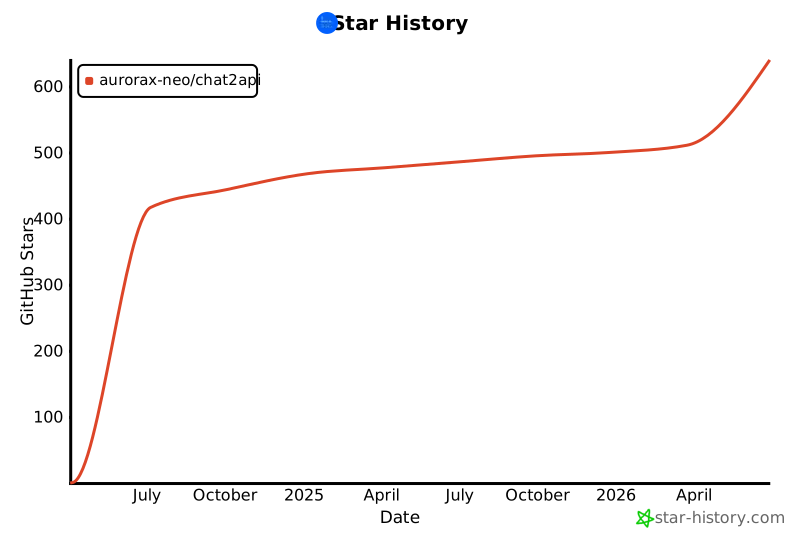
## Star History
[](https://star-history.com/#aurorax-neo/chat2api&Date)