https://github.com/austingebauer/devise
A fast, minimal, responsive Hugo theme for blogs.
https://github.com/austingebauer/devise
Last synced: about 1 year ago
JSON representation
A fast, minimal, responsive Hugo theme for blogs.
- Host: GitHub
- URL: https://github.com/austingebauer/devise
- Owner: austingebauer
- License: mit
- Created: 2019-06-21T05:59:52.000Z (about 7 years ago)
- Default Branch: main
- Last Pushed: 2024-11-08T18:00:07.000Z (over 1 year ago)
- Last Synced: 2025-02-08T20:23:59.038Z (over 1 year ago)
- Language: HTML
- Homepage: https://themes.gohugo.io/devise
- Size: 18.2 MB
- Stars: 111
- Watchers: 5
- Forks: 54
- Open Issues: 7
-
Metadata Files:
- Readme: README.md
- License: LICENSE
Awesome Lists containing this project
README
# Devise
A fast, minimal, responsive [Hugo](https://gohugo.io/) theme for blogs.
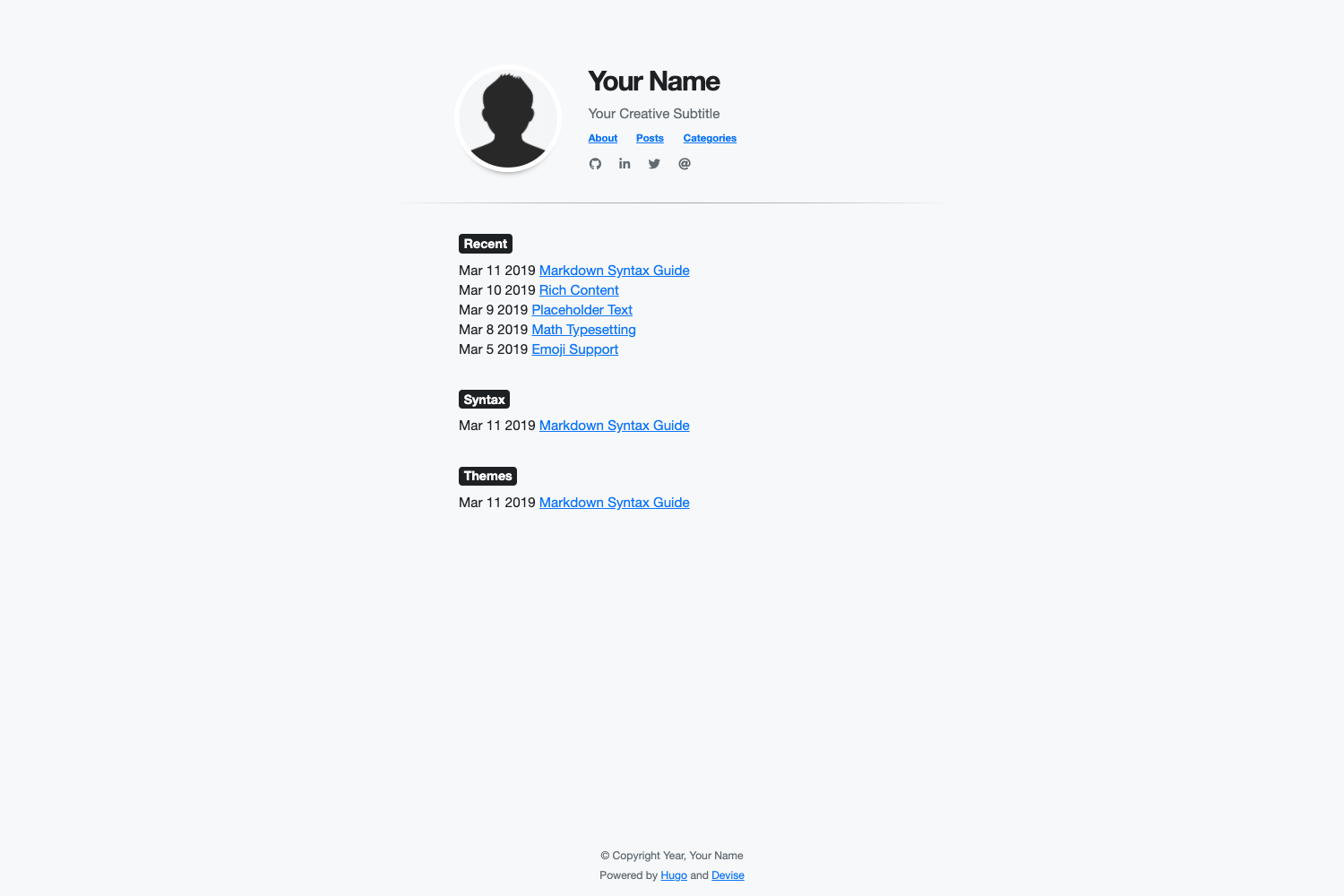
For a live demo of the theme, see at:
- [themes.gohugo.io/devise](https://themes.gohugo.io/devise)
- [austingebauer.dev](https://austingebauer.dev)
## Features
- All of Hugo's builtin [Content Management](https://gohugo.io/content-management/)
- Easy installation of [Google Analytics](https://analytics.google.com/analytics/web/provision/#/provision) via Hugo [configuration](https://gohugo.io/getting-started/configuration/) file
- Fast loading with a 95-100 score on [Google PageSpeed](https://developers.google.com/speed/pagespeed/insights/)
- Ability to use [Bootstrap 4](https://getbootstrap.com/docs/4.0/getting-started/introduction/) CSS classes via HTML/CSS in Markdown
- Ability to use [Font Awesome](https://fontawesome.com/) icons
- Ability to customize the theme styles via [Sass](https://sass-lang.com/)
- Ability to customize the following items via Hugo [configuration](https://gohugo.io/getting-started/configuration/) file
- Meta description
- Title
- Subtitle
- Image
- Image border color
- Navigation menu
- Social icons
- Last 'n' recent posts
- Background color
- Font family
- Font color
## Usage
This following guides installation, configuration, and updating of the Devise Hugo theme.
### Installation
Before installing this theme, be sure to [install Hugo](https://gohugo.io/getting-started/quick-start/)
and [create a new site](https://gohugo.io/getting-started/quick-start/#step-2-create-a-new-site).
To install the theme, run the following from the root directory of your Hugo site:
```bash
$ git submodule add https://github.com/austingebauer/devise.git themes/devise
```
### Configuration
Next, open the `config.toml` file in the root of your Hugo site and set the theme:
```toml
theme = "devise"
```
Example `config.toml` file with all configuration features filled out:
```toml
baseURL = "https://example.com"
title = "Your Website Title"
languageCode = "en-us"
theme = "devise"
relativeURLs = true
enableEmoji = true
googleAnalytics = ""
enableRobotsTXT = true
copyright = "© Copyright Year, Your Name"
# Main menu items
[menu]
[[menu.main]]
identifier = "about"
name = "About"
title = "About"
url = "/about/"
weight = -110
[[menu.main]]
identifier = "posts"
name = "Posts"
title = "Posts"
url = "/post/"
weight = -100
[[menu.main]]
identifier = "categories"
name = "Categories"
title = "Categories"
url = "/categories/"
weight = -90
# Configuration Features
[params]
description = "Your meta description" # Your meta description of the site
header_title = "Your Name" # Your header title
header_subtitle = "Your Creative Subtitle" # Your header subtitle
home_image = "/images/avatar.png" # Path to header image starting from the static directory (optional)
recent_posts = 5 # Max amount of recent posts to show
mainSections = ["posts", "post", "blog"] # Main sections to include in recent posts
[params.style] # CSS style overrides
backgroundColor = "#f8f9fa"
homeImageBorderColor = "#ffffff"
fontFamilyBase = "Helvetica Neue" # First-choice font
fontColor = "#212529"
[[params.social]]
fa_icon = "fab fa-github fa-1x" # Font Awesome icon class
href = "http://github.com/youruser" # Link to associate with icon (http://, https://, mailto:)
[[params.social]]
fa_icon = "fab fa-linkedin-in fa-1x"
href = ""
[[params.social]]
fa_icon = "fab fa-twitter fa-1x"
href = ""
[[params.social]]
fa_icon = "fas fa-at fa-1x"
href = ""
```
### Updating
To get updates to the theme, run the following from the root directory of your Hugo site:
```
$ git submodule update --remote themes/devise
```
### Adding Custom Styles
Adding custom styles to the devise theme is simple. There are two options
available for doing so.
#### Option 1:
In the `config.toml` file of your website, you can set the following custom style
parameters:
```toml
[params.style]
backgroundColor = "#f8f9fa"
homeImageBorderColor = "#ffffff"
fontFamilyBase = "Helvetica Neue"
fontColor = "#212529"
```
If you'd like to see other custom styles available as config parameters, please open an [issue](https://github.com/austingebauer/devise/issues).
#### Option 2:
To add custom [Sass](https://sass-lang.com/) styles to the devise theme, you'll
need to add the following file to the [assets](https://gohugo.io/hugo-pipes/introduction/#asset-directory)
directory of your site:
- `assets/sass/custom.scss`
In the file, you can use [Sass](https://sass-lang.com/) syntax to declare
your custom styles. After doing so, you should see custom styling added to
your devise based Hugo site.
## Demo
To run a live demo of the theme on your laptop, run the following from the `exampleSite` directory of the
devise theme:
```bash
hugo server --themesDir ../.. --watch --verbose --cleanDestinationDir --disableFastRender
```
For a live demo of the theme, see at:
- [themes.gohugo.io/devise](https://themes.gohugo.io/devise)
- [austingebauer.dev](https://austingebauer.dev)
## Contributing
If you have an idea for a new feature or found a bug, please feel free to use Github
[issues](https://github.com/austingebauer/devise/issues) to let me know.
## License
[MIT](LICENSE)