https://github.com/austintoddj/zip-calc
Zip Code Range and Distance Calculation Class
https://github.com/austintoddj/zip-calc
distance php postgresql radius zip-code
Last synced: over 1 year ago
JSON representation
Zip Code Range and Distance Calculation Class
- Host: GitHub
- URL: https://github.com/austintoddj/zip-calc
- Owner: austintoddj
- License: mit
- Created: 2015-11-03T16:14:37.000Z (over 10 years ago)
- Default Branch: master
- Last Pushed: 2018-11-22T04:52:53.000Z (over 7 years ago)
- Last Synced: 2025-03-18T18:21:48.508Z (over 1 year ago)
- Topics: distance, php, postgresql, radius, zip-code
- Language: PHP
- Homepage:
- Size: 3.38 MB
- Stars: 10
- Watchers: 2
- Forks: 2
- Open Issues: 1
-
Metadata Files:
- Readme: readme.md
- License: license
Awesome Lists containing this project
README
## About Zip-Calc
Zip-Calc was created to convert a PHP class written by [Quixotix](https://github.com/Quixotix/PHP-ZipCode-Class) in 2005 from MySQL to PostgreSQL. This class calculates the distance between U.S. zip codes and also finds all of the zip codes within a 9 given radius of a known zip code.
## Database
The `CREATE` syntax for the database table used in the example is as follows:
```sql
CREATE TABLE "public"."maps" (
zip_code_id SERIAL PRIMARY KEY,
zip_code TEXT NOT NULL,
city TEXT NOT NULL,
county TEXT NOT NULL,
state_name TEXT NOT NULL,
state_prefix TEXT NOT NULL,
area_code TEXT NOT NULL,
time_zone TEXT NOT NULL,
lat NUMERIC(10,7) NOT NULL,
lon NUMERIC(10,7) NOT NULL
);
```
## Installation
Install the project via [Composer](https://getcomposer.org):
```sh
composer create-project austintoddj/zip-calc
```
## Step 3: PgSQL Import
Once inside your database, import the `data/maps.sql` file included in the project. If you need some assistance on getting up and running with a PgSQL database, find out more on [Digital Ocean](https://www.digitalocean.com/community/tutorials/how-to-install-and-use-postgresql-on-ubuntu-14-04).
## Step 4: Update the Credentials
In the `example.php` file, you will need to update the `$connectionString`.
## Step 5: Run the Example
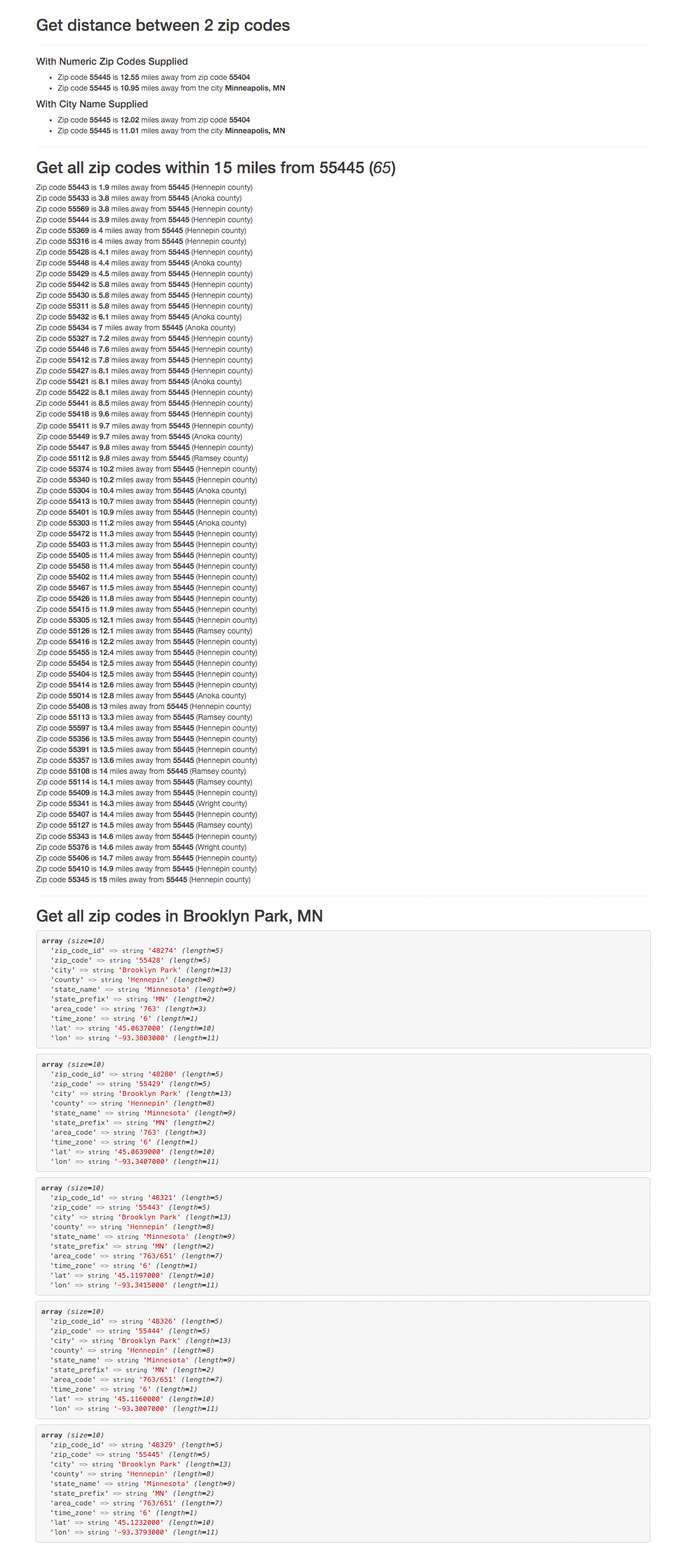
If you followed the steps up to this point correctly, you should see the following when you access `example.php` from a browser:
## License
Zip-Calc is open-sourced software licensed under the [MIT license](https://opensource.org/licenses/MIT).