https://github.com/autodesk-platform-services/aps-design-automation-nodejs
Sample tutorial project for APS Design Automation
https://github.com/autodesk-platform-services/aps-design-automation-nodejs
autodesk-designautomation nodejs tutorial
Last synced: 3 months ago
JSON representation
Sample tutorial project for APS Design Automation
- Host: GitHub
- URL: https://github.com/autodesk-platform-services/aps-design-automation-nodejs
- Owner: autodesk-platform-services
- Created: 2022-11-25T15:27:41.000Z (over 3 years ago)
- Default Branch: nodejs
- Last Pushed: 2025-01-28T11:02:36.000Z (over 1 year ago)
- Last Synced: 2025-03-31T00:11:41.658Z (over 1 year ago)
- Topics: autodesk-designautomation, nodejs, tutorial
- Language: JavaScript
- Homepage:
- Size: 10.4 MB
- Stars: 4
- Watchers: 4
- Forks: 4
- Open Issues: 1
-
Metadata Files:
- Readme: README.md
Awesome Lists containing this project
README
# APS Design Automation
[](https://nodejs.org/)
[](https://www.npmjs.com/)

[](http://opensource.org/licenses/MIT)
[](http://developer.autodesk.com/)
[](http://developer.autodesk.com/)
[](http://developer.autodesk.com/)

## Description
Webapp interface that uses Design Automation to update the `width` and `height` param of DWG Dynamic Block (using AutoCAD), RVT Window Family instance (using Revit), IPT Part parameters (using Inventor) and 3DS ... (using 3dsMax). Also includes a `Clear Account` (remove all AppBundles and Activities) and `Define new Activity` based on the sample code.
See other projects for bundles.
## Thumbnail
https://user-images.githubusercontent.com/6602398/204223085-41b11c3d-0d4b-4ae2-a7f6-d0038f74ecd1.mp4
### Setup
To use this sample, you will need Autodesk developer credentials. Visit the [APS Developer Portal](https://developer.autodesk.com), sign up for an account, then [create an app](https://developer.autodesk.com/myapps/create). For this new app, use `http://localhost:8080/api/aps/callback/oauth` as the Callback URL, although it is not used on a 2-legged flow. Finally, take note of the **Client ID** and **Client Secret**.
## Running locally
Install [NodeJS](https://nodejs.org).
Clone this project or download it. It's recommended to install [GitHub Desktop](https://desktop.github.com/). To clone it via command line, use the following (**Terminal** on MacOSX/Linux, **Git Shell** on Windows):
git clone https://github.com/autodesk-platform-services/aps-design-automation-nodejs.git
To run it, install the required packages, set the enviroment variables with your client ID, Secret and ngrok url and finally start it. Via command line, navigate to the folder where this repository was cloned to and use the following commands:
Mac OSX/Linux (Terminal)
npm install
export APS_CLIENT_ID=<>
export APS_CLIENT_SECRET=<>
npm start
Windows (use **Node.js command line** from the Start menu)
npm install
set APS_CLIENT_ID=<>
set APS_CLIENT_SECRET=<>
npm start
Open the browser: [http://localhost:8080](http://localhost:8080).
**How to use this sample**
Open `http://localhost:8080` to start the app, if first time, click on `Configure`(right top) select the bundle and engine and click on `Create/Update` this will create an activity. Enter new `width` & `height` values, select the input file (use from **sample files** folder), select the `Activity` and, finally, `Start workitem`.
## Debugging Locally
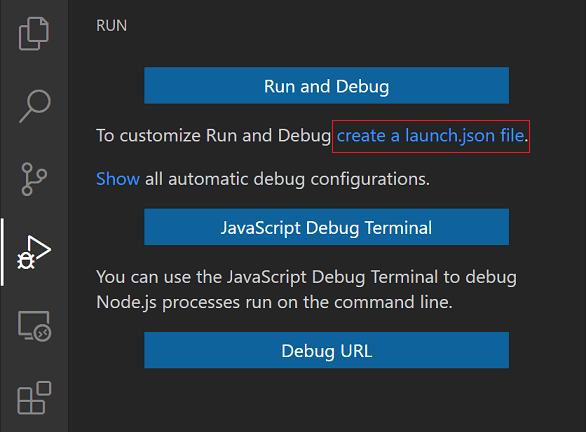
To run or debug a simple app in VS Code, select **Run and Debug** on the Debug start view or press F5 and VS Code will try to run your currently active file.
However, for most debugging scenarios, creating a launch configuration file is beneficial because it allows you to configure and save debugging setup details. VS Code keeps debugging configuration information in a `launch.json` file located in a `.vscode` folder in your workspace (project root folder) or in your [user settings](https://code.visualstudio.com/docs/editor/debugging#_global-launch-configuration) or [workspace settings](https://code.visualstudio.com/docs/editor/multi-root-workspaces#_workspace-launch-configurations).
To create a `launch.json` file, click the **create a launch.json file** link in the Run start view.
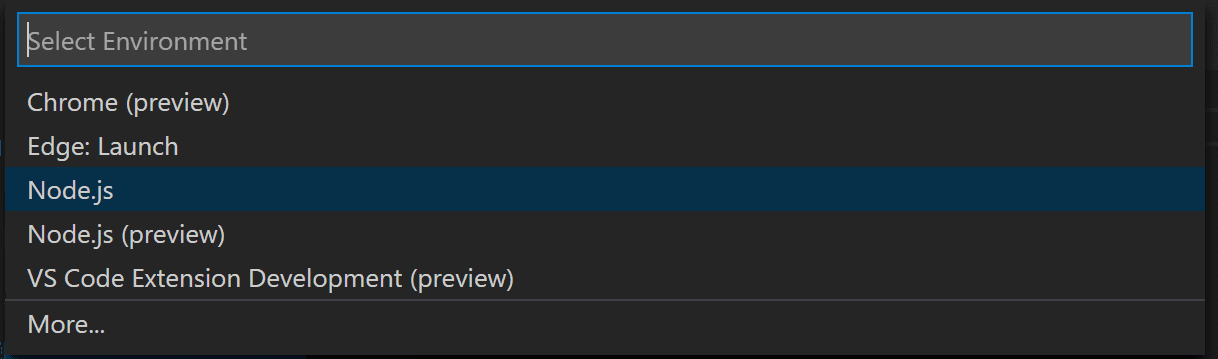
VS Code will try to automatically detect your debug environment, but if this fails, you will have to choose it manually
Here is the launch configuration generated for Node.js debugging
```json
{
// Use IntelliSense to learn about possible attributes.
// Hover to view descriptions of existing attributes.
// For more information, visit: https://go.microsoft.com/fwlink/?linkid=830387
"version": "0.2.0",
"configurations": [
{
"type": "pwa-node",
"request": "launch",
"name": "Launch Program",
"program": "${workspaceFolder}/start.js",
"env": {
"APS_CLIENT_ID": "your clientid here",
"APS_CLIENT_SECRET": "your client secret here"
}
}
]
}
```
## Further Reading
Documentation:
- [Design Automation v3](https://forge.autodesk.com/en/docs/design-automation/v3/developers_guide/overview/)
- [Data Management](https://forge.autodesk.com/en/docs/data/v2/reference/http/) used to store input and output files.
- [Getting started with Node.js debugging in VS Code](https://www.youtube.com/watch?v=2oFKNL7vYV8)
## Packages used
The [APS SDK](https://www.npmjs.com/package/forge-apis) packages are included by default. Some other non-Autodesk packages are used, including [express](https://www.npmjs.com/package/express) and [multer](https://www.npmjs.com/package/multer) for upload.
## Tips & tricks
For local development/ testing, consider using the [nodemon](https://www.npmjs.com/package/nodemon) package, which auto-restarts your node application after any modification to your code. To install it, use:
sudo npm install -g nodemon
Then, instead of **npm run dev**, use the following:
npm run nodemon
Which executes **nodemon server.js --ignore www/**, where the **--ignore** parameter indicates that the app should not restart if files under the **www** folder are modified.
## Troubleshooting
After installing GitHub Desktop for Windows, on the Git Shell, if you see the ***error setting certificate verify locations*** error, then use the following command:
git config --global http.sslverify "false"
## License
This sample is licensed under the terms of the [MIT License](http://opensource.org/licenses/MIT).
Please see the [LICENSE](LICENSE) file for full details.
## Written by
Autodesk APS [@AutodeskAPS](https://twitter.com/autodeskaps), [APS Partner Development](http://aps.autodesk.com)