https://github.com/avsoto/nttdata-accountms
The Account Microservice manages customer bank accounts, handling operations like account creation, deposits, and withdrawals. Built with Spring Boot, JPA/Hibernate, and MySQL, it interacts with the Customer Microservice to access customer information and perform account-related actions based on business rules.
https://github.com/avsoto/nttdata-accountms
diagrams java mysql postman spring-boot
Last synced: 3 months ago
JSON representation
The Account Microservice manages customer bank accounts, handling operations like account creation, deposits, and withdrawals. Built with Spring Boot, JPA/Hibernate, and MySQL, it interacts with the Customer Microservice to access customer information and perform account-related actions based on business rules.
- Host: GitHub
- URL: https://github.com/avsoto/nttdata-accountms
- Owner: avsoto
- Created: 2024-11-15T04:11:57.000Z (over 1 year ago)
- Default Branch: main
- Last Pushed: 2024-12-04T00:02:32.000Z (over 1 year ago)
- Last Synced: 2025-03-21T12:22:04.543Z (about 1 year ago)
- Topics: diagrams, java, mysql, postman, spring-boot
- Language: Java
- Homepage:
- Size: 134 KB
- Stars: 1
- Watchers: 1
- Forks: 0
- Open Issues: 0
-
Metadata Files:
- Readme: README.md
Awesome Lists containing this project
README
# Account Microservice - Banking System
## Overview
The **Account Microservice** is part of the banking system designed to manage bank accounts for customers. This microservice handles the creation, management, and transaction operations for customer accounts such as deposits and withdrawals. The system is built using **Spring Boot**, **JPA/Hibernate**, and a **MySQL** database.
This microservice interacts with a **Customer Microservice** for customer information and performs actions on bank accounts based on business rules outlined below.
## Technologies
- **Spring Boot** (for microservice development)
- **Spring Data JPA** (for database interaction)
- **MySQL** (for relational database)
- **OpenAPI** (for contract-based development)
- **Java 8/11** (for functional programming features)
## System Requirements
- **Java 8 or 11** or later
- **MySQL** for relational database management
- **Spring Boot** dependencies for JPA, Web, and OpenAPI integration
- **Postman** for testing API endpoints
## Project Reports
### SOLID Principles Report
This report provides a detailed analysis of how the SOLID principles have been applied throughout the project. It includes explanations of each principle and examples of how they were implemented in the code to enhance maintainability, scalability, and readability.
[SOLID Principles Report](https://docs.google.com/document/d/1tSSjcOaGNktm7uQvlNelBmg7FlEsAfO_/edit?usp=sharing&ouid=111308656360819493585&rtpof=true&sd=true)
### Code Coverage Report
The code coverage report outlines the extent of testing performed in the project, including unit tests and integration tests. It provides insights into the percentage of code covered by tests, highlighting areas that need additional testing to ensure robustness and reliability.
[Code Coverage Report](https://docs.google.com/document/d/1zNvOwxqBcbkEUDoxmEIhLKotHEuPPfHO/edit?usp=sharing&ouid=111308656360819493585&rtpof=true&sd=true)
## Installation and Setup
### 1. Clone the repository
```bash
git clone https://github.com/your-username/account-ms.git
cd account-ms
```
### 2. Database Configuration
Make sure you have **MySQL** installed and running. Set up your database as follows:
```bash
CREATE DATABASE accountms;
```
Configure the `application.properties` file to point to your database:
```properties
spring.datasource.url=jdbc:mysql://localhost:3306/accountms
spring.datasource.username=root
spring.datasource.password=yourpassword
spring.jpa.hibernate.ddl-auto=update
spring.jpa.database-platform=org.hibernate.dialect.MySQLDialect
server.port=8081
```
### 3. Run the application
After configuring the database, run the Spring Boot application:
```bash
./mvnw spring-boot:run
```
The application will start on port `8081`.
## Endpoints
### 1. **Create Account**
- **Endpoint:** `POST /accounts`
- **Description:** Creates a new bank account for a customer.
- **Request body:**
```json
{
"balance": 1000.0,
"accountType": "SAVINGS",
"customerId": 1
}
```
- **Response:**
```json
{
"id": 1,
"accountNumber": "65b009d1-1b1a-4dc6-baa6-34ee37525a56",
"balance": 1000.0,
"accountType": "SAVINGS",
"customerId": 1
}
```
### 2. **Get All Accounts**
- **Endpoint:** `GET /accounts`
- **Description:** Lists all bank accounts.
- **Response:**
```json
[
{
"id": 1,
"accountNumber": "65b009d1-1b1a-4dc6-baa6-34ee37525a56",
"balance": 1000.0,
"accountType": "SAVINGS",
"customerId": 1
},
{
"id": 2,
"accountNumber": "78b009d1-1b1a-54dc6-baa6-34ee775as526",
"balance": 1500.0,
"accountType": "CHECKING",
"customerId": 2
}
]
```
### 3. **Get Account by ID**
- **Endpoint:** `GET /accounts/{id}`
- **Description:** Retrieves a specific account by its ID.
- **Response:**
```json
{
"id": 1,
"accountNumber": "65b009d1-1b1a-4dc6-baa6-34ee37525a56",
"balance": 1000.0,
"accountType": "SAVINGS",
"customerId": 1
}
```
### 4. **Deposit to Account**
- **Endpoint:** `PUT /accounts/{id}/deposit`
- **Description:** Deposits a specified amount into the account.
- **Request body:**
```json
{
"amount": 50.0
}
```
- **Response:**
```json
{
"id": 1,
"accountNumber": "65b009d1-1b1a-4dc6-baa6-34ee37525a56",
"balance": 1050.0,
"accountType": "SAVINGS",
"customerId": 1
}
```
### 5. **Withdraw from Account**
- **Endpoint:** `PUT /accounts/{id}/withdraw`
- **Description:** Withdraws a specified amount from the account.
- **Request body:**
```json
{
"amount": 50.0
}
```
- **Response:**
```json
{
"id": 1,
"accountNumber": "65b009d1-1b1a-4dc6-baa6-34ee37525a56",
"balance": 1000.0,
"accountType": "SAVINGS",
"customerId": 1
}
```
### 6. **Delete Account**
- **Endpoint:** `DELETE /accounts/{id}`
- **Description:** Deletes a bank account by ID.
- **Response:**
```json
{
"message": "Account successfully deleted"
}
```
## Business Rules
### 1. **Account Creation Rules**
- The account must have a **saldo** of `0.0` upon creation.
- Accounts must belong to an existing customer (`clienteId`).
- Only **SAVINGS** and **CHECKING** are valid account types.
### 2. **Deposit/Withdrawal Rules**
- **SAVINGS** accounts cannot have a negative balance after withdrawal.
- **CHECKING** accounts can have a maximum overdraft limit of `-500.0`.
- Deposits can increase the balance by the specified amount.
### 3. **Account Deletion Rules**
- An account cannot be deleted if it has any active transactions or related customer constraints.
## Architecture
### Component Diagram
This system follows a **microservices architecture**, where **AccountMS** communicates with other microservices, such as **CustomerMS**. Both microservices interact with a MySQL database for data persistence.
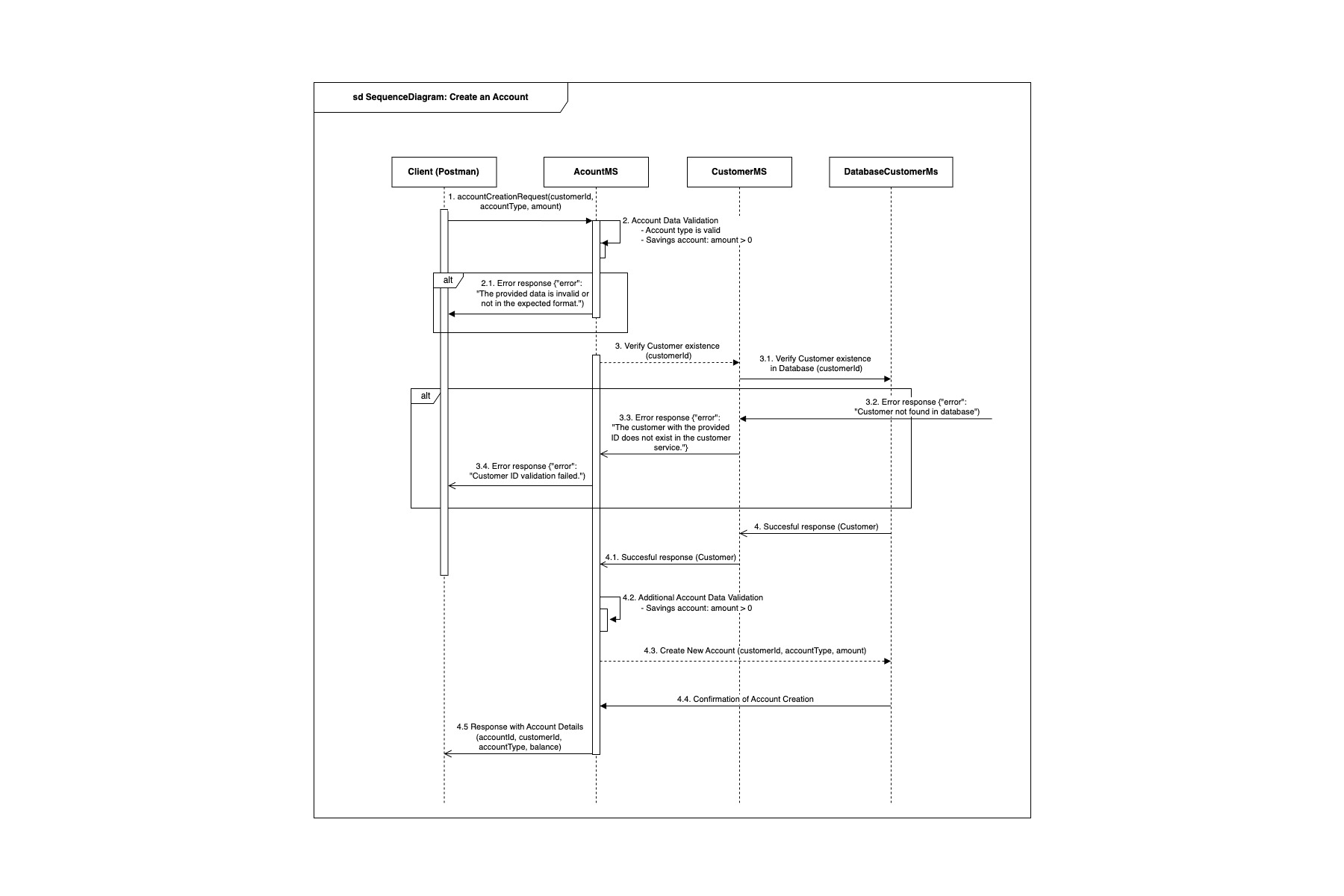
### Sequence Diagram
The sequence diagrams illustrate the communication flow between the microservices during a deposit operation in a client account, ensuring that services remain decoupled and can scale independently.
## Testing with Postman
To test the functionality of this microservice, you can use **Postman** with the following base URL:
```
http://localhost:8081
```
### Example Test Cases:
1. **Create Account:** POST `/accounts`
2. **Get All Accounts:** GET `/accounts`
3. **Deposit to Account:** PUT `/accounts/{id}/deposit`
4. **Withdraw from Account:** PUT `/accounts/{id}/withdraw`
5. **Delete Account:** DELETE `/accounts/{id}`