https://github.com/ayastreb/bandwidth-hero
:guardsman: Saves data by compressing images on web page
https://github.com/ayastreb/bandwidth-hero
chrome-extension data-compression data-saving firefox-addon react semantic-ui web-extension webpack
Last synced: about 1 year ago
JSON representation
:guardsman: Saves data by compressing images on web page
- Host: GitHub
- URL: https://github.com/ayastreb/bandwidth-hero
- Owner: ayastreb
- License: mit
- Created: 2016-08-18T21:10:59.000Z (almost 10 years ago)
- Default Branch: master
- Last Pushed: 2023-01-04T06:48:20.000Z (over 3 years ago)
- Last Synced: 2025-03-31T16:21:47.328Z (over 1 year ago)
- Topics: chrome-extension, data-compression, data-saving, firefox-addon, react, semantic-ui, web-extension, webpack
- Language: JavaScript
- Homepage: https://bandwidth-hero.com/
- Size: 1.59 MB
- Stars: 275
- Watchers: 10
- Forks: 50
- Open Issues: 56
-
Metadata Files:
- Readme: README.md
- License: LICENSE
Awesome Lists containing this project
README

[](https://travis-ci.org/ayastreb/bandwidth-hero)
[](https://codeclimate.com/github/ayastreb/bandwidth-hero)
Bandwidth Hero is an open-source browser extension which reduces the amount of data consumed when
you browse web pages by compressing all images on the page. It uses
[data compression service](https://github.com/ayastreb/bandwidth-hero-proxy) to convert images to
low-resolution [WebP](https://developers.google.com/speed/webp/) or JPEG images.
## How It Works?
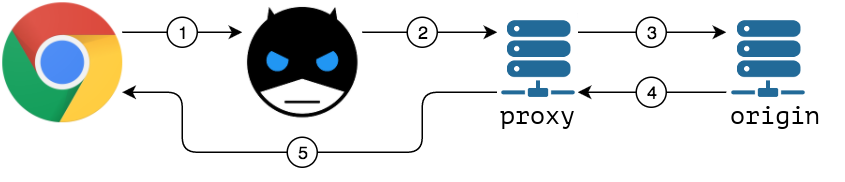
1. When active, Bandwidth Hero intercepts all images loading requests
2. It sends each image URL to the data compression service
3. Compression service downloads the original image
4. Once image is downloaded it is then converted to low-resolution
[WebP](https://developers.google.com/speed/webp/)/JPEG image.
5. Compression service returns processed image to the browser
## Privacy Consideration
After installing the extension you need to setup data compression service.
Please refer to [data compression service docs](https://github.com/ayastreb/bandwidth-hero-proxy)
for detailed instructions on how to run your own service.
Once you have your own instance running, click "Configure data compression service" button under
"Compression settings" in the extension popup.
## Installation
[](https://chrome.google.com/webstore/detail/bandwidth-hero/mmhippoadkhcflebgghophicgldbahdb?hl=en-US)
[](https://addons.mozilla.org/en-US/firefox/addon/bandwidth-hero/)
## Build From Source
If you want to build this extension from source, you will need to install [Node.js](https://nodejs.org/en/download/package-manager/)
Here's how to install it on Ubuntu 16:
```
curl -sL https://deb.nodesource.com/setup_8.x | sudo -E bash -
sudo apt-get install -y nodejs
```
and make sure it works:
```
node -v
->v8.9.4
npm -v
->5.6.0
```
When you have `node` and `npm` available, get the latest source code from GitHub:
```
git clone https://github.com/ayastreb/bandwidth-hero.git
cd bandwidth-hero/
```
and install dependencies:
```
npm install
->...
->added 1108 packages in 30.127s
```
run test suite to check that everything is ok:
```
npm test
->all tests should pass
```
and build the extension:
```
npm run build
->...
->Hash: 5cc956a28d496fc03ff3
->Version: webpack 4.29.6
->Time: 3262ms
->...
```
Webpack will produce compiled extension code and assets into `dist` directory.
You can zip this directory and load it into the browser as local extension.
```
cd dist/
tar -zcvf bandwidth-hero.zip .
```
## Credits
daredevil logo by Daniel Pineda from the Noun Project