https://github.com/ayonious/git-network-trainline
🚂 Show a city's train lines in form of Git Network
https://github.com/ayonious/git-network-trainline
git graph javascript road trainline
Last synced: about 2 months ago
JSON representation
🚂 Show a city's train lines in form of Git Network
- Host: GitHub
- URL: https://github.com/ayonious/git-network-trainline
- Owner: ayonious
- License: mit
- Created: 2020-05-11T22:38:33.000Z (about 6 years ago)
- Default Branch: master
- Last Pushed: 2020-05-22T20:44:29.000Z (about 6 years ago)
- Last Synced: 2025-07-19T05:23:09.975Z (12 months ago)
- Topics: git, graph, javascript, road, trainline
- Language: JavaScript
- Homepage:
- Size: 56.6 KB
- Stars: 0
- Watchers: 1
- Forks: 0
- Open Issues: 2
-
Metadata Files:
- Readme: README.md
- License: LICENSE
Awesome Lists containing this project
README
Git Network Trainline
🚂 Show a city's train lines in form of Git Network
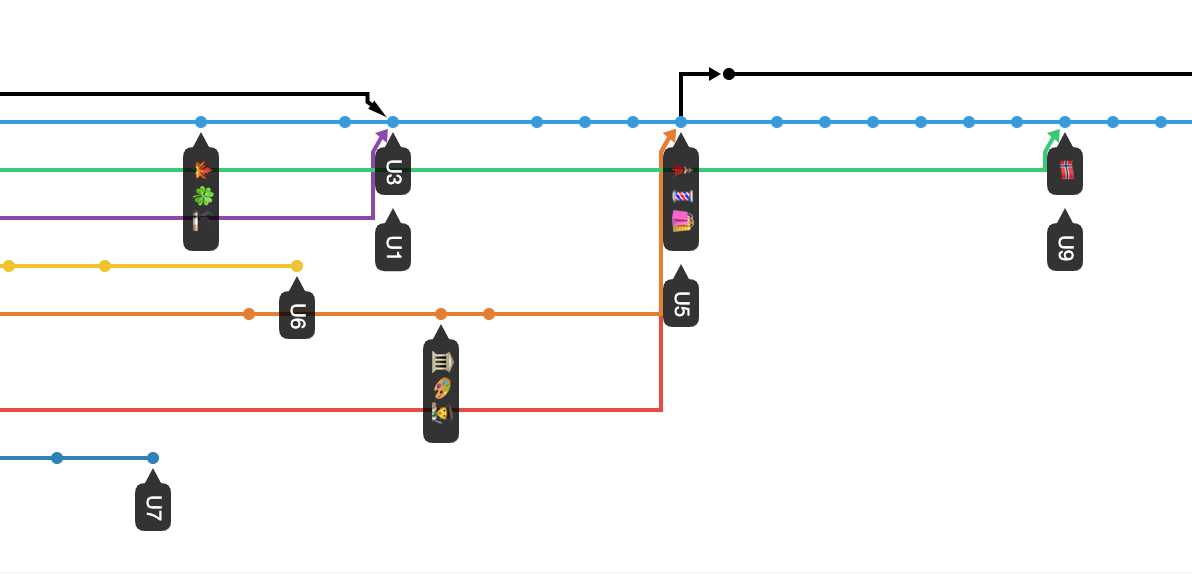
- Berlin's underground rail GitHub network view : https://github.com/ayonious/git-network-trainline/network
# ❓Synopsis
Use this script to create road maps of your own city. This uses simple graph theory on top of git commands to generate a nice git network graph.
# 🏃♂️ Run
First you need to add inputs. In this file https://github.com/ayonious/git-network-trainline/blob/master/src/rawInput.js
1. Add your git remote head.
2. Add your roads
3. You can add comments while describing the stations as `imoji` param. This will showup in the git network graph as label
Now run
```bash
node .
```
When all is finished successfully
```bash
Git Network generated Successfully!!
```
Now go back to your git network network page: https://github.com/{username}/{repo}/network
Mine is: https://github.com/ayonious/git-network-trainline/network
> Rememeber, you can drag and scroll the git graph left and right.
Enjoy!
# 😞 Limitations
1. Make sure when inputting the graph there is no cyclic dependencies. This will make the graph not print full map and stop at a junction.
2. Dont have same imoji for 2 different stations unless its a junction. Also line names need to be distinct.
# 💡 Inspired by
[yangshun/smrt-git](https://github.com/yangshun/smrt-git) which shows Singaporen metro lines in Git Network
# 📝 License
[MIT](https://github.com/ayonious/git-network-trainline/blob/master/LICENSE)