https://github.com/ayrshare/social-api-demo
Demo of the Ayrshare's Social Media API for scheduling posts to TikTok, Instagram, Facebook, LinkedIn, and X
https://github.com/ayrshare/social-api-demo
api facebook-api instagram-api linkedin-api social-media social-network tiktok-api x-api
Last synced: about 1 year ago
JSON representation
Demo of the Ayrshare's Social Media API for scheduling posts to TikTok, Instagram, Facebook, LinkedIn, and X
- Host: GitHub
- URL: https://github.com/ayrshare/social-api-demo
- Owner: ayrshare
- Created: 2024-07-20T23:22:46.000Z (almost 2 years ago)
- Default Branch: main
- Last Pushed: 2024-07-22T19:53:30.000Z (almost 2 years ago)
- Last Synced: 2024-07-22T23:38:03.784Z (almost 2 years ago)
- Topics: api, facebook-api, instagram-api, linkedin-api, social-media, social-network, tiktok-api, x-api
- Language: JavaScript
- Homepage: https://www.ayrshare.com
- Size: 126 KB
- Stars: 2
- Watchers: 2
- Forks: 0
- Open Issues: 0
-
Metadata Files:
- Readme: README.md
Awesome Lists containing this project
README
# Social API Demo
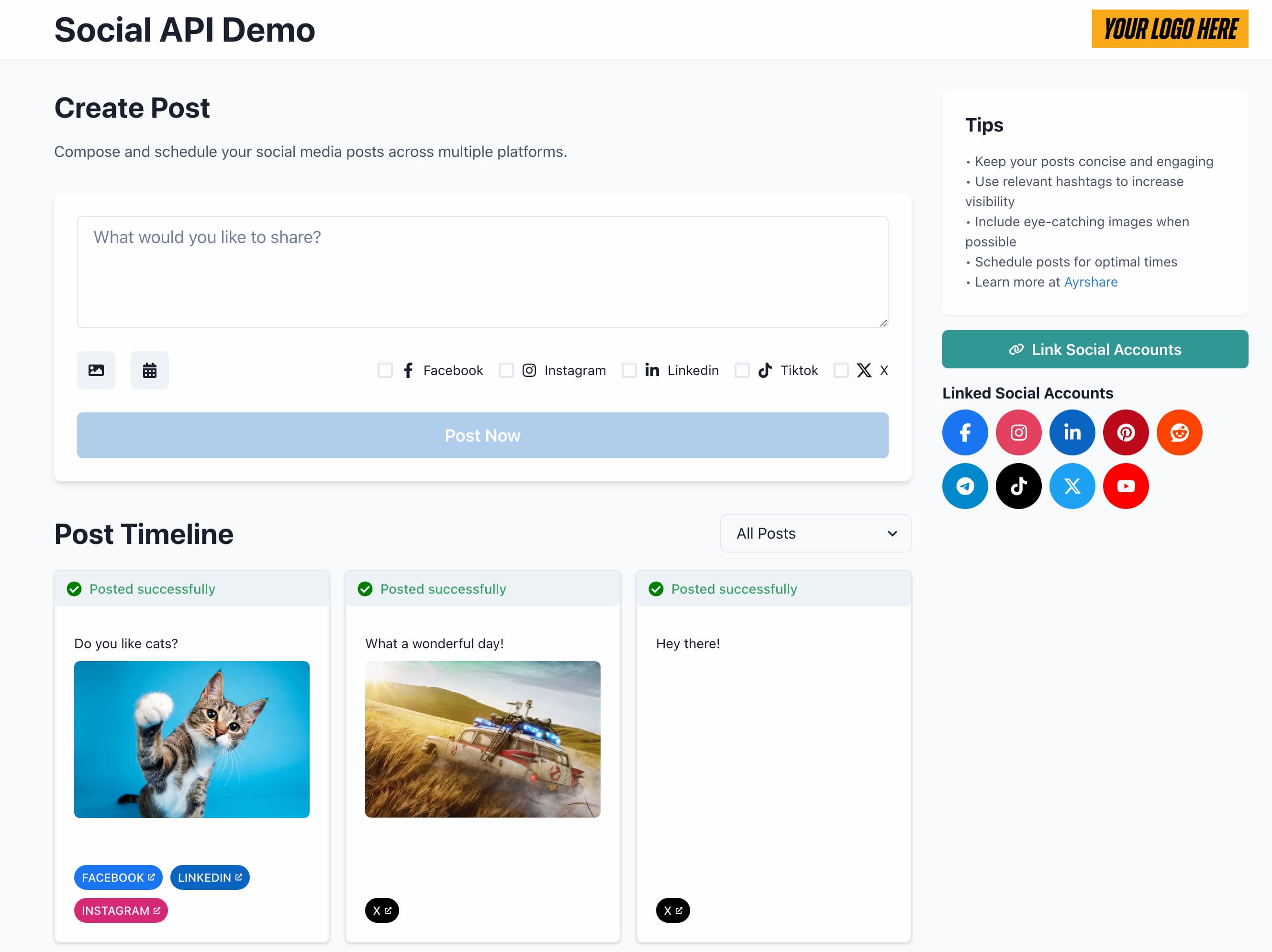
The Social API Demo is a web application that allows users to compose, schedule, and post content to multiple social media platforms simultaneously. If you have a Business Plan, you can also allow your user to link their social accounts.
Built with React and Node.js, it leverages the Ayrshare API to manage social media posts across various networks. It is built upon [Ayrshare's Social Media API](https://www.ayrshare.com)
## Features
- Compose posts with text and media (images/videos).
- Schedule posts for future publication.
- Post to multiple social networks (Facebook, Instagram, LinkedIn, TikTok, X/Twitter).
- View post history and status.
- Filter by success or error posts.
- Responsive design for desktop and mobile use.
- See [Ayrshare's API Docs](https://docs.ayrshare.com) for more info.
## Prerequisites
Before you begin, ensure you have met the following requirements:
- Node.js (v18.0.0 or later)
- npm (v8.0.0 or later)
- An [Ayrshare](https://app.ayrshare.com) account and an [Ayrshare API key](https://www.ayrshare.com/docs/apis/overview#watch-how-to-use-the-social-api)
## Installation
1. Clone the repository:
```markdown
git clone https://github.com/ayrshare/social-api-demo.git
cd social-api-demo
```
2. Install dependencies for both frontend and backend:
```markdown
cd social-api-demo
npm install
cd functions
npm install
```
3. Create a `.env` file in the functions directory with your Ayrshare API key:
```markdown
AYRSHARE_API_KEY=your_api_key_here
```
4. If you have an Ayrshare Business Plan, you can set up the ability for your users to link their social accounts. Use the data provides in your Business integration package. In the `.env` file add:
```markdown
AYRSHARE_DOMAIN=your_domain
AYRSHARE_PROFILE_KEY=your_users_profile_key
AYRSHARE_PRIVATE_KEY=./privatekeys/private.pem
```
## Configuration
1. Frontend: Update the `baseURL` in `src/utils/constants.js` if your functions are not running on `http://localhost:3001`.
2. Backend: Update the `corsOptions` in `server.js`. Currernly all domains are allows and is not recommended for production.
## Running the Application
1. Start the backend server:
```markdown
cd functions
npm run start
```
2. In a new terminal, start the frontend development server:
```markdown
cd social-api-demo
npm run dev
```
3. Open your browser and navigate to `http://localhost:5173` (or the port specified by Vite).
## Usage
1. Compose your post by entering text in the text area.
2. Optionally, upload an image or video by clicking the image icon.
3. Select the social networks you want to post to by checking the corresponding boxes.
4. If you want to schedule the post, click the calendar icon and select a date and time.
5. Click "Post Now" or "Schedule Post" to submit your post.
6. View your post history in the timeline below the posting form.
## Contributing
Contributions to SocialPost are welcome. Please follow these steps:
1. Fork the repository.
2. Create a new branch: `git checkout -b `.
3. Make your changes and commit them: `git commit -m ''`
4. Push to the original branch: `git push origin /`
5. Create the pull request.
Alternatively, see the GitHub documentation on [creating a pull request](https://help.github.com/articles/creating-a-pull-request/).
## License
This project uses the following license: [MIT License](https://opensource.org/license/mit).
## Contact
If you want to contact us, you can reach us via chat at .
## Packages
- [Ayrshare](https://www.ayrshare.com) for providing the social media posting API. Ayrshare [social media API](https://www.ayrshare.com/docs)
- [React](https://reactjs.org/)
- [Chakra UI](https://chakra-ui.com/)
- [Node.js](https://nodejs.org/)
- [Express](https://expressjs.com/)