https://github.com/azeemba/lpaid
Personal Plaid-based money tracker (banks, credit cards, investment accounts)
https://github.com/azeemba/lpaid
budget money plaid plaid-api plaid-link spending spending-tracker
Last synced: 12 months ago
JSON representation
Personal Plaid-based money tracker (banks, credit cards, investment accounts)
- Host: GitHub
- URL: https://github.com/azeemba/lpaid
- Owner: azeemba
- Created: 2017-06-23T00:18:24.000Z (about 9 years ago)
- Default Branch: master
- Last Pushed: 2019-05-26T23:53:09.000Z (about 7 years ago)
- Last Synced: 2025-04-03T19:22:18.548Z (over 1 year ago)
- Topics: budget, money, plaid, plaid-api, plaid-link, spending, spending-tracker
- Language: JavaScript
- Size: 23.4 KB
- Stars: 46
- Watchers: 2
- Forks: 12
- Open Issues: 1
-
Metadata Files:
- Readme: README.md
Awesome Lists containing this project
README
Lpaid
======
Personal Plaid-based money tracker
# Goal
There are many money tracking apps out there with many tradeoffs. Some
require too much manual work, some don't work with multifactor authentication,
and others store the login info on their servers.
Lpaid does none of those. It uses [Plaid](https://plaid.com/) which allows you to link your bank
accounts to an access token which can be used to retrieve transaction. This
access token and the downloaded transactions are stored on your machine.
However the trade off is that Lpaid is not designed to be used for people with little
technical background. It requires people to get developer keys from plaid, and run `npm`and `node` locally.
# Workflow
After running `node index.js` you will see a page to add new users or select a user:
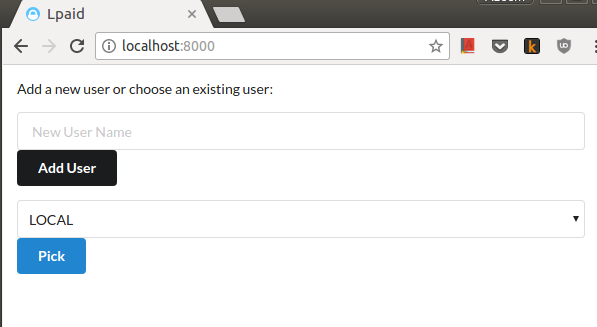
Once you pick the user, you will be taken to a screen where you can add new accounts or revalidate accounts for which passwords have changed:

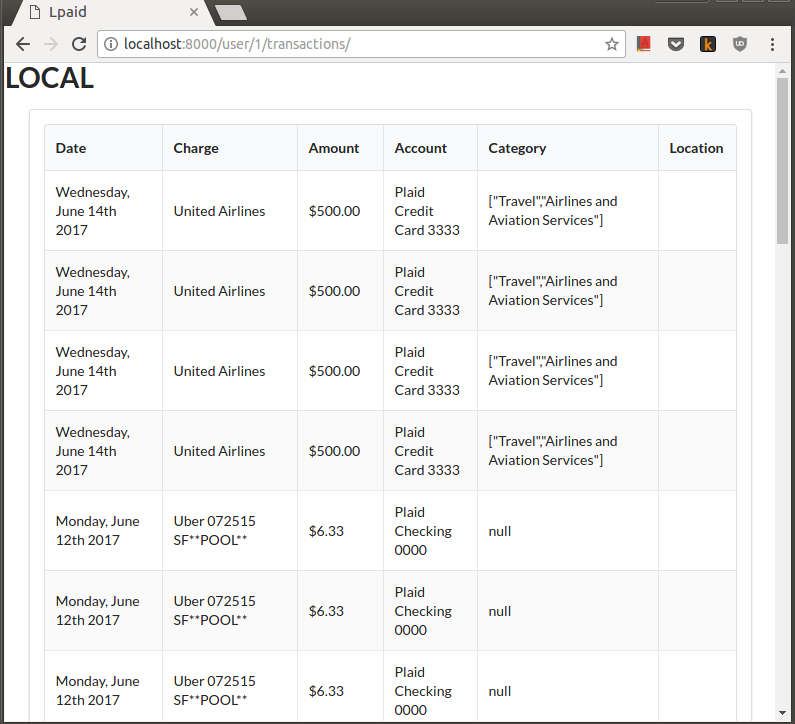
After you use `node cli.js` to fetch transactions, you can use the website to look at recent transactions:
# Design
Lpaid contains two components:
- Account setup server (needed to run only when accounts need to be
added/removed)
- Update script (fetches new transactions for all accounts)
Lpaid provides nothing to help analyze the data. The plan is to keep the db schema consistent to allow many possible "frontends" to analyze the data.
# Set up
### Set up keys
Currently `config/default.json` contains dummy values that do not work.
In order to be able to access test or real world data, you must
create a new plaid account. Upon account creation, you will get "sandbox" keys.
To access real world data, you must request development keys which allow you to
link up to 100 accounts. (Of course Plaid may decide to decline your request or
even decide to revoke my keys. So no guarantees on that end).
Once you have have the keys, create a new file `config/local.json`.
The data should look like the defaul config file. Also change "ENV" to "development" if you have development keys.
Make sure not to share these keys! `config/local.json` has been
added to the `.gitignore` to avoid any accidental commits.
### Initialize DB
Initialize the db by running `./init_db.sh`.
This will initialize a sqlite3 db in the db/ folder. If you would like to use
any other database, jump to the advanced section.
### Run Account Setup
```
npm install
node index.js
```
and then go on `localhost:8000` in your browser. This will allow you to link
your various accounts so that plaid can fetch the information for this account.
If your account has multifactor authentication, the first login may fail.
However, on the second attempt, plaid will attempt the other form of
authentication as well.
Once your accounts are linked, you should wait a little bit so that plaid has
time to load all the linked data (roughly 30ish mins).
If any of your login information changes, you can rerun this server to update the login information.
### Fetch transactions
`node cli.js --help` will tell you what commands you have available.
Normally you will only need to do:
- `node cli.js fetch`: this will retrieve transactions for the past 30 days
for all your accounts.
- `node cli.js balance`: This will fetch the balance of your
checking/savings account for today and save it. Since plaid doesn't
maintain balance history (or rather banks don't provide that to plaid), we
have to maintain this history ourselves. So you should run this every few
days to have a running balance`.
Note that the above command assumes that there is only one "user" in your
db. If you have multiple users, then the commands accept the user id
(integer) as the first argument after the command name.
## Advanced
### Database:
Lpaid uses `sequelize` as an ORM layer to talk to the database. Since sequelize
supports multiple dbs (namely postgres, mysql, sqlite and mssql), you should be
able to create any of those databases with the appropriate tables and use it.
The only change you should have to make is in the config json file, you should
change the `DB_STRING` to the appropriate database connection string for your
db.
### Analysis
Currently, Lpaid provides no scripts to analyze the data. However, the existing
code should be easy to leverage to do analysis. Additionally, many other
languages have libraries to easily talk to sqlite3 databases.
The goal is to have various frontends to the current db schema.