https://github.com/azer/measure-time
create benchmark suites and see the time consumption per given functions.
https://github.com/azer/measure-time
Last synced: 11 months ago
JSON representation
create benchmark suites and see the time consumption per given functions.
- Host: GitHub
- URL: https://github.com/azer/measure-time
- Owner: azer
- Created: 2014-08-20T05:05:05.000Z (almost 12 years ago)
- Default Branch: master
- Last Pushed: 2014-08-24T18:47:06.000Z (almost 12 years ago)
- Last Synced: 2024-04-15T03:09:38.164Z (about 2 years ago)
- Language: JavaScript
- Homepage:
- Size: 148 KB
- Stars: 15
- Watchers: 5
- Forks: 0
- Open Issues: 0
-
Metadata Files:
- Readme: README.md
Awesome Lists containing this project
README
## measure-time
Create benchmark suites and see the time consumption per given functions.
## Install
```bash
$ npm install measure-time
```
## Usage
Pass functions to measure-time with a title:
```js
var time = require('measure-time')
time('testing', function (done) {
// ...
})
```
Once everything your module is defined, all functions you defined will be called
with a done function that should be called once the function is done its job:
```js
var time = require('measure-time')
time('do something', function (done) { // done can be called also as "t" to mock tape
dosomething()
done()
});
time('do something async', function (done) {
doSomethingAsync(done)
})
```
Once you write a module like above, you can run it like a regular Node module:
```bash
$ node example
```
It'll run the functions you passed for 9999 times by default. You can choose how many times you want to run by:
```bash
$ node example -t 12345 # or: --times 123455
```
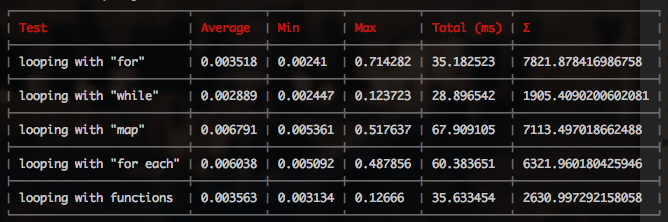
And it'll give an output like the screenshot on top. See the `example.js` in the repo
for another example.
To see all the command-line options, pass -h or --help:
```bash
$ node example --help
```
Or see `docs/man` in this repo.