https://github.com/azu/inkdrop-move-notes
Provide move notes command for Inkdrop.
https://github.com/azu/inkdrop-move-notes
inkdrop plugin
Last synced: 9 months ago
JSON representation
Provide move notes command for Inkdrop.
- Host: GitHub
- URL: https://github.com/azu/inkdrop-move-notes
- Owner: azu
- License: mit
- Created: 2020-06-09T14:09:09.000Z (over 5 years ago)
- Default Branch: master
- Last Pushed: 2022-08-23T13:37:50.000Z (over 3 years ago)
- Last Synced: 2025-02-13T12:25:15.842Z (11 months ago)
- Topics: inkdrop, plugin
- Language: JavaScript
- Homepage:
- Size: 127 KB
- Stars: 3
- Watchers: 3
- Forks: 0
- Open Issues: 1
-
Metadata Files:
- Readme: README.md
- License: LICENSE
Awesome Lists containing this project
README
# inkdrop-move-notes
Provide move notes command for Inkdrop.
This plugin move notes from A to B using pattern matching.
## UseCase
This plugin help you to move your daily notes like `YYYY-MM-DD` to "Archives" note book.
## Install
Install with [ipm](https://docs.inkdrop.app/manual/extend-inkdrop-with-plugins):
ipm install move-notes
## Usage
1. Create `config.js` in your favorite directory
condig.js should export an Array.
- `commandName`: command name
- `from`: from notebook name
- `to`: to notebook name
- `pattern`: predicate function for detecting
- If the predicate function return `true`, this plugin move the note from `from` to `to`
`config.js` example:
```js
module.exports = [
{
"commandName": "Test",
"from": "Inbox",
"to": "Archives",
// pattern receive note instance
// https://docs.inkdrop.app/reference/db-note
// ({ title, body }) => boolean;
"pattern": ({ title }) => {
return /TEST_TITLE/.test(title);
}
},
{
"commandName": "Prune Inbox",
"from": "Inbox",
"to": "Archives",
"pattern": ({ title }) => {
// Move "YYYY-DD-MM" note from "Inbox" to "Archives"
// Not include YYYY-DD-MM ~ YYYY-DD-MM
// Not include today
const todayDate = new Date().toISOString().slice(0, 10);
return /^\d{4}-\d{2}-\d{2}/.test(title) && !/\s[~-]\s/.test(title) && !title.includes(todayDate);
}
}
]
```
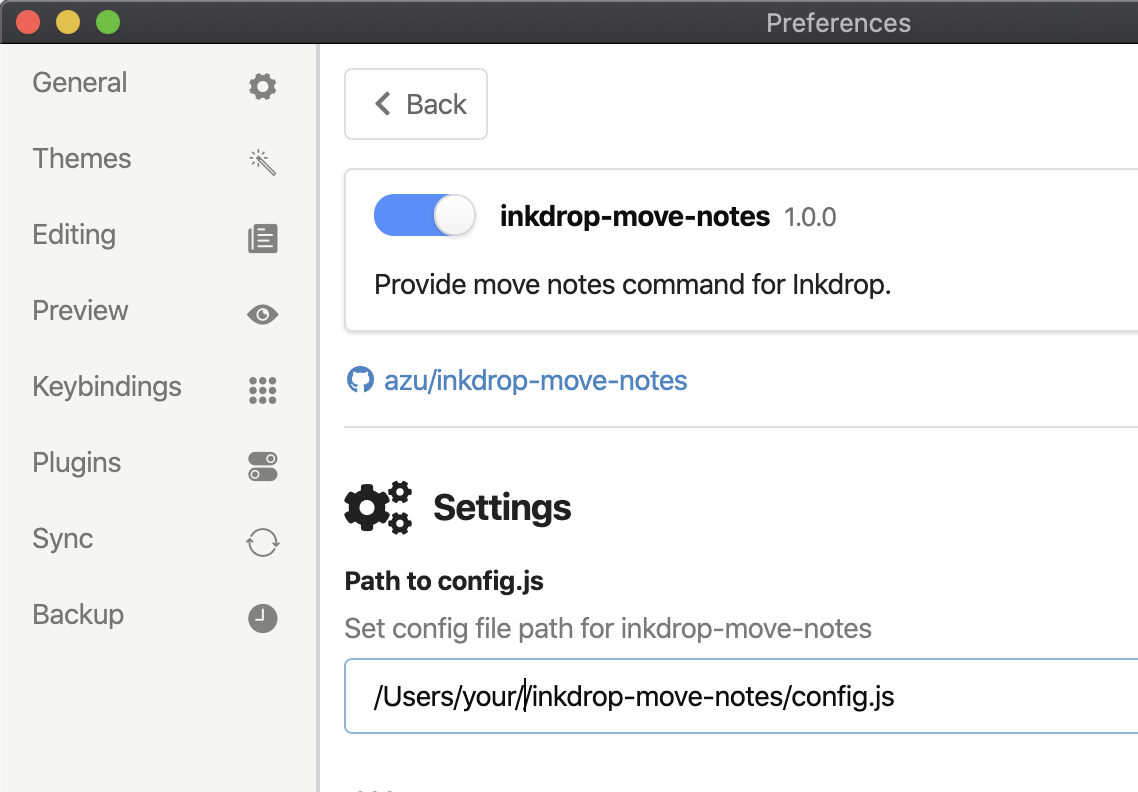
2. Set path to `config.js` from Plugin Setting
3. Reload after configuration!
4. Select "Plugins" → "Move Notes" → "{commandName}"
**Limited**
- Move only 100 notes at once
Tips: This plugin `move-notes:${item.commandName}` as Inkdrop command. You can use it from key [Customizing Keybindings](https://docs.inkdrop.app/manual/customizing-keybindings).
## Changelog
See [Releases page](https://github.com/azu/inkdrop-move-notes/releases).
## Running tests
Install devDependencies and Run `npm test`:
npm test
## Contributing
Pull requests and stars are always welcome.
For bugs and feature requests, [please create an issue](https://github.com/azu/inkdrop-move-notes/issues).
1. Fork it!
2. Create your feature branch: `git checkout -b my-new-feature`
3. Commit your changes: `git commit -am 'Add some feature'`
4. Push to the branch: `git push origin my-new-feature`
5. Submit a pull request :D
## Author
- [github/azu](https://github.com/azu)
- [twitter/azu_re](https://twitter.com/azu_re)
## License
MIT © azu