https://github.com/b1rger/carl
carl is a calendar for the commandline. It tries to mimic the various cal(1) implementations out there, but also adds enhanced features like colors and ical support.
https://github.com/b1rger/carl
cal calendar cli date ical rust
Last synced: over 1 year ago
JSON representation
carl is a calendar for the commandline. It tries to mimic the various cal(1) implementations out there, but also adds enhanced features like colors and ical support.
- Host: GitHub
- URL: https://github.com/b1rger/carl
- Owner: b1rger
- Created: 2021-12-11T09:52:49.000Z (over 4 years ago)
- Default Branch: main
- Last Pushed: 2025-03-23T18:51:03.000Z (over 1 year ago)
- Last Synced: 2025-03-23T19:30:55.927Z (over 1 year ago)
- Topics: cal, calendar, cli, date, ical, rust
- Language: Rust
- Homepage:
- Size: 244 KB
- Stars: 53
- Watchers: 2
- Forks: 3
- Open Issues: 12
-
Metadata Files:
- Readme: README.md
- Changelog: CHANGELOG.md
- License: LICENSES/CC0-1.0.txt
Awesome Lists containing this project
README

`carl` is a calendar for the commandline. It tries to mimic the various
`cal(1)` implementations out there, but also adds enhanced features like colors
and ical support.
**If you find any bugs or have ideas for additional features, please don't hesitate to create a bug report or a feature request [on codeberg](https://codeberg.org/birger/carl/issues/new) or [github](https://github.com/b1rger/carl/issues/new).**
---
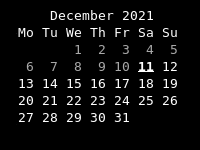
Default output of `carl`
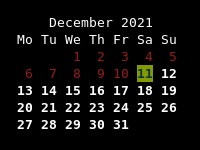
`carl` output with custom colors
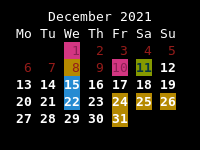
`carl` output with events
from ical highlighted
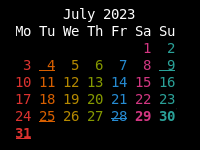
`carl` output with rainbow
colored weekdays
## Installation
```
cargo install carl
```
## Commandline flags
- **-1**, **--one**: Display single month output. (This is the default.)
- **-3**, **--three**: Display prev/current/next month output.
- **-n**, **--months NUMBER**: Display current and following months.
- **-s**, **--sunday**: Display Sunday as the first day of the week.
- **-m**, **--monday**: Display Monday as the first day of the week.
- **-j**, **--julian**: Display Julian dates (days one-based, numbered from January 1).
- **-y**, **--year**: Display a calendar for the current year.
- **-V**, **--version**: Display version information and exit.
- **-h**, **--help**: Display help screen and exit.
- **--theme THEME**: Set the theme that should be used
- **--themestyletype TYPE**: "dark" or "light", use the theme styles marked for "dark" or for "light" backgrounds. Defaults to "light"
- **-a**, **--agenda**: Display agenda (a listing of all the events that occur in the the displayed calendar timespan) below the calendar
## Commandline options
- **YYYY**: Display the current date from the given year
- **MM YYYYY**: Display the given month in the given year
- **DD MM YYYY**: Display the given date
## Configuration file
The configuration file is located `XDG_CONFIG_DIRS/carl/config.toml` or `XDG_CONFIG_HOME/.carl/config.toml` (the latter has precedence).
It can be used to define the name of a themefile as well as one or more icalfiles.
A sample configuration file is located in [data/config.toml](data/config.toml).
### Ical Files
Icalfile listings contain paths to icalfiles and can be combined with their own
styledefinitions. All the events from those icalfiles are then highlighted
using either the `IsEvent` property (see below) or using the style defined
togehter with the ical listing.
When using the `-a` or `--agenda` switch, the event summary is displayed below
the calendar in a bullet list, with the bullet also highlighted with the
corresponding style.
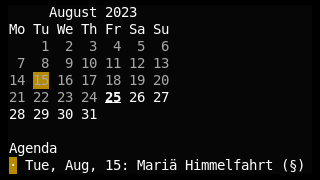
Icalfile listings can be specified using the `[[ical]]` setting:
```
[[ical]]
file = "/home/user/birthdays.ics"
stylenames = ['FGPurple']
```
If the `file` setting points to a directory, `carl` uses all the files in the directory it can parse.
### Themefile
Themefiles contain listings of date properties together with styledefintions.
The name of a theme is simple specified using the `theme = ` setting:
```
theme = "default"
```
The themefile is read from `XDG_CONFIG_DIRS/carl/.toml` or `XDG_CONFIG_HOME/.carl/.toml` (the latter has precedence).
### Styles
Themefiles and Icalfile listings can contain custom style settings. A style changes how a specific date in the calendar is displayed.
A style consists of a list of stylenames and optionally a weight and a styletype (`'Dark'` or `'Light'`). If no styletype is set, the style is effective in either case.
The various possible stylenames are listed at the bottom.
Example:
```
stylenames = ['Dimmed']
weight = 10
styletype = 'Dark'
```
## Themefile
A themefile consists of a collection of datestyles:
### Datestyles
A datestyle consists of a list of properties of a date and a style. The date has to fullfill *all* of the properties for the style to be applied.
Example:
```
[[date]]
properties = ['CurrentDate']
stylenames = ['FGRed']
weight = 3
styletype = 'Light'
```
#### Possible properties
- `FirstDayOfMonth`
- `BeforeFirstDayOfMonth`
- `BeforeCurrentDate`
- `CurrentDate`
- `AfterCurrentDate`
- `AfterLastDayOfMonth`
- `LastDayOfMonth`
- `IsEvent`
- `Monday`
- `Tuesday`
- `Wednesday`
- `Thursday`
- `Friday`
- `Saturday`
- `Sunday`
- `Even`
- `Odd`
A sample theme file is located in [data/default.theme](data/default.theme).
## Stylenames
### Styles
- `Bold`
- `Dimmed`
- `Italic`
- `Underline`
- `Blink`
- `Reverse`
- `Hidden`
- `Strikethrough`
### Foreground color names
- `FGBlack`
- `FGRed`
- `FGGreen`
- `FGYellow`
- `FGBlue`
- `FGPurple`
- `FGCyan`
- `FGWhite`
- `{ FGRGB = {r = x, g = y, b = z }}` where x, y and z are the RGB values
- `{ FGFixed = x }` a color number from 0 to 255, see the [color chart](https://upload.wikimedia.org/wikipedia/commons/1/15/Xterm_256color_chart.svg)
### Background color names
- `BGBlack`
- `BGRed`
- `BGGreen`
- `BGYellow`
- `BGBlue`
- `BGPurple`
- `BGCyan`
- `BGWhite`
- `{BGRGB = { r = x, g = y, b = z }}` where x, y and z are the RGB values
- `{BGFixed = x }` a color number from 0 to 255, see the [color chart](https://upload.wikimedia.org/wikipedia/commons/1/15/Xterm_256color_chart.svg)
Multiple styles and colors can be combined using lists: `["Bold", "FGRed", "Underline"]`