https://github.com/baba-s/uni-texture-packer-importer
無料版の TexturePacker でパッキングしたテクスチャを Unity で使用できるようにするエディタ拡張
https://github.com/baba-s/uni-texture-packer-importer
unity unity-editor unity-extension unity-extensions unity3d
Last synced: about 1 year ago
JSON representation
無料版の TexturePacker でパッキングしたテクスチャを Unity で使用できるようにするエディタ拡張
- Host: GitHub
- URL: https://github.com/baba-s/uni-texture-packer-importer
- Owner: baba-s
- License: mit
- Created: 2019-04-10T05:37:34.000Z (about 7 years ago)
- Default Branch: master
- Last Pushed: 2019-04-11T11:29:53.000Z (about 7 years ago)
- Last Synced: 2025-03-25T22:36:31.639Z (about 1 year ago)
- Topics: unity, unity-editor, unity-extension, unity-extensions, unity3d
- Language: C#
- Homepage:
- Size: 18.6 KB
- Stars: 6
- Watchers: 3
- Forks: 3
- Open Issues: 0
-
Metadata Files:
- Readme: README.md
- License: LICENSE
Awesome Lists containing this project
README
# UniTexturePackerImporter
無料版の TexturePacker でパッキングしたテクスチャを Unity で使用できるようにするエディタ拡張
[](https://github.com/baba-s/uni-texture-packer-importer/releases)
[](https://github.com/baba-s/uni-texture-packer-importer/releases)


[](https://github.com/baba-s/uni-texture-packer-importer/blob/master/LICENSE)
## バージョン
- Unity 2018.3.11f1
## 使い方
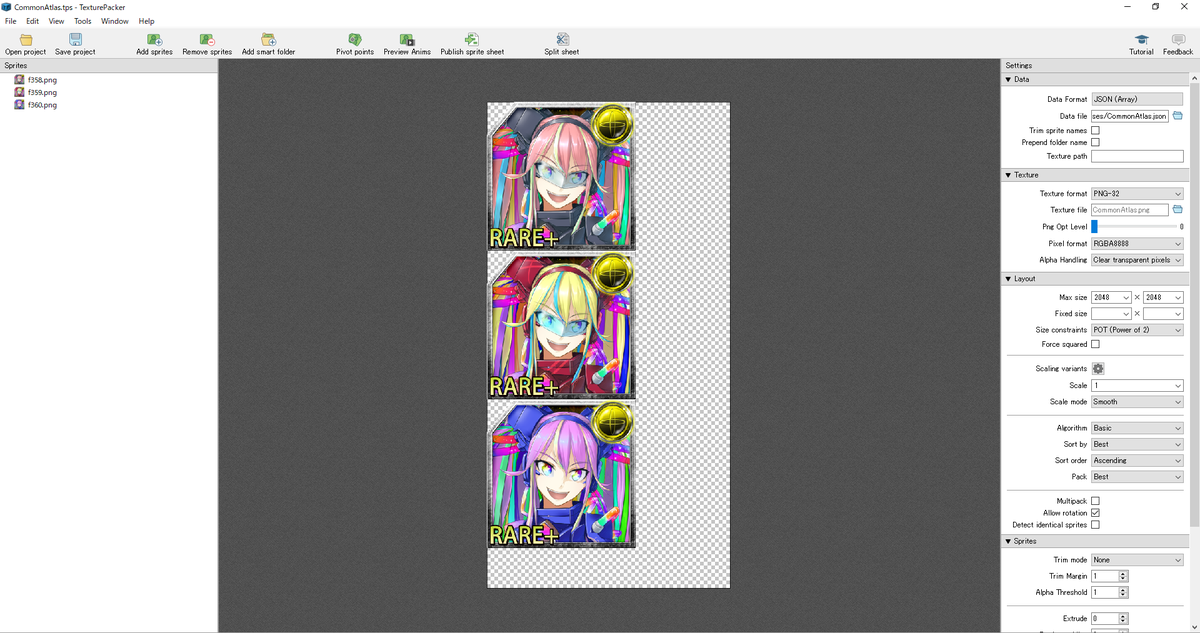
無料版の TexturePacker でパッキングしたいテクスチャを設定します
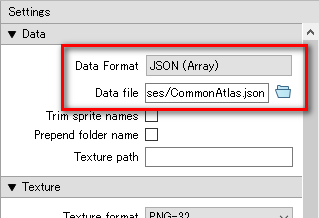
「Data Format」を「JSON(Array)」に変更して、
Unity プロジェクトの Assets フォルダ以下に .json を出力するように「Data file」を設定します
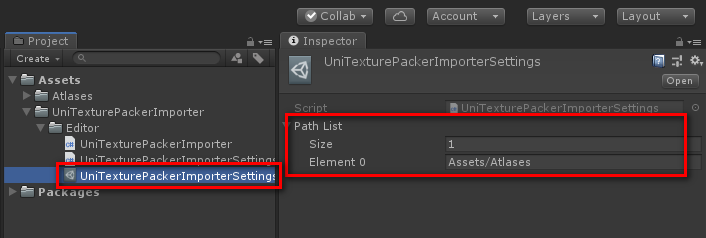
Unity プロジェクトの「UniTexturePackerImporterSettings」を選択して、
TexturePacker でパッキングしたテクスチャを管理するフォルダのパスを「Path List」に追加します

そして、TexturePacker でテクスチャをパッキングして Unity プロジェクトに出力すると、
スプライトが分割された状態でインポートされます