https://github.com/baiganio/aperio
One brain. Every AI agent. Nothing forgotten. — Self-hosted memory layer via MCP + Postgres + pgvector
https://github.com/baiganio/aperio
docker lancedb local-ai local-embeddings mcp ollama pgvector postgres self-hosted
Last synced: about 2 months ago
JSON representation
One brain. Every AI agent. Nothing forgotten. — Self-hosted memory layer via MCP + Postgres + pgvector
- Host: GitHub
- URL: https://github.com/baiganio/aperio
- Owner: BaiGanio
- License: mit
- Created: 2026-03-08T22:10:54.000Z (4 months ago)
- Default Branch: master
- Last Pushed: 2026-05-23T07:39:05.000Z (about 2 months ago)
- Last Synced: 2026-05-23T09:34:01.109Z (about 2 months ago)
- Topics: docker, lancedb, local-ai, local-embeddings, mcp, ollama, pgvector, postgres, self-hosted
- Language: JavaScript
- Homepage: https://baiganio.github.io/aperio/
- Size: 12.3 MB
- Stars: 6
- Watchers: 0
- Forks: 3
- Open Issues: 32
-
Metadata Files:
- Readme: README.md
- Changelog: CHANGELOG.md
- Contributing: CONTRIBUTING.md
- Funding: .github/FUNDING.yml
- License: LICENSE
- Security: SECURITY.md
Awesome Lists containing this project
README
✨ Aperio
**One brain. Every agent. Nothing forgotten.**
A self-hosted personal memory layer for AI agents. SQLite (or Postgres) + MCP + Ollama.
Zero-config by default; one file holds your memories, wiki, and code graph.
Your context, always available.
•
Getting Started
•
Architecture
•
Philosophy
•
AI Providers
•
How To Use?
•
Privacy
•
Security
•
Design Decisions
•
#### • 🌐 Site: [https://baiganio.github.io/aperio](https://baiganio.github.io/aperio) •
[](https://github.com/baiganio/aperio/releases)


[](https://github.com/baiganio/aperio)
[](https://github.com/baiganio/aperio/actions/workflows/ci.codeql.yml)
[](https://codecov.io/github/BaiGanio/aperio)
[](https://sonarcloud.io/summary/new_code?id=BaiGanio_aperio)
[](https://app.codacy.com/gh/BaiGanio/aperio/dashboard?utm_source=gh&utm_medium=referral&utm_content=&utm_campaign=Badge_grade)
[](https://github.com/baiganio/aperio/security/dependabot)
[](https://github.com/baiganio/aperio/security/policy)
💡 Pro Tip: Visit the Aperio Wiki or Discussions for extensive documentation on advanced topics.
🔍 Explore more: Early Testing Contributors • FAQ • Troubleshooting
---
## 🏗️ (Quick) Project Structure
```txt
📂 aperio/ <---= You are here if You are Developer. He-he ;/
├── 📂 db/
│ ├── index.js # Store factory — auto-selects Postgres or SQLite
│ ├── sqlite.js # SQLite + sqlite-vec + FTS5 adapter (zero config, default)
│ ├── postgres.js # Postgres + pgvector adapter (Docker)
│ ├── types.js # Shared DB types
│ ├── 📂 migrations/ # Postgres SQL (memories + wiki + codegraph)
│ └── 📂 migrations-sqlite/ # SQLite SQL (same schemas, FTS5 + vec0)
├── 📂 docker/
│ └── docker-compose.yml # pgvector/pgvector:pg16
├── 📂 docs/
│ └── index.html # Landing page for GitHub Pages
├── 📂 id/
│ └── whoami.md # Instructions for AI agent identity (edit this!)
├── 📂 lib/
│ ├── agent.js # Agent core — Anthropic / DeepSeek / Ollama loops
│ ├── terminal.js # Terminal chat client
│ ├── 📂 emitters/ # CLI and WebSocket stream emitters
│ ├── 📂 handlers/ # Attachment and memory handlers
│ ├── 📂 helpers/ # Embeddings, logger, port, shutdown, Ollama health
│ ├── 📂 routes/ # Express API routes + path safety guards
│ ├── 📂 utils/ # Chat utilities
│ └── 📂 workers/ # Deduplication, reasoning adapters, skill loader
├── 📂 lib/codegraph/ # Pre-indexed code knowledge graph (symbols, calls, imports)
│ ├── indexer.js # Backend dispatcher (Postgres or SQLite)
│ ├── watcher.js # chokidar-backed live reindex
│ ├── extract-ts.js # tree-sitter JS/TS/JSX/TSX extractor
│ └── 📂 backends/ # postgres.js · sqlite.js
├── 📂 mcp/
│ ├── index.js # MCP server entry point
│ └── 📂 tools/
│ ├── memory.js # remember · recall · update_memory · forget · backfill_embeddings · deduplicate_memories
│ ├── codegraph.js # code_search · code_outline · code_context · code_callers · code_callees · code_repos
│ ├── files.js # read_file · write_file · append_file · scan_project
│ ├── shell.js # run_node_script · run_shell · syntax_check
│ ├── web.js # fetch_url
│ └── image.js # read_image · preprocess_image
├── 📂 public/
│ └── index.html # Web UI — themes, streaming, sidebar
├── 📂 skills/ # Memory, reasoning, tools, coding standards, etc.
├── 📂 tests/
├── .env.example # Pre-set quick configuration
├── package.json # Dependencies
└── server.js # Express + WebSocket + agent loop
```
> **💡 Tip:** **`whoami.md`** controls the identity of the AI agent.
> - It is the most impactful file to customize.
---
## Getting Started
### Prerequisites
- Node.js 18+ — download from [https://nodejs.org/en/download](https://nodejs.org/en/download)
- [Docker Desktop](https://www.docker.com/products/docker-desktop/) — (optional, for Postgres mode)
- Ollama — download from [https://ollama.com/download](https://ollama.com/download) (optional, for local AI)
- [Anthropic API key](https://console.anthropic.com) — (optional, for cloud AI)
- [DeepSeek API key](https://platform.deepseek.com) — (optional, for cloud AI)
- [Google Gemini API key](https://aistudio.google.com/apikey) — (optional, for cloud AI)
- [Voyage AI API key](https://www.voyageai.com/) — (optional, for cloud embeddings)
### Step 1. Clone & Configure Environment Variables
Dedicated `dev` branch stripped from the file/folder noise. Only what's needed.
```bash
# dedicated developer branch - no extra files
git clone --depth 1 -b dev https://github.com/BaiGanio/aperio.git
cd aperio
# restore dependencies
npm install
```
> Ready to use `.env.example` for a fully local setup:
```env
# cp .env.example .env
AI_PROVIDER=ollama
OLLAMA_MODEL=qwen2.5:3b
EMBEDDING_PROVIDER=transformers # fully local, no API key required
# DB_BACKEND=sqlite # default; uncomment to override
# SQLITE_PATH=./var/aperio.db # default location for the single-file DB
```
### Step 2. Databases & Migrations
Aperio supports two storage backends. **You don't need to choose** — auto-detect picks
the right one based on whether Docker is running:
| Backend | When to use | Requires |
|---------|-------------|----------|
| **SQLite + sqlite-vec** (default) | No Docker, quick start, single user. Single file at `var/aperio.db`. | Nothing extra |
| **Postgres + pgvector** | Multi-agent, persistent, production-like | Docker |
```bash
# SQLite is the default — no extra steps needed.
# Skip the Docker commands below and go directly to Step 3.
```
> **💡 Tip:** Set `DB_BACKEND=sqlite` in `.env` to force SQLite, or `DB_BACKEND=postgres` for Postgres.
> If not set, Aperio auto-detects: uses Postgres when Docker is running, SQLite otherwise.
```bash
# POSTGRES MODE — start the database and run migrations
cd docker && docker compose up -d && cd ..
npm run migrate
```
### Step 3. Install Ollama & Pull Models
> **💡 Tip:** Skip this step entirely if you are using Anthropic or DeepSeek as your `AI_PROVIDER`.
```bash
ollama serve # use separate terminal
```
```bash
ollama pull qwen2.5:3b # LLM — lightweight, fast, good tool-calling
# ollama pull llama3.1 # LLM — solid tool-calling, no reasoning
# ollama pull qwen3:4b # LLM — strong reasoning, thinking mode support
```
### Step 4. Start Aperio Web UI
```bash
npm run start:local # localhost:31337 → browser opens automatically
```
### Step 5. Start Aperio terminal chat
```bash
npm run chat:local # runs as proxy or standalone
```
> That's it. No API keys. No cloud. Full semantic memory on your machine.
### Q: Now what?
>💡 Stuck on the installation steps? — check [Troubleshooting](https://github.com/BaiGanio/aperio/wiki/Troubleshooting) wiki.
>💡 Check [Aperio MCP Tools Guide](https://github.com/BaiGanio/aperio/wiki/MCP-Tools-Guide) wiki for extended examples.
>💡 Check [Commands](https://github.com/BaiGanio/aperio/wiki/Commands) wiki for the available options to run the app.
---
## Architecture
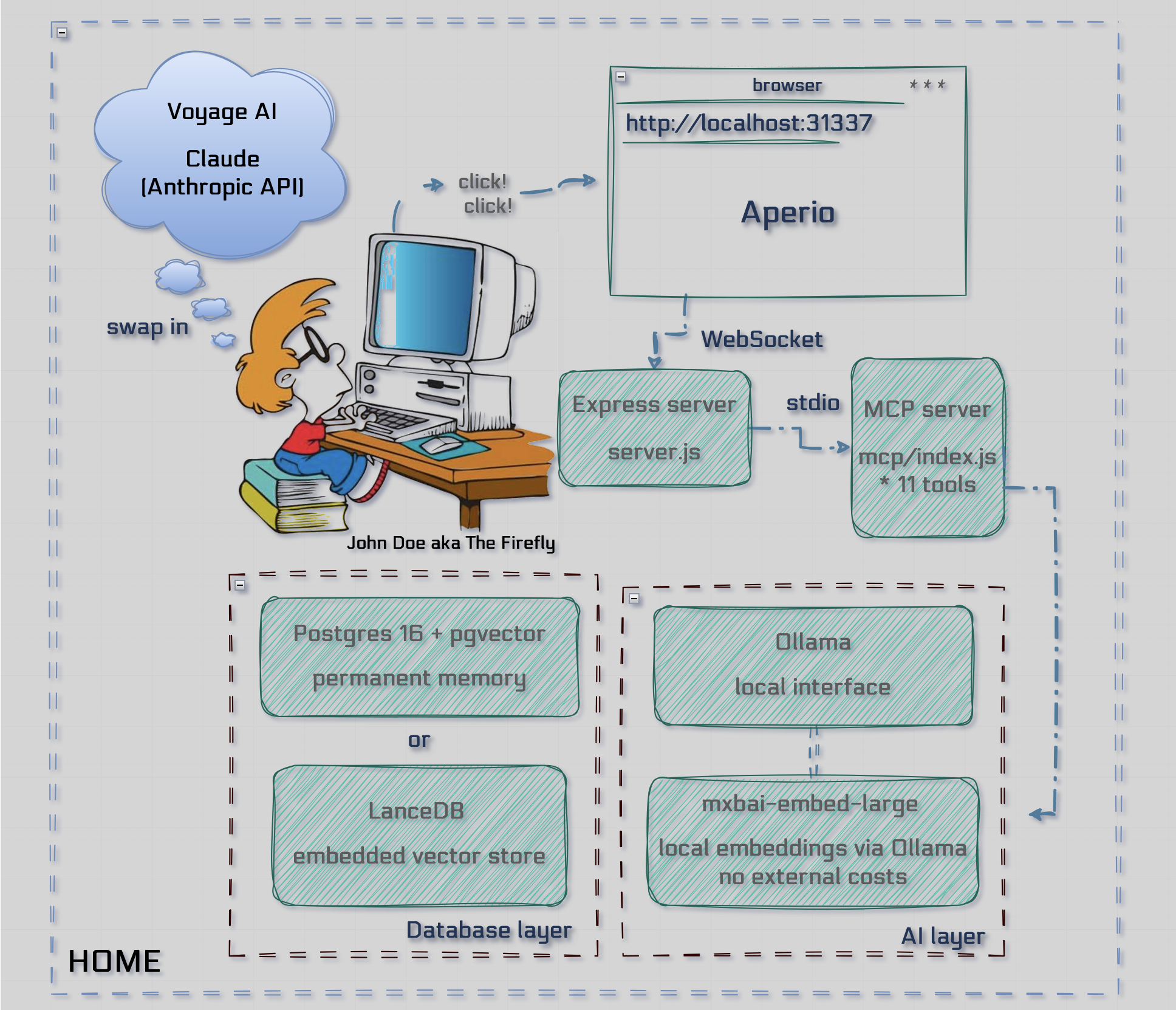
#### Q: Feel a need to read?
> **💡 Tip:** Visit [Architecture & Design](https://github.com/BaiGanio/aperio/discussions/24) for **in-depth** explanations.
---
## Round-table mode (two-agent cross-review)
Aperio can boot a **second agent** alongside the primary so that any chat turn
can be cross-reviewed before it reaches you. Two agents take turns: **Agent A**
answers, **Agent B** reviews, A revises, B re-reviews — until they reach
explicit `AGREED` or a hard round cap is hit. A single consensus bubble is
rendered when they agree; otherwise both positions are shown side-by-side.
**Enable it** with `ROUNDTABLE_AGENTS` in `.env`:
```env
# Format: provider:model,provider:model
ROUNDTABLE_AGENTS=anthropic:claude-haiku-4-5-20251001,deepseek:deepseek-chat
ROUNDTABLE_MAX_ROUNDS=3
```
When set, the chat UI gains a **Discuss** toggle next to the send button.
Toggle it ON to route the next turn through the round-table; OFF behaves
identically to single-agent chat. If `ROUNDTABLE_AGENTS` is unset or only one
pair parses, the toggle stays disabled and the app behaves exactly as before.
Personas live in `id/whoami-primary.md` and `id/whoami-verifier.md` — edit them
to tune how each agent answers or critiques.
---
## Code Graph
Aperio ships a **pre-indexed code knowledge graph** so an agent can query
your codebase instead of reading 50 files to answer "who calls X?" or
"where is Y defined?". Symbols, calls, imports, and `extends` edges are
extracted with tree-sitter (JS / TS / JSX / TSX) and stored alongside
your memories.
Two ways to use it:
```bash
# 1. One-shot index of the current directory
node lib/codegraph/indexer.js .
# 2. Live mode — start the server with a file watcher that reindexes on save
APERIO_CODEGRAPH=on npm run start:local
```
The graph respects `APERIO_ALLOWED_PATHS_TO_READ`, so you can index
multiple repos at once (e.g. Aperio + a side project). The sidebar in
the web UI has a "Code" panel for searching symbols and walking
callers / callees visually; the model uses the same data via the
`code_*` MCP tools listed below.
**Backend support:** Postgres and SQLite both work; LanceDB has no graph
store. With SQLite (the default), the graph lives in the same
`var/aperio.db` file as your memories.
---
## MCP Tools
Aperio exposes **28 tools** over MCP. Any MCP-compatible agent (Cursor, Windsurf, Claude, etc.) can call them.
| Category | Tool | What it does |
|----------|------|-------------|
| **Memory** | `remember` | Save a memory with type, title, tags, importance, and optional expiry |
| | `recall` | Semantic or full-text search across all memories |
| | `update_memory` | Update an existing memory by ID; tombstones the old version, re-generates its embedding |
| | `forget` | Delete a memory by ID |
| | `backfill_embeddings` | Generate embeddings for memories that are missing one |
| | `deduplicate_memories` | Find and merge near-duplicate memories by cosine similarity |
| **Wiki** | `wiki_write` | Create or update a wiki article (LLM-authored, cited synthesis); upserts by slug, bumps revision |
| | `wiki_search` | Hybrid full-text + semantic search over articles — call before `wiki_write` |
| | `wiki_list` | Browse articles newest-first by tag / status / `updated_since` |
| | `wiki_get` | Fetch a full article by slug, with breadcrumb and optional stale-refresh |
| **Code Graph** | `code_search` | Hybrid FTS + semantic search over pre-indexed symbols (functions, classes, methods, consts) |
| | `code_outline` | List every symbol in a file by line — cheap map before reading |
| | `code_context` | Fetch the source slice for a qualified symbol, with leading doc and line padding |
| | `code_callers` | Walk the reverse call graph (depth-capped) — who calls this? |
| | `code_callees` | Walk the forward call graph (depth-capped) — what does this call? |
| | `code_repos` | List indexed repos with file / symbol counts and last-indexed timestamp |
| **Files** | `read_file` | Read a code or text file (max 500 lines per call, paginated via `offset`) |
| | `write_file` | Create or overwrite a file (subject to write-path guard) |
| | `append_file` | Append content to an existing file without touching the rest |
| | `edit_file` | Replace an exact string in a file (`replace_all` for multiple occurrences) |
| | `scan_project` | Traverse a project folder — returns a file tree and reads key files |
| | `generate_xlsx` | Generate a multi-sheet `.xlsx` workbook, served for download |
| **Shell** | `run_node_script` | Run a `.js` script inside an allowed write path; returns its output |
| | `syntax_check` | Check a JavaScript file for syntax errors without executing it |
| **Web** | `fetch_url` | Fetch a URL, strip HTML, truncate at 15 000 characters |
| **Image** | `read_image` | Load an image (file path or base64) for the agent to analyze |
| | `preprocess_image` | Normalize an image to RGB PNG before sending to a local VLM (strips alpha, letterboxes to 896×896) |
| | `describe_image` | Send an image to a local Ollama vision model (VLM) and return a text description |
> PowerPoint files are generated by writing a script (see `skills/pptx/`) and running it via `run_node_script` — there is no dedicated `pptx` tool.
> **💡 Tip:** Check [Aperio MCP Tools Guide](https://github.com/BaiGanio/aperio/wiki/MCP-Tools-Guide) for call examples.
---
## Philosophy
Aperio is open source and self-hosted because **your memories is yours**.
- It runs entirely on your machine - no API keys, no data leaving your network, no cloud dependency.
- Default is local and private. The option - self-hosted. The price - free forever.
- Cloud AI is available as a power upgrade, but you will be never forced to use it.
| | |
|---|---|
| 🔒 **Local by default** | ☁️ **Cloud as upgrade** |
| Ollama + local embeddings — zero external calls | Claude / DeepSeek for deep research & heavy tasks |
| | |
|---|---|
| 🗄️ **Your brain, your data** | 🖥️ **MCP-native** |
| Postgres or SQLite lives on your machine. You own it. | Any MCP agent plugs in — Cursor, Windsurf, etc. |
| |
|---|
| ✅ **Free to run** | |
| No subscription. No per-message cost. Just your hardware. | |
> #### ‼️ What Aperio Is Not!
| | |
|---|---|
| 🚫 **Not a cloud service** | 🚫 **Not a managed product** |
| No hosted version, no SaaS, no managed infra | No support contracts, SLAs, or guaranteed uptime |
| | |
|---|---|
| 🚫 **Not a plugin or extension** | 🚫 **Not a replacement for your AI** |
| It's a self-hosted server you run yourself | A memory layer alongside Claude, Cursor, etc. |
| | |
|---|---|
| 🚫 **Not plug-and-play** | 🚫 **Not production-hardened** |
| Needs Node.js, Docker, and basic terminal comfort | Early software, built in the open, improving fast |
---
## AI Providers
Switch with a single line in `.env`. Everything else — memories, tools, UI — stays identical.
```env
AI_PROVIDER=ollama # "ollama" | "anthropic" | "deepseek" | "gemini"
```
### ⬡ Ollama (Default — Local, Free, Private)
No API keys, no data leaving your machine.
```env
AI_PROVIDER=ollama
OLLAMA_MODEL=qwen2.5:3b
OLLAMA_BASE_URL=http://localhost:11434
```
Recommended models (pull with `ollama pull `):
| Model | Best for |
|-------|----------|
| `qwen2.5:3b` | Default — lightweight, fast, good tool-calling |
| `llama3.1` | Solid tool-calling, no thinking/reasoning overhead |
| `qwen3:4b` | Strong reasoning, thinking mode |
| `deepseek-r1:32b` | Heavy reasoning, requires ≥ 60 GB RAM |
> **💡 Tip:** Set `CHECK_RAM=true` in `.env` to let Aperio auto-select a model based on available RAM.
### ✦ Anthropic Claude (Optional — Cloud Upgrade)
For heavy research, complex multi-step reasoning, or the strongest tool-calling available.
```env
AI_PROVIDER=anthropic
ANTHROPIC_API_KEY=sk-ant-...
ANTHROPIC_MODEL=claude-haiku-4-5-20251001
```
Available models (set via `ANTHROPIC_MODEL`):
| Model | Notes |
|-------|-------|
| `claude-haiku-4-5-20251001` | Fast and cost-efficient — good default |
| `claude-sonnet-4-6` | Balanced performance and cost |
| `claude-opus-4-7` | Most capable, highest cost |
### ◈ DeepSeek (Optional — Cloud Upgrade)
Cost-effective cloud alternative with strong reasoning capabilities.
```env
AI_PROVIDER=deepseek
DEEPSEEK_API_KEY=sk-...
DEEPSEEK_MODEL=deepseek-chat
```
Sign up at [platform.deepseek.com](https://platform.deepseek.com). No vision support — image tools are disabled in DeepSeek mode.
### ◆ Google Gemini (Optional — Cloud Upgrade)
Large context window with native vision support.
```env
AI_PROVIDER=gemini
GEMINI_API_KEY=...
GEMINI_MODEL=gemini-2.0-flash
```
Get a key from [aistudio.google.com](https://aistudio.google.com/apikey).
---
## Embeddings
Embeddings power semantic search across your memories. Aperio supports two providers:
```env
EMBEDDING_PROVIDER=transformers # "transformers" | "voyage"
```
### HuggingFace Transformers (Default — Fully Local)
Downloads `mixedbread-ai/mxbai-embed-large-v1` (ONNX, quantized) on first run. No daemon, no API key, no network calls after the initial download.
```env
EMBEDDING_PROVIDER=transformers
```
### Voyage AI (Optional — Cloud)
Higher-quality embeddings, free tier: 50M tokens/month.
```env
EMBEDDING_PROVIDER=voyage
VOYAGE_API_KEY=pa-...
```
Sign up at [dash.voyageai.com](https://dash.voyageai.com).
#### Q: Is that all?
> **💡 Tip:** Check out our wiki pages [AI Agents Comparison](https://github.com/BaiGanio/aperio/wiki/AI-Agents-Comparison) & [Embeddings](https://github.com/BaiGanio/aperio/wiki/Embeddings) for more details.
---
## Privacy
### Reading Files with Local AI
Ollama itself has no file system access — it's purely an inference engine.
Aperio's MCP layer bridges the gap.
When you ask the AI to read a file, here's what actually happens:
```
You → "read /path/to/server.js and explain the WebSocket handler"
MCP Server → calls read_file tool, loads the file from disk
Ollama → receives the file contents as context, reasons over it
You ← answer based on your actual code
```
The model never touches your file system directly.
Aperio reads the file and injects the content into the conversation.
#### Q: You call this privacy?
> 💡 Check out our wiki page [MPC Tools](https://github.com/BaiGanio/aperio/wiki/MPC-Tools) for more details.
---
## Security
Aperio runs on your machine and has access to your file system through the `scan_project`, `write_file`, `append_file`, and `read_file` tools. File operations are gated by a path safety system — read and write access are controlled independently.
### File System Access
All file operations go through `lib/routes/paths.js`, which resolves and validates every path before it reaches the disk.
Two environment variables control what is accessible:
```env
# Allow read operations only inside these directories (comma-separated absolute paths)
APERIO_ALLOWED_PATHS_TO_READ=/Users/yourname/projects,/Users/yourname/documents
# Allow write operations only inside these directories (comma-separated absolute paths)
APERIO_ALLOWED_PATHS_TO_WRITE=/Users/yourname/projects
```
**How path resolution works:**
1. Both values default to the current working directory (`process.cwd()`) when not set — which is the Aperio project root when you run `npm run start:local`.
2. Paths are resolved to absolute form at startup. `~` is expanded to the working directory.
3. A request to read or write `/some/path/file.txt` is allowed only if its resolved absolute path starts with one of the permitted directories. Paths outside the allow-list are rejected with a clear error message before any I/O occurs.
4. Read and write guards are separate. You can grant broad read access while keeping write access narrow — for example, read your entire `~/projects` tree but only write inside the Aperio project root.
**What the model can and cannot do:**
| Operation | Guard | Default scope |
|-----------|-------|---------------|
| `read_file` | `APERIO_ALLOWED_PATHS_TO_READ` | Project root |
| `write_file` | `APERIO_ALLOWED_PATHS_TO_WRITE` | Project root |
| `append_file` | `APERIO_ALLOWED_PATHS_TO_WRITE` | Project root |
| `scan_project` | `APERIO_ALLOWED_PATHS_TO_READ` | Project root |
Additionally, `read_file` enforces:
- **Extension allow-list** — only code and text files (`.js`, `.ts`, `.py`, `.md`, `.json`, `.sql`, `.sh`, etc.)
- **Size cap** — files larger than 500 KB are rejected
- **Pagination** — reads at most 500 lines per call; use the `offset` parameter to page through larger files
### Shell Execution (`run_shell`)
By default the model can only execute `.js` files (the `run_node_script` tool). The optional `run_shell` tool widens this to a fixed allow-list of real binaries — used for QA steps that need them, such as pptx visual QA (`soffice` → `pdftoppm`) or grepping extracted text for leftover placeholders. It is **off by default** and gated by two environment variables:
```env
# Master switch — enables run_shell at all. When unset, the tool refuses every call.
APERIO_ENABLE_SHELL=1
# Opt-in for LOCAL Ollama models. Cloud providers (Anthropic/Gemini/DeepSeek) get
# run_shell as soon as the master switch is on; local models stay node-only unless
# you also set this, since smaller local models are prone to tool-call thrashing.
APERIO_SHELL_LOCAL=1
```
Constraints, enforced in `mcp/tools/shell.js`:
| Guard | Behavior |
|-------|----------|
| Allow-list | Only `node, npm, git, ls, cat, grep, rg, find, head, tail, python3, soffice, pdftoppm` run |
| Operators | `;`, `&&`, `\|\|`, `&`, `<`, `>`, backticks, `$()` are rejected; a single `\|` pipe is permitted |
| Working dir | Commands run in the active session workspace (or an explicit `cwd` within an allowed write path) |
| Limits | 60 s timeout, 200 KB output cap (shared with `run_node_script`) |
| Per-model gate | Disabled providers/models never see the tool at all (see `isShellAllowedFor` in `lib/agent/index.js`) |
📄 Take a notes:
- Only run Aperio on a machine you trust
- Do not expose the MCP server or web UI to the public internet without authentication
- Review any file write operations before confirming them — `write_file` overwrites completely with no undo
- The AI model can be prompted (or hallucinate) to write to sensitive paths — always review before confirming
- Never commit your `.env` file — it contains your database URL and API keys
- Write paths should be equal to or a strict subset of read paths
#### Q: And this is it?
> 💡 Check out our wiki page [Path safety](https://github.com/BaiGanio/aperio/wiki/Path-Safety) for more details.
---
**One brain. Every agent. Nothing forgotten.**
*From Latin* aperire *— to open, to reveal, to bring into the light.*