An open API service indexing awesome lists of open source software.

https://github.com/baimohui/i18n-mage

๐Ÿช„ Wave your i18n wand. Conjure order from the chaos with auto-translation, smart fixes, and Excel sync.
https://github.com/baimohui/i18n-mage

automation frontend i18n i18next internationalization l10n localization productivity react react-i18next translation translation-management typescript vscode-extension vue vue-i18n

Last synced: 3 months ago
JSON representation

๐Ÿช„ Wave your i18n wand. Conjure order from the chaos with auto-translation, smart fixes, and Excel sync.

Awesome Lists containing this project

README


i18n Mage Logo

i18n Mage


English | ็ฎ€ไฝ“ไธญๆ–‡


๐Ÿช„ Streamline your frontend i18n workflow with Vue I18n & React i18next support, auto-completion, inline hints, and Excel import/export.



VS Code Marketplace


Open VSX Version


GitHub Stars


License: MIT


Issues

---
## โœจ Features

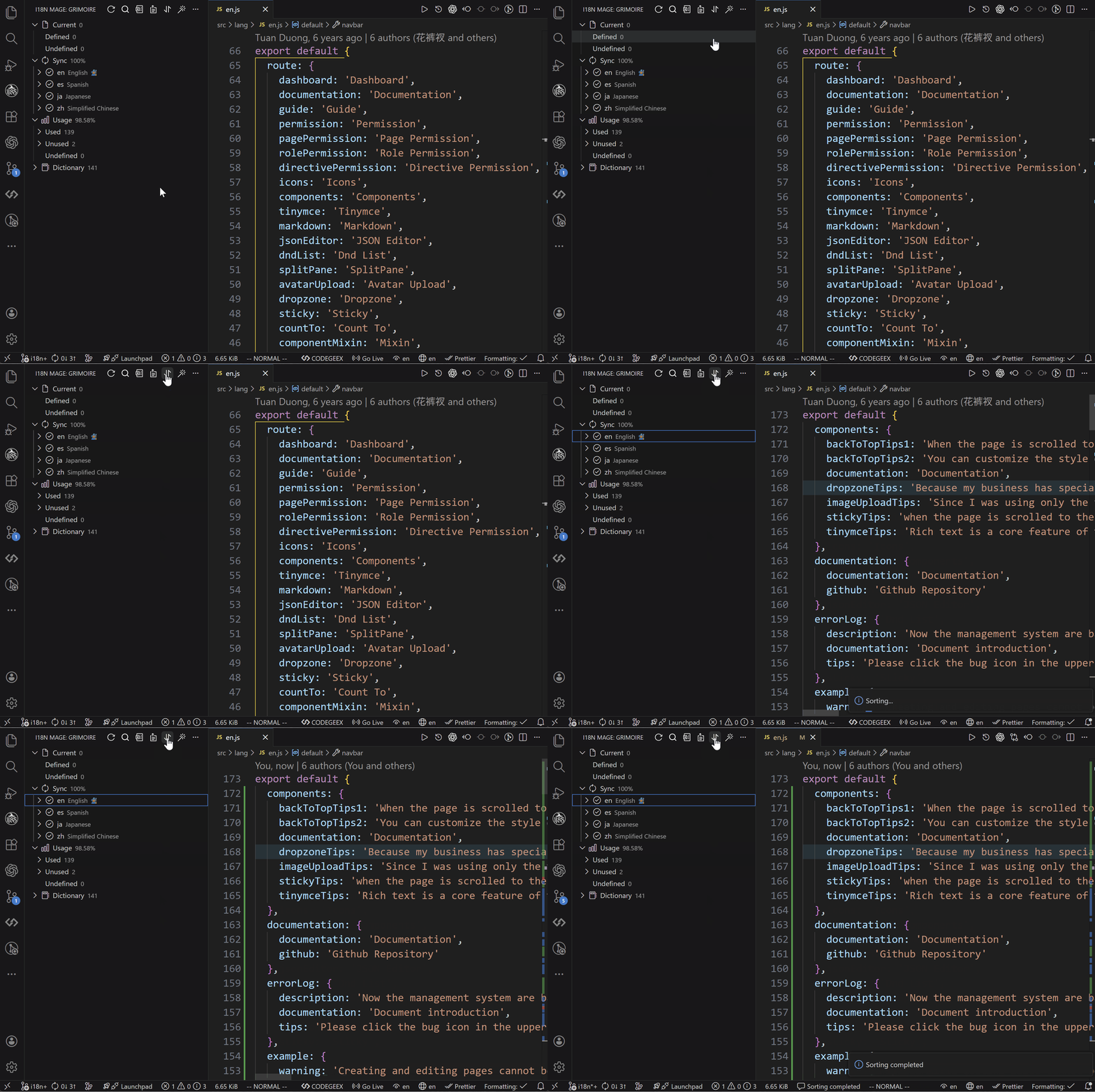
### ๐ŸŒณ Translation Tree Overview

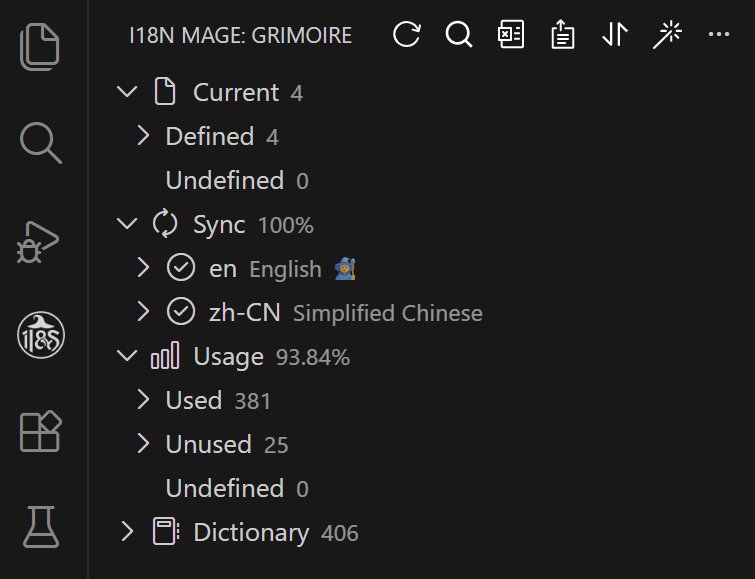
* Displays an overview panel via the VS Code sidebar.
* Includes statistics (total keys, missing translations, etc.).
* Sync status per language file.
* Tree-structured view of translation entries.
* Functional buttons: Export, Import, Sort, Fix.

![Tree Provider](https://raw.githubusercontent.com/baimohui/i18n-mage/refs/heads/main/doc-assets/panelView.png)

### ๐Ÿง  Inline Translation Hints

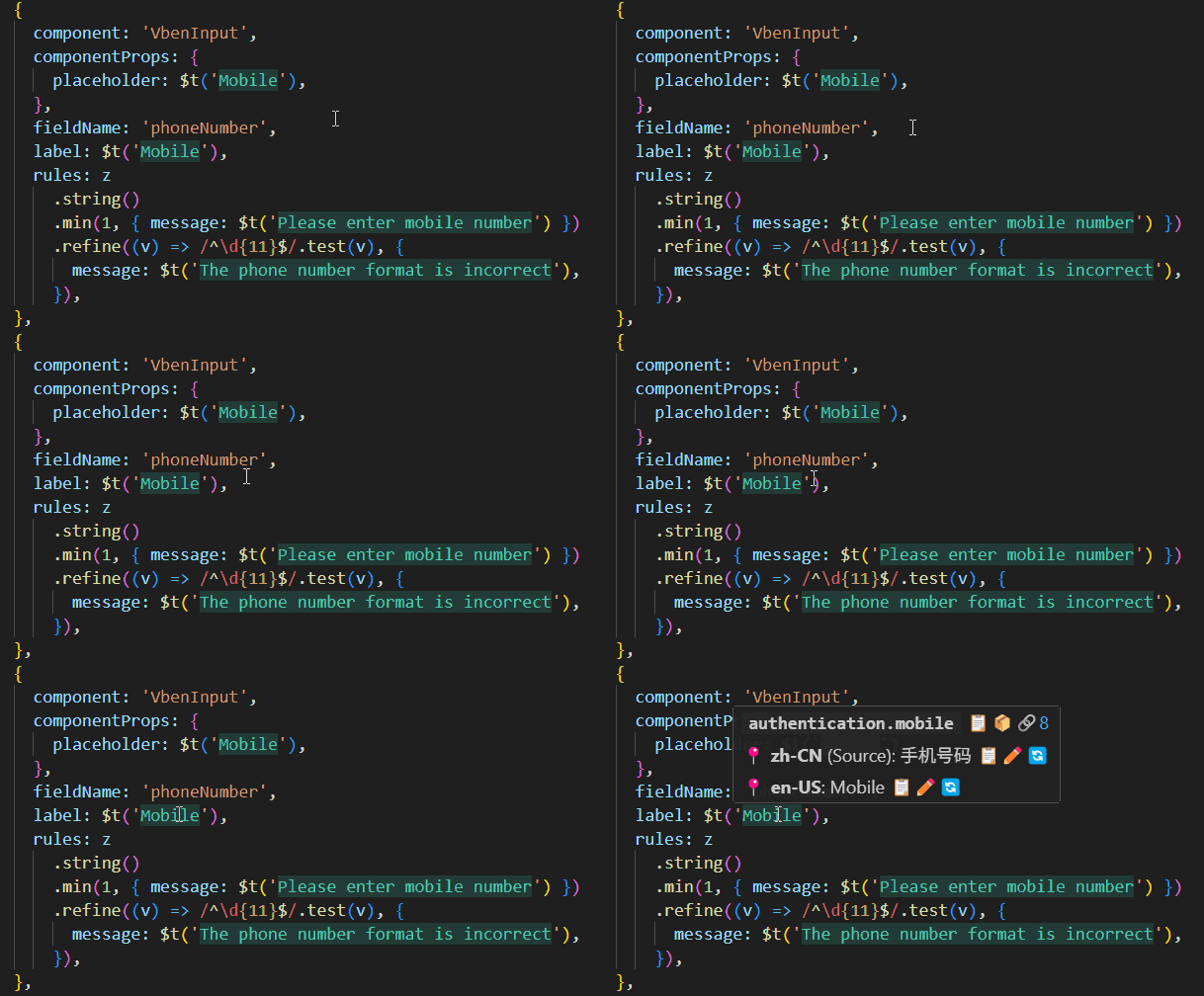
* Show actual translation inline where `t()` is used.
* Supports custom styles (color, max length, etc.).
* Toggleable via shortcuts.
![Inline Hints](https://raw.githubusercontent.com/baimohui/i18n-mage/refs/heads/main/doc-assets/inlineHints.gif)

### โšก Intelligent Code Completion

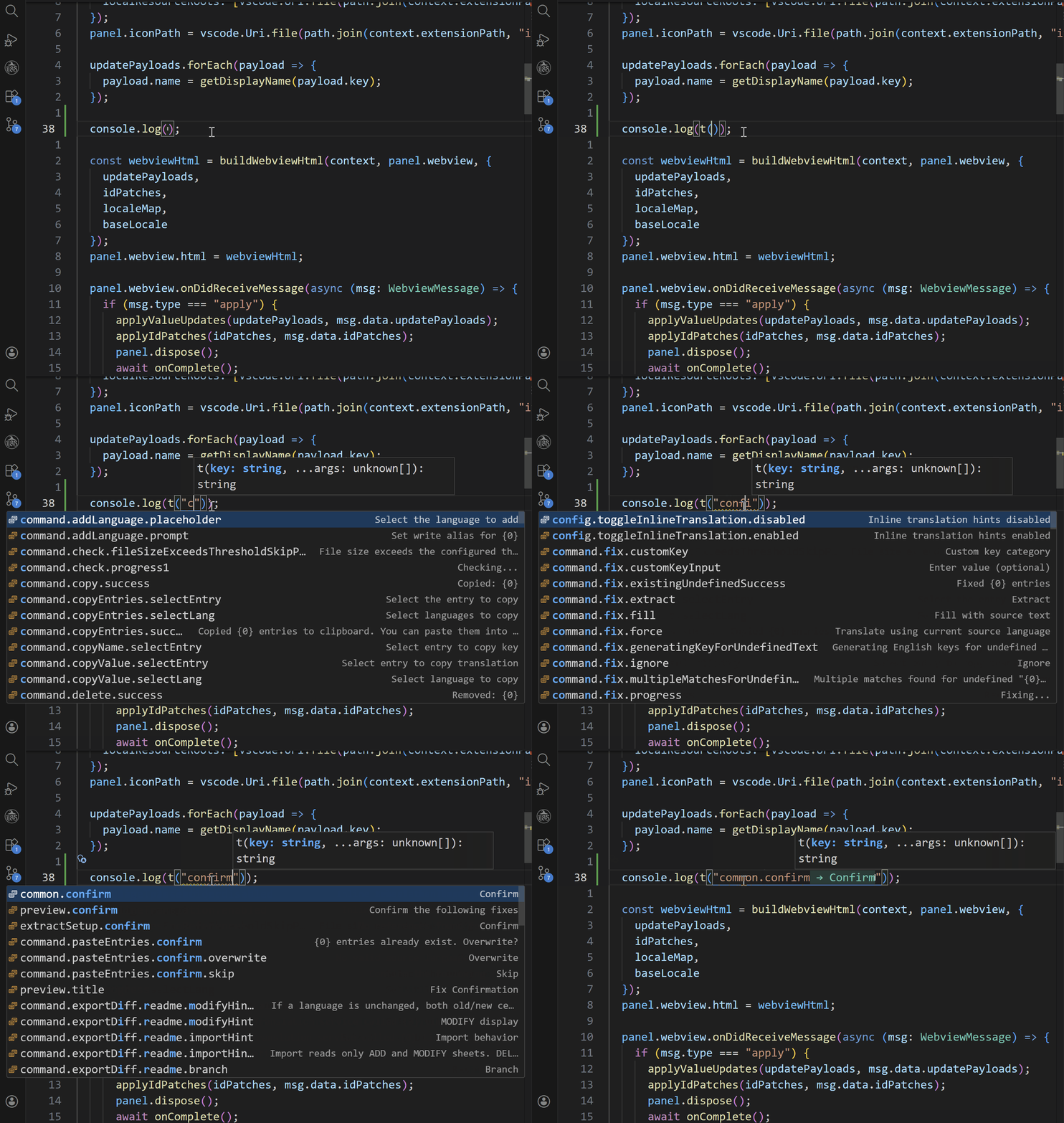
* Automatically suggests existing translation entries when typing internationalization functions (e.g., `t("...")`)
* Supports candidate filtering by key, value, or bidirectional matching
* Auto-fills translation keys to boost multilingual development efficiency
![Code Completion](https://raw.githubusercontent.com/baimohui/i18n-mage/refs/heads/main/doc-assets/completion.gif)

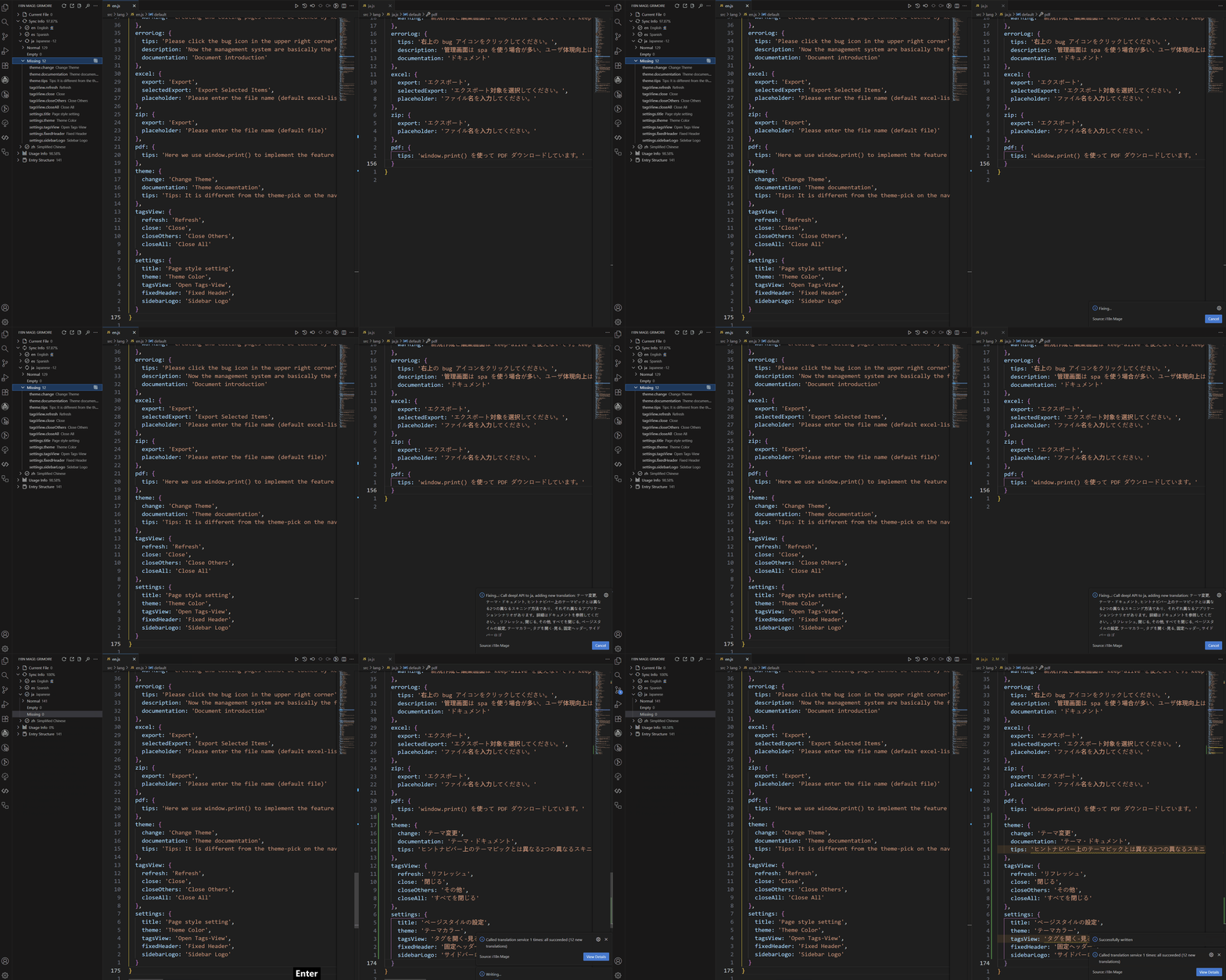
### ๐Ÿšง Auto-Fill Missing Translations

* Integrates DeepL, Google, DeepSeek, Baidu, Tencent translation services.
* Preview and confirm missing translations before applying.

![Auto-Fill Missing Translations](https://raw.githubusercontent.com/baimohui/i18n-mage/refs/heads/main/doc-assets/fixMissingTranslation.gif)

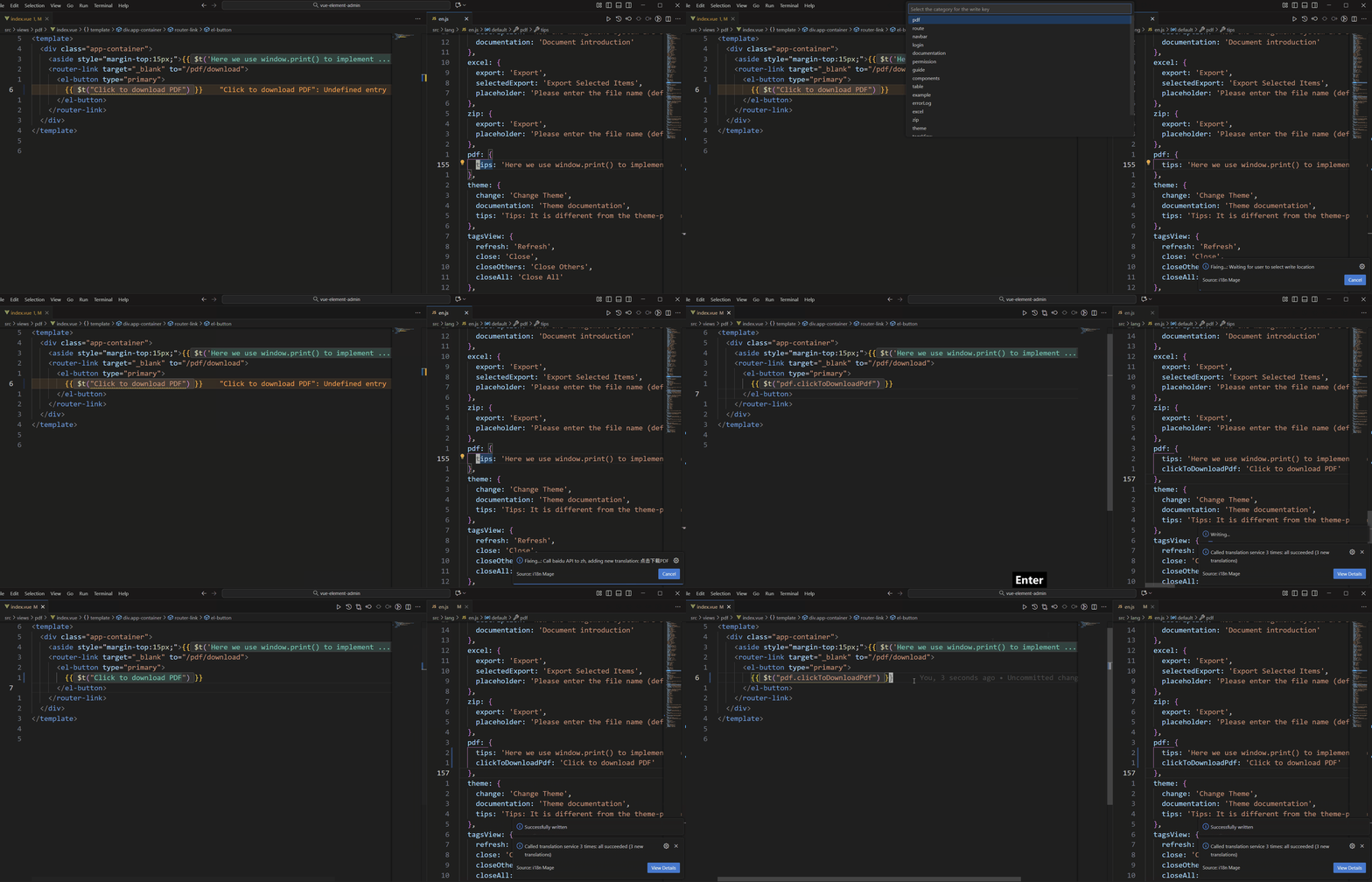
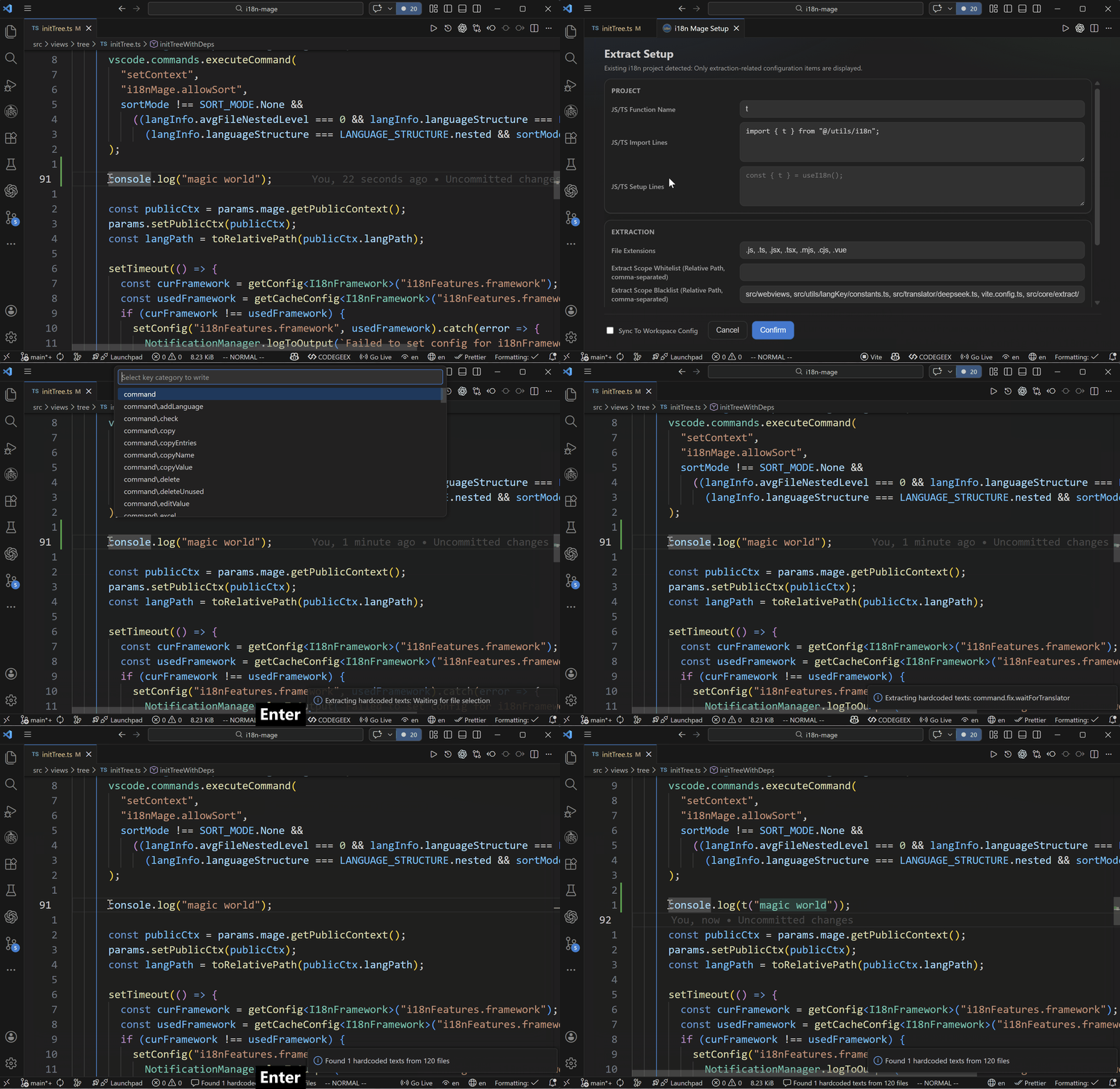
### ๐Ÿงน Auto-Fix Undefined Entries

* Detects and fixes undefined i18n keys.
* Replaces with existing key if value matches.
* Otherwise, generates a new key with customizable naming.

![Auto-Fix Undefined Entries](https://raw.githubusercontent.com/baimohui/i18n-mage/refs/heads/main/doc-assets/fixUndefinedTranslation.gif)

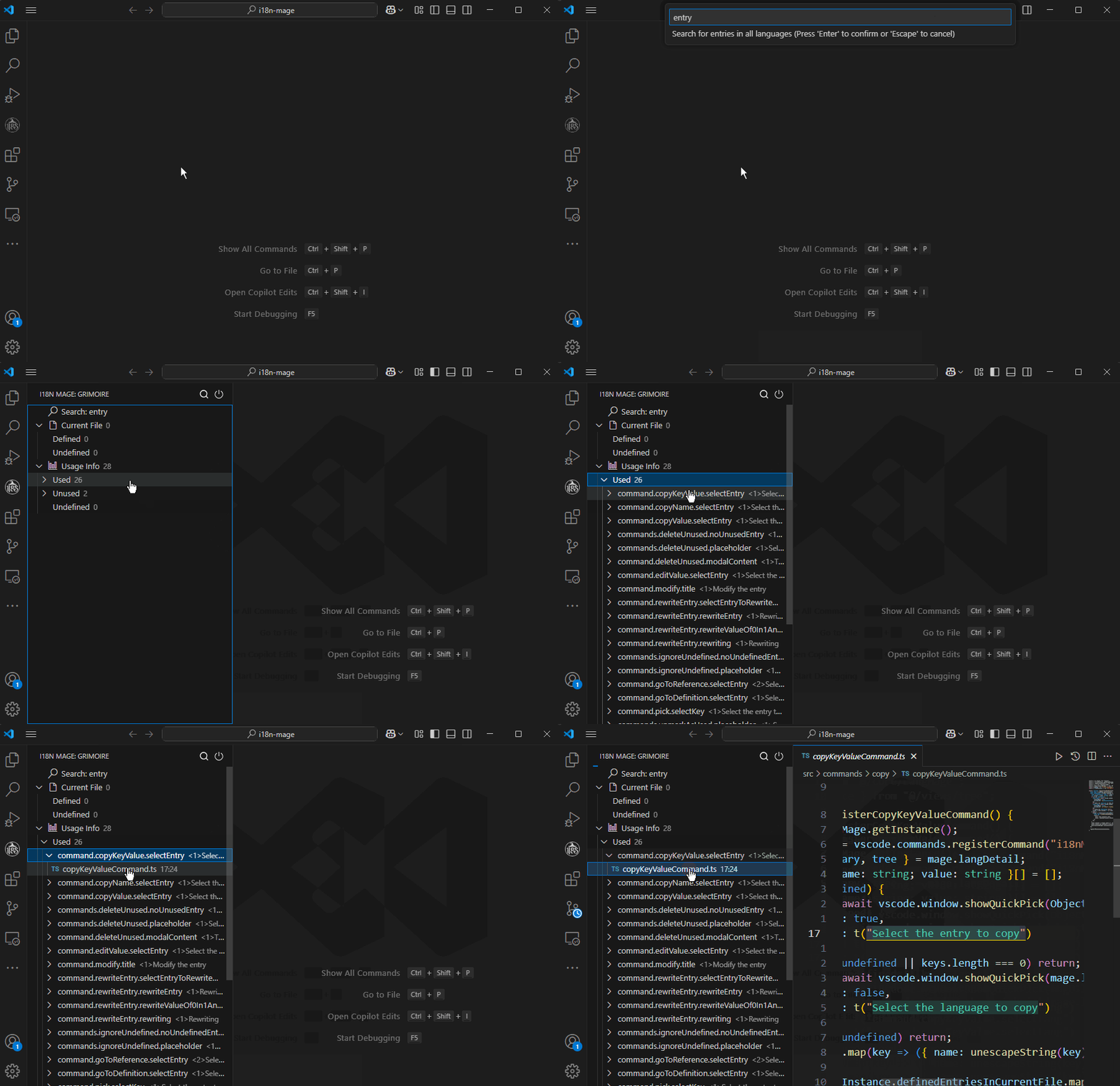
### ๐Ÿ•ต๏ธ Detect Unused Keys

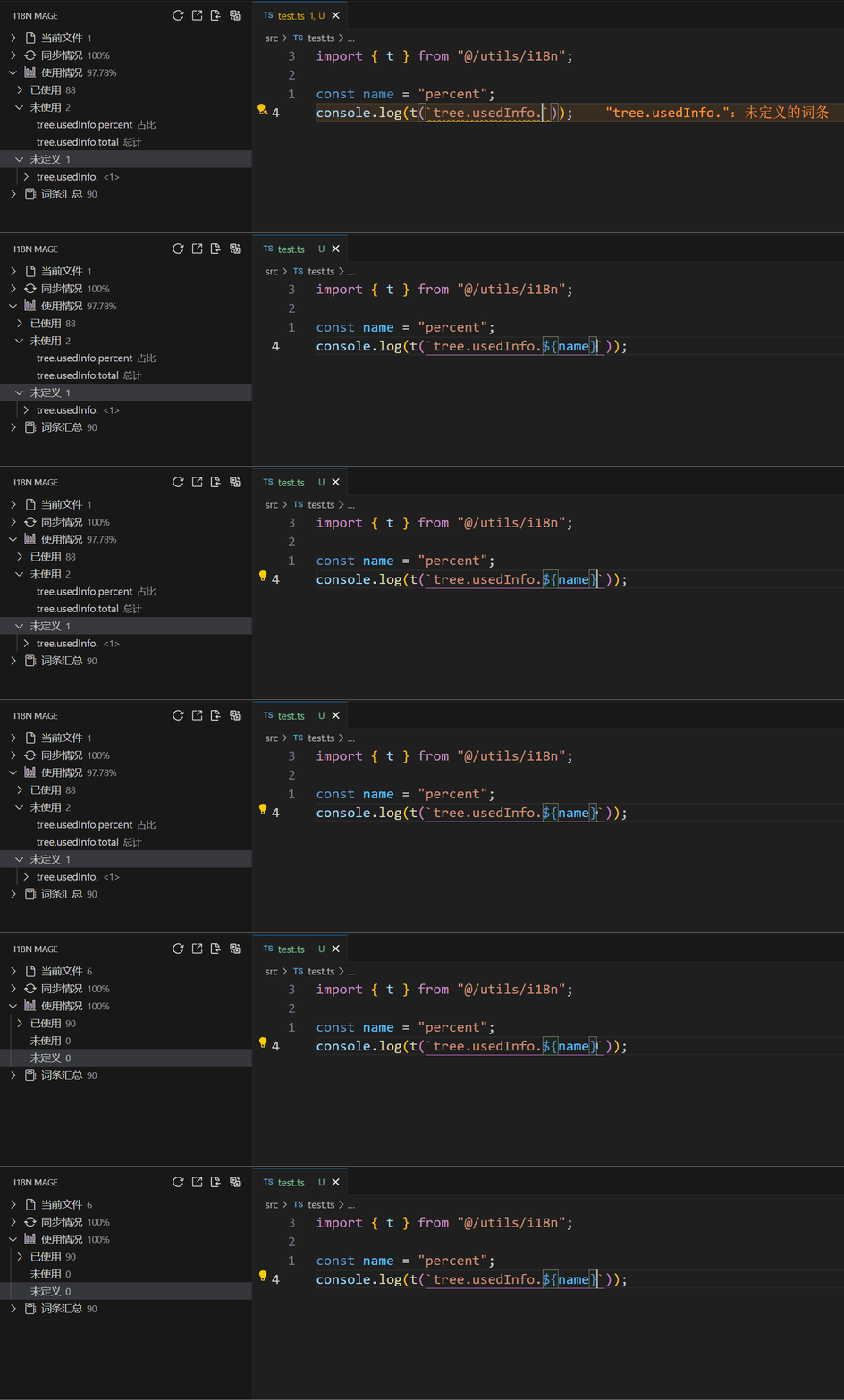
* Analyzes usage of all keys.
* Pattern matching for dynamic keys.
* Delete or mark as used manually.
![Detect Unused Keys](https://raw.githubusercontent.com/baimohui/i18n-mage/refs/heads/main/doc-assets/checkUsage.gif)

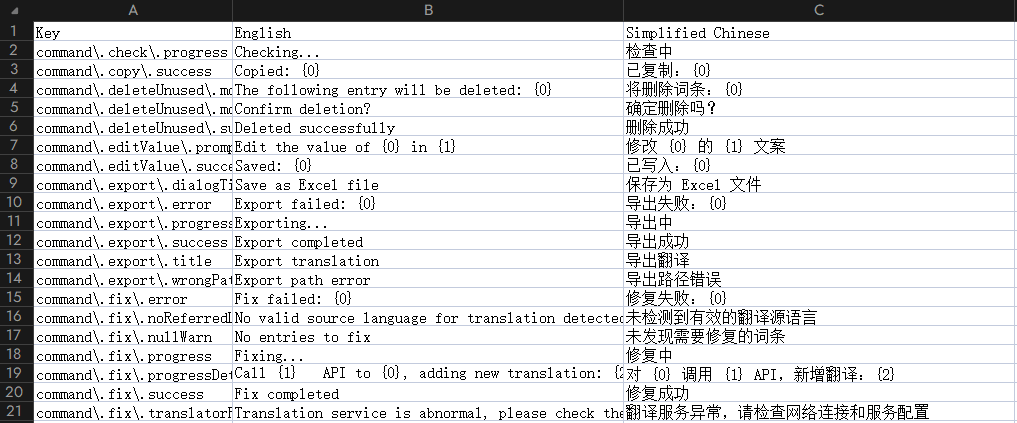
### ๐Ÿ“Š Excel Import/Export

* Export translation entries to Excel for translators.
* Import translations from Excel back into language files.

![Excel Import/Export](https://raw.githubusercontent.com/baimohui/i18n-mage/refs/heads/main/doc-assets/excel.png)

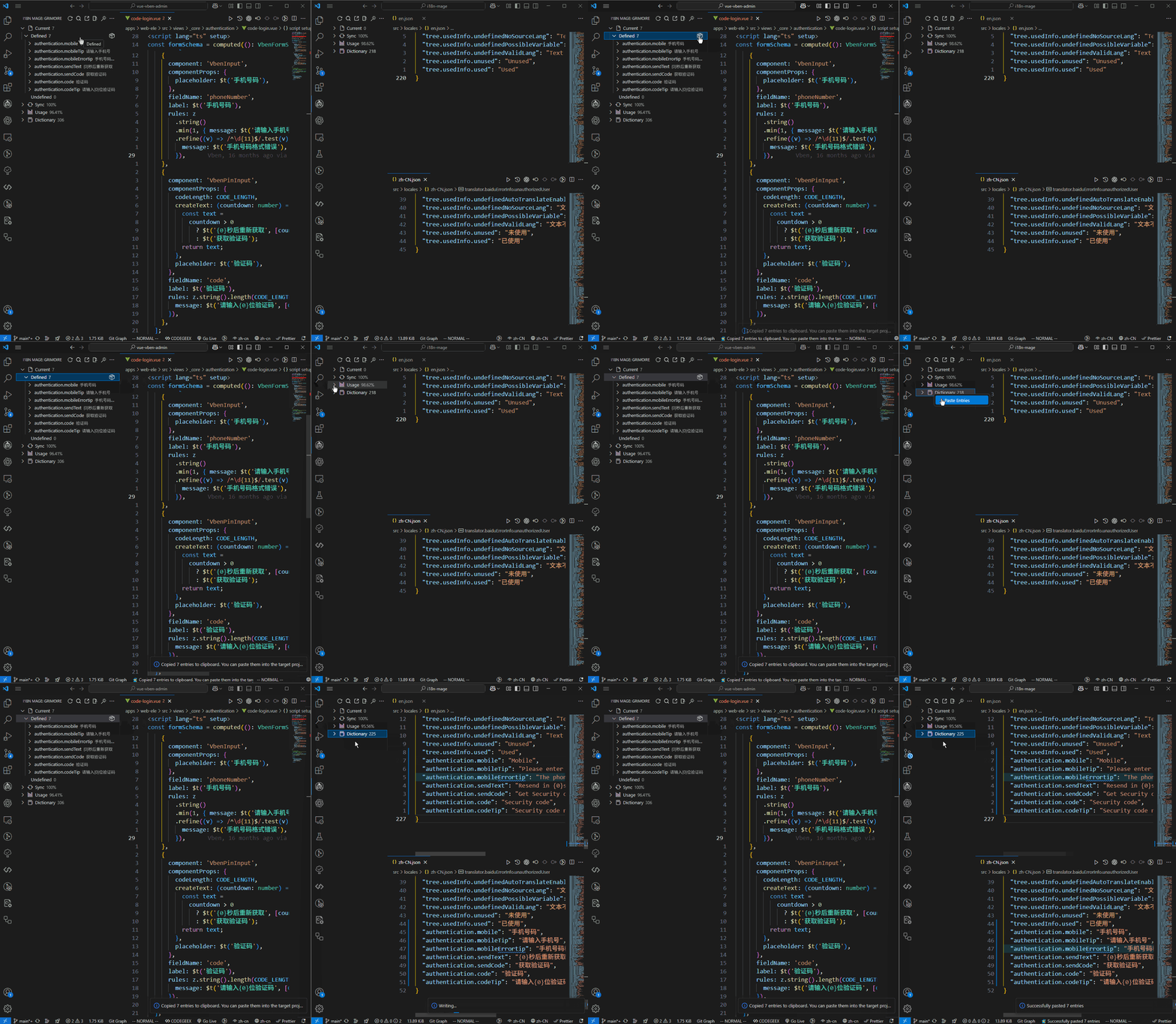
### ๐Ÿ“‹ Copy Translation Data

* One-click copy of all keys/values on the current page.

![Copy Translation Data](https://raw.githubusercontent.com/baimohui/i18n-mage/refs/heads/main/doc-assets/copyCurrentPage.gif)

## โšก Quick Start

### 1. Install the Extension

**Option 1: Install from VS Code**
1. Open VS Code and go to Extensions (`Ctrl+Shift+X` / `Cmd+Shift+X`)
2. Search for `i18n Mage`
3. Click **Install**

**Option 2: Command Line Installation**
```bash
ext install jensen-wen.i18n-mage
```

**Option 3: Manual Installation**
Visit the [Marketplace Page](https://marketplace.visualstudio.com/items?itemName=jensen-wen.i18n-mage) to install.

### 2. Open Translation Panel

- The extension automatically scans your project's i18n directory after activation
- Click the i18n Mage icon in the sidebar to open the translation panel
- Right-click in the panel to manually set translation directory if not auto-detected

### 3. Set Languages

- Right-click to configure display and source languages
- Manually assign languages to files if automatic detection fails

### 4. Configure Translation Services (Optional)

- Supported services: DeepL, Google, DeepSeek, Baidu, Tencent
- Configuration path: `Settings โ†’ Extensions โ†’ i18n Mage โ†’ Translation Services`

## ๐Ÿงฐ Configuration

### ๐Ÿš€ Key Categories

* General settings
* Framework support (e.g. translation function names, interpolation)
* Translation services (API keys, reference language)
* Analysis rules (file scanning, auto detection)
* Write rules (key style, quote style, indentation)
* Inline hint styling
* Workspace-specific settings

> All settings are accessible via the VS Code Settings UI or in `.vscode/settings.json`.

See [Full Config Reference](#-full-config-reference) for all options.

## ๐ŸŽน Commands & Shortcuts

| Command ID | Description | Shortcut |
| ---------------------------------- | ------------------------------- | ---------- |
| `i18nMage.check` | Check key information | Ctrl+Alt+C |
| `i18nMage.fix` | Fix | Ctrl+Alt+F |
| `i18nMage.toggleInlineTranslation` | Toggle inline translation hints | Ctrl+Alt+D |
| `i18nMage.export` | Export entries to Excel | - |
| `i18nMage.import` | Import entries from Excel | - |
| `i18nMage.sort` | Sort entries | - |

> ๐Ÿ’ก All commands are accessible via the Command Palette (`Ctrl+Shift+P`).

## ๐Ÿš€ Advanced Usage

### ๐Ÿ”  Auto-Translate Strings with Variables

Supports template literals and concatenated strings.

```js
const name = "value";
i18n.t(`text with variable ${name}`);
i18n.t("text with variable " + name);
```

### โŒ Ignore Code Blocks

Add `i18n-mage-disable` to disable scanning in a section, and `i18n-mage-enable` to re-enable.

```js
// i18n-mage-disable
const t = () => {};
t("text not to scan");
// i18n-mage-enable
```

### ๐Ÿ”€ Retag Keys

Use `%key%text` or `#prefix#text` to control generated key names during fix operations.

```html

{{$t("%customEntry%Sample")}}

{{$t("#prefix#Sample")}}

```

## โ“ FAQ

### Q: Which translation service should I choose?

Hereโ€™s a comparison of some popular translation services for your reference:

* **Google Translate**: Offers high-quality translations, suitable for everyday use.
* **DeepL**: Known for accurate and fluent translations, especially for European languages. Offers both free and paid plans.
* **DeepSeek**: AI-powered with lower cost, but requires an API key and account top-up.
* **Baidu Translate**: Free up to 1 million characters per month; requires a developer account.
* **Tencent Translate**: Offers a larger free quotaโ€”up to 5 million characters monthly; requires a Tencent Cloud account.

### Q: Supported language file formats?

`.json`, `.json5`, `.js`, `.ts`

### Q: Supported i18n function usage?

* Recommended: `t("key")`
* Supports concatenation: `t("prefix." + key + ".suffix")`
* Dynamic matches for usage analysis
* Inline hints only support `t("key")` (one key only)

### Q: Fix for undefined keys not working?

* Ensure auto-fix and auto-translate are enabled.
* Check language validation settings if value is ignored.

## ๐Ÿ”ง Full Config Reference

### General

#### `i18n-mage.general.enable`

Enable plugin features.

#### `i18n-mage.general.previewChanges`

Enables previewing translation changes. When enabled, when fixing or importing translations, the plugin will display the pending changes, allowing you to confirm or adjust the changes before applying them.

#### `i18n-mage.general.displayLanguage`

Specifies the default language source for inline translation tooltips and the information panel.

#### `i18n-mage.general.fileExtensions`

Specifies the file extensions to be scanned.

#### `i18n-mage.general.sortOnExport`

Sorting rules when exporting translations to an excel. Supports sorting by the first letter of the term key name and by the source file location where the term first appears.

### Internationalization Features

#### `i18n-mage.i18nFeatures.framework`

Select the internationalization framework to use: e.g., `vue-i18n`, `react-i18next`, etc.

#### `i18n-mage.i18nFeatures.translationFunctionNames`

Specifies a list of internationalization translation function names. The default is `t`. When `vue-i18n` is used as the framework, `t` and `tc` are forcibly enabled.

#### `i18n-mage.i18nFeatures.namespaceStrategy`

Controls the generation strategy for translation key namespaces. Options: `'auto'` | `'full'` | `'file'` | `'none'`

**Option Details:**

- **`'auto'` (Auto Inference)**:
- Automatically select a namespace strategy with a non-zero term usage rate

- **`'full'` (Full Path)**:
- Uses the full relative path of the language file as the namespace prefix
- Path separators (e.g., `/`) are replaced with dots (`.`)
- Example: File `zh/modules/components.json` generates the prefix `modules.components`
- Suitable for complex project structures, ensuring key uniqueness

- **`'file'` (File Name Only)**:
- Uses only the file name (without extension) as the namespace prefix
- Example: File `zh/modules/components.json` generates the prefix `components`
- Suitable for simple project structures, producing shorter keys but potentially less unique

- **`'none'` (No Namespace)**:
- Does not use any namespace prefix, directly merging language file contents to the top level
- Example: Keys from file `zh/modules/components.json` are used directly without any prefix
- Requires all keys across language files to be globally unique to avoid overwrites

#### `i18n-mage.i18nFeatures.interpolationBrackets`

Sets the brace style used for variable interpolation. By default, it follows the selected internationalization framework (e.g., `vue-i18n` uses {}, `react-i18next` uses `{{}}`).

#### `i18n-mage.i18nFeatures.namespaceSeparator`

Sets the internationalization namespace separator. By default, it follows the selected internationalization framework (e.g., `.` for `vue-i18n`, `:` for `react-i18next`).

#### `i18n-mage.i18nFeatures.defaultNamespace`

Specifies a default namespace, used to simplify `t` function calls in frameworks like react-i18next and i18next. If no namespace is explicitly specified, this namespace will be used by default. Please ensure that the namespace is loaded correctly.

### Translation Service

#### `i18n-mage.translationServices.referenceLanguage`

Set the reference language used by the translation service. You can use the language code of each translation platform or a language name recognized by the plugin.

#### `i18n-mage.translationServices.deeplVersion`

Set the DeepL API version.

#### `i18n-mage.translationServices.deeplApiKey`

Set the DeepL Translation API key.

#### `i18n-mage.translationServices.chatgptApiKey`

Set the ChatGPT API key.

#### `i18n-mage.translationServices.deepseekApiKey`

Set the DeepSeek API key.

#### `i18n-mage.translationServices.baiduAppId`

Set the Baidu Translate Open Platform developer app ID.

#### `i18n-mage.translationServices.baiduSecretKey`

Set the Baidu Translate Open Platform developer key.

#### `i18n-mage.translationServices.tencentSecretId`

Set the Tencent Cloud Platform account secret ID.

#### `i18n-mage.translationServices.tencentSecretKey`

Set the SecretKey for your Tencent Cloud account.

#### `i18n-mage.translationServices.translateApiPriority`

Set the translation service to use and its priority. If an exception occurs while calling a translation service, the plugin will automatically switch to the next available service.

#### `i18n-mage.translationServices.langAliasCustomMappings`

Configure custom language alias mappings (format: { 'language code': ['alias 1', 'alias 2'] }) to resolve plugin language identification issues.

- Language code: Must use the standard Google Translate country code (e.g., 'zh-CN')
- Alias: Supports multiple alternative names (e.g., ['็ฎ€ไฝ“ไธญๆ–‡', 'ไธญๆ–‡็ฎ€ไฝ“'])

#### `i18n-mage.translationServices.autoTranslateEmptyKey`

Whether to translate empty value terms when repairing.

#### `i18n-mage.translationServices.matchExistingKey`

Enable automatic matching of undefined terms: When undefined translation text (e.g., `t('ๆœชๅฎšไน‰')`) is detected during translation, the plugin searches for existing entries in the reference language file for the same text. If a match is found, the source file will be automatically replaced with the key of the entry (e.g., 'undefined'). A successful match will not trigger automatic translation.

#### `i18n-mage.translationServices.autoTranslateMissingKey`

Enable automatic translation of undefined terms: When undefined translation text (e.g., t('ๆœชๅฎšไน‰')) is detected during repair, and the plugin cannot find a matching existing term in the reference language file (with automatic matching of undefined terms enabled), it will automatically call the translation service to complete the translation, generate a new term key (e.g., 'undefined'), write the new translation to the language file, and automatically replace the text in the source file.

#### `i18n-mage.translationServices.validateLanguageBeforeTranslate`

Enable language validation before translation: Before translating undefined terms, a language validation method will be used to determine whether the string belongs to the reference language. Automatic translation will only be performed if the validation passes. This is useful for filtering non-source language content to prevent mistranslations.

#### `i18n-mage.translationServices.unmatchedLanguageAction`

Set the action to take when the language validation fails.

#### `i18n-mage.translationServices.ignorePossibleVariables`

Enable ignoring possible variables: When enabled, the plugin will ignore terms that may be variable names or encoded values, preventing mistranslations.

### Checking Rules

#### `i18n-mage.analysis.languageFileParser`

Used to select the parsing method of language files. You can choose from three modes: strictly secure JSON5, relaxed but risky eval, and automatic degradation, based on your needs for security and leniency.

#### `i18n-mage.analysis.onSave`

When enabled, global term checking will be triggered every time a file is saved. A built-in debounce mechanism is included to prevent frequent triggering.

#### `i18n-mage.analysis.scanStringLiterals`

Whether to scan string literals in the code when counting term usage information. When enabled, string values in the identified file will be used as possible keys; when disabled, only the parameters of internationalization functions such as t() will be analyzed.

#### `i18n-mage.analysis.ignoreCommentedCode`

Whether to ignore commented-out code when analyzing term usage information. When enabled, terms in commented-out code will not be counted.

#### `i18n-mage.analysis.syncBasedOnReferredEntries`

Configure the baseline for term synchronization: When enabled, only the terms defined in the reference language file will be used as the baseline. When disabled, the terms defined in all language files will be used as the baseline (suitable for projects that require strict consistency with the reference language).

#### `i18n-mage.analysis.fileSizeSkipThresholdKB`

Set the file size threshold (in KB) above which analysis will be skipped.

### Writing Rules

#### `i18n-mage.writeRules.sortRule`

Sorting rules when writing language files (supports flat structures only). Supports alphabetical sorting of term keys and sorting by the source file location of the first occurrence of a term.

#### `i18n-mage.writeRules.sortAfterFix`

Whether to sort language files after repairing.

#### `i18n-mage.writeRules.indentSize`

The number of spaces to use for indentation when writing language files. If not set, the indentation size is automatically inferred from the existing file content.

#### `i18n-mage.writeRules.quoteStyleForKey`

Set the quote style for key characters when writing.

#### `i18n-mage.writeRules.quoteStyleForValue`

Sets the quote style for the value when writing.

#### `i18n-mage.writeRules.generatedKeyStyle`

Sets the style for generated translation keys. CamelCase, underscores, hyphens, and original names are supported.

#### `i18n-mage.writeRules.maxGeneratedKeyLength`

The maximum length of the generated key. If the limit is exceeded, the key will be generated using the format of "filename + text + sequence number". If the limit is still exceeded, the file name will be truncated to meet the length requirement.

#### `i18n-mage.writeRules.keyPrefix`

The prefix used for generated keys. Optional: Use the most common prefix in the project, no prefix, or manually specify a custom prefix.

#### `i18n-mage.writeRules.stopWords`

A stopword list used to remove extraneous invalid words when generating keys.

#### `i18n-mage.writeRules.enableKeyTagRule`

When automatic translation of undefined entries is enabled, this is used to customize the names of newly added entries: using the `%key%text` format for entry naming, the placeholder text will automatically be used as the entry key.

```html

{{$t("%customEntry%Test")}}

```

For example, in the code above, the plugin will write a new entry named `customEntry` and automatically translate it to `Test`.

In addition, if the custom key already exists, the plugin will overwrite the existing entry.

#### `i18n-mage.writeRules.enablePrefixTagRule`

When automatic translation of undefined terms is enabled, this rule is used to customize the prefix of newly added term names: using the term naming rule of the `#prefix#text` format, the placeholder content is automatically used as the prefix of the term key.

```html

{{$t("#customPrefix#test")}}

```

For example, in the code above, the plugin might write a new term named `customPrefix.test` and automatically translate it to `test`.

### Translation Inline Hints

#### `i18n-mage.translationHints.enable`

Enables the inline translation hint feature.

#### `i18n-mage.translationHints.enableLooseKeyMatch`

Enables fuzzy matching for dynamically concatenated terms (e.g., `t("prefix" + key + "suffix")`). When matching multiple translations, only the first matching result is displayed. This is recommended only if this syntax is widely used in your project, as it may result in false positives.

#### `i18n-mage.translationHints.maxLength`

Sets the maximum length of inline hints. If the length exceeds, the hint will be truncated.

#### `i18n-mage.translationHints.light.fontColor`

Sets the color of the hint text in light themes (in hexadecimal).

#### `translationHints.light.backgroundColor`

Sets the base background color of the hint in light themes (in hexadecimal).

#### `i18n-mage.translationHints.light.backgroundAlpha`

Sets the transparency of the tooltip background in the light theme (0-1).

#### `i18n-mage.translationHints.dark.fontColor`

Sets the tooltip text color in the dark theme (in hexadecimal).

#### `i18n-mage.translationHints.dark.backgroundColor`

Sets the tooltip background base color in the dark theme (in hexadecimal).

#### `i18n-mage.translationHints.dark.backgroundAlpha`

Sets the transparency of the tooltip background in the dark theme (in hexadecimal).

#### `i18n-mage.translationHints.dark.backgroundAlpha`

Sets the transparency of the tooltip background in the dark theme (in 0-1).

### Workspace configuration only

#### `i18n-mage.workspace.projectPath`

Sets the project root directory path.

#### `i18n-mage.workspace.languagePath`

Sets the language file storage path.

#### `i18n-mage.workspace.manuallyMarkedUsedEntries`

A list of entries manually marked as used.

#### `i18n-mage.workspace.ignoredFiles`

Sets a list of files to be ignored.

#### `i18n-mage.workspace.ignoredDirectories`

Sets a list of directories to be ignored.

#### `i18n-mage.workspace.ignoredLanguages`

Sets a list of language files to be ignored.

#### `i18n-mage.workspace.ignoredUndefinedEntries`

Sets a list of entries to be ignored when checking for undefined entries.

## ๐Ÿค Contributing

```bash
git clone https://github.com/baimohui/i18n-mage.git
cd i18n-mage
npm install
npm run check
npm run build
```

Feel free to submit issues or PRs!

## ๐Ÿ“„ License

MIT License ยฉ 2024-2025 Jensen Wen