https://github.com/balassy/mmm-bubi
MagicMirror module that displays bike availability in the Budapest public bike system (aka MOL Bubi).
https://github.com/balassy/mmm-bubi
bike bike-share-station bike-sharing bubi javascript magicmirror magicmirror2 public-transport raspberry raspberry-pi
Last synced: 5 months ago
JSON representation
MagicMirror module that displays bike availability in the Budapest public bike system (aka MOL Bubi).
- Host: GitHub
- URL: https://github.com/balassy/mmm-bubi
- Owner: balassy
- License: mit
- Created: 2018-08-08T03:40:08.000Z (almost 8 years ago)
- Default Branch: master
- Last Pushed: 2023-01-04T05:51:26.000Z (over 3 years ago)
- Last Synced: 2025-03-05T15:48:37.402Z (over 1 year ago)
- Topics: bike, bike-share-station, bike-sharing, bubi, javascript, magicmirror, magicmirror2, public-transport, raspberry, raspberry-pi
- Language: JavaScript
- Size: 699 KB
- Stars: 0
- Watchers: 3
- Forks: 0
- Open Issues: 10
-
Metadata Files:
- Readme: README.md
- Changelog: CHANGELOG.md
- License: LICENSE
Awesome Lists containing this project
README
# MMM-Bubi
This is a module for the [MagicMirror²](https://github.com/MichMich/MagicMirror/) to display the number of available bikes on the selected stations of the Budapest public bike system (aka MOL Bubi).
## Features
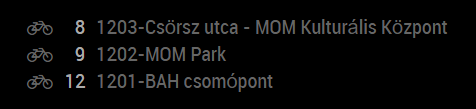
By default this module displays the number of available bikes and the official names of the specified stations:
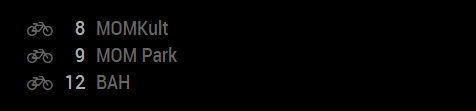
You can configure the module to display a custom (typically shorter) names for the stations:
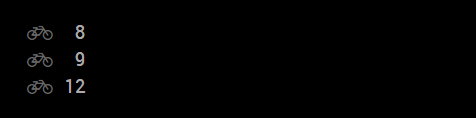
If you wish, you can completely remove the station names:
For updates, please check the [CHANGELOG](https://github.com/balassy/MMM-Bubi/blob/master/CHANGELOG.md).
## Using the module
To use this module follow these steps:
1. Clone this repository to the `modules` folder of your MagicMirror:
```bash
git clone https://github.com/balassy/MMM-Bubi.git
```
2. Add the following configuration block to the modules array in the `config/config.js` file:
```js
var config = {
modules: [
{
module: 'MMM-Bubi',
position: 'top_right',
config: {
updateInterval: 600000, // 10 minutes in milliseconds
showPlaceName: true,
align: 'left',
places: [
{ id: 42990755, name: 'MOMKult' },
{ id: 42990754, name: 'MOM Park' },
{ id: 42990729, name: 'BAH csomópont' }
]
}
}
]
}
```
## Configuration options
| Option | Description
|------------------------|-----------
| `places` | **REQUIRED** The list of Bubi stations to display. The unique `id` of the station is used to lookup the data from the webservice. The `name` is optional, and can be used to display a custom name for the station instead of the official name if the `showPlaceName` option is set to `true`.
**Type:** `Array<{ id: number, name: string }>`
**Default value:** 3 preconfigured stations
| `showPlaceName` | *Optional* Specifies whether the module should display not only the number of available bikes for each station, but also the names of the stations. If the `name` property is set in the `places` array, then it will be displayed, otherwise the official names of the stations will be rendered onto the Mirror.
**Type:** `boolean`
**Default value:** `true`
| `align` | *Optional* Determines how the text is aligned within the module. Set this to `left` if the module is displayed on left side of the mirror, or to `right` if you positioned this module to the right column of the mirror.
**Type:** `string`
**Possible values**: `'left'` or `'right'`
**Default value:** `'left'`
| `updateInterval` | *Optional* The frequency of how often the module should query the number of available bikes from the webservice.
**Type:** `int` (milliseconds)
**Default value:** `600000` milliseconds (10 minutes)
## How to get the place ID
In the `id` property of the objects in the `places` array of the configuration settings you have to specify the unique identifier of the station for which the module should display the bike availability.
To obtain the unique identifier of the station, follow these steps:
1. Navigate to the [MOL Bubi homepage](https://molbubi.hu/hu/terkep/) with your favorite webbrowser.
2. Use the map on the page to find your favorite MOL Bubi station and click its icon.
3. Note the official name of the station, e.g. `1201-BAH csomópont`.
4. Navigate to the https://maps.nextbike.net/maps/nextbike-live.json?domains=bh URL and use the browser's find function (CTRL+F) to locate the place by its name.
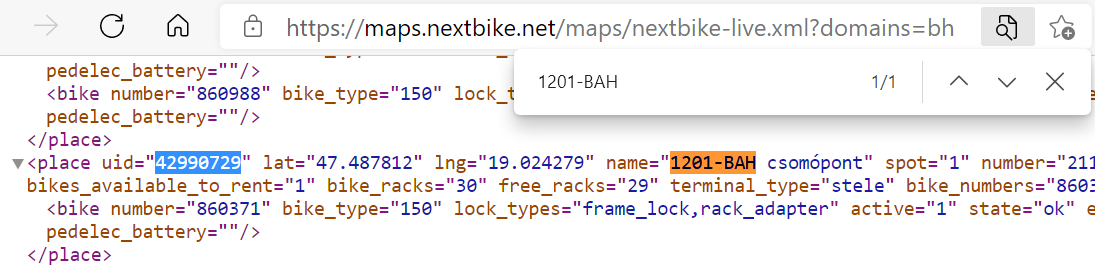
5. Find the `uid` attribute in the same row, it is the unique identifier of the station.
## How it works
This module periodically sends requests from the browser window of the MagicMirror Electron application to the public [NextBike API](https://maps.nextbike.net/maps/nextbike-live.json?domains=bh). The NextBike API is free, and it does NOT require any login or API key.
You can see an XML example by visiting this URL: https://maps.nextbike.net/maps/nextbike-live.xml?domains=bh
## Contribution
Although for operation this module does not depend on any other module, if you would like to contribute to the codebase, please use the preconfigured linters to analyze the source code before sending a pull request. To run the linters follow these steps:
1. Install developer dependencies:
```bash
npm install
```
2. Install Grunt:
```bash
npm install -g grunt
```
3. Use Grunt to run all linters:
```bash
grunt
```
## Got feedback?
Your feedback is more than welcome, please send your suggestions, feature requests or bug reports as [Github issues](https://github.com/balassy/MMM-Bubi/issues).
## Acknowledments
Many thanks to [Michael Teeuw](https://github.com/MichMich) for creating and maintaining the [MagicMirror²](https://github.com/MichMich/MagicMirror/) project fully open source.
## About the author
This project is created and maintaned by [György Balássy](https://www.linkedin.com/in/balassy).