https://github.com/baltpeter/internetmarke-php
A PHP wrapper for the Deutsche Post Internetmarke web service 1C4A ("OneClickForApplikation")
https://github.com/baltpeter/internetmarke-php
1c4a deutsche-post hacktoberfest internetmarke php stamp
Last synced: about 1 year ago
JSON representation
A PHP wrapper for the Deutsche Post Internetmarke web service 1C4A ("OneClickForApplikation")
- Host: GitHub
- URL: https://github.com/baltpeter/internetmarke-php
- Owner: baltpeter
- License: mit
- Created: 2017-03-27T14:08:44.000Z (over 9 years ago)
- Default Branch: master
- Last Pushed: 2024-08-13T08:12:28.000Z (almost 2 years ago)
- Last Synced: 2025-06-05T23:49:19.693Z (about 1 year ago)
- Topics: 1c4a, deutsche-post, hacktoberfest, internetmarke, php, stamp
- Language: PHP
- Homepage:
- Size: 34.2 KB
- Stars: 37
- Watchers: 11
- Forks: 9
- Open Issues: 3
-
Metadata Files:
- Readme: README.md
- License: LICENSE
Awesome Lists containing this project
README
# internetmarke-php – Simple PHP wrapper for the Internetmarke API
> Simple PHP wrapper for the 1C4A (“OneClickForApplikation”) web service for the Internetmarke provided by Deutsche Post (DPAG).

This project’s main purpose is to be able to order Deutsche Post stamps directly from your own applications. The payment is handled via the Portokasse, a prepaid wallet service also by Deutsche Post.
The web service by Deutsche Post is a custom SOAP API (see the WSDL here: https://internetmarke.deutschepost.de/OneClickForAppV3?wsdl). This project aims to abstract the SOAP nature away and provide a PHP API, while still adhering to the structure defined by DPAG.
Do note that this is only a very thin wrapper around the SOAP API and the user still has to follow DPAG’s [specification](https://www.deutschepost.de/de/i/internetmarke-porto-drucken/downloads.html).
## Requirements
To access the web service, you will need to register as a partner with DPAG. This can either be done via their [website](https://www.deutschepost.de/de/i/internetmarke-porto-drucken/geschaeftskunden.html) (German only) or by contacting pcf-1click@deutschepost.de. They ask you to fill out following [form](https://www.deutschepost.de/content/dam/dpag/images/i_i/Internetmarke/partnerwerden/dp-internetmarke-anmeldebogen-api-anbindung.pdf). So keep in mind to fill it out first. (German only).
They will send you the documentation for the web service and create your personal credentials (consisting of: your partner ID, a secret key called `SCHLUESSEL_DPWN_MARKTPLATZ`, and a key phase which is usually `1`).
In addition, you will need to have an account for the [Portokasse service](https://portokasse.deutschepost.de/portokasse/#!/). This is a prepaid wallet from which your purchase totals will be deducted.
After registering, you can access the service with your username (email address) and password.
## Installation
The package is available via Composer. To install the latest version from Packagist, run:
```
composer require baltpeter/internetmarke-php
```
## Basic Usage
All actions provided by the web service are implemented in the `baltpeter\Internetmarke\Service` class.
This example shows you how to order a single stamp for a domestic letter. Other actions and parameters are documented with phpDoc. For more examples, please refer to the [wiki](https://github.com/baltpeter/internetmarke-php/wiki/Examples).
```php
// The `PartnerInformation` object is used to authenticate you as a partner with DPAG.
$partner_info = new \baltpeter\Internetmarke\PartnerInformation('ABCDE', 1, 'yoursecretkey');
// The `Service` object provides an interface for all actions in the web service.
$service = new \baltpeter\Internetmarke\Service($partner_info);
// First, we need to get a token for our Portokasse user.
$user_token = $service->authenticateUser('portokasse@yourmailserver.tld', 'yourpassword')->getUserToken();
// Next, we create an `OrderItem` which holds the details of the stamp we want to purchase.
$order_item = new \baltpeter\Internetmarke\OrderItem(1, null, null,
new \baltpeter\Internetmarke\Position(1, 1, 1), 'FrankingZone');
// Finally, we call `checkoutShoppingCartPdf()` which creates the order and actually
// deducts the money from your Portokasse.
// The last parameter in this example is the total cost in eurocents, which you have to calculate
// manually. This value *has* to be correct, it is checked on the server side.
var_dump($service->checkoutShoppingCartPdf($user_token, 1, array($order_item), 80));
```
Running this code will print a result similar to this:
```php
object(stdClass)#10 (3) {
["link"]=>
string(111) "https://internetmarke.deutschepost.de/PcfExtensionWeb/document?keyphase=0&data=abcdefghijklmopqrstuvwxyz"
["walletBallance"]=>
int(236725)
["shoppingCart"]=>
object(stdClass)#11 (2) {
["shopOrderId"]=>
string(9) "12345678"
["voucherList"]=>
object(stdClass)#12 (1) {
["voucher"]=>
array(1) {
[0]=>
object(stdClass)#13 (1) {
["voucherId"]=>
string(20) "A0011E78E1000001234A"
}
}
}
}
}
```
Note how we wrapped the `$order_item` in an array. If you want to order multiple stamps, just include more `OrderItem`s in that array.
The stamp in the linked PDF will look something like this:
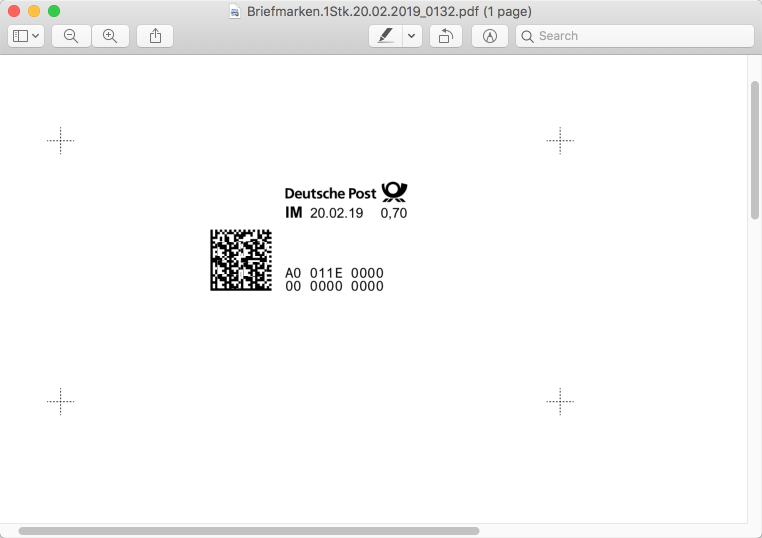
Again, please refer to the [wiki](https://github.com/baltpeter/internetmarke-php/wiki/Examples) for more examples.
## License
internetmarke-php is licensed under the MIT license, see the `LICENSE` file for details. Pull requests are welcome!