https://github.com/bangertech/prism-dashboard
A modern, glassmorphism-inspired dashboard for Home Assistant.
https://github.com/bangertech/prism-dashboard
custom-card dashboard hacs hacs-custom home-assistant homeassistant homeassistant-custom-component lovelace smart-home
Last synced: 3 months ago
JSON representation
A modern, glassmorphism-inspired dashboard for Home Assistant.
- Host: GitHub
- URL: https://github.com/bangertech/prism-dashboard
- Owner: BangerTech
- License: mit
- Created: 2025-12-23T09:10:42.000Z (6 months ago)
- Default Branch: main
- Last Pushed: 2026-01-30T18:44:23.000Z (4 months ago)
- Last Synced: 2026-01-31T10:47:42.058Z (4 months ago)
- Topics: custom-card, dashboard, hacs, hacs-custom, home-assistant, homeassistant, homeassistant-custom-component, lovelace, smart-home
- Language: JavaScript
- Homepage: https://bangertech.de
- Size: 32.4 MB
- Stars: 161
- Watchers: 5
- Forks: 6
- Open Issues: 1
-
Metadata Files:
- Readme: README.md
- Funding: .github/FUNDING.yml
- License: LICENSE
Awesome Lists containing this project
README
PRISM Dashboard
A modern, glassmorphism-inspired dashboard and custom-cards for Home Assistant.
---
Dashboard Configuration

Custom Cards
---
### Table of Contents
- [What is Prism?](#what-is-prism)
- [Features](#features)
- [Requirements](#requirements)
- [Installation](#installation)
- [Option 1: Installation via HACS](#option-1-installation-via-hacs-recommended)
- [Option 2: Manual Installation](#option-2-manual-installation)
- [2. Create Dashboard](#2-create-dashboard)
- [3. Register Custom Cards](#3-register-custom-cards-manual-installation-only)
- [Project Structure](#project-structure)
- [Available Custom Cards](#available-custom-cards)
- [Dashboard Configuration](#dashboard-configuration)
- [Support / Feedback](#support--feedback)
- [Development](#development)
- [Contributing](#contributing)
- [Sponsorship](#sponsorship)
- [Keywords](#keywords)
---
## What is Prism?
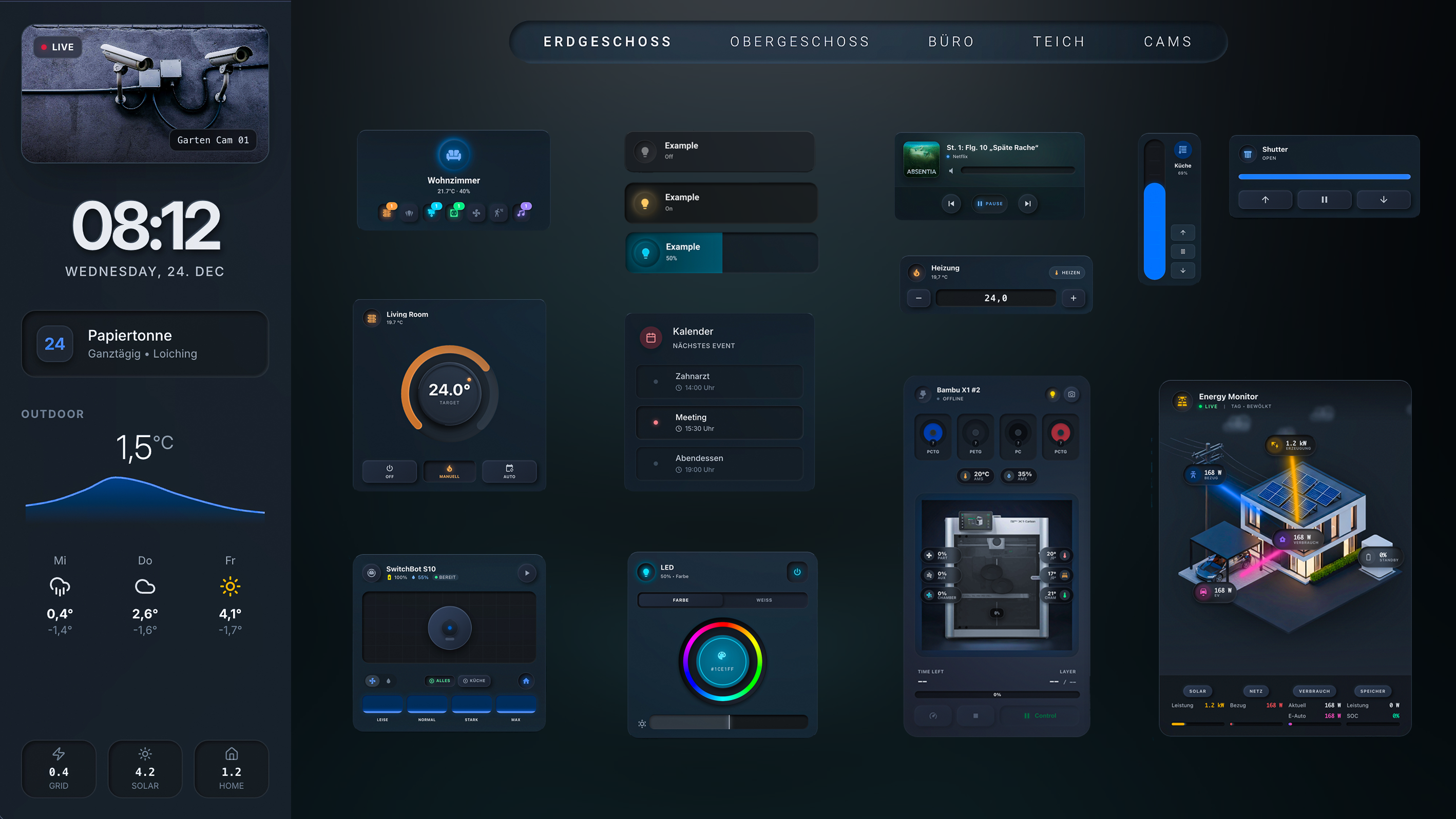
Prism is a modern, responsive Home Assistant dashboard with a glassmorphism design.
It combines semi-transparent "frosted glass" surfaces with neumorphism elements for haptic feedback and uses smart YAML anchors to keep the code lean, consistent, and easy to maintain.
Prism is optimized for wall tablets and smartphones and is ideal as a central smart home hub for everyday use.
> **📝 Note:** The dashboard configuration (YAML) was completely hand-written by me.
> The custom JavaScript cards were developed with AI assistance (Cursor AI).

---
## Features
- **💎 Glassmorphism UI**
Semi-transparent "Frosted Glass" cards with blur effects for a modern, premium look.
- **👆 Haptic Feedback (Neumorphism)**
Active buttons appear "pressed" and provide visual feedback on interactions.
- **🧭 Smart Navigation**
Animated navigation bar that automatically highlights the current room or active view.
- **🌈 Status Glow**
Icons glow in appropriate colors depending on state (e.g., green for security, orange for heating).
- **📱 Responsive Grid**
Layout seamlessly adapts to different devices (tablet on the wall, smartphone in hand).
- **🖨️ Advanced 3D Printer Support**
Full-featured cards for Bambu Lab, Creality, and generic Klipper/Moonraker printers with:
- AMS/CFS filament system visualization
- 3D model preview (cover image)
- Multi-printer camera view
- Real-time temperature, progress, layer info
- Pause/Resume/Stop controls
- **🧹 Clean Code with YAML Anchors**
Uses YAML anchors (`&` and `*`) to avoid repetition and keep global style changes centralized.
---
## Requirements
For this dashboard to work, the following frontend integrations must be installed via **HACS (Home Assistant Community Store)**:
- **Mushroom Cards**
Base for almost all cards in the dashboard.
- **card-mod**
Essential for CSS and glassmorphism styling.
- **layout-card**
Enables the responsive grid layout (sidebar + main area).
- **kiosk-mode**
Hides Home Assistant header and sidebar for a clean fullscreen look.
- **mini-graph-card**
Required for the temperature graph in the sidebar (`prism-sidebar` and `prism-sidebar-light`). The sidebar uses mini-graph-card to display accurate temperature history graphs matching Home Assistant's native graph style.
- **browser_mod**
Important for popups (e.g., calendar, vacuum control).
---
## Installation
### Option 1: Installation via HACS (Recommended)
[](https://my.home-assistant.io/redirect/hacs_repository/?owner=BangerTech&repository=Prism-Dashboard&category=dashboard)
1. Make sure [HACS](https://hacs.xyz) is installed.
2. Go to **HACS → Frontend** (three-dot menu top right) → **Custom Repositories**
3. Add this repository:
- **Repository:** `https://github.com/BangerTech/Prism-Dashboard`
- **Type:** `Dashboard`
4. Search for "Prism Dashboard" and click **"Download"**
5. Restart Home Assistant
> **✨ That's it!** HACS automatically registers the resource. All 29 custom cards (dark + light themes) are included in this single file and will receive automatic cache updates via HACS.
### Option 2: Manual Installation
1. Download or clone this repository.
2. Copy the contents of the `www` folder to your Home Assistant configuration folder under
`/config/www/`.
3. The background image should then be accessible at
`/local/background/background.png`.
4. **Note:** Restart Home Assistant if the `www` folder was newly created or newly added.
### 2. Create Dashboard
1. Navigate to **Settings → Dashboards** in Home Assistant.
2. Click **"Add Dashboard"** → Select **"New Dashboard from Scratch"**.
3. Make the following settings:
- **Title:** `Prism` (or a title of your choice)
- **View Type:** `Grid (layout-card)` (if available, otherwise define it later in the code)
> **Note:** For dashboard configuration and adjustments, see [Dashboard Configuration](#dashboard-configuration) and [Dashboard README](dashboard/README.md).
### 3. Register Custom Cards (Manual Installation Only)
If you chose Option 2 (manual installation), the custom cards must be registered manually:
1. Navigate to **Settings → Dashboards** in Home Assistant.
2. Click **"Resources"** (top right).
3. Click **"Add Resource"**.
4. Add the bundled resource:
- **URL:** `/local/custom-components/prism-dashboard.js`
- **Type:** `JavaScript Module`
5. Restart Home Assistant so the custom cards are loaded.
> **✨ All 29 cards are included!** The bundled file contains all dark and light theme cards.
---
## Project Structure
```
Prism-Dashboard/
├── custom-components/ # JavaScript Custom Cards (prism-heat.js, prism-button.js, etc.)
│ ├── images/ # Images for Custom Cards
│ └── README.md # Custom Cards Documentation
├── dashboard/ # Dashboard Configuration
│ ├── prism-dashboard.yml # Main Dashboard Configuration
│ ├── components/ # Reusable YAML Components
│ │ ├── custom-card.yml # Template for Standard Cards
│ │ ├── navigation-bar.yml # Navigation Bar
│ │ └── sidebar.yml # Sidebar Component
│ └── README.md # Dashboard Components Documentation
├── www/ # Static Files for Home Assistant
│ ├── background/ # Background Images
│ └── custom-components/ # Compiled Custom Cards
└── README.md # This File
```
> **Note:** The dashboard components in the `dashboard/components/` folder are reusable YAML templates. See [Dashboard README](dashboard/README.md) for details on usage.
---
## Available Custom Cards
Prism Dashboard includes **29+ custom cards** (including dark and light theme variants):
### Room & Navigation
- **prism-room** – Compact room overview with grouped entities and popup
- **prism-navigation** – Floating navigation bar for dashboard views
- **prism-spacer** – Invisible placeholder for layout spacing
### Climate Control
- **prism-heat** / **prism-heat-light** – Circular thermostat knob with drag control
- **prism-heat-small** / **prism-heat-small-light** – Compact heating card
### Lights
- **prism-button** / **prism-button-light** – Entity button with brightness slider
- **prism-led** / **prism-led-light** – RGB light with color wheel and temperature control
### Covers & Shutters
- **prism-shutter** / **prism-shutter-light** – Horizontal shutter card
- **prism-shutter-vertical** / **prism-shutter-vertical-light** – Vertical shutter card
### Media & Calendar
- **prism-media** / **prism-media-light** – Media player card
- **prism-calendar** / **prism-calendar-light** – Calendar events card
### Cleaning
- **prism-vacuum** / **prism-vacuum-light** – Vacuum robot card
- **prism-vacuum-switchbot** – Specialized card for SwitchBot vacuums
### Energy
- **prism-energy** – Energy flow visualization with animations
- **prism-energy-horizontal** – Horizontal energy flow layout
### 3D Printing
- **prism-3dprinter** – Generic 3D printer card for **Moonraker/Klipper** (Voron, Prusa, RatRig, etc.)
- **prism-bambu** – Bambu Lab printer with **AMS support**, cover image, multi-printer view
- **prism-creality** – Creality printer with **CFS support** (same design as AMS), cover image, multi-printer view
- Supports: K1, K1C, K1 Max, K1 SE, K2, K2 Plus, Ender 3 V3 series
- Integrations: [ha_creality_ws](https://github.com/3dg1luk43/ha_creality_ws) (recommended) or Moonraker
### Dashboard Layout
- **prism-sidebar** / **prism-sidebar-light** – Full sidebar with camera, weather, calendar
> 📚 **Full documentation** for all cards available in [Custom Components README](custom-components/README.md)
---
## Dashboard Configuration
The dashboard configuration is located in the `dashboard/` folder. There you will find:
- **`prism-dashboard.yml`** – The complete dashboard configuration
- **`components/`** – Reusable YAML components (Sidebar, Navigation, etc.)
### Setup Dashboard
1. Open your dashboard in Home Assistant
2. Go to **Edit** → **Raw Configuration Editor**
3. Copy the contents of `dashboard/prism-dashboard.yml` into it
4. **IMPORTANT:** Adjust all entities to your hardware (see [Dashboard README](dashboard/README.md))
5. Save the changes
### Customization
For detailed information on:
- **Adjusting entities** – See [Dashboard README](dashboard/README.md#customization)
- **Using components** – See [Dashboard README](dashboard/README.md#reusable-components)
- **Adjusting styles** – See [Dashboard README](dashboard/README.md#customization)
- **Configuring custom cards** – See [Custom Components README](custom-components/README.md)
---
## Support / Feedback
For bugs, questions, or feature requests:
- **GitHub Issues:** Please use the "Issues" tab of this repository.
- Alternatively: Contact me directly (e.g., via your preferred profile, if linked here).
Feedback, suggestions, and screenshots of your own setups are always welcome!
---
## Development
Built with AI assistance (Cursor AI)
The cards were created collaboratively using AI-assisted development. All features
have been tested and the code is actively maintained.
---
## Contributing
Contributions are explicitly welcome:
1. Fork the repository.
2. Create your own branch (`feature/...` or `fix/...`).
3. Make changes and test them.
4. Open a pull request and briefly describe what was changed.
---
## Sponsorship
If you like Prism and want to support further development:
Feel free to use the **Support button above**
Thank you for your support! 💙
---
## Keywords
`home-assistant`, `dashboard`, `glassmorphism`, `lovelace`, `mushroom-cards`, `yaml`, `smart-home`, `ui-design`, `hacs`, `minimalist`