https://github.com/banknatchapol/sparkify-data-lake
Build an ETL pipeline for a data lake hosted on AWS S3.
https://github.com/banknatchapol/sparkify-data-lake
aws data-lake
Last synced: 4 months ago
JSON representation
Build an ETL pipeline for a data lake hosted on AWS S3.
- Host: GitHub
- URL: https://github.com/banknatchapol/sparkify-data-lake
- Owner: BankNatchapol
- Created: 2021-01-19T10:09:04.000Z (over 5 years ago)
- Default Branch: main
- Last Pushed: 2021-01-20T16:33:39.000Z (over 5 years ago)
- Last Synced: 2025-01-27T14:53:25.122Z (over 1 year ago)
- Topics: aws, data-lake
- Language: Jupyter Notebook
- Homepage:
- Size: 406 KB
- Stars: 1
- Watchers: 2
- Forks: 0
- Open Issues: 0
-
Metadata Files:
- Readme: README.md
Awesome Lists containing this project
README
[![LinkedIn][linkedin-shield]][linkedin-url]
Sparkify Data Lake on AWS
Create ETL and Data Lake on AWS.
Report Bug
·
Request Feature
Table of Contents
## About The Project
A music streaming startup, Sparkify, has grown their user base and song database even more and want to move their data warehouse to a data lake. Their data resides in S3, in a directory of JSON logs on user activity on the app, as well as a directory with JSON metadata on the songs in their app.
As their data engineer, you are tasked with building an ETL pipeline that extracts their data from S3, processes them using Spark, and loads the data back into S3 as a set of dimensional tables. This will allow their analytics team to continue finding insights in what songs their users are listening to.
## Dataset
### Project Dataset
There are two datasets that reside in S3. Here are the S3 links for each:
Song data:
>s3://udacity-dend/song_data
Log data:
>s3://udacity-dend/log_data
### Song Dataset
The first dataset is a subset of real data from the Million Song Dataset. Each file is in JSON format and contains metadata about a song and the artist of that song. The files are partitioned by the first three letters of each song's track ID. For example, here are filepaths to two files in this dataset.
>song_data/A/B/C/TRABCEI128F424C983.json
>song_data/A/A/B/TRAABJL12903CDCF1A.json
And below is an example of what a single song file, TRAABJL12903CDCF1A.json, looks like.
>{"num_songs": 1, "artist_id": "ARJIE2Y1187B994AB7", "artist_latitude": null, "artist_longitude": null, "artist_location": "", "artist_name": "Line Renaud", "song_id": "SOUPIRU12A6D4FA1E1", "title": "Der Kleine Dompfaff", "duration": 152.92036, "year": 0}
### Log Dataset
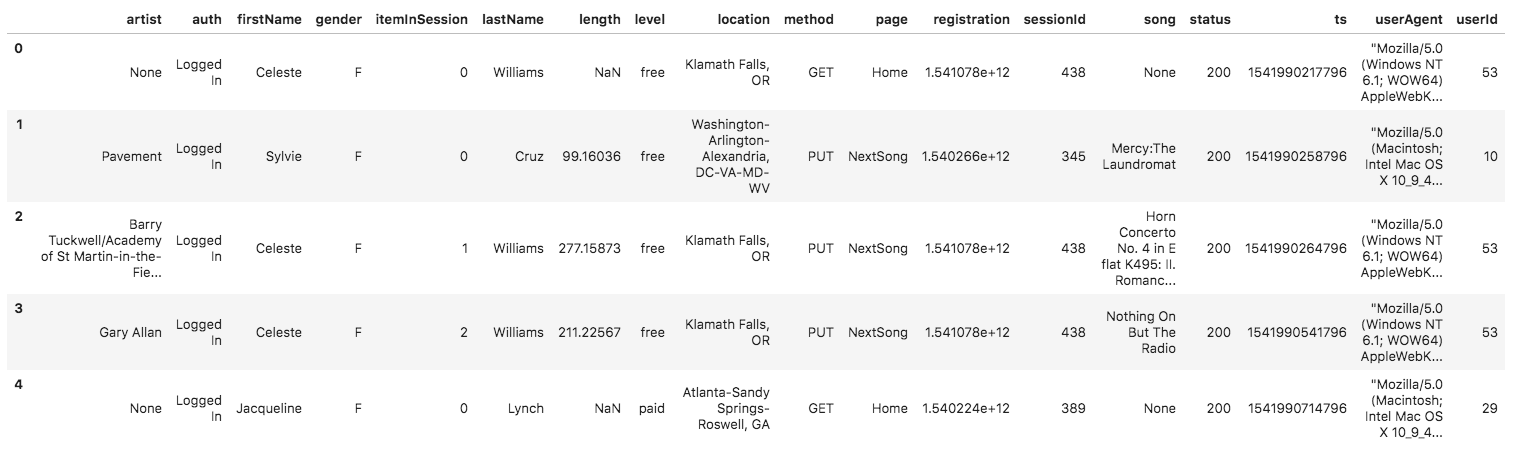
The second dataset consists of log files in JSON format generated by this event simulator based on the songs in the dataset above. These simulate activity logs from a music streaming app based on specified configurations.
The log files in the dataset you'll be working with are partitioned by year and month. For example, here are filepaths to two files in this dataset.
>log_data/2018/11/2018-11-12-events.json
>log_data/2018/11/2018-11-13-events.json
And below is an example of what the data in a log file, 2018-11-12-events.json, looks like.
## Data Model
This is my database Star Schema.

## Working Processes
### Installation
install package with.
> pip install -r requirements.txt
### Config files
create config files for access AWS
dl.cfg :
> [SECRET]
> AWS_ACCESS_KEY_ID= ? // AWS User Access Key
> AWS_SECRET_ACCESS_KEY= ? // AWS User Secret Access Key
>
> [STORAGE]
> INPUT_DATA= ? // Path to data that you want to transform
> OUTPUT_DATA= ? // Your S3 Bucket Path
### ETL Process
run this script to do ETL process for transforming your input data to your output path.
> python etl.py
this process will take some times.
or you can use etl.ipynb notebook to do each step of ETL process seperately.
## Contact
Facebook - [@Natchapol Patamawisut](https://www.facebook.com/natchapol.patamawisut/)
Project Link: [https://github.com/BankNatchapol/Sparkify-Data-Lake](https://github.com/BankNatchapol/Sparkify-Data-Lake)
[linkedin-shield]: https://img.shields.io/badge/-LinkedIn-black.svg?style=for-the-badge&logo=linkedin&colorB=555
[linkedin-url]: https://www.linkedin.com/in/natchapol-patamawisut