https://github.com/barbosa89/vue-table
A classical data table component in VueJS and Bootstrap 4, optimized for Laravel applications.
https://github.com/barbosa89/vue-table
bootstrap4 data datatable javascript laravel php table vuejs
Last synced: 3 months ago
JSON representation
A classical data table component in VueJS and Bootstrap 4, optimized for Laravel applications.
- Host: GitHub
- URL: https://github.com/barbosa89/vue-table
- Owner: barbosa89
- License: mit
- Created: 2020-08-07T23:25:32.000Z (almost 6 years ago)
- Default Branch: master
- Last Pushed: 2021-04-27T12:17:31.000Z (about 5 years ago)
- Last Synced: 2026-02-24T15:07:15.835Z (5 months ago)
- Topics: bootstrap4, data, datatable, javascript, laravel, php, table, vuejs
- Language: Vue
- Homepage:
- Size: 265 KB
- Stars: 0
- Watchers: 1
- Forks: 0
- Open Issues: 0
-
Metadata Files:
- Readme: README.md
- Changelog: CHANGELOG.md
- License: LICENSE
Awesome Lists containing this project
README
# Vue-table component
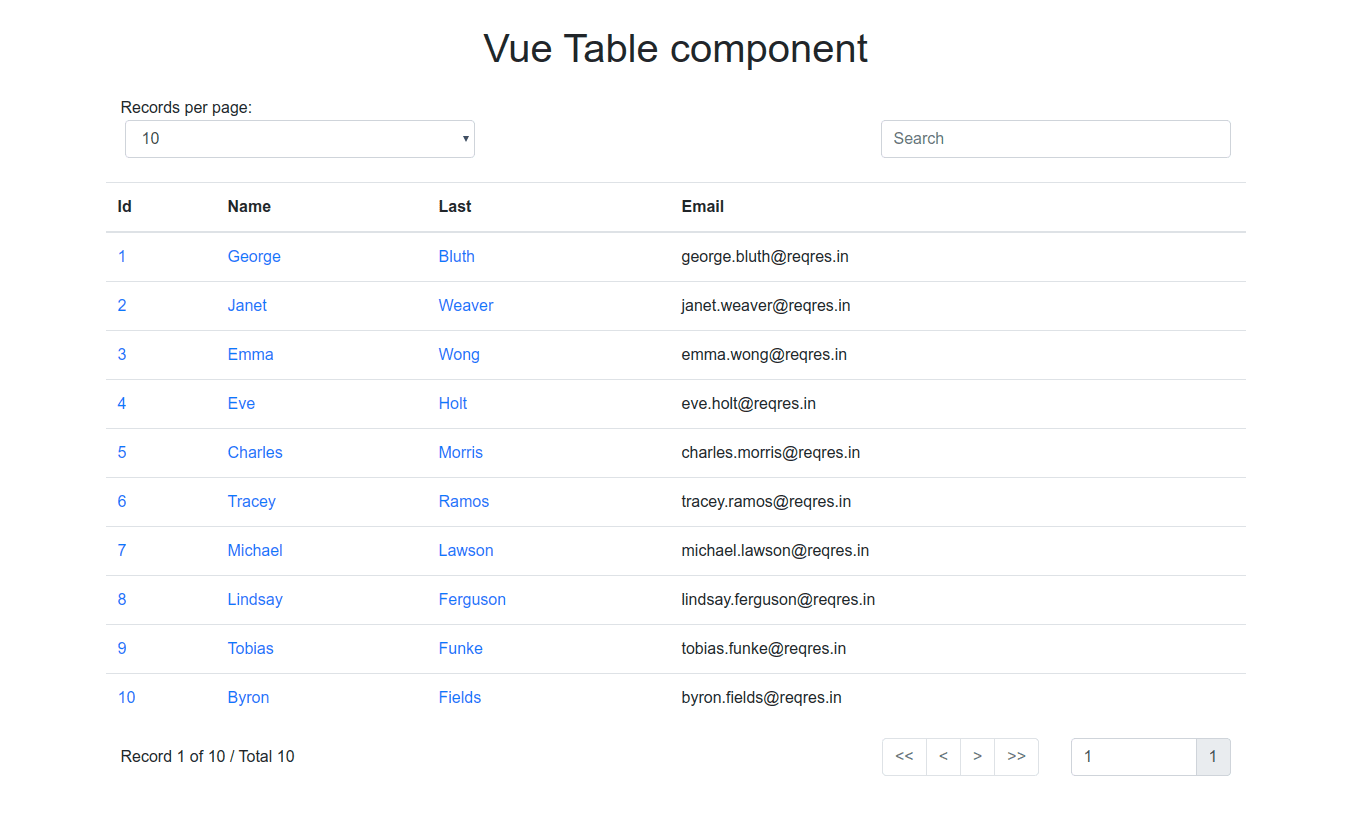
Vue-table is a data table component that allows the developer a high degree of customization, it takes care of complex tasks and gives the developer control over how the data is displayed. This component works with the **Laravel** framework pagination response.
## Features
- Pagination
- Go to specific page
- Option for records by page
- Search input
- Multilingual support
- Responsive
## Installation
```
npm i @barbosa89/vue-table
```
## Usage
The component styles are based on the CSS framework **Bootstrap 4**, so, Vue-table is structured in three rows (.row), so you must nest the component inside a Bootstrap container (.container/.container-fluid).
### How it works
Vue-table does not display the data sent by the server directly, this passes each record to a slot, the developer uses the slot to determine the way the data is displayed.
### Props
The component can be configured with four props:
- **headers**: It is an array that contains objects with two properties, **description** and **sortable**, the **description** property is required and represents a table column header; the **sortable** is optional, it is used as a data sort column.
```js
headers: [
{
description: 'Id', # Name to display
sortable: 'id', # Sortable column name in table
},
{
description: 'Email' # No sortable column
}
]
```
- **url**: The endpoint from which Axios will request data.
```
https://myapp.com/endpoint
```
- **lang** (en/es): The language to use, by default is English, English and Spanish are supported.
- **locales**: It is an object of translations.
```js
locales: {
en:{
display: 'Records per page',
search: 'Search',
record: 'Record',
of: 'of',
total: 'Total'
},
es:{
display: 'Registros por página',
search: 'Buscar',
record: 'Registro',
of: 'de',
total: 'Total'
}
}
```
- **params**: Object with additional parameters such as filters.
```js
params: {
model: 'value',
reference: 'value'
}
```
- **user-data**: Array|Object data from user. If the prop is an array, a list without controls is printed. If the prop is an object, the Laravel pagination variables are assigned:
```js
{
"total": 50,
"per_page": 15,
"current_page": 1,
"last_page": 4,
"first_page_url": "http://laravel.app?page=1",
"last_page_url": "http://laravel.app?page=4",
"next_page_url": "http://laravel.app?page=2",
"prev_page_url": null,
"path": "http://laravel.app",
"from": 1,
"to": 15,
"data":[
{
// Result Object
},
{
// Result Object
}
]
}
```
When a Laravel paging object is assigned, the parent component must listen for an event to update the URL.
```html
```
Listen event using a method:
```html
```
- **data-key**: You can pass a custom data key to access the data received from the API service.
```php
return response()->json([
'key' => $collection,
]);
```
when you don't pass a custom data key, it means the API service send data as follows:
```php
return response()->json($collection);
```
- **search-icon**: Now you can pass a custom search icon, example: **fas fa-search**.
### Example
```html
Vue Table component
{{ record.id }}
{{ record.first_name }}
{{ record.last_name }}
{{ record.email }}
import VueTable from 'VueTable'
export default {
data() {
return {
headers: [
{
description: 'Id',
field: 'id', # Sortable column
},
{
description: 'Name',
field: 'name', # Sortable column
},
{
description: 'Last',
field: 'last', # Sortable column
},
{
description: 'Email' # No sortable column
},
],
url: 'https://myserver.app/api/users?page=1',
// Optional, You will need to pass the props
lang: 'en',
locales: {
en:{
display: 'Records per page',
search: 'Search',
record: 'Record',
of: 'of',
total: 'Total'
},
es:{
display: 'Registros por página',
search: 'Buscar',
record: 'Registro',
of: 'de',
total: 'Total'
}
}
};
},
components: {
VueTable
}
}
```
### Internacionalization
With packages like **vue-i18n**, you can automate multiple languages:
```js
lang: document.documentElement.lang,
locales: {
en:{
display: $t('display'),
search: $t('search'),
record: $t('record'),
of: $t('of'),
total: $t('total')
},
es:{
display: $t('display'),
search: $t('search'),
record: $t('record'),
of: $t('of'),
total: $t('total')
}
}
```
## Server side with Laravel
Vue-table sends Laravel a series of parameters namely:
- page
- per_page
- search: The search param
- ordered_desc/ordered_asc
URL example:
```
mylaravel.app/endpoint?page=1&per_page=15&search_=text&ordered_desc=column_name
```
In an example of implementation in Laravel 7:
```php
public function index()
{
$posts = Post::query();
foreach(request()->toArray() as $filter => $value) {
$filter = Str::camel($filter);
if($posts->hasNamedScope($filter)) {
$posts->{$filter}($value);
}
}
return $posts->paginate(request->get('per_page', 15));
}
```
You need to create three scopes corresponding to each parameter, excluding per_page and page, which are passed to Laravel directly:
```php
// Eloquent model
public function scopeQueryBy($query, $value)
{
return $query->Where('name', 'like', '%' . $value . '%');
}
public function scopeOrderedDesc($query, $value)
{
return $query->orderBy($value, 'DESC');
}
public function scopeOrderedAsc($query, $value)
{
return $query->orderBy($value, 'ASC');
}
```
## Developers
```bash
npm install -g @vue/cli
# OR
yarn global add @vue/cli
```
You will need an add-on service for Vue CLI
```bash
npm install -g @vue/cli-service-global
```
Run local server
```bash
npm run dev
```
Run production mode
```bash
npm run build
```
## Next steps
- Create a data table package for infinite loading