https://github.com/barisates/react-data-table-component-extensions
Export table data as a CSV or Excel file, filter and print the data.
https://github.com/barisates/react-data-table-component-extensions
datatable extensions react react-component reactjs
Last synced: over 1 year ago
JSON representation
Export table data as a CSV or Excel file, filter and print the data.
- Host: GitHub
- URL: https://github.com/barisates/react-data-table-component-extensions
- Owner: barisates
- License: mit
- Created: 2019-10-04T07:24:09.000Z (almost 7 years ago)
- Default Branch: master
- Last Pushed: 2023-02-27T15:31:12.000Z (over 3 years ago)
- Last Synced: 2024-09-18T20:24:52.263Z (almost 2 years ago)
- Topics: datatable, extensions, react, react-component, reactjs
- Language: JavaScript
- Homepage:
- Size: 5.4 MB
- Stars: 44
- Watchers: 2
- Forks: 25
- Open Issues: 40
-
Metadata Files:
- Readme: README.md
- License: LICENSE
Awesome Lists containing this project
README
# react-data-table-component-extensions
Export table data as a CSV or Excel file, filter and print the data.
[![npm package][npm-image]][npm-url]
[![Build Status][travis-image]][travis-url]
[![Dependencies Status][david-image]][david-url]
[![Package Size][bundlephobia-image]][bundlephobia-url]
## Getting started
#### Install with NPM:
[Install the data-table component first,](https://github.com/jbetancur/react-data-table-component "Install the data-table component first.")
```
$ npm install react-data-table-component styled-components
```
then install the data-table-extensions extension.
```
$ npm install react-data-table-component-extensions
```
#### Usage
**Live Demo [CodeSandbox](https://codesandbox.io/s/data-table-extensions-qxpv4?fontsize=14 "CodeSandbox")**
##### Features
- Export the file in \*.csv and \*.xls format.
- Print the table data.
- Filter table data by all columns.
- Filter table by digit length. Default value is 2.
#### Example
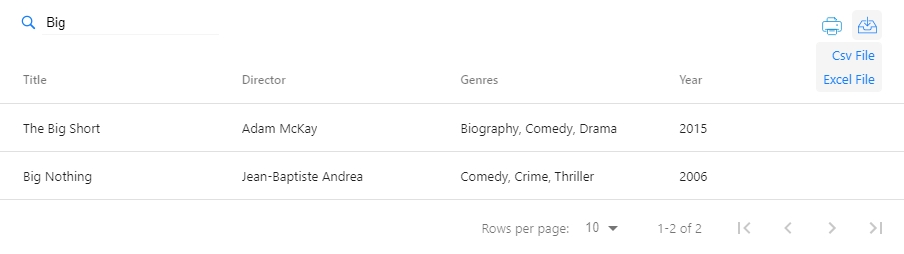
Example of filtering table data and export, print buttons.
```jsx
// App.js
import React from 'react';
import DataTable from 'react-data-table-component';
import DataTableExtensions from 'react-data-table-component-extensions';
import 'react-data-table-component-extensions/dist/index.css';
import { columns, data } from './Data.js';
function App() {
const tableData = {
columns,
data,
};
return (
);
}
export default App;
```
```jsx
// Data.js
export const columns = [
{
name: 'Title',
selector: 'title',
sortable: true,
},
{
name: 'Director',
selector: 'director',
sortable: true,
},
{
name: 'Genres',
selector: 'genres',
sortable: true,
cell: d => {d.genres.join(', ')},
},
{
name: 'Year',
selector: 'year',
sortable: true,
},
];
export const data = [
{
title: 'Beetlejuice',
year: '1988',
genres: [
'Comedy',
'Fantasy',
],
director: 'Tim Burton',
},
{
id: 2,
title: 'The Cotton Club',
year: '1984',
runtime: '127',
genres: [
'Crime',
'Drama',
'Music',
],
director: 'Francis Ford Coppola',
}];
```
#### Properties
Descriptions and configuration settings for component properties.
| Property | Type | Required | Default | Description |
|--------------------------|---------------------|----------|---------|-------------------------------------------------------------------------------------------------------------------------------------------------------------------------------------------------|
| columns | array | yes | [ ] | Table column configuration |
| data | array | no | [ ] | Table data |
| filter | bool | no | true | Enable input filter |
| filterPlaceholder | string | no | Filter Table | Default placeholder for the filter field |
| **filterHidden** | bool | no | true | Filter hidden fields |
| export | bool | no | true | Enable export button |
| print | bool | no | true | Enable print button |
| exportHeaders | bool | no | false | Exports data with table headers |
| filterDigit | number | no | 2 | Number of digts to use in search. |
| fileName | string | no | document.title | Set exported csv and excel file name |
##### Column Properties
| Property | Type | Required | Description |
|--------------------------|---------------------|----------|-------------------------------------------------------------------------------------------------------------------------------------------------------------------------------------------------|
| cellExport | func | no | Export configuration `row => ({Title: row.Title, Example: row.Example})` |
------------
#### Author
**Barış Ateş**
- http://barisates.com
- [github/barisates](https://github.com/barisates "github/barisates")
[npm-image]:https://img.shields.io/npm/v/react-data-table-component-extensions.svg
[npm-url]:https://www.npmjs.com/package/react-data-table-component-extensions
[travis-image]:https://travis-ci.org/barisates/react-data-table-component-extensions.svg?branch=master
[travis-url]:https://travis-ci.org/barisates/react-data-table-component-extensions
[david-image]:https://david-dm.org/barisates/react-data-table-component-extensions.svg
[david-url]:https://david-dm.org/barisates/react-data-table-component-extensions
[bundlephobia-image]:https://badgen.net/bundlephobia/minzip/react-data-table-component-extensions
[bundlephobia-url]:https://bundlephobia.com/result?p=react-data-table-component-extensions