https://github.com/barkprotocol/token-sale-dapp
BARK Token Sale Platform is a Next.js-based web3 application for managing and participating in the BARK token sale on the Solana blockchain. This platform provides a user-friendly interface for users to purchase BARK tokens, track the progress of the token sale, and access important information about the project.
https://github.com/barkprotocol/token-sale-dapp
ico solana solana-token token
Last synced: 4 months ago
JSON representation
BARK Token Sale Platform is a Next.js-based web3 application for managing and participating in the BARK token sale on the Solana blockchain. This platform provides a user-friendly interface for users to purchase BARK tokens, track the progress of the token sale, and access important information about the project.
- Host: GitHub
- URL: https://github.com/barkprotocol/token-sale-dapp
- Owner: barkprotocol
- License: other
- Created: 2024-12-09T11:47:43.000Z (over 1 year ago)
- Default Branch: main
- Last Pushed: 2025-03-21T17:05:14.000Z (over 1 year ago)
- Last Synced: 2025-04-30T21:53:40.400Z (about 1 year ago)
- Topics: ico, solana, solana-token, token
- Language: TypeScript
- Homepage: https://token-sale-mvp.vercel.app
- Size: 683 KB
- Stars: 2
- Watchers: 1
- Forks: 1
- Open Issues: 2
-
Metadata Files:
- Readme: README.md
Awesome Lists containing this project
README
# BARK Token Sale Platform
## Overview
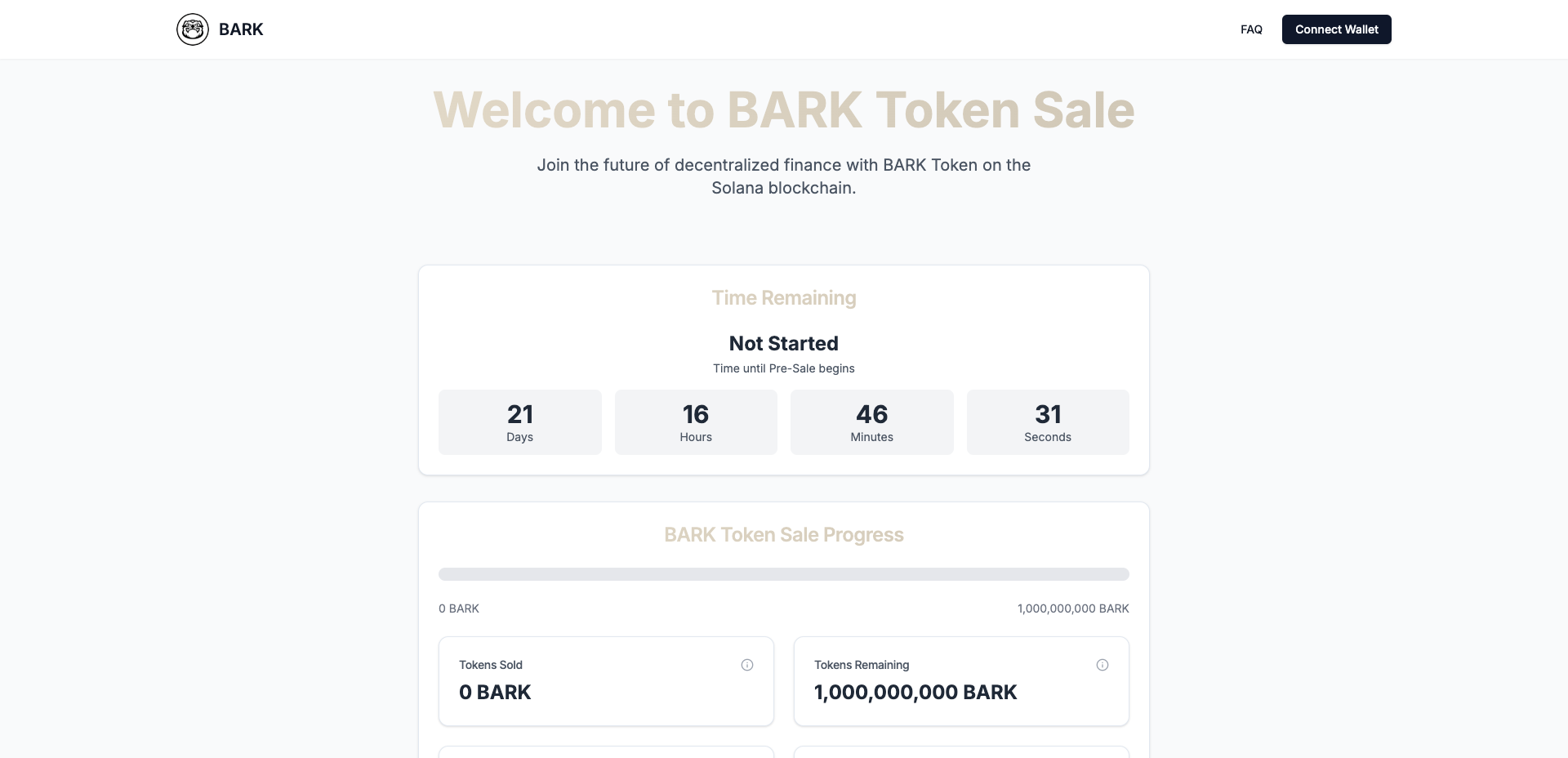
BARK Token Sale Platform is a Next.js-based web3 application for managing and participating in the BARK token sale on the Solana blockchain. This platform provides a user-friendly interface for users to purchase BARK tokens, track the progress of the token sale, and access important information about the project.
## Features
- Real-time token sale progress tracking
- Countdown timer for sale stages (Pre-sale, Public sale)
- Secure token purchase functionality
- Wallet integration for Solana blockchain
- Responsive design for mobile and desktop
- FAQ, Terms of Sale, and Privacy Policy pages
## Technologies Used
- Next.js 15+ (App Router)
- React 19
- TypeScript
- Tailwind CSS
- Shadcn/ui components
- Solana Web3.js (for blockchain interactions)
## Prerequisites
- Node.js 20 or later
- npm or yarn package manager
- A Solana wallet (e.g., Phantom, Solflare)
## Installation
1. Clone the repository:
```bash
git clone https://github.com/bark-protocol/bark-token-sale-platform.git
```
2. Navigate to the project directory:
```bash
cd bark-token-sale-platform
```
3. Install dependencies:
```bash
pnpm install
# or
yarn install
```
4. Set up environment variables:
- Create a `.env.local` file in the root directory and populate it with the following values:
```plaintext
NEXT_PUBLIC_SUPABASE_URL=
NEXT_PUBLIC_SUPABASE_ANON_KEY=
NEXT_PUBLIC_SOLANA_NETWORK=
NEXT_PUBLIC_SOLANA_RPC_URL=
TOKEN_PROGRAM_ID=
SALE_WALLET_ADDRESS=
```
5. Start the development server:
```bash
pnpm run dev
# or
yarn dev
```
6. Open the application in your browser:
- Navigate to `http://localhost:3000`.
## Deployment
This project is pre-configured for Vercel deployment. To deploy:
1. Connect your GitHub repository to Vercel.
2. Set the required environment variables in the Vercel dashboard.
3. Deploy your application with a single click.
## Usage
1. **Connect Wallet**:
- Users can connect their Solana wallet (e.g., Phantom or Solflare) using the wallet integration feature.
2. **View Token Sale Progress**:
- The real-time progress bar and countdown timer show the current status of the token sale.
3. **Purchase Tokens**:
- Users can input the number of tokens they wish to buy, review the transaction details, and confirm the purchase.
4. **Access Information**:
- Dedicated pages for FAQs, Terms of Sale, and Privacy Policy provide all necessary details about the token sale.
## Contribution
We welcome contributions! Please follow the steps below:
1. Fork the repository.
2. Create a feature branch:
```bash
git checkout -b feature-name
```
3. Commit your changes:
```bash
git commit -m "Description of your changes"
```
4. Push the branch:
```bash
git push origin feature-name
```
5. Open a pull request in the original repository.
## License
This project is licensed under the MIT License. See the `LICENSE` file for details.