https://github.com/barzin144/react-custable
A custom table for react
https://github.com/barzin144/react-custable
custom-table react react-table table
Last synced: about 2 months ago
JSON representation
A custom table for react
- Host: GitHub
- URL: https://github.com/barzin144/react-custable
- Owner: barzin144
- License: mit
- Created: 2022-07-17T06:58:32.000Z (about 4 years ago)
- Default Branch: main
- Last Pushed: 2024-10-23T23:15:28.000Z (almost 2 years ago)
- Last Synced: 2025-10-11T04:42:31.052Z (10 months ago)
- Topics: custom-table, react, react-table, table
- Language: TypeScript
- Homepage: https://barzin144.github.io/react-custable/?path=/story/components--table
- Size: 1.6 MB
- Stars: 1
- Watchers: 1
- Forks: 0
- Open Issues: 0
-
Metadata Files:
- Readme: README.md
- License: LICENSE
Awesome Lists containing this project
README
# React CusTable
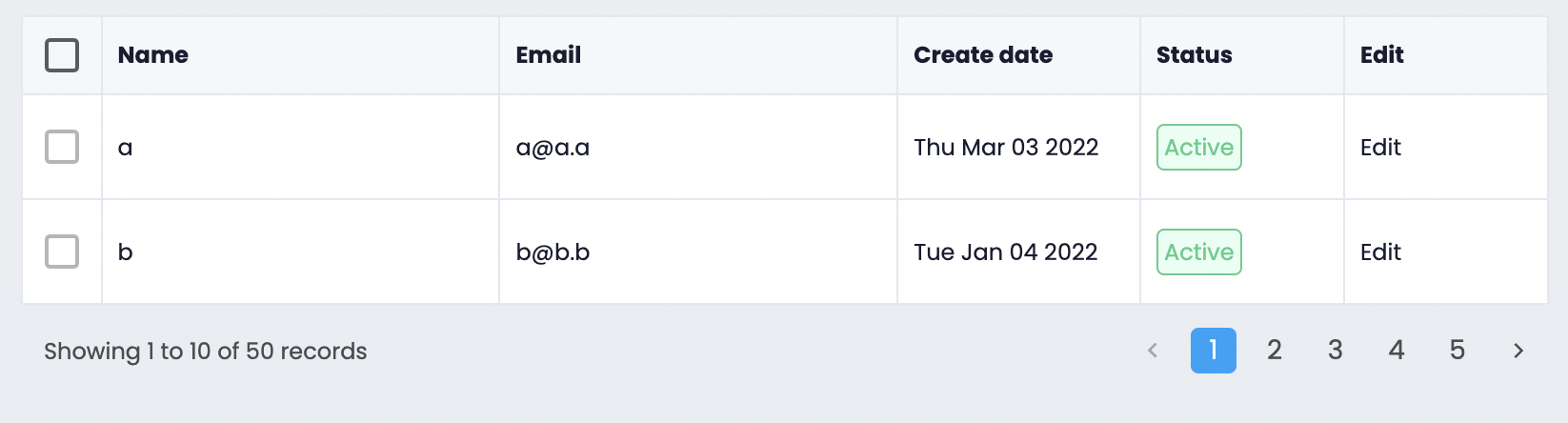
**React CusTable** is a versatile and customizable table component for React that supports selectable rows, custom cell rendering, and pagination.
## Features
- Selectable rows with callback functions
- Customizable components within table cells
- Built-in pagination support
- Sorting capabilities with customizable sort functions
## When to Use
This component is ideal if you need:
- A selectable React table
- Custom components rendered inside table cells
- Beautiful, built-in pagination for large datasets
## Installation
To install via NPM, run:
```bash
npm install --save react-custable
```
## Usage Example
You'll need to provide two variables: `columns` and `data`.
```javascript
import { Table } from 'react-custable';
// the fieldName should match the keys of your data
const columns = [
{ fieldName: 'name', title: 'Name', width: '180px', sortable: true },
{ fieldName: 'email', title: 'Email', width: '180px', sortable: true },
];
const data = [
{ id: '1', name: 'name one', email: 'mailone@mail.com' },
{ id: '2', name: 'name two', email: 'mailtwo@mail.com' },
];
;
```
## Column Options
| Option | Type | Description |
| :-----------: | :-----------------: | :-----------------------------------------------------------------------------------: |
| fieldName\* | string | Key corresponding to your data object |
| title\* | string | The header title for the column |
| width | string(px) | Width of the column (default is auto-width) |
| fixed | string ('left' or 'right') | Fixed position for the column (works for first or last column only) |
| sortable | boolean | Enable sorting for the column (default is false) |
| sortFunc | (a, b) => number | Sorting function (return -1 for a < b, 1 for a > b, and 0 for a = b) |
| render | (row: T, index: number) => Cell | Function to render a custom component inside the cell |
### Cell Type
```javascript
type Cell = {
value: React.ReactNode,
props: { [key: string]: string }, // props applied to the element, such as colspan
};
```
## Table Options
| Option | Type | Description |
| :-----------------: | :-------------------------------: | :-------------------------------------------------------------------------: |
| columns\* | Column[] | Array of columns |
| data\* | { id: string, ... }[] | Array of row data |
| selectRowHandler | (selectedRowIds: string[]) => void | Callback triggered when row selection changes (returns selected row IDs) |
| selectedRowKeys | string[] | Default selected row IDs |
| pagination | { currentPage: number; totalCount: number; pageLimit: number; } | Pagination options, including current page, total item count, and page limit |
| pageChangeHandler | (pageNumber: number) => void | Callback for handling page changes |
| rowClickHandler | (row: Row) => void | Callback for handling row clicks |
| showLoading | boolean | Displays a spinner overlay when data is loading |
## Try it in Storybook
You can explore and test this component in Storybook:
- Visit the [online Storybook](https://barzin144.github.io/react-custable)
- Or run it locally by cloning the repository and running the following commands:
```bash
git clone https://github.com/barzin144/react-custable.git
cd react-custable
npm install
npm start
```
## Contributing
We welcome contributions! Feel free to open issues or submit pull requests.