https://github.com/basecamp/orc
Orc(hestrator) - A really bad pow.cx clone for linux
https://github.com/basecamp/orc
Last synced: 11 months ago
JSON representation
Orc(hestrator) - A really bad pow.cx clone for linux
- Host: GitHub
- URL: https://github.com/basecamp/orc
- Owner: basecamp
- License: mit
- Created: 2015-08-21T04:36:27.000Z (almost 11 years ago)
- Default Branch: master
- Last Pushed: 2018-04-30T17:35:19.000Z (about 8 years ago)
- Last Synced: 2025-07-18T05:34:50.984Z (11 months ago)
- Language: Shell
- Size: 306 KB
- Stars: 11
- Watchers: 6
- Forks: 3
- Open Issues: 0
-
Metadata Files:
- Readme: README.md
- License: LICENSE
Awesome Lists containing this project
README
# Orc(hestrator)
This is a script to emulate some of pow's functionality.
For it all to work, it requires:
1. A functional nginx installation (provided)
2. A functional dnsmasq installation (provided)
3. An app that listens on `$app_dir/tmp/app.sock` or a static site that places
it's content under $app_dir/public
4. Some familiarity with the command line
## Installation
1. Check out orc into `~/.orc`.
~~~ sh
$ git clone https://github.com/basecamp/orc.git ~/.orc
~~~
2. Add `orc init` to your shell to enable shims and autocompletion.
~~~ sh
$ echo 'eval "$(~/.orc/bin/orc init -)"' >> ~/.bash_profile
~~~
_Use `~/.bashrc` on Ubuntu, or `~/.zshrc` for Zsh._
3. Restart your shell so that PATH changes take effect. (Opening a new
terminal tab will usually do it.) Now check if orc was set up:
~~~ sh
$ type orc
#=> "orc is a aliased to _orc_wrapper"
~~~
4. Start the web and dns processes:
~~~ sh
$ orc install
~~~
This will configure our DNS resolver to use our new dns server for the *.devel domain.
Here's how we're doing it on OS X:
~~~ sh
$ echo nameserver 127.0.0.1 | \
sudo tee /etc/resolver/devel /etc/resolver/staging
~~~
For Linux, please install dnsmasq and add the following to your config:
~~~ sh
address=/.devel/127.0.0.1
~~~
## Uninstalling
~~~ sh
$ orc uninstall
~~~
And remove the `eval "$(~/.orc/bin/orc init -)"` line from your `.bashrc`/`.bash_profile`/`.zshrc`.
## Adding apps to orc
~~~ sh
$ orc add /path/to/my-cool-app
~~~
You can now go to http://my-cool-app.dev/ and see your app running!
## Removing apps from orc
~~~ sh
$ orc remove my-cool-app
~~~
This will remove the link to the app and orc cannot manage it anymore.
## Starting and Stopping Apps
This is in flux. More details as this architecture emerges.
## Help
Running `orc help` is your friend.
## Nginx and dnsmasq
To handle nginx and dns, we use docker! [Go install it](https://www.docker.com/products/overview#/install_the_platform). To get them setup and running, it's pretty easy:
~~~ sh
$ orc web start
~~~
This will create AND TRUST a local CA for local https development and start the
docker containers. If you want to watch the nginx logs, run:
~~~ sh
$ orc web logs
# or
$ orc web logs -f
~~~
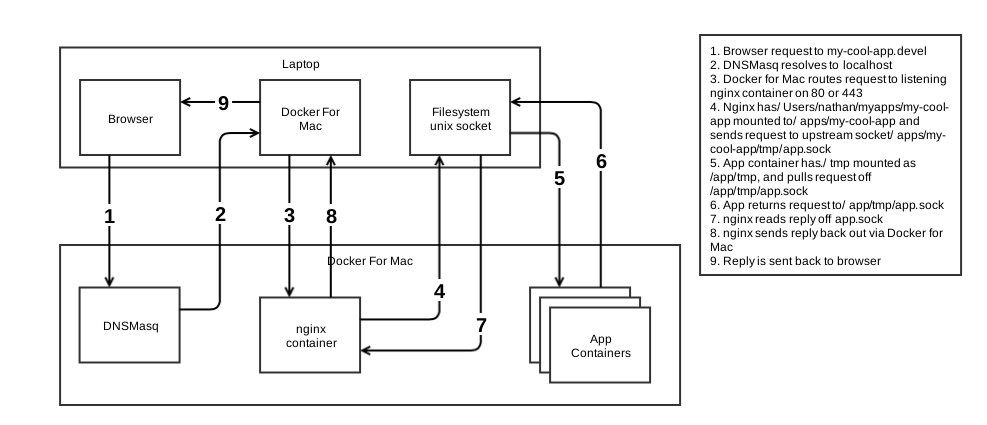
## General Architecture
Our general request path will look like this:
## Thanks
Many thanks to @noahhl, @sstephenson, @qrush for their excellent support
and encouragement! Thanks to @ernie for the_setup which also influenced the
design; more directly in some ways than others!