https://github.com/basesecrete/rorvswild-theme-terminal
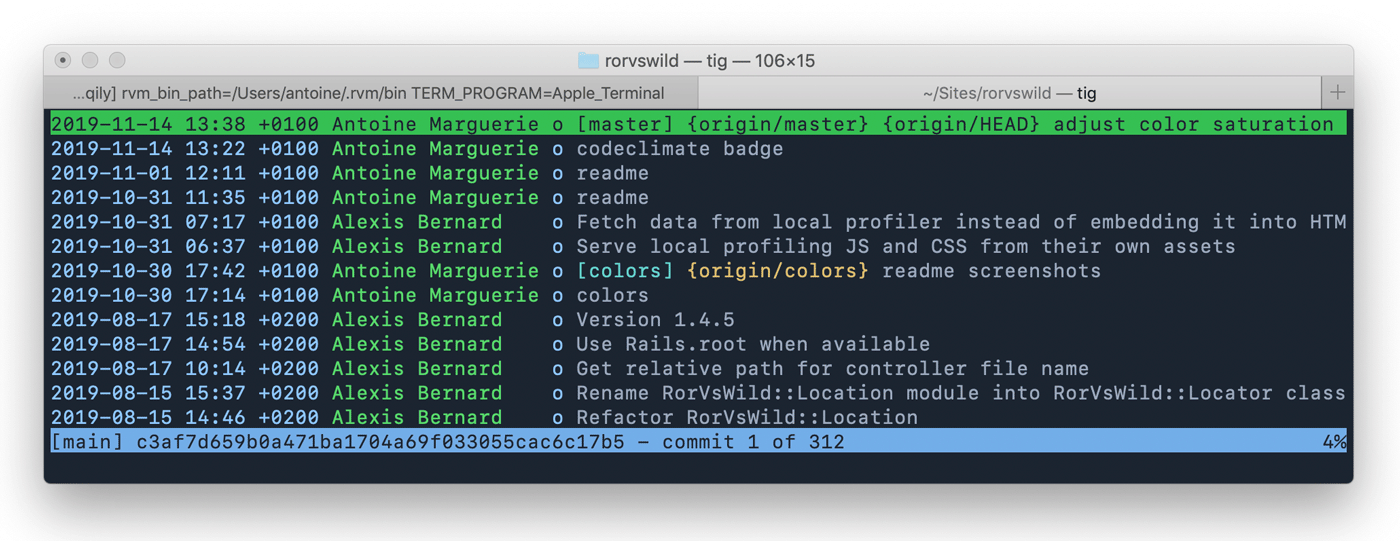
Terminal color scheme based on rorvswild colors.
https://github.com/basesecrete/rorvswild-theme-terminal
rorvswild terminal-app theme
Last synced: about 1 year ago
JSON representation
Terminal color scheme based on rorvswild colors.
- Host: GitHub
- URL: https://github.com/basesecrete/rorvswild-theme-terminal
- Owner: BaseSecrete
- Created: 2019-11-19T14:17:55.000Z (over 6 years ago)
- Default Branch: master
- Last Pushed: 2020-05-14T06:45:20.000Z (about 6 years ago)
- Last Synced: 2025-03-16T01:32:49.071Z (about 1 year ago)
- Topics: rorvswild, terminal-app, theme
- Language: Shell
- Homepage: https://www.rorvswild.com/theme
- Size: 8.79 KB
- Stars: 0
- Watchers: 3
- Forks: 0
- Open Issues: 0
-
Metadata Files:
- Readme: README.md
Awesome Lists containing this project
README
# RoRvsWild theme for Gnome and Terminal.app
Accessible dark and light themes based on [RoRvsWild](https://www.rorvswild.com) colors.
## Preview

## Terminal.app
* Navigate to the
[Terminal.app folder](https://github.com/BaseSecrete/rorvswild-theme-terminal/tree/master/Terminal.app)
* Download the dark or light .terminal file and double-click it to install.
## Gnome
* Download source code `git clone git@github.com:BaseSecrete/rorvswild-theme-terminal.git`
* Go to the [Gnome folder](https://github.com/BaseSecrete/rorvswild-theme-terminal/tree/master/Gnome) `cd rorvswild-theme-terminal/Gnome`
* Execute `./RorVsWild-dark.sh` or `./RorVsWild-light.sh` to create the Gnome terminal profile
* Right click in your terminal to select the desired theme from the context menu
## Other versions
Checkout other versions [RoRvsWild theme](https://www.rorvswild.com/theme).
## About
Made in Geneva, Switzerland by [Base Secrète](https://basesecrete.com).
[RoRvsWild](https://rorvswild.com) is an application monitoring tool for Ruby on Rails developers.