https://github.com/basionwang-bot/hermespet
让 AI 住在你 MacBook 的刘海里 · 零依赖开箱即用 · 多引擎并行的桌面 AI 伴侣(Swift 6 / SwiftUI / macOS 14+)
https://github.com/basionwang-bot/hermespet
ai chatgpt chinese claude deepseek desktop-app dynamic-island llm macos menu-bar-app swift swiftui
Last synced: 3 days ago
JSON representation
让 AI 住在你 MacBook 的刘海里 · 零依赖开箱即用 · 多引擎并行的桌面 AI 伴侣(Swift 6 / SwiftUI / macOS 14+)
- Host: GitHub
- URL: https://github.com/basionwang-bot/hermespet
- Owner: basionwang-bot
- License: apache-2.0
- Created: 2026-05-15T06:03:02.000Z (about 2 months ago)
- Default Branch: main
- Last Pushed: 2026-06-16T19:25:37.000Z (14 days ago)
- Last Synced: 2026-06-16T21:17:05.697Z (14 days ago)
- Topics: ai, chatgpt, chinese, claude, deepseek, desktop-app, dynamic-island, llm, macos, menu-bar-app, swift, swiftui
- Language: Swift
- Homepage: https://hermespet.cc
- Size: 12.9 MB
- Stars: 503
- Watchers: 2
- Forks: 58
- Open Issues: 126
-
Metadata Files:
- Readme: README.en.md
- Contributing: CONTRIBUTING.md
- Funding: .github/FUNDING.yml
- License: LICENSE
- Code of conduct: CODE_OF_CONDUCT.md
- Security: .github/SECURITY.md
- Notice: NOTICE
- Agents: AGENTS.md
Awesome Lists containing this project
README

# HermesPet

**An AI chat client living under your MacBook's notch · 6 parallel engines · 6 pixel pets**
**Now following you onto iPhone & Apple Watch**
[](https://hermespet.cc)
[](https://www.apple.com/macos/)
[](https://www.apple.com/ios/)
[](https://www.swift.org/)
[](https://github.com/basionwang-bot/HermesPet/releases/latest)
[](https://github.com/basionwang-bot/HermesPet/releases)
[](LICENSE)
🌍 [中文](./README.md) · **English**
### 📦 [Download the latest DMG →](https://github.com/basionwang-bot/HermesPet/releases/latest) · 🌐 [Visit hermespet.cc →](https://hermespet.cc)
Grab the macOS DMG · **double-click to install and open** (Apple-notarized) · pick a provider, paste an API key — **no command-line tools required**
💡 Prefer the official signed DMG above (no build needed, double-click to run) · 🤖 AI agents: see [AGENTS.md](AGENTS.md)
---
> ## 🛡️ Official Download Source
>
> HermesPet is independently designed, developed and maintained by **[Basion (@basionwang-bot)](https://github.com/basionwang-bot)** since October 2024. Every commit and release is verifiable in this repo.
>
> ⚠️ Third parties have been re-uploading this project to cloud drives / secondary marketplaces and impersonating the original author. **DMGs from anywhere outside the official channel are NOT guaranteed safe or authentic** — they may be tampered with.
>
> | Official channel | Link | Use |
> |---|---|---|
> | 🌐 Site | [hermespet.cc](https://hermespet.cc) | Product info, versions |
> | 📦 Repo | [github.com/basionwang-bot/HermesPet](https://github.com/basionwang-bot/HermesPet) | Source, Issues |
> | 📥 Download | [GitHub Releases](https://github.com/basionwang-bot/HermesPet/releases) | **The only safe source** |
> | 📧 Contact | [basionwang@gmail.com](mailto:basionwang@gmail.com) | Partnerships, reports |
>
> **Verify authenticity**: download from GitHub Releases → Settings → About → **Official Version Verification**; the authentic build shows the original author's Team ID **`R34KL4X4D9`**. If verification fails, delete it and re-download from the official source. Report impersonation via [GitHub Issues](https://github.com/basionwang-bot/HermesPet/issues).
---
🌟 Thanks to these friends who support HermesPet ❤️

Anonymous

Anonymous

You next?
---
## What is this
HermesPet is an AI chat client + desktop companion that lives **right below your MacBook's notch** — and now has **iPhone & Apple Watch companions** too.
**The most important thing**: it works out of the box. No CLI tools required on your machine. Open it → pick an AI provider (DeepSeek / Zhipu / Kimi / MiniMax / OpenAI / OpenClaw / your own cloud gateway) → paste an API Key → start chatting. If you also have `claude` / `codex` CLIs installed, the app auto-detects them and unlocks advanced capabilities like "read/write local files / run commands / generate images".
Tap the notch to summon the chat window, hold `⌘⇧V` to talk, drop files onto the little pet, watch fomo the nine-tailed fox wander your desktop, see the Dynamic Island draw a Face ID-style checkmark ✓ when the AI is done — **desktop AI should feel alive**. The interface ships in **English / 中文 with instant in-app switching**.
> Swift 6 · SwiftUI · macOS 14+ · iOS / watchOS · Pure native (no Electron / no Web view) · Apache-2.0 open source

Floating-glass chat window · top conversation pills for instant switching · shared context across AIs
---
## 📱 One pet, following you across devices
Not four separate apps — **four bodies of the same companion**: the Mac is the brain and hands that actually do the work, the iPhone is your pocket remote + second screen, the Apple Watch is a glance-able status dial. Heavy lifting always returns to the Mac; phone and watch do the four light things only — **look, ask, jot, hand off**.

Home · daily companion
Today's briefing at a glance
+ favorite AI one tap away

Remote-control your Mac's AI
See how far each agent got;
approve risky actions from your phone

Pick up the chat anywhere
Choose a pet and command
your Mac's AI on the go

Run a skill in one sentence
Polish / Translate / Summarize /
Meeting minutes / Deep insight

Workbench in your pocket
Task board · Skills · Artifacts
Todo · Remote terminal

Toss anything at it
Photo / Album / File
/ Fleet mode / Remote terminal

⌚️ The pet on your wrist
**Apple Watch**: all 6 pets on your watch face — switch with a flick, glance at how far your Mac's agent has gotten, get a haptic tap when a task is done.
- 🔔 **Task progress on your phone**: iPhone Dynamic Island / Lock Screen show "which step the Mac's agent is on" via Live Activities
- 🤝 **Hand off**: start on the Mac, pick it up on your phone — and vice versa
- 📝 **Jot / snap and toss**: drop an idea or photo on the go; back at the Mac your pet has already handled it
- ⌚️ **Wrist remote**: check status, get reminders, lift high-frequency taps off the keyboard
> 📲 The phone & watch companions are built on Apple-native **CloudKit + Live Activities + Handoff** — your data syncs through your own iCloud, never through any third-party server.
---
## ✨ Highlights (macOS desktop)
### 🔀 6 AI engines, truly running in parallel
Not switching — **truly in parallel**. Each conversation independently binds to one AI engine and locks after the first message. Run up to 8 conversations at once (`⌘1`~`⌘8` jumps instantly). Have Claude editing code, Online AI translating docs, and Codex generating an image — **all at the same time**. When a background conversation finishes, the corresponding spot on the Dynamic Island pulses softly so you don't have to babysit.
| Engine | Best for | Setup |
|---|---|---|
| ☁️ **Online AI** ⭐ | DeepSeek / Zhipu / Kimi / MiniMax / OpenAI — just pick a provider and paste a Key | DMG ships with bundled opencode runtime, **zero dependencies** |
| ⚡ **OpenClaw** | Gateway-style AI platform on your network | Install [OpenClaw](https://openclaw.ai) (one-line npm) → auto-detect + zero-config first connect |
| ✦ **Hermes Gateway** | Any **OpenAI-compatible HTTP endpoint** (self-hosted / cloud / vLLM / Ollama) | Fill in baseURL + Key; 3 built-in presets, model auto-pulled from `/v1/models` |
| ⌨️ **Claude Code** | File edits / shell commands / deep coding | Install [`claude` CLI](https://docs.claude.com/en/docs/agents-and-tools/claude-code/overview) (optional) |
| ✨ **Codex** | Code + native image generation (multi-image vision) | Install [`codex` CLI](https://github.com/openai/codex) (optional) |
| 🧩 **QwenCode** | **Zero-Key, zero-config** for Qwen `qwen` users (reuses your terminal login) | Install the `qwen` CLI and sign in → auto-detected & unlocked |
**New users see only "Online AI" mode by default** (the simplest experience); the other five modes **auto-appear and unlock** when the matching tool is installed — no manual toggling required. **User intent always wins over auto-detection** — any enabled mode can be turned off again in settings.
### 🦊 6 pixel pets · one per AI mode
Every AI mode gets its own **pixel-art pet** living in your menu bar. They also **grow up**: egg → baby → prime → adult, gaining XP and shifting moods as you use the AI.

Growth stages × moods of one pet (shown: QwenCode "Little Teal")
| Pet | Mode | Vibe |
|---|---|---|
| 🦞 **Clawd** | Claude Code | Orange pixel crab, the OG — wanders the desktop sniffing your icons |
| ☁️ **Cloud** | Online AI | Indigo sprite, puts on glasses when you drop an image to inspect |
| 🦊 **fomo** | OpenClaw | Moonlight silver-white nine-tailed fox, with twitchy ears |
| 🐴 **Pegasus** | Hermes | Golden flying horse, mane fluttering in trot rhythm |
| ⌨️ **coco** | Codex | Iron Man-style pixel robot |
| 👓 **Little Teal** | QwenCode | Teal monster in round black-rimmed glasses, zero-config Qwen |
Pets aren't just decoration:
- 🍽 **Drop a file on the pet** → it chews and swallows → file auto-attaches to the current conversation
- 👃 **Drag the pet onto a desktop icon** → it stops and sniffs → AI generates a ≤10-character quip about the filename
- 🌀 **Cross-island teleport portal**: when the pet walks under the notch, a **pixel-art teleport portal** appears (octagonal frame + rotating star points + mode-color pulse) and the pet warps to the other side
- 🛡 Filenames pass through a local blocklist before reaching the AI (salary / contract / password / `.env` etc. are dropped)
### 🏔 Dynamic Island = OS-level status display (incl. tool permission)
The capsule below the notch is the **heart** of HermesPet:

Left-ear pet sprite · right-ear tool status · Face ID-style stroke checkmark ✓ on completion
- **Left ear** sprite follows the current mode in real time (6 independent animations)
- **Right ear** real-time tool status: rotating pulse → step count → file change count → **Face ID-style stroke checkmark ✓** on completion
- **Hover → water-drop expansion** — the capsule flows down from the notch, showing mode color + model name + recent reply preview
- 🛡 **Real-time tool permission**: when Claude / Codex wants to **write a file or run a command** on your machine, a black card pops out **flush below** the island (visually seamless with the notch), showing the tool name + key arguments, with three buttons **[Deny / Allow / Always Allow]** and a feedback banner after you decide. When the chat window is open, the UI hops into the header strip and the pet strikes an "arms-up, help-me" pose — **HermesPet won't decide for you**
- 💬 **AI response summary card**: when the chat window is closed, a summary card pops below the island for 8s after the AI finishes — never miss a reply you weren't watching for
- 🎙 **Live speech transcription**: hold `⌘⇧V` and a real-time transcript bar appears below the island
- 📊 **System info ticker**: the right ear cycles live **memory / CPU / network speed / temperature**; hover the island to expand the full set of metrics
- ❌ **Error state** turns the whole capsule amber + click to retry · 📸 **Screenshot shutter** 0.18s white flash · 🌊 **Background conversations** pulse softly on their capsule spot
### 🎙 Push-to-talk · 📎 Drag files · 💬 Multi-conversation
**Push-to-talk from any app (`⌘⇧V`)**: an **Apple Intelligence-style colorful glow** appears at the screen edge + the right ear pulses a red microphone + a live transcript shows below the island. Speech uses **SFSpeechRecognizer** (macOS offline model); release to auto-send, with a "ding" when the AI finishes.
**Drag files to AI · AI reads them on demand**: instead of stuffing the whole PDF into context, HermesPet appends the **absolute path** to the prompt and lets Claude / Codex **read just the pages they need** with their own Read / Bash tools — saving context, tokens, and time. **The online AI can read PDFs too**: drop a PDF into chat and it can read, summarize, and answer from it — scanned / photographed PDFs are OCR'd automatically. Images support four input paths: **clipboard paste / drag / `⌘⇧J` screenshot / Codex direct generation**.
**Multi-conversation · cross-AI shared context (signature feature)**: up to **8 conversations** at once (`⌘N` new / `⌘[` `⌘]` switch / `⌘1`~`⌘8` jump), each independently bound to a mode with zero cross-contamination; **switching a conversation's mode passes the entire history to the new model** — Claude can keep going from what Hermes was discussing, and vice versa.
### 🌌 Knowledge Nebula · a universe of conversations you never lose
Other AI clients hand you a sidebar list that only grows **longer and more exhausting**. HermesPet gives you a **living, breathing galaxy**.

Hit ⌘⇧G and the full-screen Knowledge Nebula floats up — each conversation is a star, clustered by keyword gravity
Hit **`⌘⇧G`** and a full-screen Knowledge Nebula floats up from your desktop — **every conversation is a glowing star**, brighter and bigger the deeper you went; similar topics get **pulled into clusters by keyword gravity** (fitness, travel, code, that bug you fought for three days…), each cluster labeled at its core so you see at a glance *what you've actually been talking about with your AI*. Sweep over a star and **only its links light up** while the rest fade into deep space; click it to **jump straight back into that conversation**. Liquid-glass depth, mode-color glow, a bloom-open entrance — this isn't a chat list, it's **the first time the things you and your AI thought through together are drawn as a map**.
Underneath, three hard features ship together:
- **🗂 Conversations never lost**: every chat lands in a **permanent local store** (`history.sqlite`, separate from the working set, never auto-deleted), browsable and keyword-searchable (local tokenizer; *"that one where we debugged the crash"* still finds it).
- **🧠 It learns you over time**: long-term cross-conversation memory **auto-revises while you're idle**, so it still understands you no matter which engine you switch to.
- **⭐ Star to pin + 🗄 auto-archive**: star an important chat and it turns **bigger, gold-rimmed, never buried**; chats untouched for 90+ days **quietly sink into the archive** (not deleted — recall anytime).
> Fully local, zero upload. Those "revisit / star / salience" signals make HermesPet understand your rhythm the more you use it — and the final say is always yours.
### 🆕 More and more like a partner that works alongside you
- 🎙 **Voice companion (`⌘⇧L`)**: summon a capsule floating under the notch and hold a **continuous voice conversation** with the AI (listen → think → speak, looping automatically). While listening it's a field of softly breathing **nebula particles**; as it speaks, **each word lights up as it's read aloud**, like karaoke lyrics your eyes can follow.
- 📝 **AI Notes (`⌘⇧N`) + Writing mode**: a **local Markdown notebook** (three-pane window) your pet writes alongside you — let the AI continue / rewrite / tidy up as you type; Writing mode has live preview.
- 🚀 **Fleet workflow (Beta)**: hand a task to a whole **"AI company" with real job roles** — the captain asks a few clarifying questions first, then splits the work across multiple AIs (research / copy / engineering / QA…) **running in parallel**, with a full-screen "fleet theater" showing every lane's progress live, then synthesizes it into one deliverable.
- 🎬 **Meeting minutes**: record → auto-segmented transcription → AI organizes it into structured minutes (it can even capture the other party's voice in online meetings).
- 👁 **See & operate your screen (experimental)**: let the AI **see your screen** (screenshot + OCR) and **act on it** (move the mouse / click / type) to take over repetitive operations.
- 🐣 **Pet growth**: as you get things done with the AI, your pet **gains XP, levels up, and shifts moods** — with more forms to unlock / collect down the road.
### 📋 AI task planner & dispatch · 📰 Cross-day memory + daily companion
Let the AI **plan tasks and dispatch them to the right AI**: say "help me list what to do today" and the AI replies with a ```` ```tasks ```` YAML block that the client renders into **actionable cards**, each with 3 buttons — 📌 **Pin** to the desktop (checkbox strikes through, never disappears) / 🤖 **Let AI do it** (auto-creates a conversation in the recommended mode) / ✗ **Skip**. Not just a chat client — a **task dispatch hub**.
It also **quietly remembers you**: it records what apps you used, files you dropped, and what you asked the AI (all in local SQLite, sensitive keywords stripped at the source), then gently checks in at the right moments:
- 🌅 **Daily briefing**: on morning launch the AI reviews yesterday, writes a Markdown recap, and **follows up proactively** ("You were tuning SwiftUI animation yesterday — want me to Pin the key solution to your desktop?")
- 🎉 **Weekly review + milestones**: a recap every week, plus a little celebration at 30 / 100 / 365 days together
- 🧠 **Cross-mode shared memory**: one **user-editable memory shared across all engines**, so any engine you switch to still "gets you" (edit / clear / disable under Settings → Privacy)
> All intent data **stays on your machine** — one-click export to JSON / clear / blocklist an app.
### 🎨 And a pile of nice little details
Full **Markdown** render (GFM tables + numbered lists → clickable cards + code blocks with "copied" feedback) · **Pin** any AI reply to the desktop · **Quick-ask** (`⌘⇧Space`, Spotlight-style) without opening the chat window — iOS 26 liquid-glass look, and you can **select any screen region to OCR its text** for the AI · **paste images straight into chat** · **context-usage bar** so you always know how much room is left this turn · **input bar strictly follows Apple HIG** (Capsule + iMessage feel) · **5 chat font sizes** (`⌘+` / `⌘-` / `⌘0`) · **window pinning toggle** · **optional Dock icon** (defaults to menubar-agent style) · **5 event sounds** each togglable + custom audio drop-in.
---
## 💬 Add the author on WeChat · let's connect
Building this solo isn't easy — feel free to scan and add me for bug reports, feature ideas, collaboration, or just to chat (note **HermesPet** so I approve faster) 👇

Miao Qingshan · Hangzhou, China · scan to add, note "HermesPet"
---
## 🚀 Quick start
### Option A: Download the DMG (recommended, no Xcode needed · 3 min to first chat)
1. Go to the [Releases page](https://github.com/basionwang-bot/HermesPet/releases) and download the latest DMG (**Apple Silicon / Intel** — pick the one for your chip; unsure? click → About This Mac and check the "Chip" line)
2. Double-click the DMG → drag "Hermes 桌宠" into Applications
3. **Open it from Launchpad / Spotlight with a double-click** — it's Apple-notarized, so Gatekeeper won't block it
4. Click the menu-bar icon → gear ⚙️ → AI Backend → **pick a provider from the dropdown** → paste API Key → start chatting
No API Key yet? Each provider in the settings panel has a **"Get Key" link** that goes straight to its official signup page.
### Option B: Build from source (developers)
Requires macOS 14+ and Xcode Command Line Tools:
```bash
git clone https://github.com/basionwang-bot/HermesPet.git
cd HermesPet
./install.sh
```
| Script | Purpose |
|---|---|
| `./build.sh` | Just build `.app` into `./HermesPet.app` |
| `./install.sh` | Build + install to `/Applications` + launch (**use this daily**) |
| `./make-dmg.sh` | Generate a distributable DMG (Developer ID signed + Apple-notarized, double-click opens) |
> All three scripts sign with a **Developer ID certificate + Hardened Runtime** (when a certificate is present), keeping TCC permissions stable — "what you install locally == what users download".
### Advanced: unlock more AI engines (all optional)
All four advanced engines are **optional**. Installing them unlocks stronger capabilities; you can fully use the Online AI mode without any of them:
| Engine | Install command | Unlocks |
|---|---|---|
| **OpenClaw** | `npm i -g openclaw@latest && openclaw onboard --install-daemon` | Gateway-style AI platform + multi-model aggregation |
| **Hermes Gateway** | Self-host any OpenAI-compatible API (or fill in a cloud baseURL) | Connect to your company's internal LLM / vLLM / Ollama |
| **Claude Code** | [Official installation guide](https://docs.claude.com/en/docs/agents-and-tools/claude-code/overview) | File read/write + shell commands + deep coding |
| **OpenAI Codex** | [Official repository](https://github.com/openai/codex) | Image generation + multi-image vision + code |
After installing, **restart HermesPet and the path is auto-detected** (on launch it runs `zsh -lic 'command -v ...'`, reading your real `PATH` from `~/.zshrc`). If detection fails, open settings and click "Re-detect" on the corresponding mode's card.
### First-time permissions
| Permission | Trigger | Used for |
|---|---|---|
| Screen Recording | First `⌘⇧J` screenshot | ScreenCaptureKit |
| Microphone + Speech Recognition | First `⌘⇧V` | Recording + SFSpeechRecognizer |
| Accessibility | Quick Ask reads selected text | AX API |
| Finder Automation | Enable "Clawd desktop patrol" | osascript reads desktop icons |
After granting any permission, **fully quit and reopen** (menu-bar icon → Quit → reopen) so the new process picks it up.
---
## 🎯 Online AI: a dozen+ providers out of the box
"Online AI" is the default, zero-dependency mode for new users. It ships with presets for **a dozen-plus mainstream LLMs — DeepSeek / Zhipu / Kimi / MiniMax / OpenAI / Qwen / Doubao / Hunyuan / ERNIE / Gemini / Grok / Mistral and more** (**the client auto-pulls the latest list from the cloud on launch — new providers need no app update**), each with a **3-level response preference** (fast / balanced / deep) auto-mapped to the right model; the bundled opencode runtime handles SSE / reasoning filtering / tool calling:
| Provider | Default model | Sign up |
|---|---|---|
| DeepSeek | deepseek-chat | [platform.deepseek.com](https://platform.deepseek.com) |
| Zhipu GLM | glm-4-flash | [open.bigmodel.cn](https://open.bigmodel.cn) |
| Moonshot Kimi | moonshot-v1-8k | [platform.moonshot.cn](https://platform.moonshot.cn) |
| MiniMax | MiniMax-M2.7 | [platform.minimaxi.com](https://platform.minimaxi.com) |
| OpenAI | gpt-4o-mini | [platform.openai.com](https://platform.openai.com) |
| Custom | You decide | Any OpenAI-compatible endpoint |
Each provider's **API Key is stored separately** (no cross-contamination); switching auto-fills the matching baseURL. **Each mode's config is stored fully independently**, new conversations inherit "the last mode you used", and you're **5 minutes from install to first chat**.
---
## ⌨️ Keyboard shortcuts
**Global hotkeys** (trigger from any app):
| Combo | Function |
|---|---|
| `⌘⇧H` | Show / hide chat window |
| `⌘⇧J` | Capture current screen and attach to chat |
| `⌘⇧V` | Hold to talk, release to auto-send |
| `⌘⇧P` | Pin the latest AI reply of the current conversation to the desktop |
| `⌘⇧Space` | Spotlight-style quick-ask floating window |
| `⌘⇧L` | Voice companion (continuous voice chat) |
| `⌘⇧N` | AI notebook |
| `⌘⇧G` | Knowledge Nebula |
**In-window** (when the chat window is focused): `⌘N` new conversation · `⌘[` / `⌘]` previous/next conversation · `⌘1`~`⌘8` jump to that conversation · `⌘⌫` close current conversation · `⌘+` / `⌘-` / `⌘0` font size.
---
## 🗂 Data storage / Privacy
| Path | Contents |
|---|---|
| `~/.hermespet/conversations.json` | All conversation history (without image Data) |
| `~/.hermespet/images/` | User-attached / Codex-generated image persistence |
| `~/.hermespet/pins.json` | Desktop Pin cards |
| `~/.hermespet/activity.sqlite` | Activity sampling + user intent records (briefing / memory source) |
| `~/Library/Caches/HermesPet/` | Screenshot temp area + pet temp cache |
**Privacy boundary** (HermesPet makes "no data collection" a hard constraint):
- 🛡 **Zero telemetry**: the project itself does NOT phone home. All AI calls go to backends you configure yourself (your API Key / your self-hosted Gateway / your local CLI)
- 🛡 **Desktop patrol blocklist**: filenames pass through a local blocklist before reaching the AI (salary / contract / password / `.env` / `credentials` keywords are dropped entirely)
- 🛡 **Activity sampling + shared memory stay local**: all briefing / memory data lives in local SQLite and **never leaves your machine**; one-click export to JSON / clear / blocklist an app / edit or disable shared memory
- 🛡 **Phone companion uses your own iCloud**: cross-device sync is built on CloudKit — data lives in your iCloud, never through any third-party server
- 🛡 **Crash logs**: HermesPet scans local crash files → copies the full log to clipboard → **you** manually paste into a GitHub Issue. It never auto-uploads anything.
> Technical decision notes (gotchas / Swift 6 isolation / macOS layout cycles) live in [CLAUDE.md](./CLAUDE.md); roadmap in [TODO.md](./TODO.md). Pure native Swift, no Electron.
---
## 🤝 Come hang out · buy me a coffee
HermesPet is currently a one-person open-source project. Every issue / PR / star genuinely makes my day.
- 🐞 **Found a bug / something feels off / want a feature**: open an [Issue](https://github.com/basionwang-bot/HermesPet/issues) with your machine model + macOS version + repro steps, and I'll get to it soon
- 🛠 **Want to send a PR**: open an issue first to chat about direction — saves us both time. No strict style guide, just match the surrounding files
- ⭐ **Like the project**: a Star or a share with someone who'd like it goes a long way — getting this in front of more people is the best reward this project could ask for
> 💡 Want to use HermesPet inside your company, or customize it as your branded macOS AI tool? Email me: [basionwang@gmail.com](mailto:basionwang@gmail.com)
---
## 📄 License
[Apache License 2.0](./LICENSE) — when using this project's code you **must** keep the original copyright and [NOTICE](./NOTICE) attribution, clearly mark your modifications, and **must not use the HermesPet name / trademark / logo to imply association with or endorsement by the original project**.
See [NOTICE](./NOTICE) · [Brand Guidelines](./BRAND_GUIDELINES.md) · [Contributing](./CONTRIBUTING.md)
### ⭐ Star History
[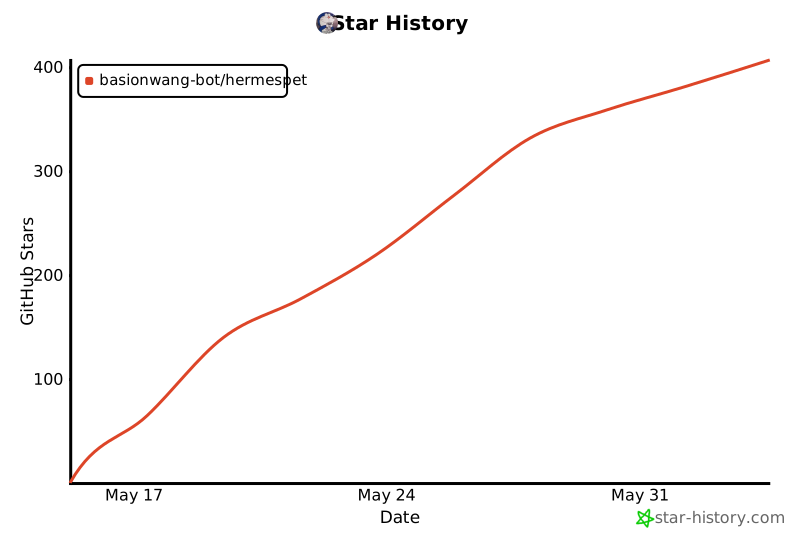](https://star-history.com/#basionwang-bot/HermesPet&Date)
---
Made with ✦, coffee, and stubborn love on a MacBook
*For everyone who's ever wished their AI felt a little more alive.*
© 2024–2026 [Basion Wang](https://github.com/basionwang-bot). HermesPet is an original work; unauthorized copying, modification or distribution will be pursued.